Pool route software for the routes you run every week.
A pool route isn’t a delivery route. It’s the same pools on the same day with the same tech, some every week and some every other. Pool Founder builds those routes, orders every day by drive time, covers a tech who’s out, and catches the pools that got missed.
$45 a month per tech, every feature included. No credit card for the trial.
Why a delivery route planner doesn’t fit a pool route.
General route apps are built to get packages out the door once. A pool company runs the same week again and again, and every stop is a pool with a history.
- What the route is
- Pool Founder: The same pools on the same weekday, every week
- Delivery route planner: A new list of stops every day
- Who services the stop
- Pool Founder: The tech who always does that pool, kept when routes are fixed
- Delivery route planner: Whichever driver is closest
- How often a stop comes up
- Pool Founder: Weekly, every 2 weeks, monthly, quarterly, or up to 5 times a week
- Delivery route planner: Once
- How long a stop takes
- Pool Founder: Learned from that pool’s own visit times
- Delivery route planner: A fixed service time you type in
- What gets done there
- Pool Founder: Chemistry readings, doses, checklist and photos, then the invoice
- Delivery route planner: Proof of delivery
- When a tech is out
- Pool Founder: Their pools move until a date, then come back on their own
- Delivery route planner: Re-plan the day
From a list of customers to a week that runs itself.
The same four steps whether you have one truck or ten.
Build the week
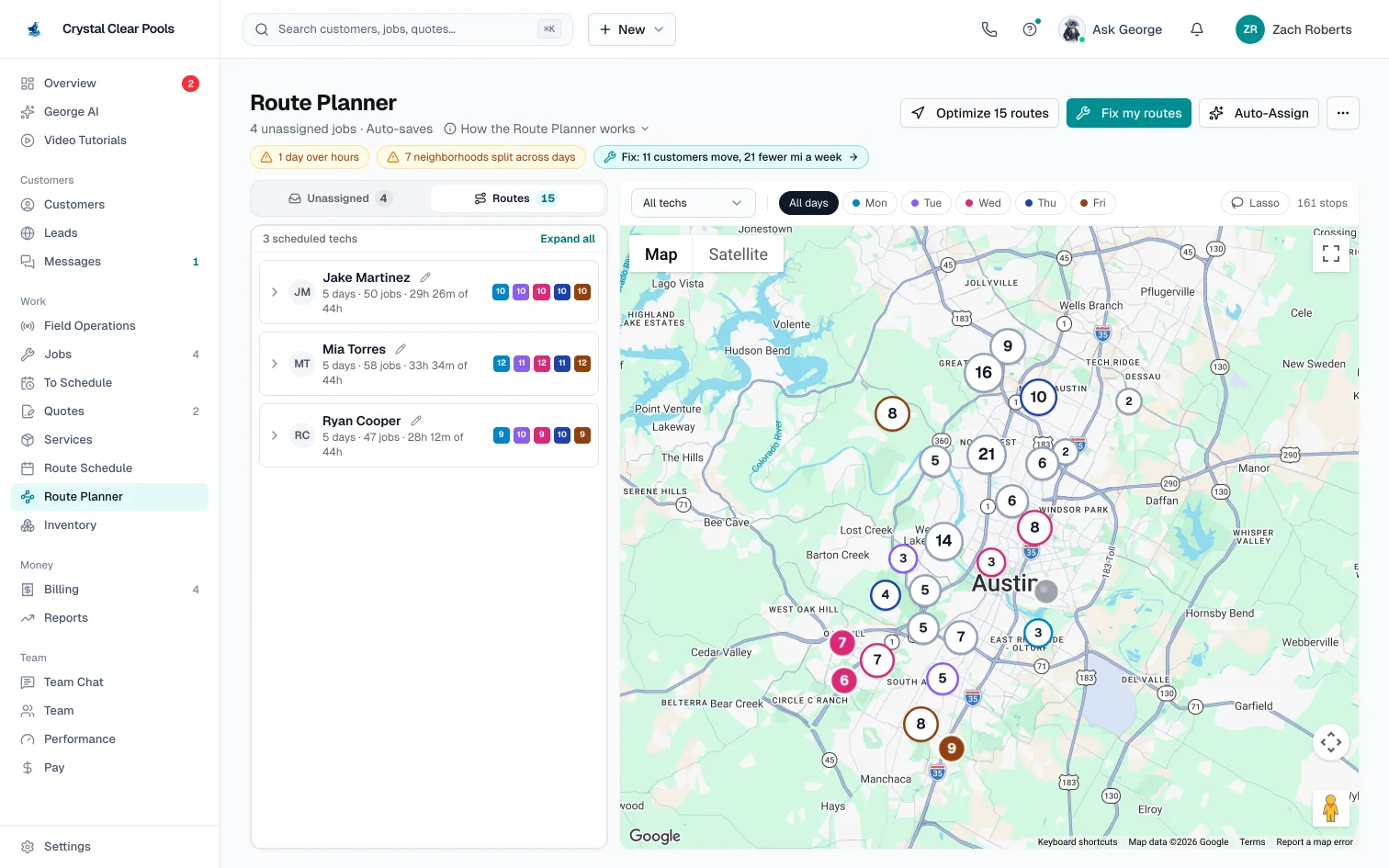
The Route Planner is a board of technicians and days beside a map of every stop. Drag a job onto a day, or drop it on a tech’s name and Best fit picks the day and spot that add the least driving, without running past their workday. Auto-Assign places every new job at once and shows a preview before anything is saved. Every move you make by hand has Undo.
Build and optimize routespoolfounder.com/routes/builderPut every day in order
Optimize orders a day’s stops by Google Maps drive time. Optimize N routes does every route that needs it in one go, and a route you change afterwards says Changed since optimized so you know it’s out of date. Lock a stop that has to stay first or last, and Optimize works around it every week.
Route Health and Optimize allpoolfounder.com/routes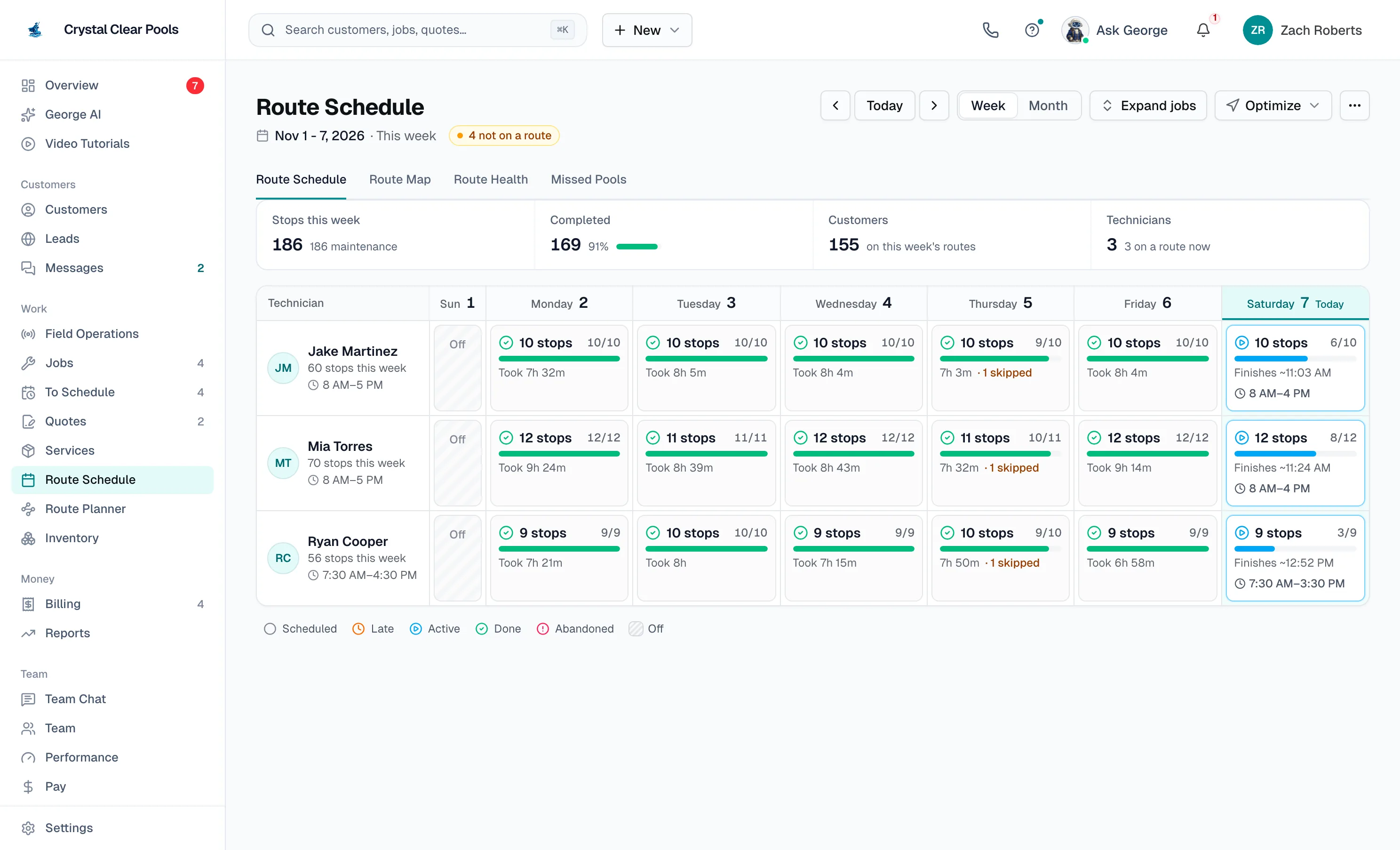
Run it from the truck
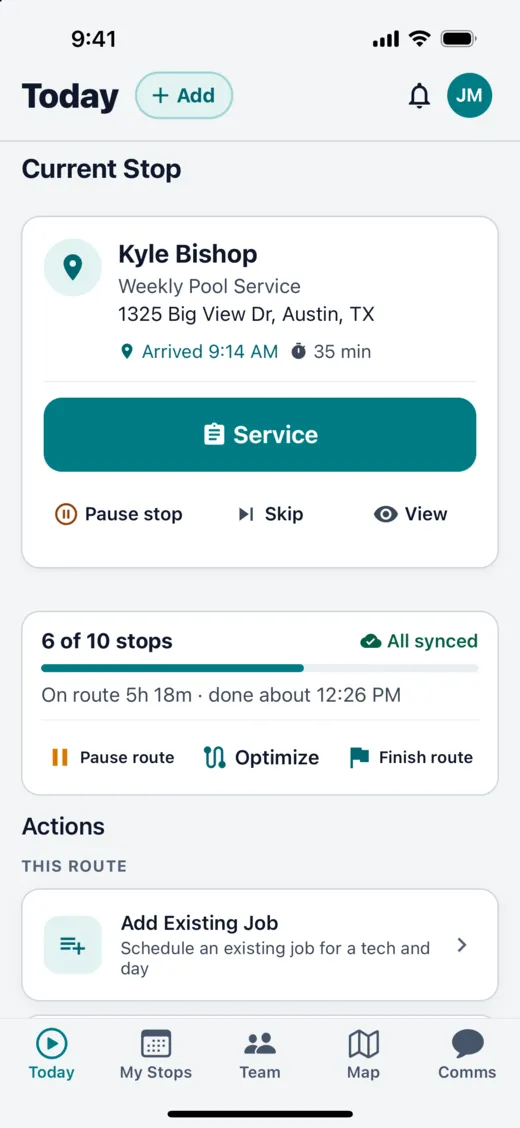
The tech app opens to today’s stops with how many are done and when the route will finish. Techs can re-optimize what’s left from where they are, run the rest of the day backwards, and keep working with no signal. The office watches each tech’s position and progress on the Field Operations map while routes run.
Run your routeWhat the tech sees, what the office sees
- Today tab: the current stop, stops done, time on the route and when they’ll be done.
- My Stops: reorder, Optimize, Reverse, Skip and On the Way.
- Offline: readings, photos and checklists save with no signal and sync when it comes back.
- Field Operations: each tech’s live position, stops done and remaining, and routes that need a look.
- Customers: an “on the way” text with an arrival time from the tech’s GPS.
Fix it without starting over
Routes drift as you add customers. Fix my routes looks at the last 6 weeks of visits, keeps each pool with the tech who has been doing it, keeps neighbors on one day, cuts road miles and brings every day back within its hours, moving as few customers as it can. You see every customer who moves before you click Move.
Compare route plansYour week, planned four ways
Route Health puts each plan next to how your routes run now: miles a week, paid hours, days that run late, latest back, and customers who move.
- Fewest changes
- Fixes what’s broken (days over hours, neighborhoods split across days) and moves as few customers as it can. The same plan as Fix my routes.
- Keep every tech
- Every pool stays with its tech. Only the day can change, to save miles.
- Fewest miles
- The lowest road miles that still fit everyone in their hours, whoever does the pool and on whatever day.
- Least payroll time
- The fewest paid hours, with overtime avoided first.
Start it now or next Monday, untick anyone who should stay put, and copy the list of customers whose day changes to let them know.
Every day has a size. You see it before you book.
Routes are planned against each tech’s hours, so a full day looks full before the tech is out at 6 PM.
Room left, in stops
A Route Schedule day reads room for 3 before it starts, and Finishes ~3:40 PM or 1h 10m over once stops are on it.
Stop times from real visits
Once a pool has 3 timed visits, its stop is planned at its typical visit time, not a guess.
Hours per tech, per day
Click a day’s hours to give someone a half day or a dentist appointment. Mark a day as a repair day and no route pools land on it.
A route for every new lead
Route Fit ranks the days and techs where a new pool adds the fewest miles and minutes, and suggests what to charge for it.
When the week doesn’t go to plan.
Your techs’ phones get the change, and every schedule change is logged with who made it. Or text George, the AI built into Pool Founder: “Mike is off October 6 through 17, give all his pools to Jake.”
A tech calls out sick
Mark them off under Team, then Time off, and spread their stops across the team. Each tech’s finish time for the day is shown before you confirm.
Time off and call-outsTwo weeks of vacation
On the Transfer stops page, choose Until a date and pick who covers. Visits move on the same weekday, then the pools go back to the original route after the end date. Nothing to undo, for up to 12 weeks.
Cover a technician until a dateTuesday runs an hour over
The Route Schedule shows the day in red, for example 1h 10m over. Open Transfer stops and Pick for me ticks the fewest stops that bring the day back within hours, and sends them to techs who still have room.
Transfer and move jobsPools that got missed
A route left running closes itself overnight. Missed stops show in an amber banner with Reschedule Stops, and the Missed Pools page lists every pool whose day passed without a visit for the last 7, 14 or 30 days.
Reschedule missed stopsA route is a business. See what each one makes.
The Profitability page breaks revenue, costs and margin down by route, technician, customer and job, from the visits, invoices and chemicals already in the app. Give each tech an hourly rate and each truck a cost per mile, and labor and driving are counted too.
Route optimization isn’t a premium tier here.
Several pool and field service tools put routing on a higher plan. Pool Founder has one price: $45 a month per tech, with unlimited pools and routes.
| Tool | Price | Route optimization |
|---|---|---|
| Pool Founder | $45 per tech a month, office staff free | Included on every plan |
| Skimmer | $1 per serviced pool a month from $49, or $2 from $98 | Comes with the $2 plan (Scaling Up) |
| Pool Brain | $50 a month plus $65 per field tech | One plan with all features |
| Housecall Pro | $79, $189 or $329 a month by plan | Top plan (Max) only |
| GorillaDesk | Priced per route, from $49 a month | Capped at 25 stops on Basic |
From each vendor’s own pricing page, checked November 8, 2026. Plans change; check the vendor before you buy. Full prices on our pricing page.
Where another tool fits better
- You need arrival windows on recurring route stops. A locked stop holds its place in the order, not a clock time like 1 to 3 PM; only one-off work orders and unplanned stops get a set time.
- You want weather-driven rescheduling. There is no weather integration; rain is a skip reason.
- Pools are a side line. If you run several trades, a general field service tool schedules all of them in one place.
Questions about pool route software.
Pool route software builds and runs the weekly routes of a pool service company: which tech services each pool on which day, the order of each day’s stops, what happens when a tech is out or a stop is missed, and the tech’s view of the day on their phone. Unlike a delivery route planner, it plans the same pools every week, keeps each pool with its regular tech, and handles every-other-week and monthly pools.