Why Is Scheduling the Feature That Makes or Breaks Pool Service Software Adoption?
Scheduling failures account for 38% of customer complaints in pool service, drain 4-6 hours of weekly office time for manual dispatching, and directly cause the missed-appointment rate that pushes churn above 15% annually for poorly organized operators. The scheduling engine sits at the center of every pool service business because it connects customer commitments to technician capacity to route efficiency, and a breakdown in any link cascades into lost revenue, overtime labor, and eroded trust.
This guide compares how five major pool service software platforms handle the scheduling demands unique to pool service: recurring weekly and biweekly maintenance routes, one-time repair dispatching, multi-technician crew assignment, drag-and-drop calendar management, and time window constraints that customers increasingly expect. The gap between the best and worst scheduling tools is the difference between an office manager spending 20 minutes or 3 hours building next week's schedule.
What Does Pool Service Scheduling Software Actually Need to Do?
Pool service scheduling must handle two fundamentally different job types simultaneously: high-volume recurring maintenance stops that repeat on fixed weekly or biweekly cycles, and unpredictable one-time repair or renovation jobs that require flexible dispatch to the nearest available technician. Generic scheduling tools built for project-based trades like HVAC or plumbing treat every job as a standalone event, forcing pool operators to manually recreate recurring routes every week or maintain parallel systems for maintenance and repairs.
What Are the Core Scheduling Features Every Pool Company Needs?
Recurring job automation, drag-and-drop calendar views, and multi-technician dispatch form the scheduling foundation that eliminates the 4-6 hours of weekly administrative time most pool companies lose to manual schedule management.
| Feature | What It Does | Impact on Operations |
|---|---|---|
| Recurring job scheduling | Automatically generates weekly, biweekly, or monthly service stops without manual re-entry | Eliminates 3-4 hours/week of schedule creation for a 150-pool route |
| Drag-and-drop calendar | Lets dispatchers visually move jobs between days, technicians, and time slots | Reduces scheduling errors by 60-70% vs. spreadsheet-based planning |
| Multi-technician dispatch | Assigns jobs to specific techs based on location, skill, and availability | Prevents double-booking and balances workload across crew |
| Time window management | Sets arrival windows (e.g., 8am-12pm) that sync to customer notifications | Reduces "where is my tech?" calls by 50-65% |
| Route-integrated scheduling | Ties schedule changes directly to route optimization so reordering updates both systems | Eliminates the schedule-route sync gap that causes 20+ minutes of daily confusion |
| Conflict detection | Flags overlapping appointments, overbooked days, and impossible travel times | Prevents the cascading late arrivals that damage 3-5 customer relationships per incident |
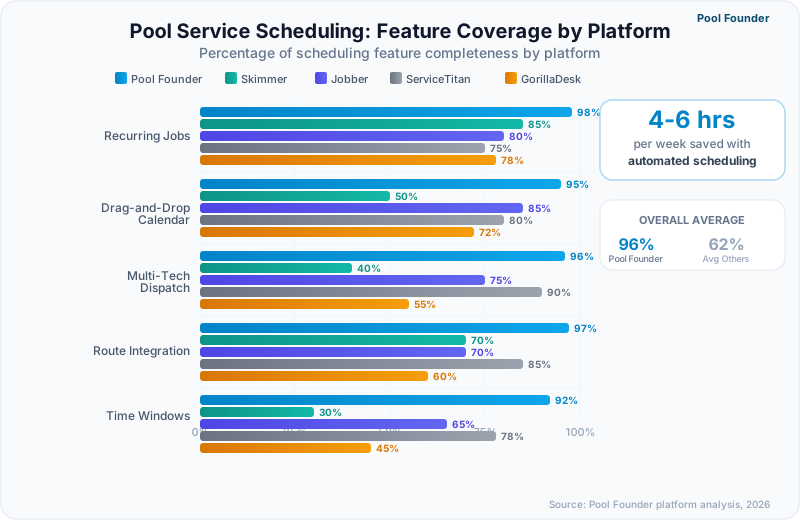
Why Do Generic Field Service Schedulers Fall Short for Pool Companies?
Generic field service schedulers treat every job as a unique dispatch event with a start time, end time, and assigned technician, but pool maintenance operates on a route-based model where 12-18 stops flow sequentially through a geographic zone without individual appointment times. This mismatch forces pool operators using generic tools to either create 12-18 separate calendar events per technician per day (overwhelming the calendar view) or use a single block entry that hides the stop-level detail dispatchers need for rebalancing and customer communication.
If your scheduling software requires you to create individual calendar events for every recurring pool stop, you are using a tool designed for a different industry. Pool-specific platforms generate recurring route stops automatically from the customer record.
How Do Pool Software Platforms Compare on Scheduling Features?
Scheduling capabilities range from Pool Founder's route-integrated recurring automation with multi-tech dispatch to GorillaDesk's basic calendar with manual job entry, and the operational gap between these extremes costs growing pool companies 6-10 hours per week in administrative overhead that compounds with every technician added. Operators choosing software primarily for scheduling efficiency should evaluate three capabilities: recurring job automation, route-schedule integration, and real-time dispatch flexibility.
| Platform | Recurring Jobs | Drag-and-Drop Calendar | Multi-Tech Dispatch | Route Integration | Time Windows | Monthly Cost |
|---|---|---|---|---|---|---|
| Pool Founder | Full automation — weekly, biweekly, monthly, custom | Yes — calendar and route view | Yes — skill and location-based | Deep — schedule changes update routes automatically | Yes — with customer notifications | $49-$249 |
| Skimmer | Recurring route stops | Yes — route day view | Basic — assign tech per route | Moderate — route-first scheduling | No native time windows | $1-$2/location ($49-$98 min) |
| Jobber | Recurring jobs with custom frequencies | Yes — full calendar view | Yes — team scheduling | Limited — separate scheduling and routing | Yes — arrival windows | $49-$499 |
| ServiceTitan | Advanced recurring with capacity rules | Yes — dispatch board | Yes — advanced with zones | Deep — integrated dispatch engine | Yes — precision time slots | Quote-based (reported $245+/tech) |
| GorillaDesk | Basic recurring | Yes — simple calendar | Basic assignment | Minimal — manual sync required | Basic | $49-$149/route |
What Makes Pool Founder's Scheduling Stand Out?
Pool Founder treats scheduling and routing as a single unified system rather than two modules that sync periodically, so adding a new recurring customer automatically places them on the geographically optimal route day, assigns the closest technician, and updates the stop sequence without any dispatcher intervention. This integration eliminates the "schedule says Tuesday but the route has them on Wednesday" conflicts that plague platforms where scheduling and routing operate independently.
- Recurring job templates generate all future stops from a single setup, with automatic handling of holidays, skip weeks, and seasonal schedule changes
- Drag-and-drop calendar lets dispatchers reassign jobs between technicians and days with real-time route recalculation
- One-time repair jobs slot into existing routes based on geographic proximity, so a repair call in the same neighborhood as scheduled maintenance runs back-to-back
- Multi-technician dispatch considers each tech's current location, remaining stops, and skill set before suggesting assignments
- Schedule conflict detection warns before overcommitting a technician's day capacity
How Does Skimmer Handle Scheduling for Route-Based Operations?
Skimmer approaches scheduling from a route-first perspective where technicians are assigned to route days rather than individual time slots, which works well for recurring maintenance but limits flexibility for one-time repair dispatch and multi-crew coordination. Adding a new maintenance customer to a specific route day is straightforward, but dispatching an urgent repair to the nearest available technician requires manual coordination outside the scheduling system.
When Does ServiceTitan's Enterprise Scheduling Justify the Cost?
ServiceTitan's dispatch board becomes cost-justified for pool companies running 8+ technicians across multiple service zones, where the capacity-based scheduling engine prevents overbooking and the zone-based dispatch ensures repair calls route to the nearest available tech automatically. Below 8 technicians, the multi-week implementation timeline and quote-based per-technician pricing (reported at $245-$500 per tech monthly) create negative ROI when simpler platforms deliver 90% of the scheduling functionality at a fraction of the price.
Ask this question during any free trial: "If a customer calls at 2pm needing same-day repair service, how many clicks does it take to find the nearest available technician and slot the job into their route?" The answer reveals more about scheduling quality than any feature list.
How Does Recurring Job Scheduling Work in Pool Service Software?
Recurring job scheduling automates the creation of weekly, biweekly, and monthly service stops from a single customer setup, eliminating the manual re-entry that costs a 200-pool operation 5-8 hours per week and introduces the data-entry errors that lead to missed stops, double-serviced pools, and billing discrepancies. The quality of recurring job automation varies dramatically: the best platforms handle frequency exceptions (skip Thanksgiving week, add an extra service before a pool party) without breaking the recurring pattern, while basic tools require deleting and recreating the entire series.
5-8 hours/week
Time spent on manual schedule management for a 200-pool operation without recurring automation
Source: Pool service operator surveys, 2025
What Recurring Frequencies Do Pool Companies Actually Need?
Pool companies run four standard service frequencies: weekly maintenance (65-70% of residential accounts), biweekly service (20-25% of accounts, growing in price-sensitive markets), monthly service (5-8% of accounts, typically chemical-only checks), and seasonal schedules that shift frequency based on time of year (weekly in summer, biweekly in shoulder seasons, monthly or paused in winter).
| Frequency Type | Pool Founder | Skimmer | Jobber | ServiceTitan | GorillaDesk |
|---|---|---|---|---|---|
| Weekly | Yes | Yes | Yes | Yes | Yes |
| Biweekly | Yes — alternating week support | Yes | Yes | Yes | Yes |
| Monthly | Yes | Yes | Yes | Yes | Yes |
| Custom intervals (every 10 days, etc.) | Yes | No | Yes | Yes | No |
| Seasonal frequency changes | Yes — automatic schedule shifting | Manual adjustment | Manual adjustment | Yes — rule-based | Manual adjustment |
| Skip/pause individual stops | Yes — preserves recurring pattern | Yes | Yes — with exceptions | Yes | Limited |
| Holiday handling | Auto-reschedule or skip | Manual skip | Manual reschedule | Rule-based holiday calendar | Manual skip |
How Should Scheduling Handle Biweekly Customers on Alternating Weeks?
Biweekly scheduling creates the most common scheduling headache in pool service because alternating-week customers leave geographic gaps on their off-weeks that waste technician drive time unless filled by complementary biweekly accounts on the opposite schedule. The best scheduling tools pair biweekly customers geographically, automatically filling the off-week gap with a nearby customer on the opposite cycle. Basic tools simply skip every other week, leaving the technician driving past the neighborhood without a stop.
Pool Founder automatically identifies biweekly geographic pairing opportunities and suggests complementary account placements when you add a new biweekly customer. This single feature recovers 15-25 minutes of drive time per route day for companies with 20%+ biweekly accounts.
How Do You Evaluate Scheduling Software During a Free Trial?
The most revealing scheduling test takes exactly 15 minutes: enter 15 recurring customers across three route days, add two one-time repair jobs, reassign one recurring stop to a different day, and skip one stop for next week. These six actions expose whether the platform handles pool scheduling natively or forces workarounds, and any trial that makes these tasks feel clumsy will multiply that friction across every dispatcher interaction for years.
What Is the Step-by-Step Scheduling Evaluation Checklist?
This evaluation sequence tests every scheduling capability that pool companies depend on daily, from basic recurring setup through advanced exception handling and dispatch scenarios.
- 1Create 5 recurring weekly customers on Monday, 5 on Wednesday, and 5 on Friday — note how many clicks and fields each setup requires
- 2Add 2 one-time repair jobs to Tuesday and check if the platform suggests the geographically closest technician or time slot
- 3Drag one Monday customer to Wednesday and verify: Does the route update? Does the recurring schedule adjust? Does the customer record reflect the change?
- 4Skip one Friday customer for next week only — confirm the recurring pattern remains intact for all following weeks
- 5Add a new biweekly customer and check if the platform identifies which alternating week and route day creates the least geographic disruption
- 6Open the mobile app as a technician and verify the daily schedule shows stops in route-optimized order with navigation
- 7Check what notifications (if any) the customer receives when a stop is rescheduled or skipped
What Red Flags Should Disqualify a Scheduling Platform?
Three scheduling failures should immediately disqualify any pool service platform: requiring individual calendar events for each recurring stop (unsustainable past 50 pools), lacking the ability to skip a single stop without breaking the recurring series, and forcing dispatchers to manually sync schedule changes to the route view. Any one of these creates compounding administrative overhead that worsens as you add customers and technicians.
- No recurring job automation — requires manual schedule creation every week or month
- Skipping a stop breaks the recurring pattern and requires manual re-creation of the series
- Schedule and route views are disconnected — changes in one do not update the other
- No mobile view for technicians — techs rely on a printed or texted schedule with no real-time updates
- Cannot handle mixed frequencies — biweekly and weekly customers cannot coexist on the same route day
- No conflict detection — allows double-booking technicians or scheduling beyond daily capacity
Run your evaluation during peak-season conditions, not off-season. Enter the number of stops you manage at your busiest point (not today's lighter load). Software that feels smooth with 40 stops may become unusable at 120.
How Do You Migrate Scheduling Data to a New Pool Service Platform?
Scheduling migration fails most often when operators try to recreate their entire weekly schedule in a single weekend, because the accumulated workarounds and special cases from months of manual adjustments do not map cleanly to a new system's data structure. A phased migration over 2-3 weeks, starting with one route day, catches incompatibilities before they affect every technician and customer on your roster.
What Is the Safest Migration Timeline for Scheduling Data?
A three-week phased migration protects customer relationships, gives technicians time to adapt to new workflows, and allows dispatchers to validate scheduling accuracy one day at a time rather than troubleshooting five days of problems simultaneously.
- 1Week 1: Import all customers with service addresses and frequencies, then build Monday's schedule only — run it for a full week and compare against the old system
- 2Week 2: If Monday ran cleanly, build Tuesday through Friday schedules and run parallel operations (old system as backup) for the full week
- 3Week 3: Cut over completely to the new platform, deactivate the old schedule, and monitor for missed stops or customer complaints daily
- 4Week 4: Fine-tune recurring patterns, resolve any frequency mismatches, and configure automated customer notifications
How Do You Prevent Missed Stops During a Scheduling Migration?
The single most effective safeguard is running both systems in parallel for one full service cycle (one week for weekly customers, two weeks for biweekly), with a daily reconciliation check where the dispatcher compares the new platform's scheduled stops against the old system's stop list before each morning's dispatch. This 10-minute daily check catches 100% of migration errors before they become missed appointments.
2-3 weeks
Recommended phased migration timeline for scheduling data to prevent missed stops and customer complaints
Source: Pool Founder migration data, 2025
Export your current schedule as a CSV before starting migration. Even if the new platform cannot import it directly, the CSV serves as your reconciliation checklist during parallel operation. Pool Founder supports direct CSV import of customer schedules with automatic route day assignment.
Ready to streamline your pool service business?
Pool Founder gives you route optimization, automated invoicing, chemical tracking, and everything else you need to run a more profitable pool business.
Frequently Asked Questions
How much time does scheduling software save compared to manual dispatching?
Pool companies switching from manual scheduling (spreadsheets, whiteboards, or paper) to automated scheduling software report saving 4-8 hours per week in administrative time. The savings come from three areas: automated recurring job generation (2-3 hours saved), drag-and-drop rescheduling instead of phone calls and texts (1-2 hours saved), and elimination of schedule-route sync errors (1-3 hours saved in troubleshooting and make-up visits).
Can pool scheduling software handle both recurring maintenance and one-time repairs?
Yes, but the quality of this dual-mode scheduling varies significantly across platforms. Pool Founder and ServiceTitan handle both natively, slotting one-time repairs into existing route days based on geographic proximity. Skimmer excels at recurring route scheduling but has more limited one-time job dispatch. Jobber handles both but treats them as fundamentally separate workflows. The key test is whether a same-day repair call can be added to an existing route without manual rearrangement.
What is the difference between route-based and appointment-based scheduling?
Route-based scheduling assigns customers to route days (all Monday customers, all Tuesday customers) and sequences stops geographically, while appointment-based scheduling assigns specific time slots to individual customers. Pool maintenance primarily uses route-based scheduling because 12-18 stops per day cannot each have a precise appointment time. Repair and renovation work uses appointment-based scheduling. The best pool software supports both modes simultaneously.
How does scheduling software handle customer cancellations and reschedules?
Modern pool scheduling platforms allow dispatchers to skip, reschedule, or cancel individual stops without breaking the recurring pattern. Pool Founder preserves the full recurring series when you skip a single stop, automatically adjusts billing for skipped services, and offers one-click rescheduling to the next available slot. Basic tools often require deleting and recreating the entire recurring series, which creates billing discrepancies and data loss.
Can scheduling software assign jobs based on technician skills?
Pool Founder and ServiceTitan support skill-based assignment where certain jobs (equipment repair, salt system maintenance, commercial pools) route only to qualified technicians. Jobber offers basic team scheduling without skill filtering. Skimmer and GorillaDesk assign technicians at the route level rather than the job level, which works for maintenance but limits flexibility for specialized repair dispatch.
How does biweekly scheduling work in pool service software?
Biweekly scheduling assigns customers to alternating service weeks (Week A or Week B) on the same route day. Pool Founder automatically manages alternating weeks and identifies geographic pairing opportunities where two biweekly customers in the same neighborhood can fill each other's off-weeks. Most platforms support basic biweekly scheduling, but only Pool Founder and ServiceTitan handle the geographic optimization that prevents drive-time waste on off-weeks.
What happens to the schedule when a technician calls in sick?
Pool Founder allows dispatchers to reassign an entire route day to a different technician with a single action, preserving the stop sequence and customer notes. ServiceTitan offers similar route reassignment through its dispatch board. With Skimmer and Jobber, reassigning requires changing the tech assignment on each individual route or job. GorillaDesk requires manual stop-by-stop reassignment.
Does Pool Founder integrate scheduling with route optimization?
Yes. Pool Founder is built on a unified scheduling-routing architecture where every schedule change automatically updates the route sequence and every route optimization automatically updates the schedule. Adding a new recurring customer to Tuesday triggers route reoptimization for that day. Skipping a stop removes it from the route without affecting the sequence of remaining stops. This integration eliminates the schedule-route desync that costs pool companies 20-30 minutes daily on other platforms.
Sources & References
- Pool & Spa News Industry Technology Survey 2025
- Skimmer 2026 State of Pool Service Report