Why Is Chemical Tracking the Most Undervalued Feature in Pool Service Software?
Digital chemical tracking improves dosing accuracy by 20-30%, reduces chemical spend per pool, and creates customer-facing documentation that directly reduces churn — yet fewer than 40% of pool service companies use software to log chemical readings, leaving the majority reliant on paper logs, text messages, or memory. The operators who do track chemicals digitally report measurable business benefits: lower chemical costs, fewer callback visits for water quality issues, and higher customer retention driven by transparent service reports.
Whether you need simple reading logs or automated dosing recommendations, the right chemical tracking system transforms a tedious data-entry obligation into a competitive advantage that reduces callbacks, lowers chemical spend, and increases customer retention.
Why Does Chemical Tracking Matter for Your Pool Business?
Chemical tracking reduces chemical overspend by 15-25% through data-driven dosing, creates the service documentation that turns satisfied customers into long-term accounts, and gives you a complete history of every pool you service — three distinct business benefits that compound with every logged reading.
How Does Digital Chemical Logging Improve Service Quality?
Timestamped digital chemical readings create a complete service record for every pool — giving you and your customers full visibility into what was tested, what was added, and how water quality has changed over time. When a customer asks about their pool history or you need to troubleshoot a recurring chemistry issue, digital logs give you instant access to weeks or months of data instead of flipping through paper notes.
- Timestamped readings show exactly when each pool was serviced and what was tested
- Historical trend data reveals patterns — chronic high CYA, recurring pH drift, seasonal changes
- Photo documentation captures water clarity and equipment condition at time of service
- Digital records are searchable — pull up any pool's full history in seconds
- Automated customer reports give homeowners visibility into what you did at every visit
How Does Chemical Tracking Reduce Per-Pool Chemical Costs?
Operators using software with historical chemical trend analysis spend 15-25% less on chemicals per pool because data reveals over-dosing patterns, identifies pools with chronic balance issues that need root-cause fixes, and eliminates the "dump and hope" approach that wastes product on every visit. A pool that consistently shows high chlorine readings does not need more chlorine on the next visit — but without historical data, technicians default to the standard dose every time.
$180-$350
Average annual chemical savings per pool when using data-driven dosing vs. standard dosing
Source: Pool service operator survey data, 2024
Why Do Customer-Facing Chemical Reports Reduce Churn?
Pool service companies that send automated post-service chemical reports to customers see 15-20% lower annual churn rates because visible proof of work transforms pool service from an invisible expense into a documented value — the difference between "I think someone came by" and "I can see exactly what they tested and added." Customers who can see their chemical readings and trend data are significantly less likely to price-shop because they understand the expertise behind the service.
The #1 reason pool service customers leave is perceived lack of value — they cannot see what they are paying for. Chemical reports delivered after every visit make your work visible and justify your pricing without a single phone call.
What Chemical Level Tracking Features Should Pool Software Include?
Comprehensive chemical tracking software should capture five core data types — pH, chlorine (free and total), alkalinity, CYA, and calcium hardness — with timestamped logging, historical trending, dosing recommendations, and customer-facing report delivery as the four feature layers that separate basic logging from business-grade chemical management. Most operators need at minimum the first two layers (logging + trending), while high-volume or chemistry-focused companies benefit from all four.
What Chemical Readings Should Be Logged at Every Visit?
The five essential readings — free chlorine, pH, alkalinity, cyanuric acid (CYA), and calcium hardness — form the complete chemical profile needed for accurate dosing decisions, trend analysis, and service documentation on every service visit. Free chlorine and pH are the minimum for every stop, while alkalinity, CYA, and calcium hardness can be tested weekly or biweekly depending on pool stability and local requirements.
| Reading | Ideal Range | Test Frequency | Why It Matters |
|---|---|---|---|
| Free Chlorine | 1-3 ppm (residential), 3-5 ppm (commercial) | Every visit | Primary sanitizer — out of range affects water safety and clarity |
| pH | 7.2-7.6 | Every visit | Affects chlorine effectiveness and bather comfort |
| Total Alkalinity | 80-120 ppm | Weekly | Buffers pH stability — low TA causes pH bounce |
| Cyanuric Acid (CYA) | 30-50 ppm (residential) | Monthly | Protects chlorine from UV degradation |
| Calcium Hardness | 200-400 ppm | Monthly | Prevents plaster damage and scaling |
| TDS (Total Dissolved Solids) | < 2000 ppm | Quarterly | Indicates when a drain and refill is needed |
| Phosphates | < 300 ppb | As needed | Fuel for algae growth when elevated |
What Is the Difference Between Chemical Logging and Dosing Recommendations?
Chemical logging records what you tested and found, while dosing recommendations calculate what chemicals to add and in what quantities based on those readings and pool volume — the difference between a passive record and an active decision-support tool that improves technician accuracy. Logging alone helps with service documentation and trend analysis; dosing recommendations add operational value by reducing guesswork, preventing over-treatment, and enabling less experienced technicians to make correct chemical decisions.
- Logging only: Records readings, creates history, supports reports — no guidance on what to add
- Basic dosing: Calculates chemical quantities based on current readings and pool volume using standard formulas
- AI-powered dosing: Uses historical trends, water source data, seasonal patterns, and pool surface type to refine recommendations beyond standard calculations
- Cost-aware dosing: Factors in your actual chemical inventory costs to recommend the most cost-effective treatment approach
How Do Customer-Facing Chemical Reports Work?
Customer-facing chemical reports are automated summaries — delivered via email, text, or customer portal after each service visit — that show the chemical readings taken, chemicals added, before/after photos, and any notes about water condition or equipment status. The best reports include visual indicators (green/yellow/red ranges) that help non-technical homeowners understand their water quality without needing to interpret raw numbers.
Customer-facing reports are a marketing tool disguised as a service feature. Every report reinforces the value of your service, gives the homeowner something to show their spouse when the bill arrives, and makes your work impossible to overlook.
How Do Pool Software Platforms Compare on Chemical Tracking?
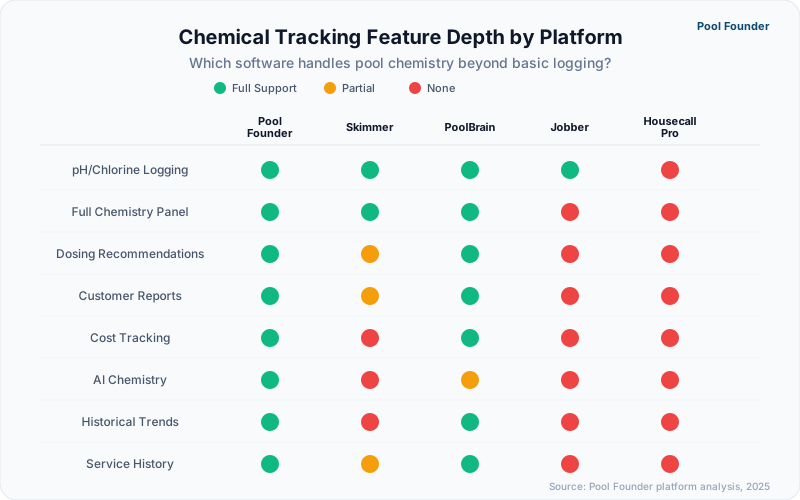
Chemical tracking capability is the single feature that most clearly separates pool-specific software from general field service platforms — Pool Founder, Skimmer, and PoolBrain all offer built-in chemistry workflows, while Jobber and ServiceTitan require manual workarounds or third-party integrations to log any water chemistry data. The depth and sophistication of chemical features varies significantly even among pool-specific tools, from basic reading entry to AI-powered predictive chemistry.
| Platform | Chemical Logging | Dosing Recommendations | Customer Reports | Chemical Cost Tracking | AI Chemistry |
|---|---|---|---|---|---|
| Pool Founder | Full suite — all readings | AI-powered recommendations + automatic LSI | Automated post-service reports | Per-pool tracking | Yes — AI dosing recommendations |
| Skimmer | Full suite — all readings | LSI + Orenda dosing (Scaling Up plan only) | Customer email reports | Limited | No |
| PoolBrain | Full suite — all readings | Automated recommendations | Detailed customer reports | Yes | Yes — automated chemistry |
| Jobber | Custom fields only (manual setup) | None | No chemical-specific reports | None | No |
| ServiceTitan | Custom forms (not pool-optimized) | None | Generic service reports only | None | No |
How Does Pool Founder Handle Chemical Tracking?
Pool Founder provides AI-powered chemical tracking with automatic LSI calculation in the completion flow, AI dosing recommendations based on pool volume and current chemistry, and customer-facing service reports that include chemical data alongside photos and tech notes — creating a complete documentation-to-communication pipeline from the moment a technician taps "start service."
- Automatic LSI calculation from your logged readings — no separate calculator needed
- AI-powered dosing recommendations based on pool volume, current readings, and chemical inventory
- Pre-configured fields for free chlorine, pH, alkalinity, CYA, calcium hardness, temperature, and more
- Historical reading charts show chemical trends over weeks and months per pool
- Customer-facing reports sent automatically after each visit with color-coded ranges
- Timestamped readings with GPS location for complete service records
- Per-pool chemical cost tracking when logging products added
- Service photos attached to the same log entry as chemical readings
What Makes PoolBrain's Automated Chemistry Different?
PoolBrain uses automated algorithms to analyze chemical reading history, water source characteristics, and seasonal patterns to generate dosing recommendations that go beyond standard LSI and balance calculations — adjusting chemical targets based on historical data rather than reacting after readings go out of range. This data-driven approach is most valuable for operators managing pools with chronic balance issues (saltwater pools, pools with high fill-water TDS, or pools in extreme heat markets) where standard formulas produce suboptimal results.
Can General Field Service Software Handle Chemical Tracking?
Jobber and ServiceTitan can technically capture chemical data through custom form fields, but the experience is clunky, lacks dosing intelligence, and produces no pool-specific reports — the equivalent of tracking pool chemistry in a spreadsheet that happens to live inside your scheduling app. Custom fields do not calculate dosing quantities, do not chart trends, do not generate customer-facing reports, and do not provide the structured data format needed for detailed service records.
If chemical tracking is a top-three priority for your business, eliminate general field service platforms from your shortlist immediately. The workaround required to make Jobber or ServiceTitan capture water chemistry data creates more daily friction than it solves.
How Does Chemical Tracking Build Customer Trust and Reduce Callbacks?
Digital chemical records give you a complete, searchable history of every pool you service — making it easy to troubleshoot recurring issues, demonstrate consistent service quality, and answer customer questions with data instead of guesswork. Operators who maintain detailed chemical logs report fewer customer disputes, faster problem resolution, and stronger long-term retention.
How Do Chemical Records Help You Troubleshoot Recurring Problems?
When a pool keeps turning green or pH keeps drifting, the answer is almost always in the historical data. Digital chemical logs let you pull up weeks of readings in seconds, spot the pattern (rising CYA, consistently low alkalinity, seasonal swings), and fix the root cause instead of dumping chemicals on a symptom every visit. This saves you chemical costs and eliminates repeat callbacks. CYA trending is especially critical for pools on trichlor tabs, where buildup is inevitable without monitoring. See our trichlor tablet management guide for the full strategy.
Why Do Documented Service Records Reduce Customer Disputes?
When customers can see exactly what was tested and what was added at every visit — through automated post-service reports — the "what am I paying for?" question answers itself. Operators who send chemical reports after every visit report significantly fewer pricing disputes and cancellation requests because the value of the service is visible, not invisible.
The best way to justify your pricing is to show your work. Automated chemical reports after every visit give customers proof of the expertise and effort behind each service stop.
How Do You Implement Chemical Tracking Without Slowing Down Your Route?
The number-one reason pool technicians resist chemical tracking software is the fear that logging readings will add 2-3 minutes per stop — a concern that well-designed mobile interfaces eliminate by reducing chemical entry to under 20 seconds per pool through smart defaults, numerical keypads, and pre-populated fields that remember each pool's typical ranges. The operational key is choosing software where chemical logging is embedded in the service workflow, not bolted on as a separate step.
What Does Fast Chemical Logging Look Like on a Phone?
The fastest chemical logging workflows present a single screen with numerical input fields for each reading, auto-populated pool volume for dosing calculations, and a one-tap save that timestamps and geolocates the entry — total interaction time of 15-25 seconds per stop when you test the water and enter readings in parallel. Slow workflows force technicians to navigate through multiple screens, select reading types from dropdowns, and manually calculate dosages in a separate step.
- Pool Founder: Single-screen chemical entry with smart number pad, auto-dosing display, 15-20 seconds per stop
- Skimmer: Streamlined chemical log screen, well-established workflow, 20-30 seconds per stop
- PoolBrain: Detailed entry with automated recommendations, 30-45 seconds per stop (more data = more time)
- Jobber custom fields: Multi-tap navigation to custom form, 45-60 seconds per stop, no dosing guidance
How Do You Get Technicians to Actually Log Chemicals Consistently?
Consistent chemical logging adoption requires three things — a workflow that takes under 30 seconds, mandatory completion before a stop can be marked "done," and visible feedback (like customer reports) that shows technicians their data is being used, not just collected. Operators who make chemical logging optional see 30-50% compliance rates; those who make it a required step before completing a service stop see 95%+ compliance within two weeks.
- 1Choose software where chemical entry is a required step in the service completion workflow, not an optional add-on
- 2Set up the chemical fields during onboarding so only the readings you test at every stop are required (pH, free chlorine at minimum)
- 3Enable automated customer reports so technicians see that their data generates a professional report the customer receives
- 4Review chemical logs weekly during the first month to catch incomplete entries and reinforce the expectation
- 5Use trend data in team meetings to show how consistent logging improves dosing accuracy and reduces callbacks
95%+
Chemical logging compliance rate when entry is a required step in the service workflow
The fastest way to build the chemical logging habit: Start by requiring only free chlorine and pH for the first two weeks. Once the workflow is automatic, add alkalinity and CYA. Trying to log seven readings on day one creates resistance that kills adoption.
Ready to streamline your pool service business?
Pool Founder gives you route optimization, automated invoicing, chemical tracking, and everything else you need to run a more profitable pool business.
Frequently Asked Questions
What is the best pool chemical tracking software in 2026?
Pool Founder offers the best combination of chemical tracking features, AI capabilities, and pricing for most pool service businesses. It includes AI dosing recommendations, automatic LSI calculation, customer-facing reports, per-pool cost tracking, and timestamped service logs — all at a flat monthly rate. PoolBrain focuses specifically on automated chemistry dosing calculations. Skimmer remains a solid choice for operators already in its ecosystem who want reliable chemical logging without switching platforms.
Can pool service software calculate chemical dosing amounts automatically?
Yes. Pool Founder and PoolBrain both calculate chemical dosing amounts automatically based on the current reading, target range, and stored pool volume. Pool Founder uses AI-powered recommendations and calculates LSI automatically from the readings you log. PoolBrain uses automated algorithms to generate dosing recommendations based on pool data. Skimmer provides LSI and Orenda-powered dosing guidance on Scaling Up+ plans. General platforms like Jobber and ServiceTitan do not offer any chemical dosing functionality.
Do I need chemical tracking software if I only service residential pools?
Yes. Chemical tracking software helps you deliver better service, reduce chemical costs, and build customer trust through automated reports — regardless of whether you service residential or commercial pools. Tracking every reading gives you historical data to troubleshoot recurring issues, optimize dosing to avoid waste, and show customers exactly what you did at every visit. The time savings and chemical cost reduction alone make it worthwhile for most operators.
How long does it take to log chemical readings in pool service software?
With well-designed pool-specific software, chemical logging takes 15-30 seconds per stop. Pool Founder and Skimmer are the fastest at 15-25 seconds with pre-configured fields and numerical keypads. PoolBrain takes 30-45 seconds because it captures more data for automated recommendations. Using custom fields in general software like Jobber takes 45-60 seconds due to navigation overhead. The key is choosing software where chemical entry is embedded in the service workflow, not a separate step.
Can chemical tracking software send reports to my customers automatically?
Pool Founder, Skimmer, and PoolBrain all offer automated customer-facing chemical reports sent after each service visit. Pool Founder delivers reports with color-coded chemical ranges, service photos, and tech notes. Skimmer sends email summaries with chemical data and service details. PoolBrain includes detailed chemistry explanations alongside readings. Jobber and ServiceTitan can send generic service completion notifications but do not generate pool-chemistry-specific reports.
Does chemical tracking software help with chemical inventory management?
Pool Founder tracks chemical costs per pool when technicians log products added during service, helping you identify which pools consume the most chemicals and where dosing adjustments could reduce spend. PoolBrain offers similar per-pool cost visibility. None of the current pool service platforms offer full chemical inventory management (warehouse stock levels, reorder alerts, vendor pricing) — that functionality requires a separate inventory management system or manual tracking.