Why Is Communication the Biggest Gap in Pool Service?
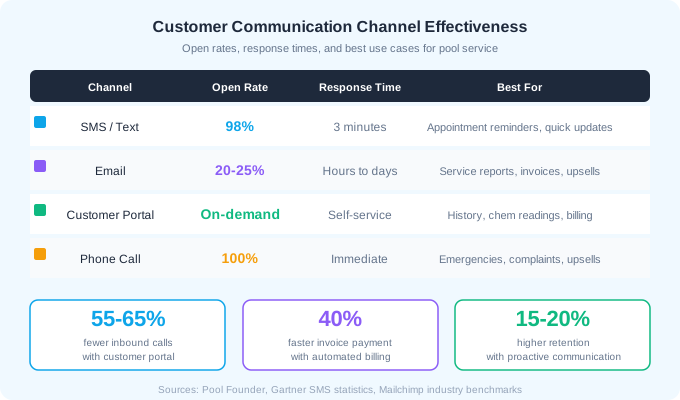
The number one customer complaint in pool service is not quality. It is communication. "Did you come today?" "What chemicals did you add?" "Why did you skip this week?" These are questions your customers should never have to ask. Every unanswered question is a seed of doubt that grows into a cancellation request. Pool service companies that solve this problem with automated, proactive communication report 55-65% fewer inbound phone calls and 15-20% higher retention rates.
Most pool companies still rely on the worst communication system: the customer has to call you. That means you are reactive, not proactive. You answer questions after the customer is already frustrated enough to pick up the phone. A proper communication system flips this dynamic. The customer receives information before they wonder, and when they do have a question, they can check a portal instead of calling.
Pool service companies with customer portals report 55-65% fewer inbound phone calls, 40% faster invoice payment, and 15-20% higher customer retention compared to companies that communicate exclusively through phone, email, and text.
What Communication Channels Should You Use?
Different messages belong on different channels. Sending a detailed chemical report by text is as ineffective as emailing an urgent schedule change. Match the channel to the message type and urgency level.
SMS / Text Messages
Text messages have a 98% open rate and the average response time is 3 minutes. Use texts for time-sensitive, short messages: appointment reminders, schedule changes, "service complete" confirmations, and payment reminders. Keep texts under 160 characters when possible. Longer messages split into multiple texts and feel spammy.
Email is the right channel for detailed information: full service reports with chemical readings, monthly summaries, equipment condition updates, and invoices. Email open rates for service businesses average 20-25%, but the people who open them are your most engaged customers. Pair email reports with a text notification ("Your service report is ready") to boost open rates.
Customer Portal
A customer portal is the self-service layer that eliminates the most common phone calls. Customers can check service history, view chemical readings over time, see upcoming appointments, pay invoices, and request additional services. The 55-65% reduction in inbound calls comes primarily from customers answering their own questions through the portal.
Phone Calls
Reserve phone calls for high-value interactions: upsell conversations, complaint resolution, and onboarding new customers. A phone call after a green pool recovery or a major equipment repair shows personal attention that no automated message can match. Use phone strategically, not as the default channel for routine updates.
What Automated Notifications Should You Send?
Automation is what makes consistent communication possible at scale. You cannot personally text 80 customers after every service visit, but your software can. Set up these automated triggers once and they run without your involvement.
Essential Automated Notifications
| Trigger | Channel | Content | Timing |
|---|---|---|---|
| Service completed | Text + Email | Completion confirmation, chemical readings, photos | Immediately after tech marks complete |
| Appointment reminder | Text | Scheduled service date and window | 24 hours before visit |
| Schedule change | Text | Rescheduled date with reason | Immediately when changed |
| Invoice sent | Email + Text | Amount due with payment link | Day of service or monthly billing date |
| Payment received | Receipt with transaction details | Immediately on payment | |
| Payment overdue | Text + Email | Friendly reminder with payment link | 3, 7, and 14 days past due |
| Equipment issue found | Email + Text | Description, photos, repair estimate | Same day as discovery |
| Chemical out of range | What is off, what was added, follow-up plan | Same day |
Let customers control their notification preferences. Some customers want every detail. Others find frequent messages annoying. A simple toggle for "All notifications," "Weekly summary only," or "Billing only" prevents opt-outs while respecting preferences.
How Do Service Reports Build Customer Trust?
A service report transforms an invisible service into a visible one. Without reports, your customer sees a clean pool and assumes it just stays that way. With reports, they see exactly what you tested, what was out of range, what you added, and what their readings are now. This visibility justifies your price and makes it much harder for customers to switch to a cheaper competitor who does not provide this level of detail.
What to Include in Service Reports
- Date, time, and technician name
- Chemical readings: free chlorine, pH, alkalinity, CYA, calcium hardness (when tested)
- Chemicals added: type and quantity
- Services performed: skimming, brushing, vacuuming, filter check, basket cleaning
- Equipment status: pump running, filter pressure, any issues observed
- Photos: water clarity, test results, any issues found
- Notes: anything the customer should know (gate was locked, dog was loose, equipment recommendation)
- Next visit date
The key is making reports easy for customers to understand. Most homeowners do not know what CYA stands for or why their pH matters. Include brief context: "pH: 7.4 (ideal range is 7.2-7.6, your pool is balanced)" is infinitely more useful than just "pH: 7.4."
15-20%
higher retention rate for pool companies that send detailed service reports vs. those that do not
How Do Customer Portals Reduce Your Workload?
A customer portal is a password-protected web page or app where customers can view their account information, service history, chemical trends, invoices, and upcoming appointments. It is the single most effective tool for reducing inbound phone calls because it answers the questions customers call about most.
Top Customer Portal Features
- Service history with dates, technician notes, and photos from each visit
- Chemical reading trends over time (chart showing pH, chlorine, and CYA across visits)
- Upcoming appointment calendar with scheduled dates
- Invoice history and online payment (credit card and ACH)
- Service request submission (report an issue, request extra service)
- Account details and billing information management
- Notification preference settings
Why Portals Accelerate Invoice Payment
The 40% faster invoice payment from customer portals comes from two factors. First, customers can pay instantly with a saved payment method instead of writing a check or calling with a card number. Second, the portal makes the service visible. When a customer sees a detailed log of 4 visits, chemical readings, and photos before opening the invoice, they connect the price to the value immediately.
A customer portal is not a nice-to-have. It is a competitive advantage. If your competitor sends the customer a monthly bill with no detail and you provide a portal showing every visit, every reading, and every photo, the customer perceives significantly more value from your service even if the actual service quality is identical.
How Do You Handle Difficult Customer Communications?
Not every message is a happy service completion notification. You also need systems for the hard conversations: price increases, service issues, schedule disruptions, and customer complaints. How you handle these communications determines whether you keep or lose the customer.
Price Increase Communication
Send price increase notices by email at least 30 days before the new rate takes effect. Include the reason (chemical costs, fuel, insurance), the specific dollar amount of the increase, and what the customer receives for the new price. Follow up with a personal phone call to your top 20 accounts. Pool companies that explain increases with specific cost data retain 85-90% of customers through price changes.
Service Issue Communication
When a technician discovers an issue (green pool, equipment failure, leak), notify the customer within 2 hours via text and email with photos, a description of the problem, and your recommended solution with estimated cost. Proactive issue reporting builds trust. Customers who learn about problems from you trust you more than customers who discover problems themselves.
Complaint Resolution
- Acknowledge the complaint immediately by phone (not text or email for complaints)
- Reference your service documentation: "Let me pull up the photos and readings from Tuesday"
- If the complaint is valid, offer a specific remedy: free re-service, credit on next bill, or equipment repair at cost
- If the documentation disproves the complaint, share it respectfully: "Here is the photo from the visit showing the water was clear at 11:15 AM"
- Follow up 48 hours after resolution to confirm satisfaction
What Communication Mistakes Lose Pool Customers?
Customer loss in pool service is rarely about a single bad visit. It is almost always about a pattern of poor communication that makes the customer feel ignored, uninformed, or unvalued. These are the most common communication failures that drive cancellations.
- 1No visit confirmation. The customer comes home, the pool looks the same as when they left, and they wonder if you came. This is the #1 fixable communication gap.
- 2Slow response to inquiries. Customers who wait more than 4 hours for a response to a question or concern are significantly more likely to start shopping competitors.
- 3Surprise invoices. Any charge the customer did not expect or approve in advance feels like a violation of trust. Always get approval before performing billable work beyond the regular service.
- 4Generic, impersonal communication. "Dear Valued Customer" emails get deleted. Use the customer name and reference their specific pool or recent service.
- 5Only communicating when you need payment. If the only message a customer receives is an invoice, they feel like an ATM, not a client.
- 6Not following up after problems. Fixing the issue without checking back tells the customer you moved on. A 48-hour follow-up call shows you care about the resolution.
- 7Over-communicating with irrelevant messages. Sending a daily marketing email to an existing customer is not communication. It is noise.
The goal is not maximum communication. It is the right communication at the right time through the right channel. One well-timed service report after each visit is worth more than five generic marketing emails per week.
How Do You Set Up a Communication System from Scratch?
If you are currently communicating with customers through personal texts and phone calls only, here is a phased approach to building a proper communication system without overwhelming yourself or your customers.
Phase 1: Service Completion Notifications (Week 1-2)
Start with the highest-impact, lowest-effort notification: an automated "service complete" text after every visit. Most pool service software sends this automatically when the technician marks a stop as complete. This single notification eliminates 30-40% of inbound "did you come?" calls immediately.
Phase 2: Service Reports with Chemical Readings (Week 3-4)
Add detailed email service reports that include chemical readings and photos. Train your technicians to input readings and take photos at every stop (this takes 2-3 minutes per pool). The automated email sends when the visit is logged.
Phase 3: Payment and Billing Automation (Month 2)
Set up automated invoicing with payment links. Configure reminders at 3, 7, and 14 days past due. This alone can reduce your average days-to-payment from 30+ days to under 10 days.
Phase 4: Customer Portal (Month 3)
Deploy a customer portal where all service history, reports, and billing are accessible on demand. Announce it to customers as a new benefit: "You can now view your complete pool service history, chemical trends, and pay invoices anytime at your convenience."
4 weeks
to implement the core communication system (notifications + reports + billing automation)
Ready to streamline your pool service business?
Pool Founder gives you route optimization, automated invoicing, chemical tracking, and everything else you need to run a more profitable pool business.
Frequently Asked Questions
How often should pool service companies communicate with customers?
At minimum, send a service completion notification after every visit and a monthly invoice or billing summary. Beyond that, communicate when there is something the customer needs to know: schedule changes, equipment issues, chemical anomalies, and price adjustments. The right frequency is when there is relevant information to share.
What is the best way to send service reports to customers?
Email is the best channel for detailed service reports because it supports photos, tables, and chemical reading charts. Pair each email with a short text notification ("Your pool service report for today is ready, check your email") to boost open rates. Customer portals provide an always-available backup.
Do customer portals actually reduce phone calls?
Yes. Pool service companies with customer portals report 55-65% fewer inbound phone calls because customers can answer common questions (did you come today, what is my balance, when is my next appointment) through the portal without calling.
How do you communicate a price increase without losing customers?
Send a written notice by email at least 30 days in advance. Include the specific dollar amount, the reason (increased chemical costs, insurance, fuel), and what the customer receives. Call your top 20 accounts personally. Companies that communicate increases transparently retain 85-90% of customers.
What pool service software has the best communication features?
Look for software that includes automated service completion notifications, customizable email reports with photos, customer portal access, payment automation, and notification preference controls for customers. Pool Founder, Skimmer, and ServiceTitan all offer integrated communication features.
Sources & References
- Pool Founder - Pool Service Customer Portals: Complete Guide
- The Pool Nest - How Pool Service Software Enhances Customer Communication
- DialMyCalls - How Pool Cleaning Companies Use Automated Calls and Texts
- Skimmer - How Pool Service Software Helps Customer Experience
- ProValet - Best Customer Communication Tools for Pool Service