Why Do Pool Companies Struggle with Technician Accountability?
You cannot be at every pool, every day, watching every technician. That is the fundamental challenge of scaling a pool service company. The moment you hire your second or third tech, you lose direct visibility into service quality. Without systems, you find out about problems the worst way possible: the customer calls to complain. By then, you have already lost trust, and sometimes the account.
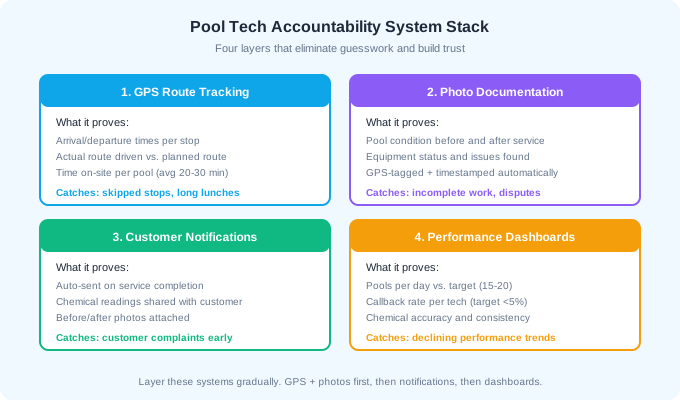
The solution is not more micromanagement. It is building systems that make accountability automatic. GPS tracking verifies arrival and departure times. Photo documentation proves the work was done. Customer notifications create transparency. Performance dashboards identify trends before they become problems. Together, these four layers give you full visibility into every route without riding along on a single truck.
Accountability is not about catching bad employees. It is about protecting good ones. When every visit is documented with timestamps and photos, false customer complaints are easily disproven. Your best technicians benefit from accountability systems as much as you do.
How Does GPS Route Tracking Improve Accountability?
GPS tracking is the foundation layer. It answers the simplest and most important question: was the technician actually at the pool? GPS logs record arrival time, departure time, time on-site, and the actual route driven between stops. This eliminates disputes about skipped pools, verifies time sheets, and helps you optimize route efficiency.
What GPS Tracking Reveals
- Arrival and departure timestamps per stop (was the tech there for 20 minutes or 5?)
- Actual route driven vs. planned route (unnecessary detours, personal stops)
- Time gaps between stops (extended lunches, unauthorized breaks)
- Skipped stops (tech marked complete but GPS shows they never arrived)
- Total miles driven per day (for mileage reimbursement accuracy)
GPS Insight reported that a pool service agency using their fleet tracking reduced unauthorized vehicle use and improved route completion rates after implementing GPS. The data also helped them verify that technicians spent adequate time at each stop, with the typical pool service visit requiring 20-30 minutes for proper cleaning, testing, and treatment.
GPS Disclosure Requirements
You must disclose GPS tracking to employees in writing. Include it in your employee handbook and have technicians sign an acknowledgment. Most states allow employer GPS tracking of company vehicles without consent, but tracking personal vehicles requires explicit consent. Several states including California, Connecticut, and New York have specific employee monitoring notification laws.
Frame GPS tracking as a benefit, not surveillance. "GPS helps us optimize your route so you spend less time driving and more time earning" lands better than "we are tracking your every move." Position it as a tool that protects the technician from false complaints.
Why Is Photo Documentation Essential?
Photo documentation is where accountability becomes visible to both you and the customer. A timestamped, GPS-tagged photo of a pool after service is proof of work that no amount of verbal assurance can match. It protects you from customer disputes, provides training material for new hires, and creates a service record that adds value if you ever sell the business.
What to Photograph at Every Visit
- Pool water clarity after service (before photos for green pool recoveries)
- Chemical test strip or test kit readings
- Skimmer basket condition (cleaned/debris removed)
- Equipment status (pump running, filter pressure reading)
- Any issues discovered: cracked tiles, leaking equipment, broken gates
- After-service overview shot showing the entire pool area
Modern pool service software automatically timestamps and GPS-tags every photo, linking it to the specific service visit. This creates an auditable record that cannot be faked. A photo taken at 10:47 AM with GPS coordinates matching the customer address is conclusive evidence of service completion.
How Photos Resolve Disputes
Customer complaints drop dramatically when you can respond with visual evidence. "Mrs. Johnson, here is the photo from Tuesday's visit showing crystal clear water and a filter pressure of 12 PSI" is an objective response that resolves most disputes instantly. Without photos, it becomes a he-said-she-said situation that you usually lose.
40-60%
reduction in customer complaints reported by pool companies after implementing mandatory photo documentation
How Do Customer Notifications Create Transparency?
Automated service notifications are the accountability layer that faces the customer. When a homeowner receives an email or text after every visit with a service summary, chemical readings, and photos, they feel informed and valued. More importantly, it creates a feedback loop: if the tech skips a step or does poor work, the customer sees it in the report and tells you before it becomes a retention problem.
What to Include in Service Notifications
- Confirmation that service was completed with timestamp
- Chemical readings: free chlorine, pH, alkalinity, CYA (if tested)
- Actions taken: chemicals added, filter cleaned, equipment checked
- Before/after photos when applicable
- Notes about any issues found or recommendations
- Next scheduled service date
Pool service companies with customer notification systems report 55-65% fewer inbound phone calls because customers no longer need to call asking "did you come today?" They already know. This frees up your time for selling and operations instead of answering the same question 20 times per day.
Let customers toggle which notifications they receive. Some want every detail. Others just want a "service complete" confirmation. Giving customers control over notification preferences reduces opt-outs and complaints about over-communication.
What Metrics Should You Track on Performance Dashboards?
Performance dashboards are the pattern-recognition layer. Individual GPS logs and photos tell you about one visit. Dashboards show you trends over weeks and months: which tech is slowing down, who has the most callbacks, whose routes consistently run late. These trends let you address issues proactively instead of reactively.
Key Performance Indicators for Pool Technicians
| KPI | Target | Warning Threshold | What It Indicates |
|---|---|---|---|
| Pools per day | 15-20 | Below 12 | Efficiency and route density |
| Avg time per pool | 20-30 min | Under 15 or over 40 min | Quality balance (too fast = rushing) |
| Callback rate | Under 3% | Over 5% | Service quality and completeness |
| Photo compliance | 100% | Below 90% | Documentation discipline |
| On-time arrival | 95%+ | Below 85% | Reliability and route planning |
| Chemical accuracy | 90%+ in range | Below 80% | Technical skill and care |
| Customer ratings | 4.5+ / 5 | Below 4.0 | Overall service satisfaction |
Review dashboards weekly with each technician during a 10-minute one-on-one. Frame it as a coaching conversation, not an interrogation. "Your callback rate went from 2% to 6% this month. Let us look at which pools are generating callbacks and figure out what is happening." This approach builds trust and improves performance simultaneously.
Compare technician metrics against each other carefully. Route difficulty varies significantly. A tech handling 12 pools with complex equipment across a spread-out area may be performing better than a tech doing 18 simple residential pools in a dense neighborhood. Adjust expectations based on route characteristics, not just raw numbers.
How Do You Build a Quality Culture Instead of a Surveillance Culture?
Every accountability system can feel like surveillance if you implement it wrong. The difference between a quality culture and a surveillance culture is intent, communication, and how you use the data. Technicians who feel watched will resist the systems. Technicians who feel supported will embrace them.
Principles for Building Quality Culture
- 1Explain the why before the what. "We are adding photo documentation so we can show customers the great work you do and protect you from false complaints" is different from "we are requiring photos to make sure you are doing your job."
- 2Use data for coaching first, discipline last. The first response to declining metrics should be a conversation, not a write-up.
- 3Celebrate wins publicly. When a technician has a perfect month with zero callbacks and 100% photo compliance, recognize it in front of the team.
- 4Tie accountability to compensation. Quality bonuses ($100-$200/month for low callback rates and full compliance) make the systems worth following.
- 5Lead by example. If you track technicians but do not hold yourself to the same documentation standards when you service pools, the system feels unfair.
- 6Ask for feedback. Let technicians suggest improvements to the accountability process. They are the ones using it daily and often have the best ideas.
The pool companies with the lowest turnover and highest customer satisfaction are not the ones with the most surveillance. They are the ones where technicians understand why the systems exist, benefit financially from compliance, and feel trusted to do good work.
What Software Supports Technician Accountability?
Modern pool service software bundles GPS tracking, photo capture, service reports, and customer notifications into a single platform. The days of cobbling together separate tools for each function are over. Here is what to look for in an accountability-ready platform.
Essential Software Features
- GPS tracking with arrival/departure logging per stop
- In-app photo capture with automatic timestamping and geotagging
- Service completion checklists customizable by pool type
- Chemical reading input with out-of-range alerts
- Automated customer notification on service completion
- Customer portal where homeowners can view history, photos, and reports
- Technician performance dashboards with KPI tracking
- Route optimization to maximize stops and minimize drive time
Pool Founder, Skimmer, and ServiceTitan all offer integrated accountability features. The key differentiator is how easily the mobile app works for technicians in the field. If the app is slow, crashes, or takes too many taps to log a visit, technicians will skip steps. Test the mobile experience before committing.
Customer portals deserve special attention. Companies with customer portals report 55-65% fewer inbound phone calls, 40% faster invoice payment, and 15-20% higher customer retention. The portal transforms your accountability data into a customer-facing value proposition.
How Do You Roll Out Accountability Systems to an Existing Team?
Introducing accountability systems to technicians who have been working without them requires careful change management. Announce it suddenly and you get pushback. Roll it out gradually with clear communication and you get buy-in.
Recommended Rollout Timeline
- 1Week 1: Announce the changes in a team meeting. Explain the business reasons (customer retention, complaint reduction, fair performance evaluation) and the technician benefits (proof of work, protection from false claims, bonus eligibility).
- 2Weeks 2-3: Training period. Technicians use the new tools but no metrics are enforced. This is the learning curve phase.
- 3Week 4: Soft launch. Begin tracking metrics but do not tie them to consequences. Share individual dashboards privately with each tech.
- 4Weeks 5-8: Full launch. Metrics count toward performance evaluations and quality bonuses begin.
- 5Month 3+: Ongoing. Weekly one-on-ones to review dashboards and coach on improvement areas.
Expect one or two technicians to resist strongly. In most cases, the resistance comes from techs who were cutting corners and know the systems will expose it. If a technician quits over photo documentation requirements, they were not the technician you wanted on your team.
Pair the rollout with a pay increase or new bonus structure. Introducing accountability without additional compensation feels like you are asking for more while giving less. A $0.50/hr raise or a new $150/month quality bonus shows that accountability comes with reward.
Ready to streamline your pool service business?
Pool Founder gives you route optimization, automated invoicing, chemical tracking, and everything else you need to run a more profitable pool business.
Frequently Asked Questions
Is it legal to GPS track pool service technicians?
Yes, in most states you can GPS track employees in company vehicles. You must disclose the tracking in writing (employee handbook or separate GPS policy). Tracking personal vehicles requires explicit written consent. California, Connecticut, and several other states have specific employee monitoring notification requirements.
How many photos should technicians take per pool visit?
A minimum of 2-3 photos per visit: one showing water clarity after service, one showing chemical test results, and one overview shot. Green pool recoveries and equipment issues warrant additional before/after documentation. Keep the requirement reasonable so it does not add excessive time to each stop.
What do you do when a technician consistently underperforms?
Start with a coaching conversation using specific data. "Your callback rate is 8% vs the team average of 3%. Let us look at which pools are generating callbacks." If performance does not improve after 2-3 documented conversations, move to a formal performance improvement plan with clear 30-day targets.
How do customer notifications affect retention?
Pool service companies with automated service notifications report 15-20% higher customer retention compared to companies relying on phone and email only. Customers who receive regular proof of service feel more connected to the value they are paying for and are less likely to cancel.
What is a reasonable callback rate target for pool technicians?
Target under 3% callback rate for experienced technicians and under 5% for technicians in their first 90 days. A callback rate above 5% for an experienced tech indicates either rushing, insufficient training, or route problems that need investigation.
Sources & References
- GPS Insight - Pool Agency Reduces Costs and Increases Accountability
- Ez Pool Biller - How Technology Increases Accountability in Field Work
- Pool Founder - Pool Service Customer Portals Guide
- ProValet - GPS Tracking for Pool Service Companies
- Skimmer - How Pool Service Software Helps Create a Better Customer Experience