Why Does Your Online Reputation Determine How Many Leads You Get?
According to BrightLocal's 2026 Local Consumer Review Survey, 97% of consumers read online reviews before choosing a local business. For pool service companies, the impact is even more direct: 68% of consumers will only use a business with four or more stars, up from 55% the previous year. And 31% now require 4.5 stars or higher. Your online reputation is not a "nice to have." It is the gatekeeper that determines whether potential customers ever call you.
This guide covers which review platforms matter for pool service, how to build a steady flow of positive reviews, the right way to respond to negative reviews, how to flag fake reviews, and simple monitoring tools that keep you informed without eating your day.
Which Review Platforms Matter Most for Pool Service Companies?
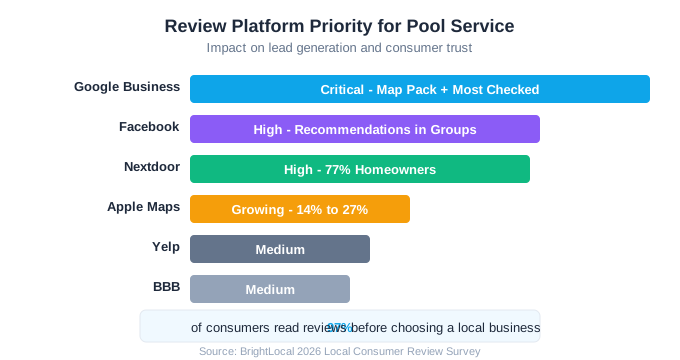
Google is the dominant review platform for local service businesses, and it is not close. Your Google Business Profile review count and star rating directly influence whether you appear in the Google Map Pack, which is where most pool service searches begin. But Google is not the only platform customers check. BrightLocal reports that consumers use an average of six review sites during their research.
| Platform | Impact on Pool Service | Priority |
|---|---|---|
| Google Business Profile | Directly affects Map Pack ranking, most-checked platform | Critical |
| Second most-checked, recommendations in local groups | High | |
| Nextdoor | 77% of users are homeowners, hyperlocal trust | High |
| Yelp | Still checked by some consumers, especially in urban markets | Medium |
| BBB (Better Business Bureau) | Signals legitimacy, especially for older demographics | Medium |
| Apple Maps | Usage nearly doubled from 14% to 27% in 2025-2026 | Growing |
| Angi (formerly Angie's List) | Some lead generation value, declining influence | Low |
Focus 80% of your review-building efforts on Google. It has the biggest impact on your visibility and the most influence on buying decisions. Once you have a steady flow of Google reviews (2-4 per month minimum), expand efforts to Facebook and Nextdoor.
How Do You Build a Steady Flow of Positive Reviews?
The key to review generation is making it systematic, not sporadic. One-off review pushes produce a burst of reviews that slows to nothing. A system built into your service workflow generates 2-4 reviews per month consistently, which is what Google rewards with higher Map Pack placement.
The After-Service Review Request System
- 1After each service visit, send an automated text message: "Thanks for choosing [Company]. Happy with today's service? Leave a quick review: [direct Google review link]"
- 2Send the text within 2 hours of the service visit while the experience is fresh
- 3Follow up with an email 24 hours later for customers who did not respond to the text
- 4Personally ask your top 10 happiest customers each quarter for a detailed review
- 5After positive phone calls or compliments, say: "Would you mind sharing that on Google? It really helps us."
Timing matters enormously. A review request sent 2 hours after service gets 3-4x the response rate of one sent the next day. The customer just saw a clean pool, they are satisfied, and the request catches them in that positive moment.
Create a Google review shortlink for your business. Go to your Google Business Profile, click "Ask for reviews," and copy the direct link. This link takes customers straight to the review form, skipping the steps that cause drop-off.
97%
of consumers read online reviews before choosing a local business
Source: BrightLocal 2026 Local Consumer Review Survey
How Should You Respond to Negative Reviews?
Negative reviews will happen. Even the best pool service companies get them. What matters is your response. BrightLocal found that 19% of consumers expect a response to their review on the same day they post it, up from 6% the prior year. And 89% of consumers say they expect businesses to respond to reviews, but only about 5% of businesses actually do. That gap is your opportunity to stand out.
The Five-Step Negative Review Response
- 1Respond within 24 hours. Speed shows you care and limits the damage of an unanswered complaint.
- 2Acknowledge the issue personally. Use their name and reference their specific concern. Never use a copy-paste template that feels generic.
- 3Apologize for their experience (not necessarily for being wrong). "I'm sorry your pool wasn't up to standard after our visit" works even if you believe the complaint is unfair.
- 4Offer to make it right offline. "I'd like to discuss this directly. Please call me at [phone] or I'll reach out today." Moving the conversation offline prevents a public back-and-forth.
- 5Follow up. If you resolve the issue, politely ask if they would consider updating their review. Many will.
Never argue with a negative reviewer publicly. Every potential customer reading that exchange will side with the reviewer, not the business. Even if the complaint is completely unfounded, a defensive response looks worse than a gracious one.
Businesses that respond to customer feedback see 85% more revenue than those that do not, according to review response research. Your response is not just for the unhappy customer. It is for every future customer who reads that review and evaluates how you handle problems.
How Do You Flag and Remove Fake Reviews?
Fake negative reviews happen in every local service industry. A competitor, a disgruntled former employee, or someone who confused your company with another can leave a review that damages your rating. Google has a process for flagging reviews that violate their policies, though removal is not guaranteed and the process can take weeks.
When Can You Flag a Review for Removal?
- The reviewer was never a customer (you have no record of servicing them)
- The review is for a different business (name confusion)
- The review contains hate speech, threats, or personally identifiable information
- The review is from a competitor or former employee with a conflict of interest
- The review is spam or contains irrelevant promotional content
How to Flag a Review on Google
- 1Go to Google Maps, find your business listing, and locate the review
- 2Click the three-dot menu on the review and select "Flag as inappropriate"
- 3Select the reason that best matches the violation
- 4If the review is not removed within a week, escalate through Google Business Profile support
- 5Document your case: screenshot the review, note why the person is not a customer, and include any evidence
Google removes about 10-15% of flagged reviews. The success rate is higher when you can clearly demonstrate the reviewer was never a customer. While waiting for removal, respond to the fake review professionally: "We have no record of servicing you. Please contact us at [phone] so we can look into this." This signals to other readers that the review may not be legitimate.
What Monitoring Tools Should Pool Companies Use?
You cannot manage your reputation if you do not know what people are saying. At minimum, set up Google Alerts for your business name and enable notifications on your Google Business Profile so you see every new review within hours. Beyond that, the monitoring tools you need depend on your budget and how many review platforms you are active on.
| Tool | Cost | What It Does | Best For |
|---|---|---|---|
| Google Business Profile notifications | Free | Email alerts for new reviews and questions | Every pool company |
| Google Alerts | Free | Monitors web mentions of your business name | Every pool company |
| Facebook Page notifications | Free | Alerts for recommendations and mentions | Companies active on Facebook |
| BrightLocal | $39-$79/mo | Multi-platform review monitoring and reporting | Companies with 50+ reviews to manage |
| Podium | $249-$599/mo | Review generation, monitoring, and messaging | Mid-size companies wanting automation |
| GatherUp | $99-$250/mo | Automated review requests and monitoring | Companies wanting systematic review generation |
For most pool service companies under 100 accounts, the free tools (Google notifications, Google Alerts, Facebook notifications) are sufficient. Add a paid tool only when you are managing reviews across multiple locations or need automated review request workflows that your pool service software does not already provide.
How Many Reviews Do You Need and How Fast Should You Grow?
The number of reviews you need depends on your local competition. Check how many Google reviews your top three competitors have. Your goal is to match and then exceed their count while maintaining a higher star rating. In most pool service markets, 30-50 Google reviews with a 4.7+ average puts you in strong competitive position. In larger markets, you may need 100+.
Pace matters. Google views sudden spikes in reviews as suspicious. If you have 10 reviews and suddenly get 30 in a week, Google may flag or filter some of them. Aim for a consistent 2-4 reviews per month. That pace looks natural, builds steadily, and is sustainable with a simple after-service request system.
| Review Count | Competitive Position | Approximate Timeline |
|---|---|---|
| 0-10 reviews | Below threshold for most consumers to trust | 0-3 months |
| 10-30 reviews | Credible but not dominant | 3-8 months |
| 30-50 reviews | Competitive in most local markets | 8-15 months |
| 50-100 reviews | Strong position, Map Pack advantage | 15-30 months |
| 100+ reviews | Dominant in local market | 2+ years |
Review recency matters as much as count. BrightLocal found that 41% of consumers only consider reviews written in the last month. A company with 200 reviews but nothing recent looks abandoned. Aim for at least 2 new reviews every month, indefinitely.
How Do You Turn Reputation Into Revenue?
A strong online reputation does not automatically generate revenue. You need to actively leverage your reviews in your marketing. Display your Google rating and review count on your website, in your email signature, on your vehicle wrap, and in every piece of marketing material. When you hit milestones (50 reviews, 100 reviews, 5.0 rating), promote them.
- Add your Google star rating and review count to your website header and footer
- Include a "See what our customers say" section with 3-5 real review quotes on your landing page
- Mention your rating in Google Ads copy: "4.9 Stars | 87 Reviews"
- Screenshot positive reviews and share them on social media (one per week)
- Include your review link in post-service communications so satisfied customers can add their voice
- Respond to every positive review with a personalized thank you (this encourages others to leave reviews)
Displaying reviews can increase conversion rates by up to 270% according to Spiegel Research Center data. Your reviews are not just a reputation signal. They are a sales tool that removes doubt and builds trust before the customer ever picks up the phone.
Ready to streamline your pool service business?
Pool Founder gives you route optimization, automated invoicing, chemical tracking, and everything else you need to run a more profitable pool business.
Frequently Asked Questions
How many Google reviews does a pool service company need?
Aim for 30-50 Google reviews with a 4.7+ star average to be competitive in most local markets. Check your top three competitors to set a specific goal. Build reviews at a steady pace of 2-4 per month using an after-service text and email request system.
How do you respond to a negative pool service review?
Respond within 24 hours. Acknowledge the issue by name, apologize for their experience, and offer to resolve it offline with a direct phone call. Never argue publicly. The response is for future customers reading the review, not just the unhappy one.
Can you remove fake Google reviews?
You can flag fake reviews through Google Maps by clicking the three-dot menu on the review. Google removes about 10-15% of flagged reviews. Success rates are higher when you can demonstrate the reviewer was never a customer. Escalate through Google Business Profile support if the initial flag does not work.
Which review platform is most important for pool service?
Google is the most important platform by a wide margin. It directly affects your Map Pack ranking and is where most consumers start their search. Focus 80% of your review-building efforts on Google before expanding to Facebook and Nextdoor.
How often should you ask customers for reviews?
Ask after every service visit using an automated text message sent within 2 hours of the appointment. Follow up with email 24 hours later. This creates a consistent review flow without being pushy. Aim for 2-4 new reviews per month.