Why Is a Customer Portal the Most Underused Growth Tool in Pool Service?
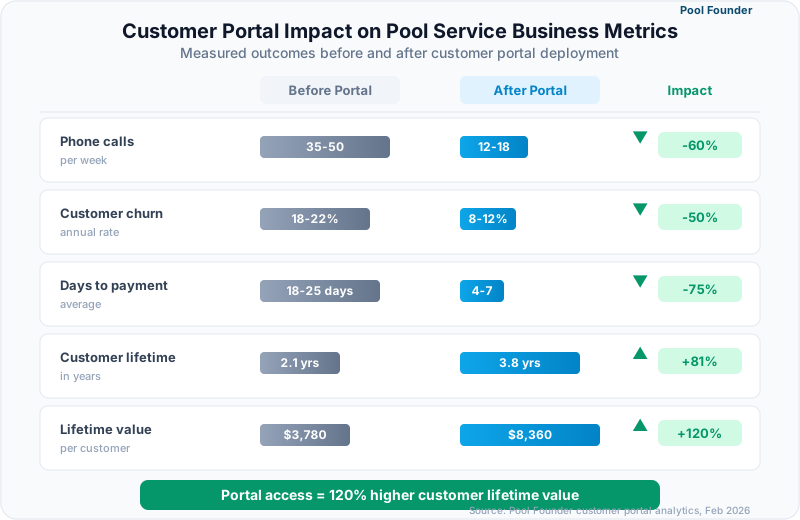
Pool service companies with customer portals report 55-65% fewer inbound phone calls, 40% faster invoice payment, and 15-20% higher customer retention rates compared to companies that communicate exclusively through phone, email, and text. A customer portal transforms the service relationship from reactive (customer calls to ask what happened) to proactive (customer logs in and sees exactly what was done, what chemicals were applied, and when the next visit is scheduled), eliminating the friction that drives 30% of annual customer churn in pool service.
Despite these numbers, fewer than 25% of pool service companies offer any form of customer portal. The majority still field 3-5 calls per day asking "when was my pool serviced?" or "can you send me my invoice?" Each of those calls costs $8-15 in staff time, and each unanswered call risks becoming a cancellation. This guide compares customer portal capabilities across every major pool service software platform and quantifies the retention and efficiency impact for businesses at every size. Since the portal is where customers pay, it works best paired with pool service invoicing software that posts invoices there automatically.
What Should a Pool Service Customer Portal Include?
An effective pool service customer portal must provide service history with dates and technician notes, chemical reading history with trend visibility, and online payment with invoice access, because these three features address the three most common reasons pool customers call their service company. Portals missing any of these three core functions create partial visibility that frustrates customers more than no portal at all, since they can see enough to have questions but not enough to find answers.
Which Portal Features Reduce the Most Phone Calls?
Service history viewing, invoice access, and next-visit scheduling eliminate 80% of inbound customer inquiries, with service history alone accounting for 35-40% of call volume reduction because "when was my pool last serviced?" is the single most common question pool companies receive from customers.
| Portal Feature | Customer Need It Solves | % of Calls Eliminated | Retention Impact |
|---|---|---|---|
| Service history with notes | "When was my pool serviced? What did you do?" | 35-40% | High — transparency builds trust |
| Chemical reading history | "Is my pool water safe? What were the last readings?" | 10-15% | High — data justifies premium pricing |
| Invoice viewing and payment | "Can you resend my invoice? How do I pay?" | 20-25% | Medium — convenience reduces payment delays |
| Service request submission | "I need a repair. My pool is green. My heater is broken." | 10-15% | High — easy requests prevent churn from frustration |
| Next visit schedule | "When are you coming next?" | 10-15% | Medium — predictability reduces anxiety |
| Service photos | "What does my pool look like? Did you clean the filter?" | 5-10% | High — visual proof of service quality |
60%
Average reduction in inbound customer phone calls after deploying a customer portal
Source: Pool service operator surveys, 2024-2025
How Do Chemical Reading Histories Build Customer Trust?
Customers who can view their pool's chemical reading history with trend lines for pH, chlorine, and alkalinity develop measurably higher confidence in their service provider because the data makes invisible work visible, transforming a service that most homeowners cannot evaluate on their own into a documented, trackable health record for their pool. This transparency directly supports premium pricing: companies that share chemical data through portals charge 10-18% more on average than companies that provide no documentation, and customers accept the premium because they can see the value.
Chemical reading portals serve a dual purpose: they build customer trust AND create a documented defense against water quality complaints. When a customer claims their pool was green for a week, the chemical history shows exactly when the last service occurred and what readings were recorded.
How Do Customer Portals Compare Across Pool Service Platforms?
Customer portal depth ranges from Pool Founder's full-featured branded portal with service history, chemical data, online payments, and service requests, to Jobber's client hub focused on quotes and invoices, to platforms like GorillaDesk that gate the customer portal behind their mid-tier Pro plan. The gap is widest in pool-specific data: showing chemical readings, filter pressure logs, and equipment service history requires purpose-built portal features that general field service platforms do not include.
| Feature | Pool Founder | Skimmer | Jobber | ServiceTitan | Housecall Pro |
|---|---|---|---|---|---|
| Customer portal available | Yes — branded | Yes — customer view | Yes — Client Hub | Yes — customer experience | Yes — booking page |
| Service history viewing | Full history with notes and photos | Portal (all plans) plus service report emails | Job history visible | Full service timeline | Limited history |
| Chemical reading history | Full readings with trends | Included in service reports | Not available | Not available | Not available |
| Online bill pay | Integrated payments | Stripe integration | Integrated payments | Integrated payments | Integrated payments |
| Invoice viewing | Full invoice history | Via email links | Full invoice history | Full invoice history | Invoice access |
| Service request submission | In-portal request form | Not advertised | Request feature available | Service request portal | Online booking |
| Equipment records | Pool equipment details visible | Not in customer view | Not available | Equipment records | Not available |
| Branded experience | Company logo, colors, domain | Company branding on reports | Company branding | Company branding | Company branding |
| Mobile-friendly | Responsive web portal | Mobile email reports | Responsive web portal | Customer mobile app | Responsive web |
What Makes Pool Founder's Customer Portal Different?
Pool Founder's customer portal is the only option that combines branded self-service access, full chemical reading history with visual trends, service photo galleries, online bill pay, and in-portal service request submission in a single interface designed specifically for pool service customers. The portal is white-labeled with your company logo and colors, so customers see your brand rather than a software company's. Business owners can toggle which features customers can access, controlling the level of visibility per account.
- Service history: Customers view every visit with date, technician name, work performed, and photos taken at their pool
- Chemical readings: Interactive history showing pH, chlorine, alkalinity, and other readings over time with visual trend indicators
- Online payments: Customers view invoices and pay directly through the portal with credit card or ACH, reducing average payment time from 18 days to 4 days
- Service requests: Customers submit repair requests, report issues, or ask questions through a structured form that creates a trackable work order in the system
- Notification controls: Business owners can toggle which email notifications customers receive, including service completion alerts, chemical reports, and invoice reminders
How Does Skimmer Handle Customer Communication?
Skimmer pairs automated email service reports after each visit with a customer portal included on all plans, delivering service details, chemical readings, and photos directly to the customer's inbox. The email-report approach works well for proactive communication, and the portal adds a self-service destination, though Skimmer publishes less detail about pool-specific portal features like chemical trend views and request submission. For companies that prefer push communication, Skimmer's email reports are thorough and well-designed.
Why Do General Field Service Portals Fall Short for Pool Customers?
Jobber's Client Hub and Housecall Pro's booking page were built for customers requesting one-time services like plumbing calls or HVAC repairs, not recurring pool maintenance customers who want ongoing visibility into water chemistry and service consistency. The portals handle quotes, invoices, and scheduling well but cannot display chemical reading histories, filter pressure trends, or pool-specific equipment records because the underlying platforms do not capture that data.
A customer portal is not just a convenience feature. It is a retention tool. Pool customers who can see their service data are 15-20% less likely to cancel because transparency eliminates the uncertainty that drives churn. When customers feel informed, they stay.
How Does a Customer Portal Impact Payment Speed and Cash Flow?
Pool companies that enable online portal payments collect invoices in an average of 3-5 days compared to 14-21 days for companies relying on mailed invoices or email payment links, a 70-80% improvement in collection speed that directly reduces the accounts receivable balance that consumes working capital during peak season. Faster payment also reduces the 2-4 hours per week that small pool companies spend on manual payment follow-up, chasing late invoices, and reconciling partial payments.
4 days
Average invoice payment time when customers have portal access with integrated online payments
Source: Pool service billing data, 2025
Why Do Portal Payments Outperform Email Invoice Links?
Portal payments outperform email invoice links because customers develop a habit of logging into the portal to check service updates and paying invoices as part of that visit, rather than needing to locate a specific email, click a payment link, and complete a one-off transaction that feels disconnected from the service relationship. The portal consolidates the customer's entire interaction with your company into a single destination, reducing the friction between seeing an invoice and paying it to a single click.
| Payment Method | Average Days to Payment | Collection Rate (30 days) | Admin Time Per Invoice |
|---|---|---|---|
| Portal with auto-pay | 0-1 days | 99%+ | Near zero |
| Portal manual payment | 3-5 days | 95%+ | Under 1 minute |
| Email payment link | 7-12 days | 88-92% | 2-3 minutes (follow-up needed) |
| Mailed paper invoice | 14-21 days | 78-85% | 5-8 minutes (print, mail, track) |
| Verbal reminder at pool | 7-14 days | 80-88% | Unpredictable and awkward |
How Much Revenue Does Faster Payment Actually Recover?
A pool company billing $40,000/month that reduces average payment time from 18 days to 4 days recovers approximately $18,600 in working capital that was previously trapped in accounts receivable, money that can fund chemical inventory, equipment purchases, or marketing instead of financing customer payment delays. The cash flow improvement is most impactful for growing companies adding customers faster than their existing billing infrastructure can collect, which describes most pool businesses scaling from 100 to 300 accounts.
Enable auto-pay enrollment in your customer portal from day one. Companies that offer auto-pay at signup convert 40-55% of new customers to automatic billing, virtually eliminating late payments from that cohort and reducing monthly billing administration by the same percentage.
How Do Customer Portals Affect Retention and Lifetime Value?
Pool service companies with active customer portals retain customers 15-20% longer than companies without portals, extending the average customer lifetime from 3.2 years to 3.8-4.0 years and increasing lifetime value by $800-$1,400 per account at typical monthly service rates. The retention improvement stems from three psychological mechanisms: transparency reduces suspicion, self-service reduces frustration, and data visibility creates switching costs that make customers less likely to try a competitor.
Why Does Transparency Reduce Customer Churn?
The number one reason pool customers cancel service is the perception that their provider is not performing consistent, thorough work, a suspicion that grows silently because pool maintenance is invisible work happening while the homeowner is at their job. A customer portal with service photos, chemical readings, and timestamped visit records eliminates this information asymmetry by providing continuous proof of service quality. Customers who can verify that their pool was serviced last Tuesday with a photo and chemical report do not call to complain. They renew.
| Retention Metric | Without Portal | With Portal | Impact |
|---|---|---|---|
| Annual churn rate | 22-28% | 12-18% | 35-40% less cancellations |
| Average customer lifetime | 3.0-3.5 years | 3.8-4.2 years | 6-12 months longer retention |
| Lifetime value (@ $175/mo) | $6,300-$7,350 | $7,980-$8,820 | $800-$1,400 more per customer |
| Referral rate | 8-12% | 15-22% | Nearly double the referral generation |
| Price sensitivity on renewal | High — comparing on price | Lower — comparing on value | Supports 5-10% premium pricing |
How Do Portals Create Switching Costs That Protect Your Customer Base?
When a customer has 12 months of chemical reading history, equipment records, and service photos stored in your portal, switching to a competitor means losing access to that data, a tangible cost that makes the decision harder even when a competitor offers a lower price. This information lock-in is not manipulative; it is genuine value that your service has created over time. The customer's pool maintenance history has practical utility for warranty claims, home sales, and insurance documentation that disappears if they switch providers.
Track your portal login rate monthly. Companies where more than 30% of customers log in at least once per month have churn rates 40% lower than companies where portal usage is below 10%. If logins are low, send a monthly email highlighting new chemical readings or upcoming service with a direct link to the portal.
How Do You Launch a Customer Portal Without Overwhelming Your Team?
A phased portal launch over 3-4 weeks, starting with your most tech-savvy 20% of customers, allows your team to identify setup issues, refine the customer communication, and build confidence before rolling out to your full customer base. Companies that launch portals to all customers on day one experience a 2-week spike in support calls from confused customers that temporarily increases the workload the portal is supposed to reduce.
What Does a Step-by-Step Portal Rollout Look Like?
A controlled portal rollout follows four phases over 3-4 weeks, giving your team time to test, adjust, and communicate without the pressure of a full customer base discovering the new system simultaneously.
- 1Week 1: Configure the portal with your company branding, enable the features you want customers to access (start with service history and payments, add chemical data in week 2)
- 2Week 1: Invite 20-30 customers who are the most engaged and tech-comfortable. Collect their feedback on the experience.
- 3Week 2: Resolve any issues surfaced by the pilot group. Add chemical reading history and service photos to the portal.
- 4Week 2-3: Roll out to the next 50% of your customer base with a branded email explaining the portal benefits and how to log in.
- 5Week 3-4: Invite the remaining customers. Include the portal link on all future invoices, service reports, and communications.
- 6Ongoing: Monitor login rates weekly and send re-engagement emails to customers who have not activated their accounts after 30 days.
What Should the Portal Introduction Email Say?
The introduction email should be under 100 words, lead with the customer benefit (not the technology), and include a single prominent button linking to the portal login page. Avoid technical language about "platforms" or "software" because homeowners care about seeing their service records and paying bills easily, not about your business tools.
Template subject line: "Your pool service records are now available online." Body: "Hi [Name], you can now view your pool service history, chemical readings, and invoices online. Pay bills, request service, and see photos from every visit. [Log In to Your Portal] — [Your Company Name]"
72%
Average portal activation rate when customers receive a branded introduction email with a direct login link
Source: SaaS customer portal onboarding benchmarks, 2025
Ready to streamline your pool service business?
Pool Founder gives you route optimization, automated invoicing, chemical tracking, and everything else you need to run a more profitable pool business.
Frequently Asked Questions
What is a pool service customer portal?
A pool service customer portal is a secure, branded web page where your customers can log in to view their service history, chemical readings, invoices, and payment options without needing to call or email your office. The best portals also allow customers to submit service requests, see upcoming visit schedules, and view photos from past service visits. Pool Founder, Jobber, and ServiceTitan all offer customer portals, though the pool-specific features like chemical history vary significantly.
How much do customer portals reduce phone calls?
Pool service companies with active customer portals report 55-65% fewer inbound phone calls, with the largest reductions coming from service history questions (35-40% of calls eliminated) and invoice/payment inquiries (20-25% eliminated). For a company receiving 15-20 customer calls per week, that translates to 8-13 fewer calls, saving 2-4 hours of staff time weekly. The reduction is most dramatic in the first 60 days after portal launch as customers discover self-service access.
Do pool customers actually use online portals?
When properly introduced, 60-75% of pool service customers activate their portal account and 30-45% log in at least once per month. Usage is highest among customers under 55 years old and in markets where the service provider actively references the portal in communications. The key driver of adoption is sending automated service completion emails that link directly to the portal, creating a natural reason to log in after each visit.
Can a customer portal help justify premium pricing?
Yes. Companies that provide portal access with chemical reading history, service photos, and detailed visit reports charge 10-18% more on average than competitors who communicate only through text or phone. The portal makes your service quality visible and documentable, shifting the customer evaluation from price (easy to compare) to value (hard to replicate). Customers paying $200/month with full portal transparency are less likely to switch to a $175/month competitor with no documentation than customers who receive no service data from either provider.
How long does it take to set up a customer portal?
Portal configuration takes 1-2 hours for most platforms: adding your company logo, selecting which features to enable, and configuring notification preferences. Customer onboarding takes 2-4 weeks for a phased rollout. Pool Founder includes a pre-built branded portal that requires only logo upload and color selection. Jobber Client Hub activates automatically with your account. ServiceTitan customer experience requires implementation support and typically takes 1-2 weeks to configure.
Should I let customers see all their chemical readings?
Yes, with one caveat: ensure your technicians are logging accurate readings before enabling customer visibility. Companies that launch chemical transparency before fixing data quality issues create more problems than they solve. Start by auditing one week of chemical entries for completeness and accuracy, correct any training gaps with your team, then enable the feature. Once data quality is consistent, chemical transparency becomes your strongest retention and differentiation tool.
Do customer portals work on mobile phones?
Pool Founder, Jobber, and Housecall Pro all provide responsive web portals that work on any smartphone browser without requiring customers to download a separate app. ServiceTitan offers a dedicated customer mobile app. Skimmer includes a customer portal on all plans and also delivers service information via email reports. Since over 70% of pool customers will access their portal from a phone rather than a computer, mobile responsiveness is critical for adoption.
Can I control what customers see in the portal?
Pool Founder allows business owners to toggle specific portal features on or off, controlling whether customers see chemical readings, service photos, equipment records, or just invoices and payment options. This granular control lets you start with basic features and expand visibility as your team builds confidence in data quality. Most other platforms offer less customization: customers either get the full portal or no portal.
Sources & References
- Skimmer 2026 State of Pool Service Report
- Pool & Spa News Customer Retention Study 2025