Why Is Dispatch Software the Operational Backbone of Growing Pool Service Companies?
Pool service dispatch software reduces unplanned downtime by 30-45%, eliminates the 45-90 minutes per day that owners spend calling technicians for status updates, and enables same-day emergency job insertion without disrupting scheduled routes — making it the feature that separates companies stuck at 1-2 crews from those scaling to 5-10. Dispatch is not scheduling; scheduling decides what happens tomorrow, while dispatch manages what is happening right now across every truck in the field.
This guide compares dispatch capabilities across every major pool service platform, quantifies the operational cost of dispatching via phone calls and text messages, and outlines the features that become non-negotiable once a pool company operates more than two crews simultaneously. The ROI of dispatch software scales linearly with crew count — a solo operator gains visibility, but a five-truck operation gains the ability to function without the owner being the human switchboard.
45-90 min/day
Time pool company owners spend calling technicians for field status updates without dispatch software
Source: ServiceTitan Field Operations Report 2025
What Does Dispatch Software Actually Do for Pool Service Companies?
Pool service dispatch software provides real-time technician location tracking, live job status monitoring, and on-the-fly job assignment — three capabilities that replace the phone-call-and-text-message dispatch system that 70% of pool companies under 5 trucks still rely on, at a cost of 45-90 minutes of owner time and 15-30 minutes of technician time per day.
How Is Dispatch Different From Scheduling and Routing?
Scheduling assigns jobs to days and technicians in advance, routing determines the optimal stop sequence for each day, and dispatch is the real-time execution layer that tracks whether the plan is being followed, flags deviations, and enables mid-day adjustments — scheduling is the plan, routing is the map, and dispatch is the live operations feed.
| Function | When It Happens | What It Controls | Who Uses It |
|---|---|---|---|
| Scheduling | Days to weeks in advance | Which jobs happen on which days, assigned to which technicians | Office manager or owner during planning |
| Routing | Day before or morning of | Stop sequence and driving order within each day | Route optimizer (automated or manual) |
| Dispatch | Real time during the workday | Live technician positions, job completion status, mid-day reassignment | Owner, dispatcher, or office manager monitoring field ops |
What Are the Core Components of Pool Service Dispatch?
Effective pool service dispatch combines five components — GPS tracking, live job status, job assignment, emergency insertion, and a field operations dashboard — each solving a specific operational blindspot that costs multi-crew pool companies time, customer satisfaction, and revenue.
| Component | What It Does | Operational Impact |
|---|---|---|
| GPS tracking | Shows real-time location of every technician on a map | Eliminates "where is my tech?" calls; enables nearest-tech dispatch for emergencies |
| Live job status | Shows which job each tech is on, en route, or completed | Owner sees full operation status without calling anyone; customers get accurate ETAs |
| Job assignment | Drag-and-drop or one-click job assignment to available technicians | New jobs dispatched in seconds instead of phone-call coordination |
| Emergency insertion | Insert urgent jobs into a live route without disrupting remaining stops | Same-day emergency response without rescheduling the entire day |
| Field ops dashboard | Single screen showing all crews, routes, progress, and alerts | Replaces the mental model that owners carry in their head with a real-time visual |
The field operations dashboard is the dispatch feature with the highest owner satisfaction because it replaces the constant anxiety of not knowing what is happening in the field. Pool company owners who implement a live dashboard report spending 60-80% less time on phone calls and text messages with technicians during the workday.
How Does Dispatch Software Compare Across Pool Service Platforms?
ServiceTitan and Pool Founder offer the most complete dispatch suites with real-time GPS, live job status boards, and drag-and-drop assignment, while Skimmer has minimal dispatch capabilities and GorillaDesk provides basic GPS tracking without a true field operations dashboard — the platform gap widens dramatically once a pool company exceeds two crews.
| Dispatch Feature | Pool Founder | Skimmer | Jobber | ServiceTitan | GorillaDesk |
|---|---|---|---|---|---|
| Real-time GPS tracking | Yes — live map with tech positions | No — check-in/check-out timestamps only | Yes — GPS tracking on mobile | Yes — real-time fleet tracking | Yes — basic GPS on stops |
| Live job status board | Yes — real-time route progress per tech | Yes — Route Dashboard with live visibility | Yes — job status updates | Yes — dispatch board with live status | Partial — basic status view |
| Drag-and-drop job assignment | Yes — assign or reassign jobs to any tech | Yes — drag-and-drop route scheduling | Yes — drag-and-drop scheduling | Yes — full dispatch board | Partial — basic reassignment |
| Emergency job insertion | Yes — insert into live route with resequencing | Partial — can add work orders to existing routes | Yes — add to schedule same-day | Yes — priority dispatch with nearest tech | Partial — manual schedule edit |
| Field operations dashboard | Yes — all crews, routes, and progress on one screen | No | Partial — schedule view with status | Yes — comprehensive dispatch center | Partial — dashboards and reporting |
| Technician time tracking | Yes — clock in/out with GPS verification | Yes — check-in/check-out timestamps | Yes — time tracking per job | Yes — detailed time tracking | Yes — basic timestamps |
| Route progress monitoring | Yes — percentage complete per route, ETA for remaining stops | Partial — completed stop count only | Partial — completed job count | Yes — detailed progress tracking | Partial — basic completion tracking |
| Multi-crew management | Yes — unlimited crews on single dashboard | Partial — separate route views per tech | Yes — team scheduling and dispatch | Yes — enterprise multi-crew | Yes — basic multi-tech support |
| Customer ETA notifications | Yes — automated ETA text to customers | No | Yes — on-my-way notifications | Yes — real-time ETA updates | No |
| Offline capability | Yes — syncs when connection restores | Yes — full offline with sync | Yes — offline queue with sync | Yes — full offline support | Yes — offline mode with sync |
Where Does Skimmer Fall Short on Advanced Dispatch?
Skimmer was built primarily as a chemical tracking and route management platform, with dispatch capabilities added through its Route Dashboard that provides live visibility into technician activities, drag-and-drop scheduling, and work order management. However, Skimmer lacks real-time GPS tracking, automated job resequencing, and the dedicated dispatch board with capacity planning that purpose-built dispatch tools provide — limitations that become apparent at two or more crews.
How Does ServiceTitan Compare to Pool Founder on Dispatch?
ServiceTitan offers the most mature dispatch center in the field service industry with features like nearest-technician routing, capacity-based scheduling, and real-time fleet tracking across unlimited crews. Pool Founder delivers the same core dispatch capabilities — GPS tracking, live job status, drag-and-drop assignment, and a field ops dashboard — at a fraction of ServiceTitan's reported $245-$500 per-technician monthly cost and without the lengthy implementation process that ServiceTitan typically requires.
For pool companies with 2-10 technicians, Pool Founder provides the dispatch functionality you need without the enterprise complexity and cost of ServiceTitan. ServiceTitan becomes worth considering only when you exceed 10-15 trucks and need features like call tracking, marketing attribution, and complex commission structures that go beyond field operations management.
How Does Real-Time GPS Tracking Improve Pool Service Operations?
Real-time GPS tracking eliminates the 3-5 daily phone calls owners make to check technician locations, enables nearest-technician emergency dispatch that cuts response time from 2-4 hours to 30-60 minutes, and provides accountability data showing actual drive time vs. productive service time — three operational improvements that collectively recover 1-2 hours of owner time and 30-45 minutes of technician time per day.
What Operational Questions Does GPS Tracking Answer?
GPS tracking answers six questions that pool company owners currently rely on phone calls and guesswork to resolve — where each technician is right now, whether they are on schedule, which tech is closest to an emergency call, how long each stop actually takes, how much time is spent driving vs. servicing, and whether technicians are where they say they are.
| Question | Without GPS | With GPS |
|---|---|---|
| Where is my technician? | Call or text, wait for response, hope they answer | Open dashboard, see live location on map instantly |
| Is the route on schedule? | Call tech, estimate based on last known position | Route progress bar shows % complete with ETA for remaining stops |
| Who is closest to an emergency? | Guess based on route assignments, call multiple techs | Map shows all tech positions; assign to nearest available in one click |
| How long do stops actually take? | Self-reported times (often inaccurate by 15-30%) | GPS-verified arrival and departure times accurate to the minute |
| How much time is drive vs. service? | No data — just total hours worked | Automatic breakdown of drive time, service time, and idle time per day |
| Is the tech at the job site? | Trust the check-in timestamp | GPS-verified check-in confirms physical presence at service address |
How Does GPS Tracking Affect Technician Accountability?
GPS tracking increases technician productivity by 12-18% on average because the awareness of location monitoring reduces extended breaks, personal stops during route time, and inflated self-reported job durations — these are not trust issues but human nature, and the same productivity gains appear in every field service industry that implements GPS tracking.
Frame GPS tracking as a benefit for technicians, not a surveillance tool. Techs benefit from not being called constantly for location updates, from receiving turn-by-turn navigation to unfamiliar stops, and from having accurate time records that prove their hours when payroll questions arise. Companies that position GPS tracking as mutual benefit see 80% faster adoption than those that announce it as a monitoring policy.
What Privacy Considerations Apply to Technician GPS Tracking?
GPS tracking during work hours using company-issued devices or work-profile apps on personal phones is legal in all 50 states with proper employee notification, but tracking personal devices after hours requires explicit consent and raises legal liability in states like California, Connecticut, and Illinois. Best practice is to use a pool service app (like Pool Founder) that activates GPS only when the technician clocks in and deactivates when they clock out.
- Disclose tracking in writing: Include GPS tracking in your employee handbook and have each technician sign an acknowledgment. This is a legal requirement in most states.
- Track during work hours only: Use software that ties GPS to clock-in/clock-out status. Tracking personal devices 24/7 creates legal exposure and destroys technician trust.
- Provide business justification: Frame tracking around customer service (accurate ETAs), safety (lone worker monitoring), and payroll accuracy (verified hours) — not surveillance.
- Allow technicians to view their own data: Transparency reduces resistance. When techs can see the same map and time data that the owner sees, GPS tracking feels collaborative rather than adversarial.
How Do You Handle Emergency Dispatch and Mid-Day Route Changes?
Emergency dispatch requires three capabilities — real-time technician location visibility, one-click job insertion into a live route, and automatic re-sequencing of remaining stops — and pool companies that handle emergencies through phone calls and manual rescheduling lose 45-90 minutes per emergency event compared to software-managed dispatch that completes the same process in 2-3 minutes.
What Types of Emergencies Require Same-Day Dispatch?
Green pools after storms, equipment failures causing water loss, chemical imbalances creating safety hazards, and property-showing preparations for real estate clients are the four most common same-day dispatch scenarios for pool companies — each requiring response within 2-4 hours to maintain customer satisfaction and prevent escalation.
| Emergency Type | Response Window | Revenue Impact | Dispatch Priority |
|---|---|---|---|
| Green pool (algae bloom) | Same day — 4-6 hours | $150-$400 emergency service charge | High — assign to nearest available tech after current stop |
| Equipment failure (pump/leak) | Same day — 2-4 hours | $200-$800 repair revenue | Urgent — may require re-routing if parts pickup needed |
| Chemical safety issue | Immediate — 1-2 hours | $100-$250 corrective treatment | Critical — override current route if necessary |
| Real estate showing prep | Scheduled same-day — time-specific window | $125-$300 one-time premium service | Planned — insert into route at optimal time slot |
How Does Pool Founder Handle Emergency Job Insertion?
Pool Founder displays all technician locations on a live map, identifies the nearest available technician based on current position and remaining route load, and inserts the emergency job into the selected technician's route with one click — the remaining stops automatically re-sequence to accommodate the insertion with minimal disruption to the rest of the day's schedule.
- 1Create the emergency job with customer address, issue description, and priority level.
- 2View the live dispatch map showing all technician positions and their current route progress.
- 3Select the nearest available technician based on proximity and remaining workload.
- 4Insert the emergency job into the selected route. Remaining stops reorder automatically to minimize total added drive time.
- 5The technician receives a mobile notification with the new job details, address, and navigation. The customer receives an ETA text message.
- 6After the emergency is completed, the technician continues with the resequenced route. The dashboard updates route progress and revised completion ETA automatically.
Emergency dispatch is a profit center, not just a customer service obligation. Pool companies that can guarantee same-day emergency response charge $150-$400 premium rates and differentiate themselves from competitors who push emergencies to the next available day. Dispatch software makes same-day response operationally feasible without disrupting the entire day's revenue.
How Does Pool Founder's Field Operations Dashboard Work?
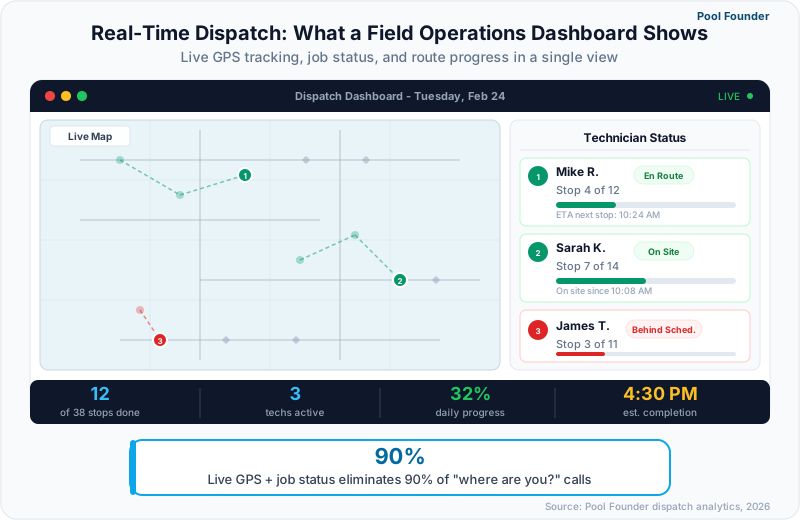
Pool Founder's field operations dashboard displays every active crew on a single screen with real-time GPS positions, route completion percentages, job status indicators, and time-at-stop tracking — replacing the mental model and phone-call-based awareness system that pool company owners currently maintain in their heads with an always-current visual that takes 10 seconds to scan.
What Information Does the Field Operations Dashboard Show?
The dashboard presents five data layers simultaneously — technician map positions updated in real time, per-route progress bars showing percentage of stops completed, individual job status cards (en route, in progress, completed, skipped), daily time tracking breakdowns, and alert indicators for routes falling behind schedule or stops exceeding expected duration.
| Dashboard Element | What It Shows | Action It Enables |
|---|---|---|
| Live map | Current GPS position of every technician | Nearest-tech emergency dispatch; verify technician locations |
| Route progress bars | X of Y stops completed per technician with time-based ETA | Identify techs running behind; proactively notify afternoon customers of delays |
| Job status cards | Individual stop status: en route, in progress, completed, skipped | Monitor job completion flow; flag skipped stops for follow-up |
| Time tracking | Clock-in time, drive time, service time, idle time per tech | Payroll accuracy; productivity analysis; route time benchmarking |
| Alert indicators | Routes behind schedule, stops exceeding duration threshold, GPS anomalies | Proactive intervention before problems impact customers or schedule |
How Does the Dashboard Scale for Multi-Crew Operations?
Pool Founder supports unlimited technicians on a single dashboard with filtering by crew, region, or route — a five-truck operation sees all five routes on one map with individual progress tracking, while the owner can filter to a single technician's route for detailed monitoring. The dashboard maintains performance regardless of crew count because data loads incrementally rather than rendering all positions simultaneously.
- All-crews view: Default view shows every active technician on the map with color-coded route lines and progress indicators. Scan the entire operation in 10 seconds.
- Single-crew filter: Click on a technician to see their detailed route with stop-by-stop status, time at each location, and remaining route ETA.
- Region filter: For companies operating across multiple service areas, filter the map to a specific zone to focus on local operations.
- Alert-only view: Show only routes with active alerts (behind schedule, extended stop, GPS anomaly) to focus attention where it is needed.
- Historical playback: Review any past day's routes to analyze drive patterns, stop durations, and schedule adherence for performance reviews and route optimization.
The field operations dashboard is the feature that most pool company owners cite as the reason they stopped working on a truck. Having real-time visibility into every crew's progress means you can manage field operations from anywhere — the office, your home, or while running estimates — without being the human relay between technicians and customers.
How Much Does Pool Business Dispatch Software Cost in 2026?
Pool business dispatch software ranges from $49/month for pool-specific platforms to quote-based enterprise field service tools reportedly running $245-$500 per technician monthly — but the price only tells half the story. The real cost comparison requires factoring in which dispatch features each platform actually includes at its base price versus charges as add-ons, since some platforms gate GPS tracking, live dashboards, or emergency dispatch behind higher-tier plans.
| Platform | Dispatch Plan Cost | GPS Tracking | Live Dashboard | Emergency Dispatch | Best For |
|---|---|---|---|---|---|
| Pool Founder | $49-249/mo (all plans) | Included | Included | Included | Pool companies 1-10 crews |
| Jobber | $299-$499/mo (Grow+) | Grow plan+ | Grow plan+ | Manual | Multi-service businesses |
| ServiceTitan | Quote-based (reported $245+/tech) | Included | Included | Included | Large operations 10+ crews |
| Skimmer | $1-$2/location ($49-$98 min) | Limited | Basic | Not available | Pool-only, route-focused teams |
| GorillaDesk | $49-$149/mo per route | Pro plan+ | Pro plan+ | Manual | Budget-conscious small teams |
Pool Founder is the only pool-specific platform that includes full dispatch capabilities — GPS tracking, live field operations dashboard, and emergency job insertion — on every plan tier. Competing platforms either reserve dispatch features for premium tiers or lack real-time dispatch entirely, relying instead on scheduled route management without live visibility into field operations.
Ready to streamline your pool service business?
Pool Founder gives you route optimization, automated invoicing, chemical tracking, and everything else you need to run a more profitable pool business.
Try Pool Founder free for 30 daysFrequently Asked Questions
What is pool service dispatch software?
Pool service dispatch software provides real-time field operations management for pool companies — GPS tracking of technicians, live job status monitoring, on-the-fly job assignment and reassignment, emergency dispatch, and a centralized dashboard showing all crew activity. It replaces phone calls and text messages as the primary way pool company owners manage technicians in the field.
Do I need dispatch software for a solo pool operation?
Solo operators benefit from GPS-verified time tracking and route progress monitoring for their own use, but dedicated dispatch features (multi-crew dashboard, technician assignment, emergency rerouting) become essential at two or more technicians. If you plan to hire within 12 months, choosing software with dispatch capabilities now avoids a platform migration later.
How does GPS tracking work in pool service apps?
Pool service apps use the technician's smartphone GPS to report location at configurable intervals (typically every 30-60 seconds when clocked in). The data feeds a live map in the office dashboard showing technician positions, route progress, and time at each stop. GPS activates at clock-in and deactivates at clock-out to respect privacy. No special hardware or vehicle-mounted trackers are required.
Can dispatch software help with emergency pool service calls?
Yes. Dispatch software shows all technician locations on a map in real time, allowing you to identify the nearest available technician and insert an emergency job into their live route with one click. The remaining stops resequence automatically. Pool companies with dispatch software respond to emergencies in 30-60 minutes compared to 2-4 hours with phone-based coordination.
Does pool service dispatch software track drive time vs. service time?
Pool Founder, Jobber, and ServiceTitan all break down each technician's day into drive time, service time, and idle time using GPS data. This breakdown reveals route efficiency problems (too much driving), service speed issues (stops taking longer than expected), and productivity patterns. The data is also useful for accurate payroll and performance-based compensation.
How does Pool Founder's dispatch compare to ServiceTitan?
Both platforms offer real-time GPS tracking, live job status boards, drag-and-drop job assignment, and emergency dispatch. ServiceTitan adds call tracking, marketing attribution, and advanced capacity planning for large operations. Pool Founder delivers the same core dispatch functionality at a significantly lower price point and with pool-specific features that ServiceTitan treats as secondary to its HVAC and plumbing focus.
Is GPS tracking of pool technicians legal?
GPS tracking during work hours on company devices or work-profile apps is legal in all 50 U.S. states with written employee notification. Tracking personal devices after hours requires explicit consent and creates legal risk in states with strong privacy laws (California, Connecticut, Illinois). Best practice is to use pool service software that ties GPS tracking to clock-in/clock-out status.
What dispatch features should I look for when hiring technicians?
When moving from solo to multi-crew, prioritize: (1) a field operations dashboard showing all technician routes and progress on one screen, (2) drag-and-drop job assignment for quick route changes, (3) GPS tracking with time-at-stop verification for payroll accuracy, and (4) customer ETA notifications to maintain service quality when you are no longer on the truck. These four features let you manage crews without being the human switchboard.