Referrals (1:27 video). Open on its own page
Two programs, one page
The Referrals page (sidebar → Settings → Marketing → Referrals) holds two separate programs. Refer & Earn is you referring another pool company to Pool Founder — they get their first month free, and you get $150 cash. Your referral program is your company's own program for your customers — "refer a neighbor, get money off your bill". The page requires the "Manage referrals" permission, which owners and admins have.
Refer & Earn: refer a pool company, get $150
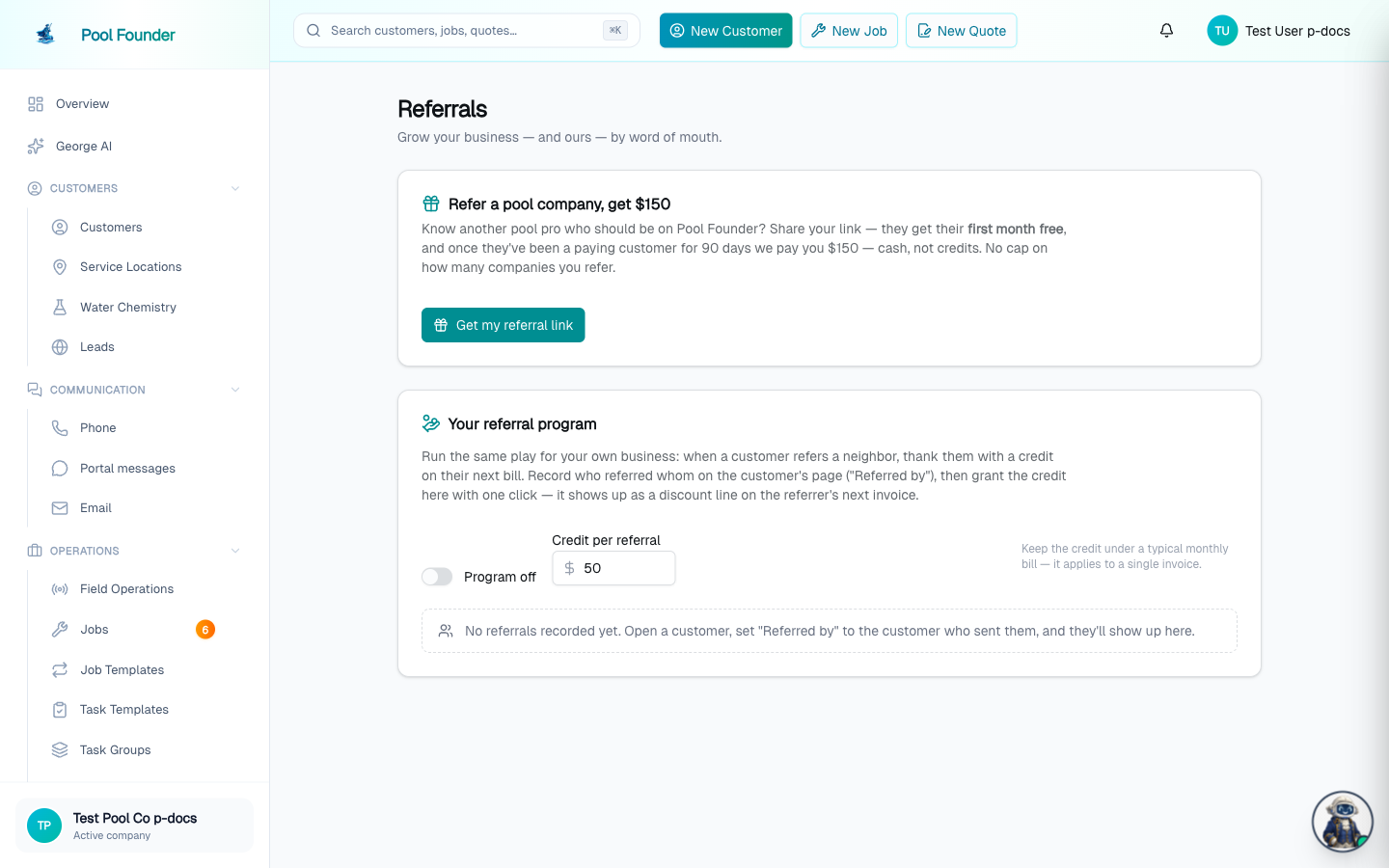
- 1On the Referrals page, under "Refer a pool company, get $150", click Get my referral link (first visit only). Your personal link appears — poolfounder.com/?ref=your-code — with a Copy link button.
- 2Share it however you like — it works from any page of poolfounder.com.
- 3A company that signs up through your link gets its first month free.
- 4Once that company has been a paying customer for 90 days, Pool Founder pays you $150 cash.
- The 90-day clock starts when their trial converts to paid — not at signup.
- The table on the page lists each referred company with its status (Trialing / Paying customer / Canceled) and a live countdown to the reward: "N days to your $150", then "$150 on its way" once it's eligible and being processed.
- The payment is sent by the Pool Founder team — it is not automatic in-app money.
- A referred company that cancels before 90 paid days earns no reward.
- There is no cap on how many companies you can refer.
Your referral program: turn it on
- 1On the Referrals page, find the "Your referral program" card.
- 2Flip the switch ON and set the Credit per referral (e.g. $50).
- 3Click Save.
Record who referred a new customer
- 1Go to Customers and open the new customer — the one who was referred.
- 2In their profile header, click "Referred by…" and search for the customer who referred them. (This needs the update-customers permission.)
- 3The pill then shows "Referred by [name]". The X on the pill removes the record if it was a mistake.
Recording "Referred by" only tracks the referral — no credit is granted automatically. A person grants it, in the next step.
Grant the credit
- 1Back on the Referrals page, the referred customer appears in the table.
- 2Click "Give $X credit". The credit is queued as a discount line on the referrer's next maintenance invoice.
- 3If the referrer has more than one location (more than one active recurring service), a "Which location gets the credit?" window opens. Pick the address and click "Give $X credit"; the discount goes on that location's next invoice. A location with two recurring services is listed twice, with the job name under the address.
- The referrer must have an active recurring service for the credit to attach to — the button errors otherwise (add the discount to their invoice manually in that case).
- One credit per referred customer, ever.
- Once granted, the table shows the amount, the date, and the address the credit went to. There is no button to move a granted credit to a different location, so pick carefully.
- The credit is capped at the referrer's typical bill — their most recent invoice total, or the job's rate if they've never been billed. A credit larger than one invoice is refused, because it would push the invoice negative; lower the program's credit amount, or split the discount manually across invoices.
No customer-facing share link
There is no shareable link or customer-portal surface for your end customers to refer people themselves — referrals are recorded by your staff on the customer's page, as above. Customers mention who sent them, and your team records it.
Frequently asked questions
When does the 90-day clock start on a Refer & Earn referral?
When the referred company's trial converts to a paying subscription — not when they sign up. The table on the Referrals page shows a live countdown for each referral.
What does "$150 on its way" mean?
The referral has hit 90 paid days and the reward is eligible and being processed. The payment is sent by the Pool Founder team — it isn't deposited in the app.
Why won't the "Give $X credit" button work?
Two common reasons: the referrer has no active recurring service for the credit to attach to (add the discount to their invoice manually instead), or the credit is larger than the referrer's typical bill — their most recent invoice total — which would push the invoice negative. In that case, lower the program credit or split the discount manually across invoices.
The referrer has several properties. Can I choose which one gets the credit?
Yes. When the referrer has more than one active recurring service, clicking "Give $X credit" asks "Which location gets the credit?" — pick the address and the discount goes on that location's next invoice. After it is granted, the Referrals table shows which address it went to.
Can my customers get a referral link to share?
No — there is no customer-facing share link or portal surface. Your staff records referrals with the "Referred by…" pill on the new customer's page, and grants the credit from the Referrals page.
Is the customer credit granted automatically once I record "Referred by"?
No. Recording "Referred by" only tracks the referral. Someone on your team clicks "Give $X credit" on the Referrals page to queue the discount on the referrer's next invoice.