Connect Claude or ChatGPT to your pool service software.
Ask the assistant you already use about your customers, routes, readings and invoices. It answers from your Pool Founder account, as you, and it can make the change too, after you say yes.
The connector URL, for Claude, Claude Code or any assistant that supports custom MCP connectors:
https://api.poolfounder.com/mcpPart of every Pool Founder plan. Already a customer? Turn it on in Settings → API.
What you can ask
Plain English, the way you’d ask your office manager. A few things owners and office staff ask:
Find out
- “Which customers have unpaid invoices over 60 days?”
- “Which pools weren’t serviced last week?”
- “What’s on Mike’s route tomorrow?”
- “How much chlorine did we use this month?”
- “Show me the chlorine readings at the Smith pool over the last month.”
- “What model is the pump at the Garcia pool?”
It reads your customers, routes, visits, readings, invoices and equipment photos, and converts cents to dollars for you.
Get it done
- “Add Dana Reyes as a customer, 512-555-0199.”
- “Add a note to the Patel account: new gate code 4471.”
- “Send the Johnson invoice.”
- “Record this receipt from the supply house as a restock.”
- “Build a good, better, best quote for a new pump at the Garcia pool.”
It uses the same actions George does. Each one is shown to you first and waits for your yes.
Learn the app
- “How do I set up autopay in Pool Founder?”
- “Where do I change a technician’s pay?”
- “Send Pool Founder feedback: I wish quotes had a photo field.”
It searches the Pool Founder help center, and feedback goes straight to the people who build the app.
Run more than one company in the same organization? A connection works in one company at a time. Ask it to switch to another of yours.
How to connect
An owner or admin does step 1 once. After that, each person on your team connects with their own Pool Founder sign-in.
Step-by-step guide with screenshotsTurn on AI assistants
An owner or admin goes to Settings → API and switches on the AI assistants (Claude, ChatGPT) card. It is off for every company until someone turns it on.
Add the connector
In Claude, open Plugins → Add → Add custom connector, name it Pool Founder and paste the connector URL. In Claude Code, add it with
claude mcp add. Other assistants that support custom MCP connectors take the same URL.Click Allow
A Pool Founder page opens, names your company and you, and asks you to allow it. Check both, then click Allow.
Ask “Who am I in Pool Founder?”
It answers with your name, your company and today’s date. Then ask something real.
You stay in charge of every change
An assistant that can add a customer can also send an invoice. So it works like your best employee: it shows you first.
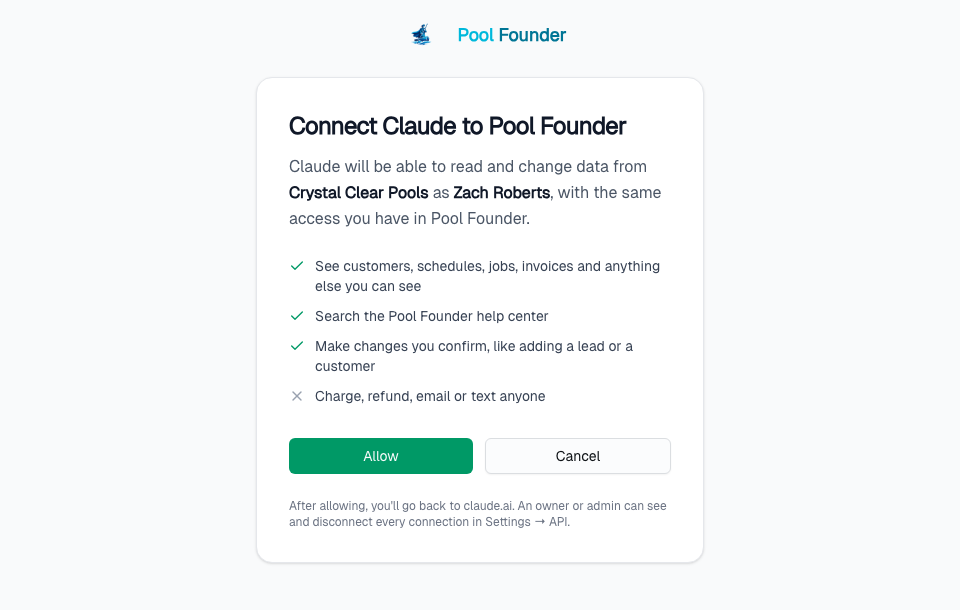
It asks before it changes anything
A change is prepared first, and nothing happens. The assistant shows you one line saying exactly what will change, like “Create customer Dana Reyes, 512-555-0199”, and only makes it after you say yes.
Undo for 15 minutes
Changed your mind? Ask it to undo. Most changes reverse within 15 minutes. Emails, texts, charges, refunds and voids go out the moment you confirm and can’t be undone, so each is confirmed on its own, with the amount.
It is you, with your role’s access
Each person connects with their own Pool Founder sign-in. The assistant sees and does only what that person’s role allows: if technicians can’t open invoices, a technician’s assistant can’t read them.
Switches you control
Turn Allow changes off in Settings → API to make every connection read-only. Set an action to Never in George Permissions and assistants can’t use it either. Disconnect any one connection from the same card.
Every change is on the record
Changes show on the Activity page as made by the assistant for that person, for example “by Claude (for Jason)”.
Things it won’t do
It never changes your Pool Founder subscription, and it never charges a customer’s card for a tip or a pay-page payment. Only the customer does those.
George, or the assistant you already use
Pick either, or both. They share one set of actions, one approval step and one Undo.
- George
- Built into Pool Founder on the web and in the tech app. Nothing to set up, and approval cards with an Undo button right in the chat. More about George and AI in pool software
- Claude, ChatGPT or another assistant
- Lives next to your email, documents and other tools in the assistant you already pay for. Good for questions that mix Pool Founder with everything else you work on.
Questions
Can I connect ChatGPT or Claude to my pool service software?
Yes, if you use Pool Founder. An owner or admin turns on AI assistants in Settings → API, then each person adds Pool Founder as a custom connector in their assistant with the URL https://api.poolfounder.com/mcp and clicks Allow. Claude and Claude Code have step-by-step instructions in the help center; other assistants that support custom MCP connectors connect the same way.
Can Claude or ChatGPT make changes in Pool Founder?
Yes. It can make the same changes George can, such as adding customers, jobs and notes, creating or sending invoices, charging or refunding a card, or texting a customer. Each change is shown to you first and happens only after you confirm it. An owner or admin can switch Allow changes off to make assistants read-only.
Can I undo something the assistant did?
Most changes can be undone by asking the assistant within 15 minutes. Emails, texts, charges, refunds, voids, approved pay runs and supply orders are real the moment you confirm them and can’t be undone.
What can a technician’s assistant see?
Exactly what the technician’s role can see in Pool Founder. Every person connects with their own sign-in, and the assistant reads and acts as that person.
Is this the same as George?
No. George is the AI assistant built into Pool Founder, on the web and in the tech app. A connected Claude or ChatGPT lives in the assistant you already use, next to your other tools, and uses the same actions George does, with the same confirmation and undo.
Where does my data go?
What the assistant reads is sent to the AI assistant you connect, under that assistant’s own terms. If your company doesn’t want that, leave AI assistants off in Settings → API.
Is there a usage limit?
Each connection can make up to 60 requests a minute and 2,000 a day. Past that, the assistant is told to wait.