What you can do
You can connect Pool Founder to Claude, or any other AI assistant that supports custom MCP connectors, and ask it about your business in plain English. It reads the answer straight from your Pool Founder account. For example:
- "Which customers have unpaid invoices over 60 days?"
- "What's on Mike's route tomorrow?"
- "Show me the chlorine readings at the Smith pool over the last month."
- "How do I set up autopay in Pool Founder?" (it can search this help center too)
Connected assistants can also make changes, like adding a customer or a job, after showing you exactly what will change and getting your OK. They can never charge, refund or pay anyone, or email or text customers. An owner or admin can switch Allow changes off to make them read-only. See Making changes below.
Step 1: Turn it on in Pool Founder
AI assistants are off for every company until an owner or admin turns them on. While off, nobody can connect, and existing connections stop working.
- 1Go to sidebar → Settings → API. (The page needs the "Manage API keys" permission, which owners and admins have.)
- 2On the AI assistants (Claude, ChatGPT) card, switch the toggle on.
- 3The card now shows the Connector URL, https://api.poolfounder.com/mcp, with a Copy button.
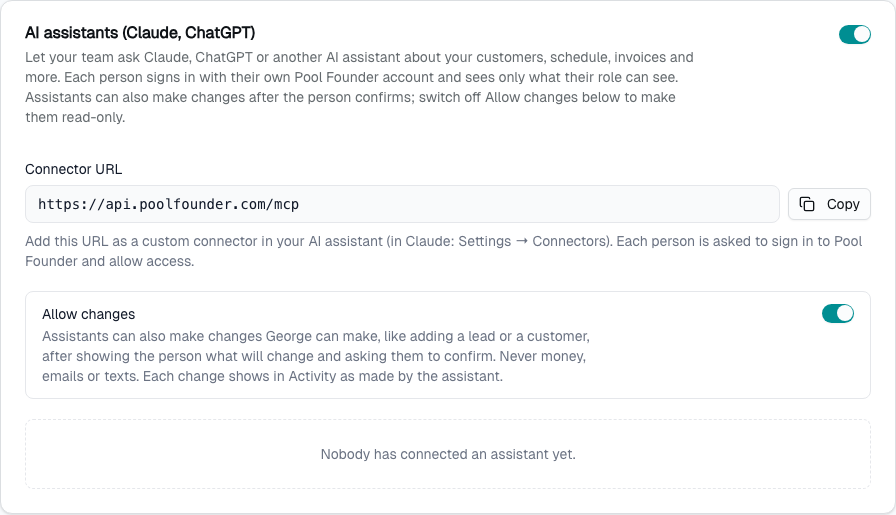
Not an owner or admin? You can skip this step if it's already on. If it's off, the sign-in page in step 3 tells you, and an owner or admin can turn it on.
Step 2: Add Pool Founder to your assistant
Claude (claude.ai or the desktop app)
- 1Open Settings → Connectors.
- 2Click Add custom connector.
- 3Name it Pool Founder and paste the connector URL: https://api.poolfounder.com/mcp.
- 4Click Connect. A Pool Founder page opens (step 3).
Claude Code
- 1In your terminal, run: claude mcp add --transport http --scope user pool-founder https://api.poolfounder.com/mcp
- 2Start Claude Code, type /mcp, pick pool-founder and choose Authenticate. A Pool Founder page opens in your browser (step 3).
Other assistants work the same way if they support custom MCP connectors: add a connector and paste the URL. Where that setting lives, and whether your plan includes it, depends on the assistant.
Step 3: Allow access
- 1Sign in to Pool Founder if you're asked to.
- 2The page says which assistant is asking, and that it will read and change your company's data as you. Check that the company and name are the ones you expect.
- 3Click Allow. You're sent back to your assistant, connected. (Cancel goes back without connecting.)
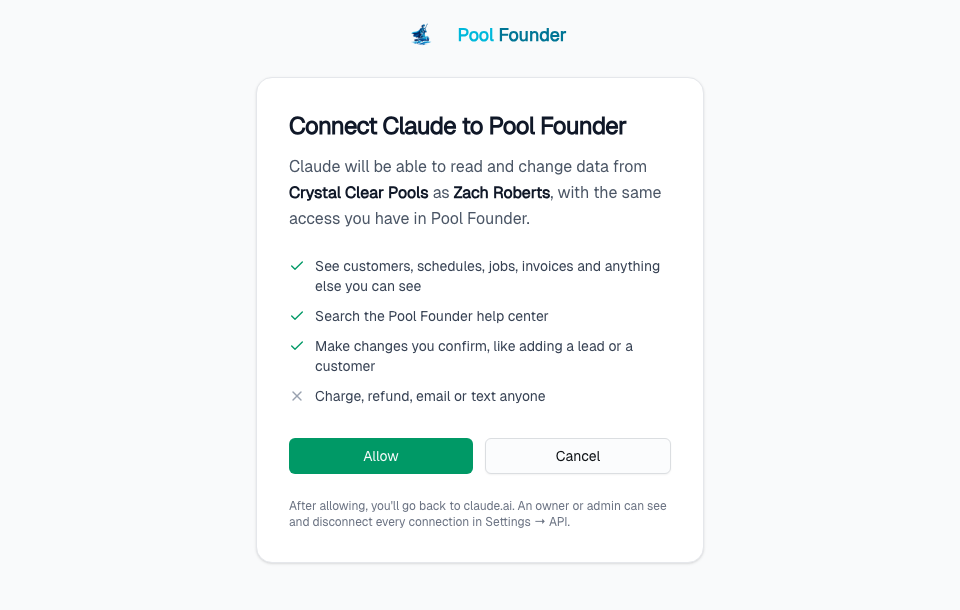
The page connects whoever is signed in to Pool Founder in that browser. If you have more than one Pool Founder login (for example, you work for two companies), sign in with the right one first, or the assistant will read the wrong company.
Owners and admins see a Turn on AI assistants button on this page if step 1 was skipped.
Step 4: Check it worked
Ask your assistant: "Who am I in Pool Founder?" It should answer with your name, your company and today's date. Then ask it something real, like which invoices are unpaid.
Making changes
Connected assistants can make changes as well as read, as long as Allow changes is on. It is on by default. An owner or admin can switch it off on the same card in Settings → API to make every connection in the company read-only right away, and switch it back on later.
With it on, you can ask things like "Add Dana Reyes as a customer, 512-555-0199". The assistant can make the same changes George can (add customers, locations and jobs, add notes, resolve technician alerts, and so on), as you, with your role's permissions:
- 1It prepares the change first. Nothing happens yet.
- 2It shows you exactly what will change, like "Create customer Dana Reyes, 512-555-0199", and asks you to confirm. Your assistant's app may also ask you to allow the action.
- 3Only after you say yes does it make the change.
- 4If you change your mind, ask it to undo it within 15 minutes.
Every change shows on the Activity page (Settings → Activity) as made by the assistant for you, for example "by Claude (for Jason)", under the George filter.
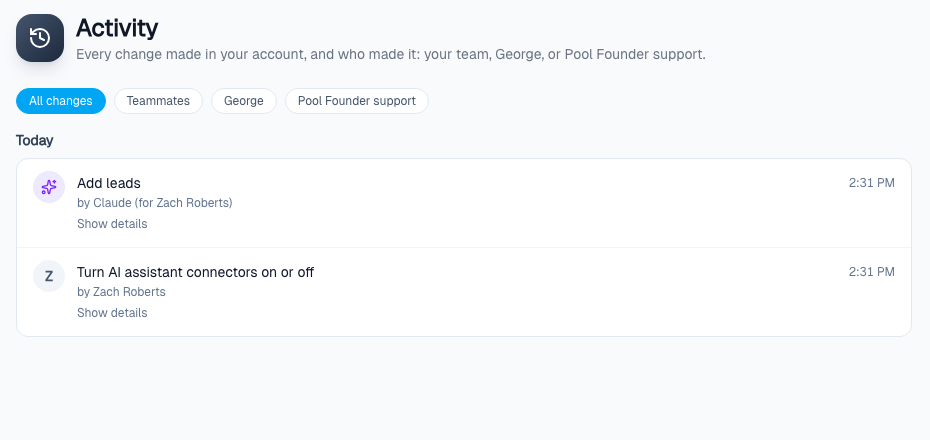
Even with Allow changes on, assistants can't charge cards, refund, void invoices or pay anyone, and can't send emails or texts to customers. Those stay in Pool Founder, done by a person. Anything your company has set George to never do (George Permissions) is off for assistants too.
Who can connect, and what they see
- Anyone on your team can connect once AI assistants are on, each with their own Pool Founder sign-in. The assistant sees exactly what that person's role can see in Pool Founder: a technician's assistant can't read invoices if the technician role can't.
- If you're viewing another company (Pool Founder support, or a franchise admin switched into a location), switch back to your own company first: you can only connect an assistant to your own company.
See and disconnect connections
When AI assistants are on, the same card on Settings → API lists every connection: the assistant, the person who connected it, when, and when it was last used. Disconnect (with a confirm) stops that connection immediately; the person can connect again later. Turning the toggle off stops every connection at once.
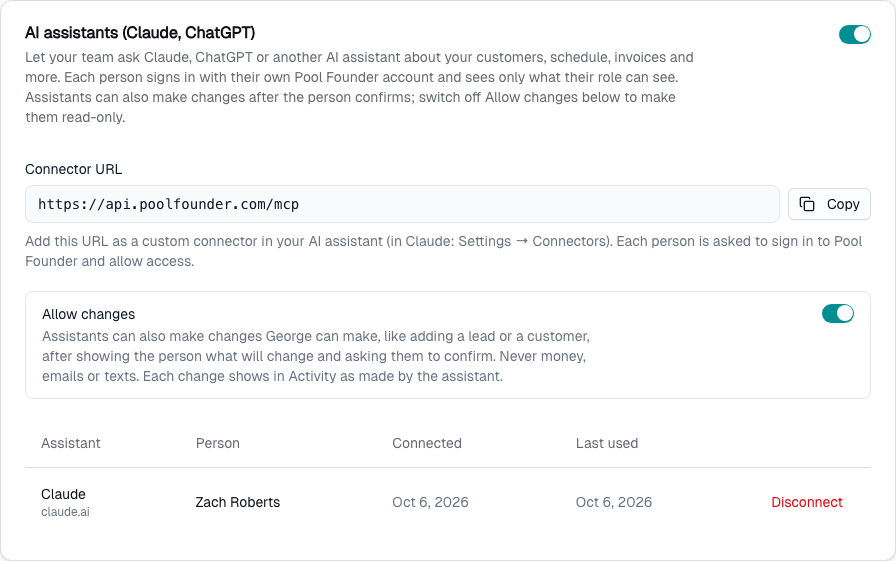
A connection also stops working on its own when the person is removed from your team.
Limits
- No money and no emails or texts, ever. Changes can only be undone from the assistant for 15 minutes (after that, change it back in Pool Founder). Switch Allow changes off to make assistants read-only.
- Each connection can make up to 60 requests a minute and 2,000 a day. Past that, the assistant is told to wait.
- Money amounts are stored in cents; the assistant is told to convert them to dollars.
- Your data is sent to the AI assistant you connect, under that assistant's own terms. Leave the toggle off if your company doesn't want that.
Frequently asked questions
Can ChatGPT or Claude change things in Pool Founder?
Yes. They can make the same changes George can, after showing you what will change and getting your OK. They can never charge, refund or pay anyone, or email or text customers. An owner or admin can switch Allow changes off in Settings → API to make them read-only.
Is this the same as George?
No. George is the assistant built into Pool Founder. A connected Claude or ChatGPT lives in the assistant you already use, alongside your other tools. It reads your data, and if your company allows changes, it uses the same actions George does (with the same confirmation and undo).
Who can connect an assistant?
Anyone on your team, once an owner or admin has turned AI assistants on in Settings → API. Each person reads only what their role can see.
What is the connector URL?
https://api.poolfounder.com/mcp. It is also shown, with a Copy button, on the AI assistants card in Settings → API once AI assistants are on.