What's new in Pool Founder: store credit, signed quotes and call transfers
A short week, but nearly everything in it came from your replies and calls. Thank you, keep them coming.
1. Store credit
One of you wanted to give credit instead of refunds. Now every customer has a Store credit balance on their Billing tab. Add credit by hand, or pick "Store credit" under "Give it back as" when you issue a refund. The credit comes off their next invoices automatically before any card is charged, and you can apply it to an invoice that is already open. Customers see their balance on the pay page and in the portal, and it syncs to QuickBooks as a credit memo. Who can give it is its own permission, Issue store credit.

2. Customers can sign to accept a quote
For bigger jobs you want proof the customer agreed to the price. Turn on "Customers sign to accept quotes" in Invoice Settings, or "Customer signs to accept" on a single quote. Accepting from the quote link or the portal then asks for their name and a drawn or typed signature, and a signed PDF lands on their Documents tab. If someone on your team marks the quote accepted for them, Pool Founder warns that no signature gets recorded.
3. Accepted quotes become work orders on their own
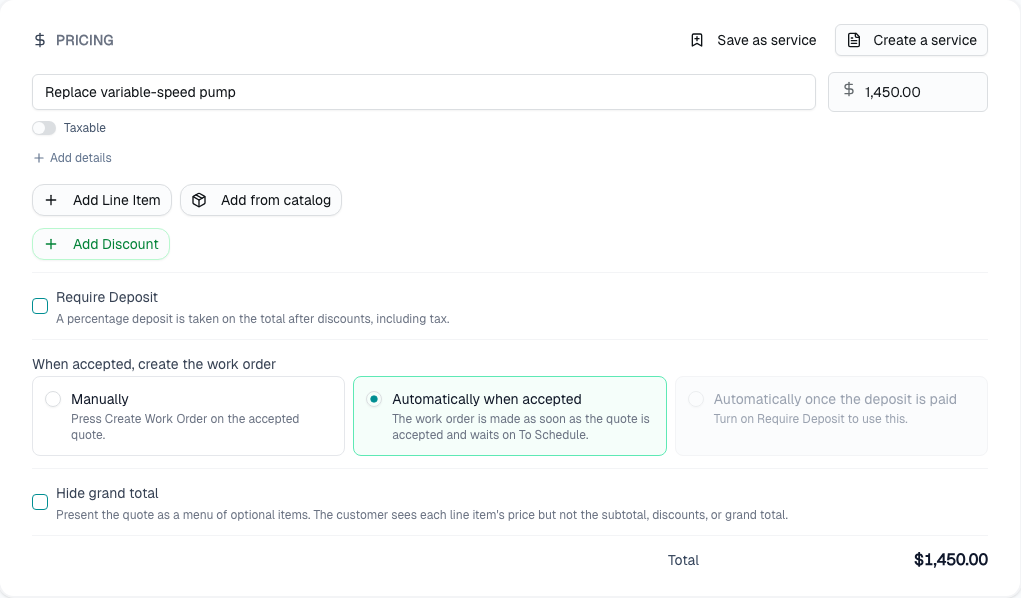
Under "When accepted, create the work order" in the quote builder, pick Automatically when accepted, or Automatically once the deposit is paid. The work order is built from the quote and waits on To Schedule, so nobody has to remember to press Create Work Order. A work order's quotes now show on its Billing tab too, since that is where one of you went looking for them.
4. Heads up: percentage deposits now include tax
A 50% deposit on a $1,000 job taxed at 8.25% used to be $500. It is now $541.25, half of the real total. The final invoice still carries all of the tax and credits the deposit, so the two add up to what the customer owes. Deposits already invoiced stay as they were.
5. Bring saved cards over from Stripe
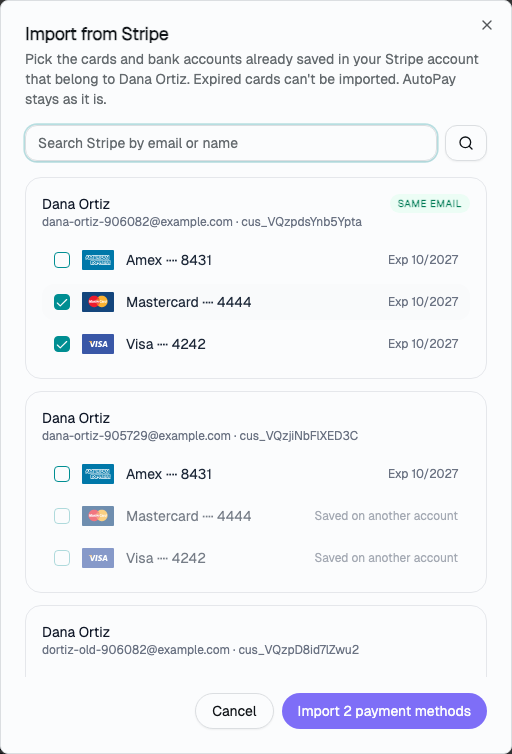
Switching from another system meant asking customers to enter their cards again. On a customer's Billing tab, Import from Stripe now lists the cards and bank accounts already saved in your Stripe account that match them, you tick the ones to bring over, and you can turn on AutoPay in the same step. The Customers list also has a Billing column and filter (AutoPay, saved method, no payment method, parent pays), so you can see who still needs one.
6. Getting paid, with fewer surprises
One of you asked whether customers hear about a card before it expires. They do now: AutoPay customers get an email a month ahead with a link to save a new card (Send card expiring notice in Invoice Settings, on by default). You can add an optional Failed payment fee, $25 by default, billed on its own invoice when an AutoPay charge is declined or a bank payment bounces. The Payments page explains when payouts reach your bank. And if a customer disputes a charge with their bank, you get a Payment Disputed alert instead of finding out later.
7. Refunds and prices get their own permissions
One of you wanted refunds to be owner-only without taking voiding away from the office, and no employee changing prices. "Issue refunds" and "Change prices & add discounts" are now their own permissions. Without the second one, your team can still build quotes, invoices and work orders, but only at your catalog and service prices, and can't add discounts. Custom roles you saved before keep what they had until you untick it.
8. Equipment on the customer page
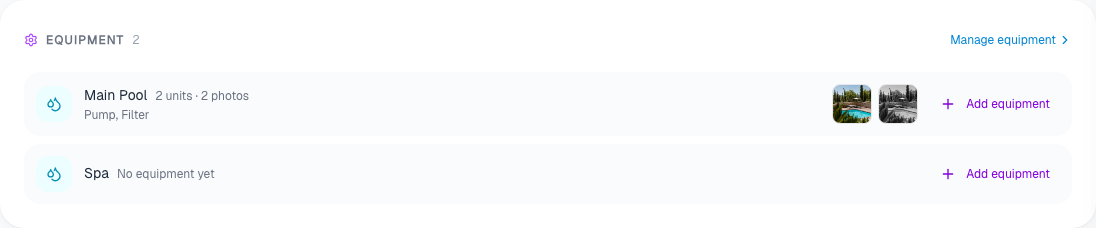
One of you could not find where to add equipment photos. The customer Overview now has an Equipment panel with each pool or spa, what is on it, its photos, and Add equipment right there.
9. The phone assistant
Callers can ask for a person and be put through. Turn on "Transfer callers who ask for a person" under Phone settings, Calls, then pick who takes calls, their number and their hours. Outside those hours the assistant takes a message for that person, and emergencies are never put through, they are flagged urgent. If you answer your own calls (No assistant), "Text callers when I miss a call" sends them a text so they don't move on to the next company. When a customer asks about their balance, the text they get now has a link to pay, and a message from a customer you know shows up with their requests.
10. The tech app never loses a visit
One of you lost a finished visit when a phone looked online but couldn't reach us, then the app was closed. Every visit, reading and photo is now saved on the phone first and sent from there, through dead connections and restarts, and the app switches itself to Offline when the server stops answering. Also in version 1.2.0 on the App Store: Team Chat and George work like a messaging app (swipe to reply, see who read it, photos from the message bar), and customer links from the dashboard open straight in the app.
11. Smaller things
Dismiss or snooze To do items that don't need you, just for you. Notes added on a customer are now signed and dated on their Notes timeline. Service report and invoice emails show under the customer's Communications. Next visit and the monthly calendar follow visits that were moved to another day. A customer's text thread no longer counts as an open request. Service history says what a rate is charged per ($125/month, $45/visit). Create Work Order in the tech app always shows Start from a service, even before you have set one up.