What's new in Pool Founder: George does the work, quote reminders, and customer exports
Big week. George went from telling you where to click to doing it for you, and most of the rest came straight off calls with owners switching over from other software. Here is what is live.
1. George does the work now, not just the explaining
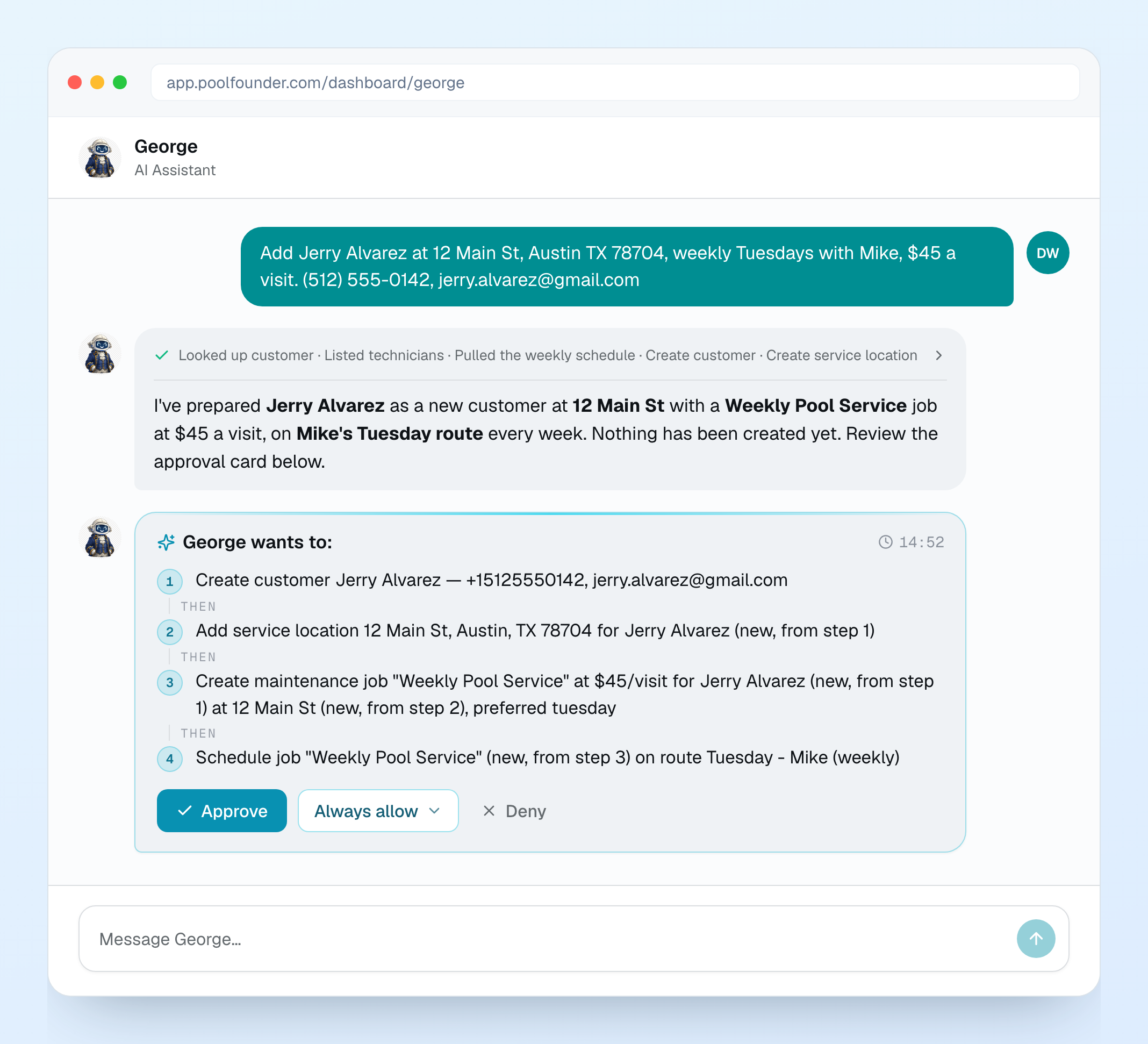
Until now George could look things up and tell you where to click. Now he can do it. Tell him "add Jerry Alvarez at 12 Main St, weekly Tuesdays with Mike" or "move Mike's Monday stops to Tuesday, this week only" and he lays the steps out on a George wants to: card. Nothing changes until you click Approve (or just type yes), and what he did stays in the chat as a receipt. He can add customers, locations, jobs, employees and routes, skip or move a visit, hand a day to another tech, import a spreadsheet you drop into the chat, and set up your service packages. He does not touch invoices, payments, quotes or your subscription. You decide how much rope he gets on the new George Permissions page: Always, Ask (the default) or Never for each action, and he can only do what your own role could do in the app. A few more: attach a photo, a screenshot or a PDF and he reads it, he knows what page you are on so "this customer" means the one in front of you, and "remember that we bill on the 1st" sticks between chats. In the tech app, George is now owners and admins only.
2. Quotes chase themselves
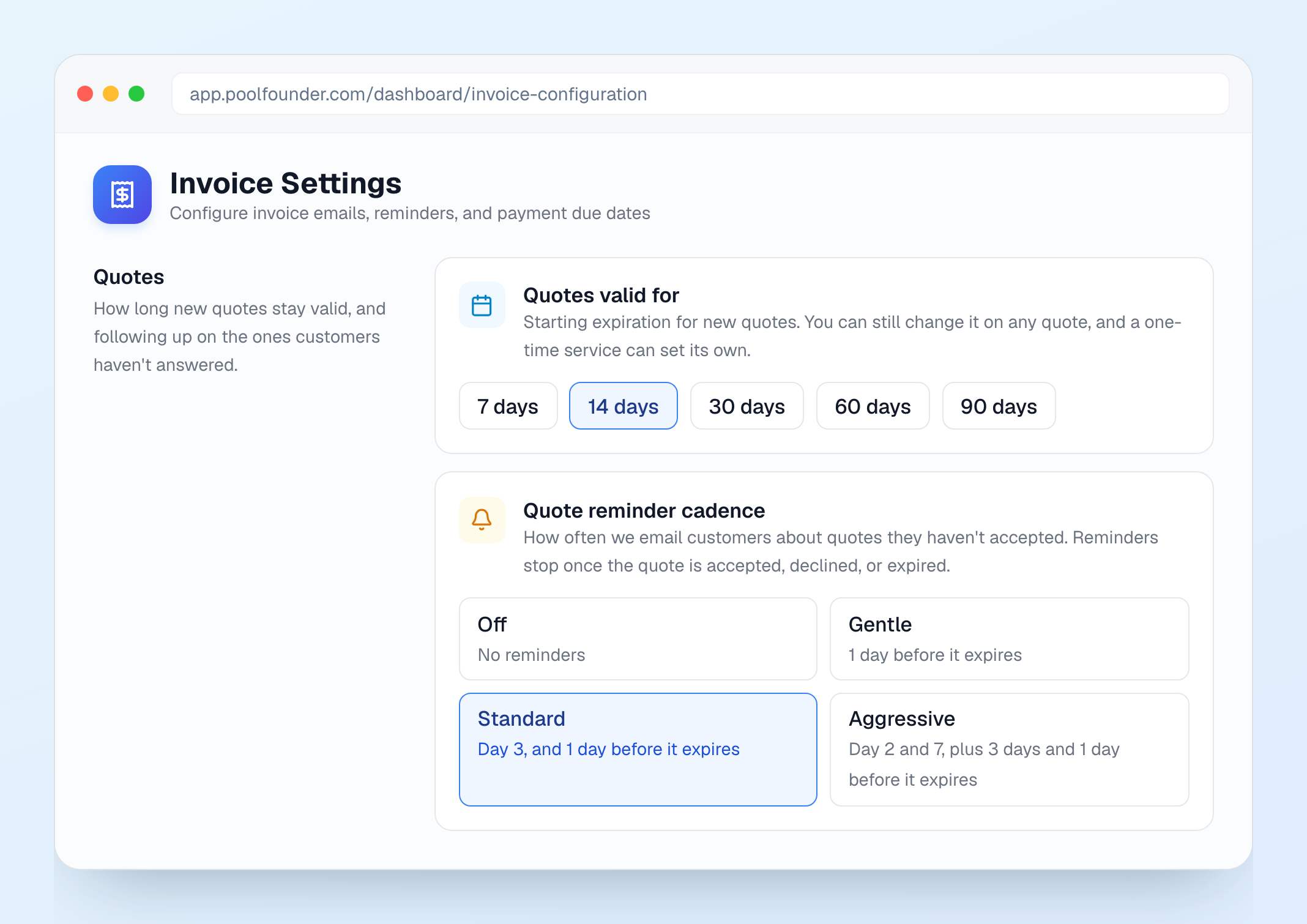
An owner who runs 7-day estimates asked for the same reminders invoices get. Invoice Settings now has Quote reminders: Off (the default), Gentle, Standard or Aggressive. Reminders go out as the normal quote email marked with the date it expires, they stop once the customer answers, and nothing goes out on or after the expiry date. Right next to it, Quotes valid for sets your company default (7, 14, 30, 60 or 90 days) instead of a fixed 30. And quote templates are now just your One-Time Services: Start from a one-time service in the quote builder, or Save as one-time service to reuse a quote you wrote, so there is one list to keep up instead of two.
3. Export your customers
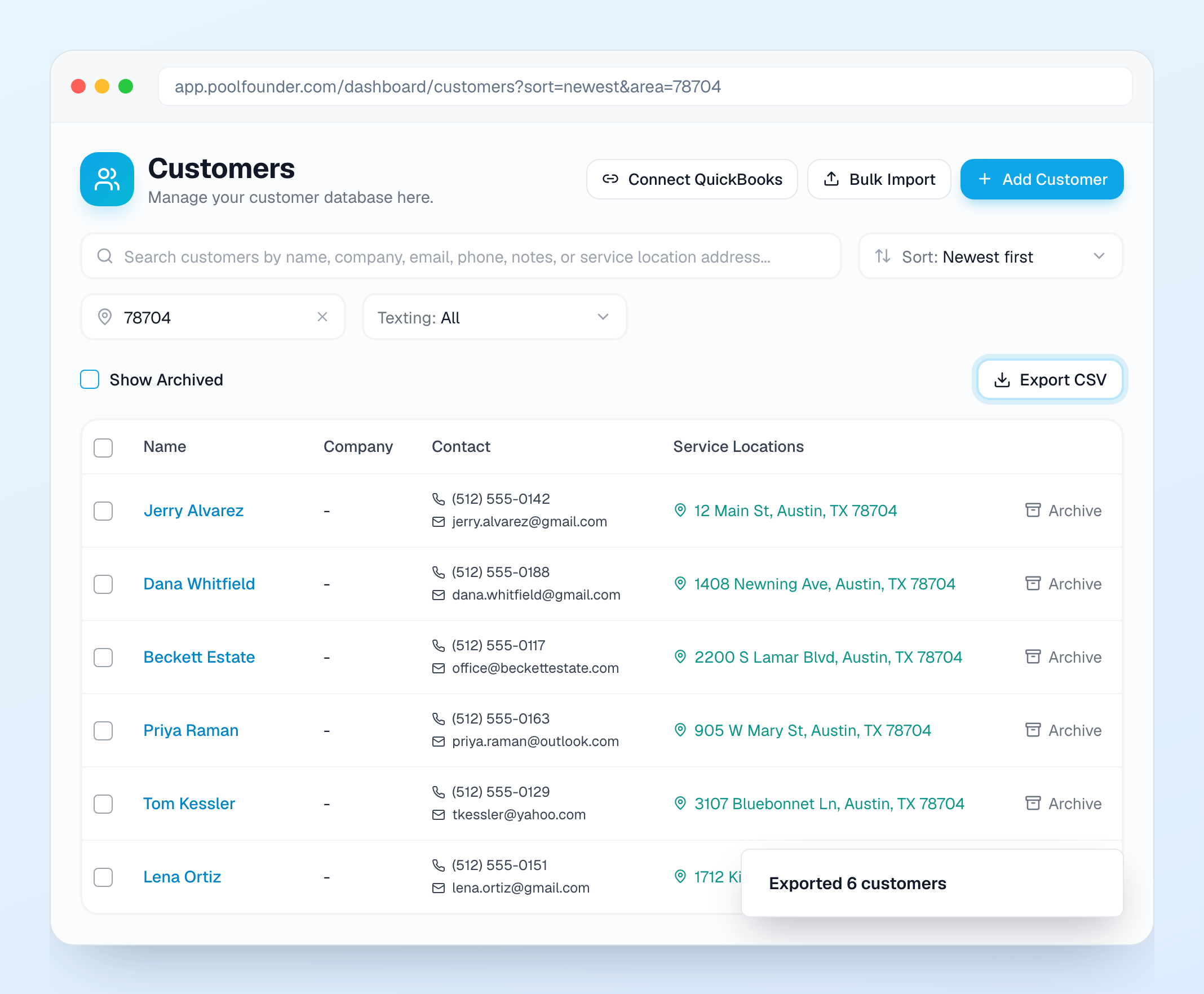
Someone asked George for a customer export and George had to tell them it did not exist. It does now. Customers, then Export CSV, downloads every customer your current view matches: search, tags, the new Zip code or city filter, and sort. It opens straight in Excel. The Customers page also got a Sort menu (Name A to Z, Z to A, Newest first, Oldest first). Exporting is its own permission, on for Owner, Admin, Office Manager and Bookkeeper by default.
4. Payroll lines up with your pay periods
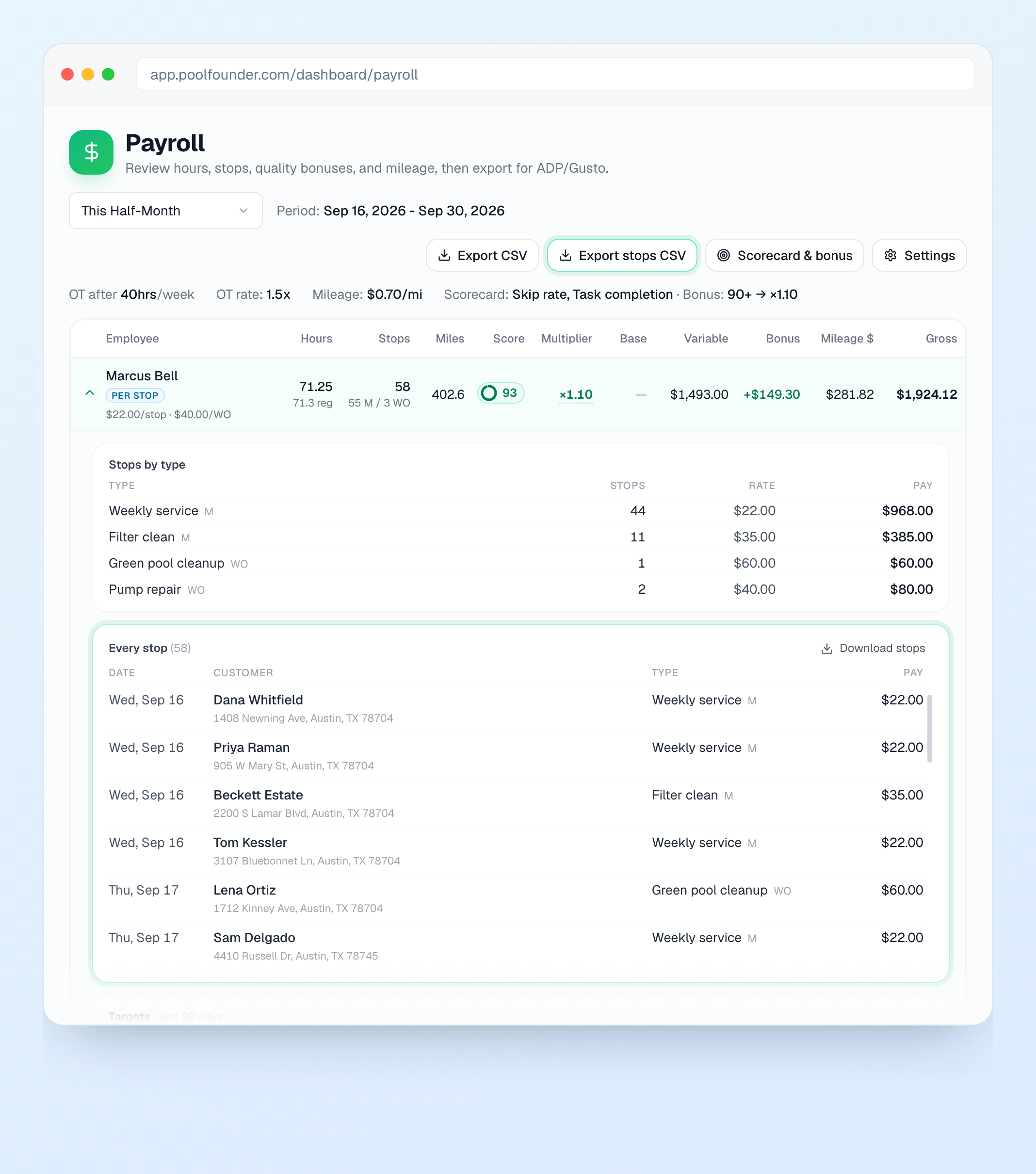
Twice-a-month shops paying per pool could not make payroll match their pay periods. The period picker now has This Half-Month and Last Half-Month (1st to 15th, 16th to the end) and Custom Dates, and it remembers your last choice. Open a tech's row and there is an Every stop list: date, customer, address, pay type and pay for every completed stop, each one linking to the visit. Export stops CSV gives you all of it, one row per stop.
5. A chemistry slider in the tech app
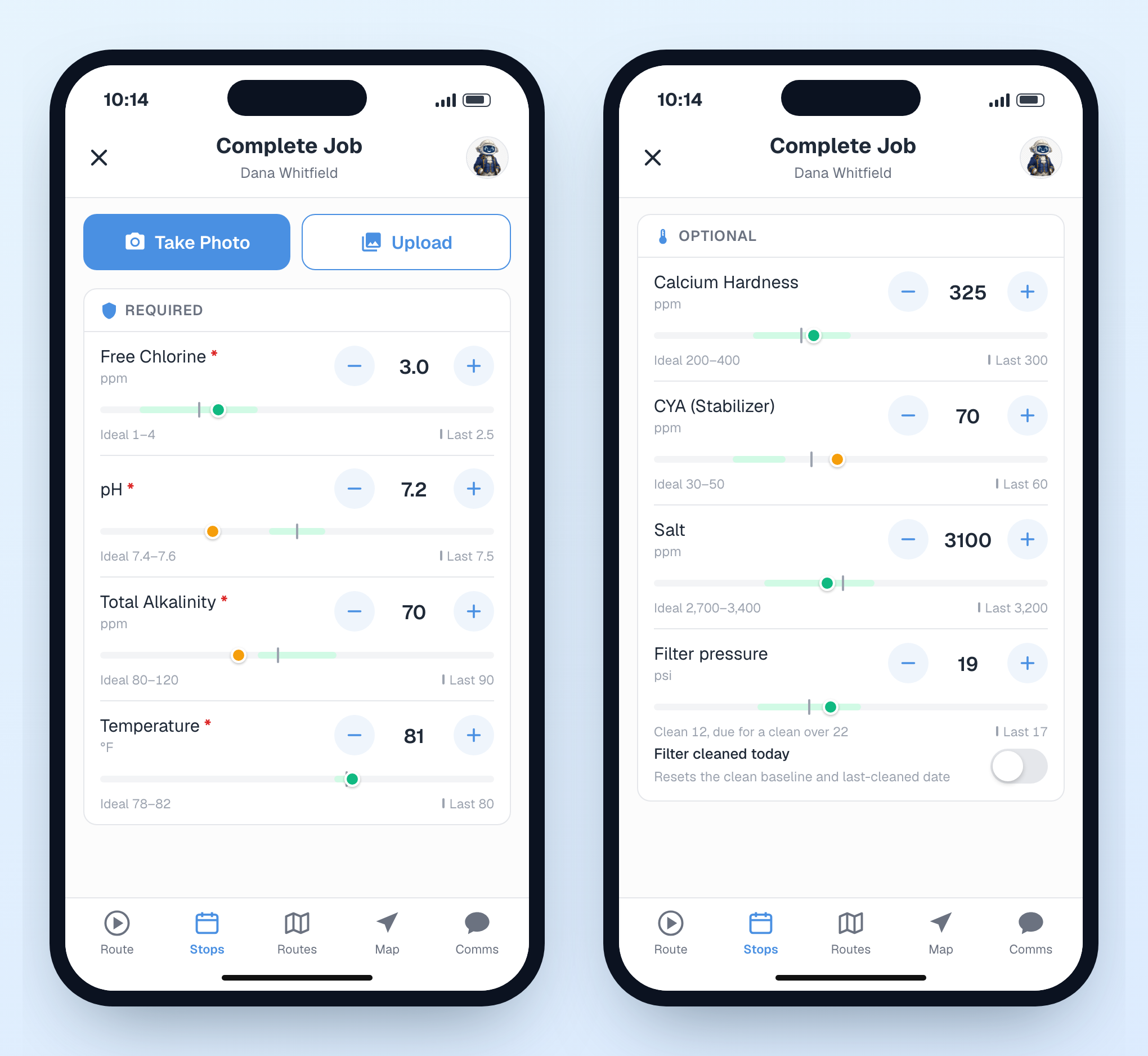
Every chemistry reading in the app now has a bar under it: a green ideal range, today's reading as a dot (green in range, amber out), and last visit's reading as a gray tick. Drag the dot to set a reading, or keep typing exact meter numbers like before. Filter pressure uses each pool's own clean baseline, so the green band is that filter's, not a generic one.
6. Saved replies for texting
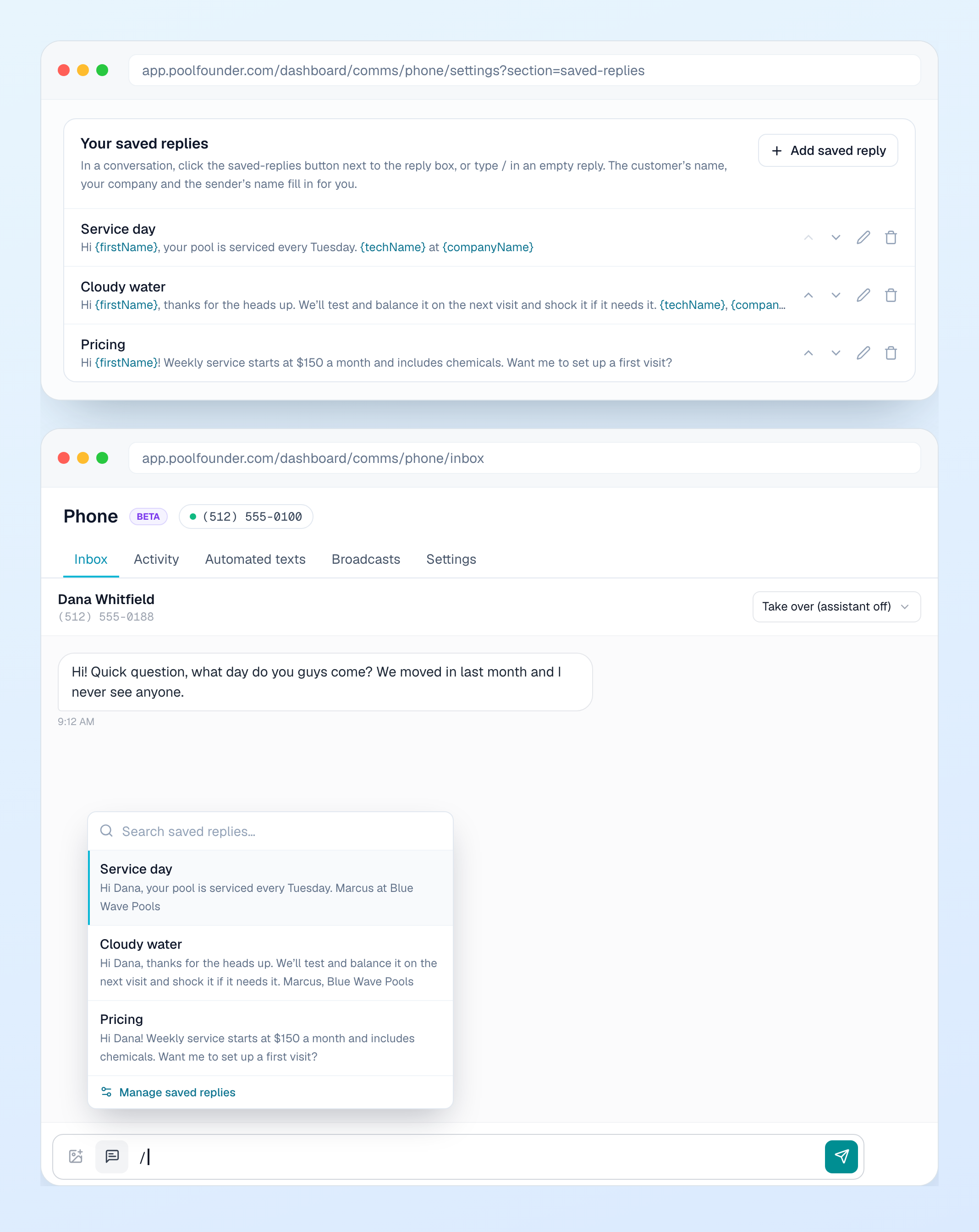
The answers your office types ten times a day ("we'll be there Thursday between 9 and 11") can now be saved once under Phone, Settings, Saved replies. Tap the button in the reply box, or type / in an empty reply, pick one, and it drops in with the customer's first name, your company name and the tech's name filled in. It never sends on its own, so you can tweak it first. Works on the web and in the tech app.
7. Customer names first, everywhere
Most jobs are named after their plan, so the schedule was a wall of "Weekly Service." The customer's name now leads on the schedule, routes, route map, the Jobs list, the job page, search, and the stop cards in the tech app, with the job name as a small line under it. Tech notifications read the same way: "Acme HOA (Weekly Service) was removed from your route."
8. Service Plans and One-Time Services
Two renames so the words match how you talk. Job Templates are now Service Plans. Work order templates are now One-Time Services, with their own spot in the sidebar right under Service Plans instead of a toggle you had to find. Nothing moved or broke, and ⌘K still finds them by the old names. When you edit a Service Plan that has open jobs, it now asks Apply these changes to N open jobs? and lists only the settings you changed.
9. Pause all customer notifications
One switch under Notification Settings, Customer Notifications, stops everything that would reach your customers: service reports, invoice emails and reminders, quote emails, texts, all of it. Handy while you are importing and cleaning up, so nobody gets a half-finished invoice. An amber banner stays up in the dashboard while it is on so you do not forget. Your team's emails and sign-in codes are not affected. Owners and admins only.
10. Add employees without inviting them yet
Add Employee has a Send invite now switch. Turn it off and the person is added with no email of any kind, then send the invite from their page when you are ready. The address is optional now too, because a customer could not add a remote office admin who has no street address to give.
11. 86 new tutorial videos
Almost every page in the dashboard now has a Watch chip next to its title that plays a short, narrated walkthrough of that page. There is a Video Tutorials page in the sidebar with all of them, the tech app has them under Account, then Tutorials, and they are all public at poolfounder.com/tutorials, so you can send one to a new hire.
12. Vote on what we build next
poolfounder.com/roadmap now shows what we just shipped, what is being built, and what is up next. Vote on what you want most, and customer votes are counted separately so yours carry the weight. Paying customers can also send a feature idea with Suggest a feature, and it comes straight to me. And every one of these emails now lives at poolfounder.com/updates, going back to July, if you ever want to find the one about a feature.
13. Work orders that are actually done
The To Schedule queue was holding work orders nobody needed to schedule. A work order booked on a day that passed with no visit now reads "Booked Jul 21, no visit logged" with a Complete button, and one a tech visited but left tasks unchecked reads "Visited Sep 18, 2 of 5 tasks done." Select a few and use Complete or Archive at the bottom to clear them at once. The Jobs page also got Technician, Route, Created date and Work Order Status filters, and your filters stay put when you open a job and come back.
14. Smaller things
Percentage deposits are back on work orders, quotes and one-time services, with the math shown under the field. The Invoice ready text now carries a pay link, and it is opt-in under Automated texts. Every gallons field has a Calculate link: pick the shape, enter the size, and it fills in the estimate. In the task template dialog, Photo Required and Camera Only now sit right under the response type instead of below the fold. On the route map, work orders show as squares. Field Operations route cards show one progress segment per stop, and the Route Schedule has an Expand jobs button. Giving a referral credit now asks which location gets it. In step-by-step completion, a required photo can no longer be skipped by checking the task off. And an unplanned stop on an otherwise empty day now shows in the Stops list, not just on the map.