What's new in Pool Founder: pay per stop, tech scorecards, and recurring work orders
Most of this week came off calls with owners switching over from other software, and a lot of it is about paying techs per pool and keeping tabs on the quality of the work. Here is what is live.
1. First, check your service reports
If you added your customers in bulk (Add Service in Bulk or a CSV import) before last Friday, service reports were switched off for those pools, so only the pools you added one at a time were emailing your customers. That was our bug, and it hit more of you than I would like. Bulk adds are on by default now, and the top of the Service Reports page tells you where you stand: a green line if every pool is sending, or an amber Not Sending card with a Turn on for all pools button. Turning them on starts with the next visit, nothing goes out for old ones.
2. Pay techs per stop or on commission
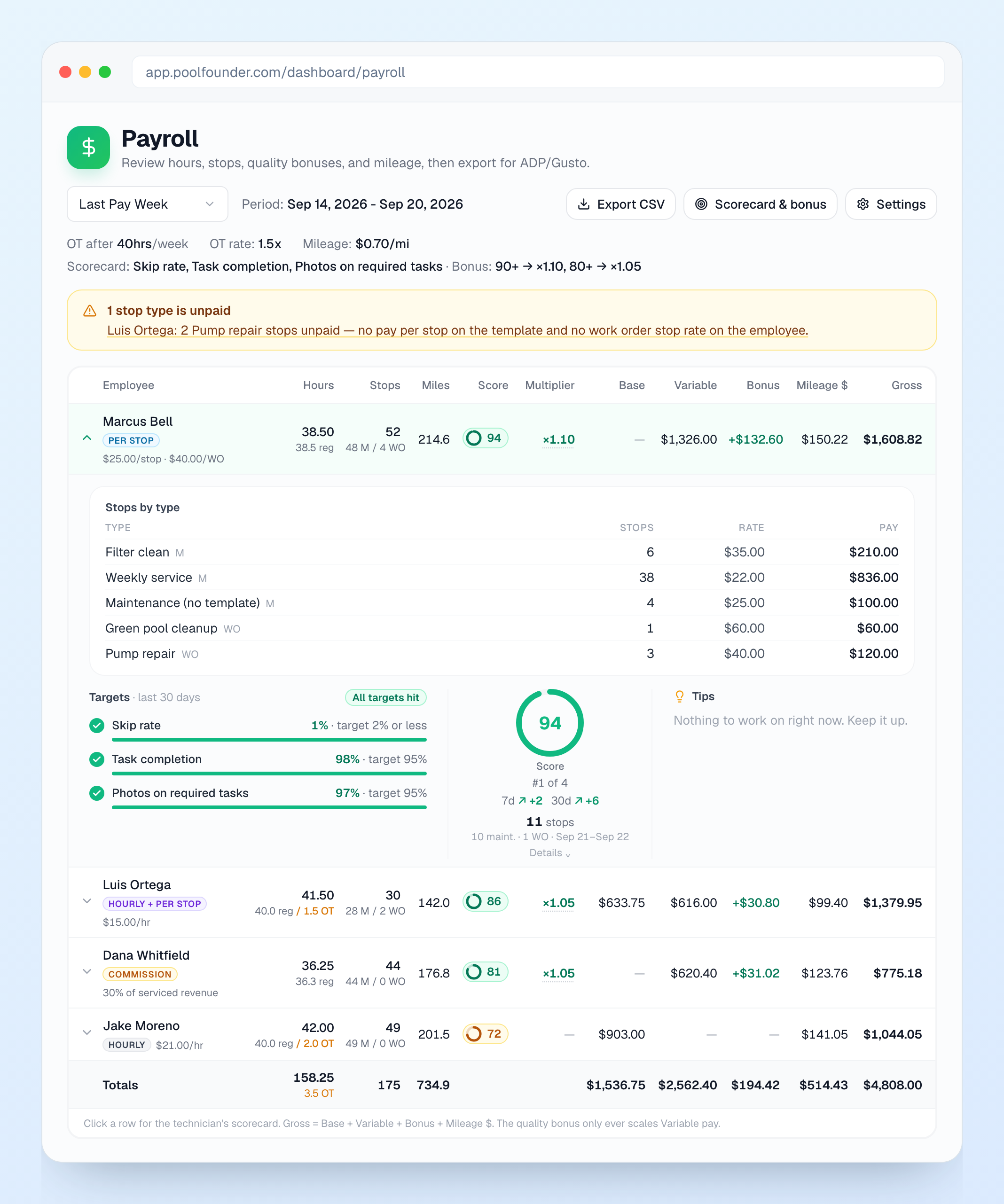
Two owners asked me the same week how to pay techs per pool instead of by the hour. Every tech now has a Pay card on their employee page with four pay models: Hourly, Per stop, Hourly + per stop, or Commission (a percentage of the revenue on the stops they complete). Per stop can have a separate Work order stop rate, and a job template can carry its own Pay per stop, so a filter clean can pay more than a weekly service. The Payroll page shows stops for every tech, a Stops by type breakdown when you open a row, and an amber banner if a stop type has no rate so nobody gets shorted. Pool Founder builds the numbers and the CSV, it does not run payroll, so you still key it into Gusto or ADP.
3. A tech scorecard you choose, and a bonus tied to it
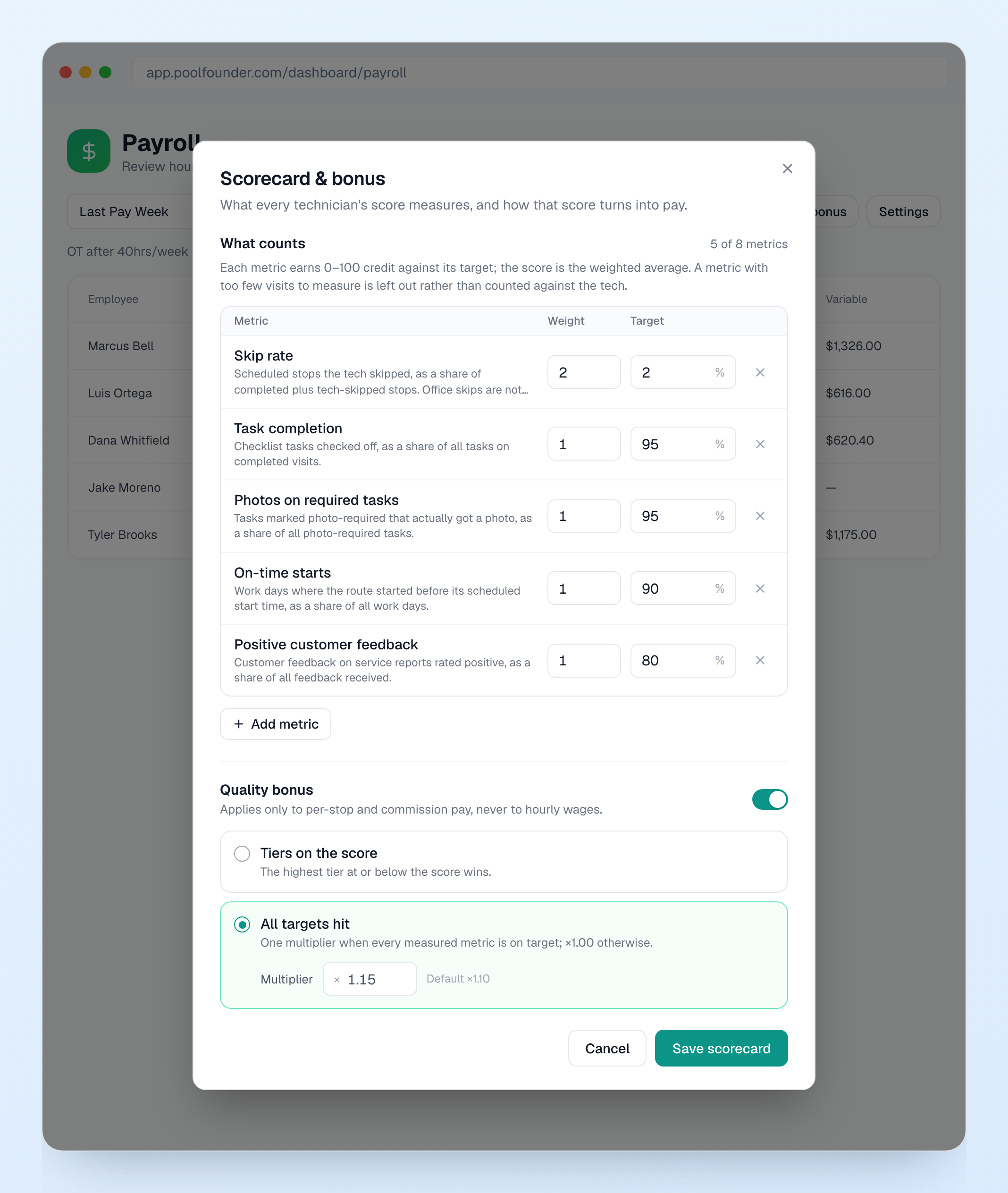
Same calls, next ask: pay for quality, not just for stops. On Payroll, click Scorecard & bonus and pick what your techs are measured on: skip rate, task completion, photos on required tasks, on-time starts, time on site, issues reported, positive customer feedback, or stops completed, each with a weight and a target. Rushing does not help, finishing faster than expected earns nothing extra. Turn on the Quality bonus and it scales per-stop or commission pay by the score, either in tiers (90 and up gets 1.10x, say) or one multiplier when every target is hit. Hourly wages are never touched. Techs see their own card in the app under Account, then My scorecard, with the targets they are missing and a tip for each. It never shows pay.
4. Recurring work orders
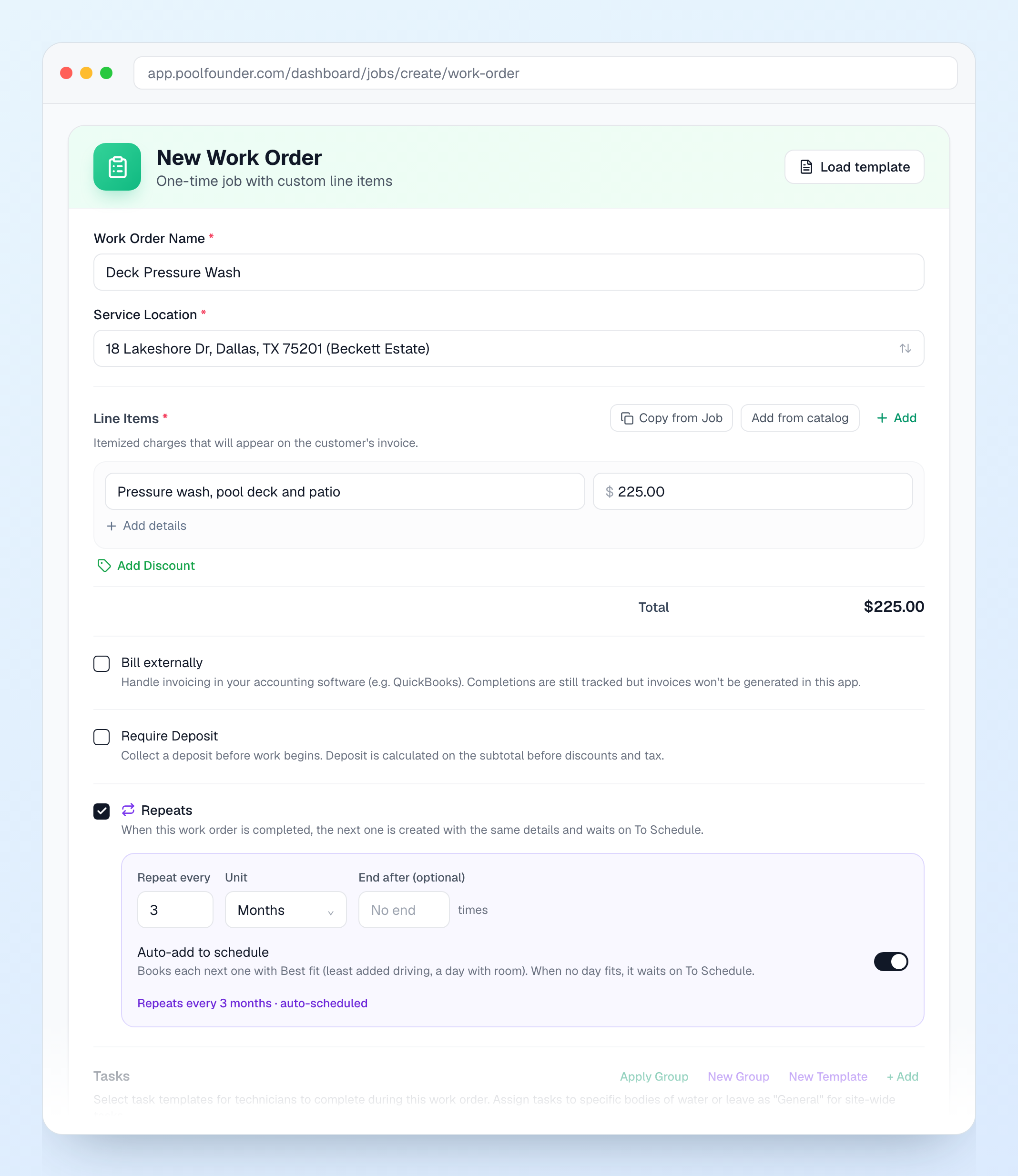
Quarterly pressure wash, a filter clean every six months, next year’s opening. Check Repeats on a work order (or on its template), set Repeat every 3 Months, and when it gets completed the next one is created on its own and waits on To Schedule, due three months out. Turn on Auto-add to schedule and it books itself on the best-fit day too. Stop repeating or Skip this one from the work order page. And every morning at 7 you get one Work Orders Due notification if anything on To Schedule is due or overdue and not booked yet, so that pile stops hiding.
5. Note for next visit
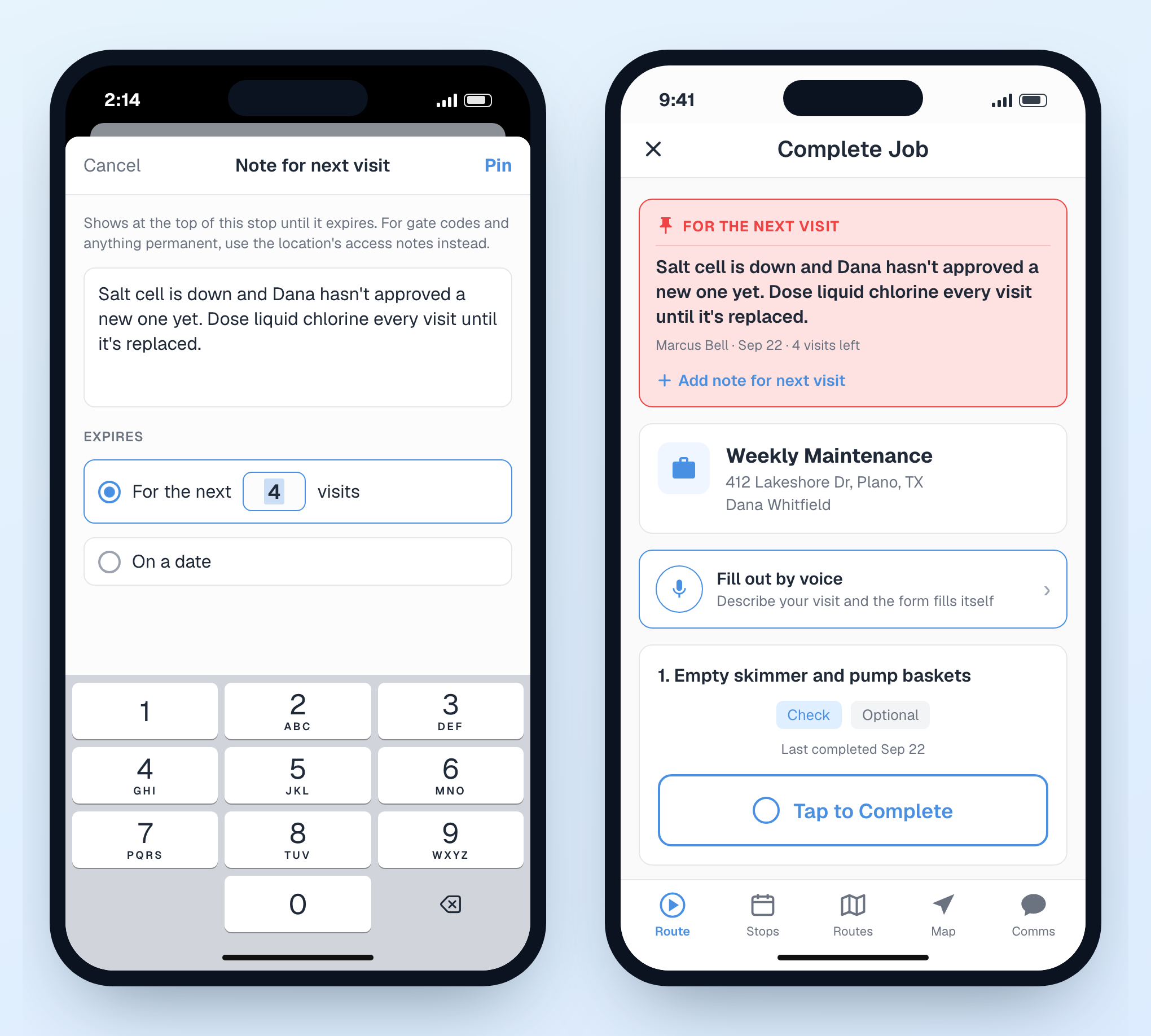
Salt cell is down, dose chlorine by hand until the customer approves the new one. That used to go in the job notes and sit there forever. Now a Note for next visit is pinned to the job for the next few visits (4 by default) or until a date, then goes away on its own. The tech sees it in red at the top of the stop, and again right after the tasks so they can leave one for whoever is next before they walk away from the pool. You can pin and resolve them from the job page too.
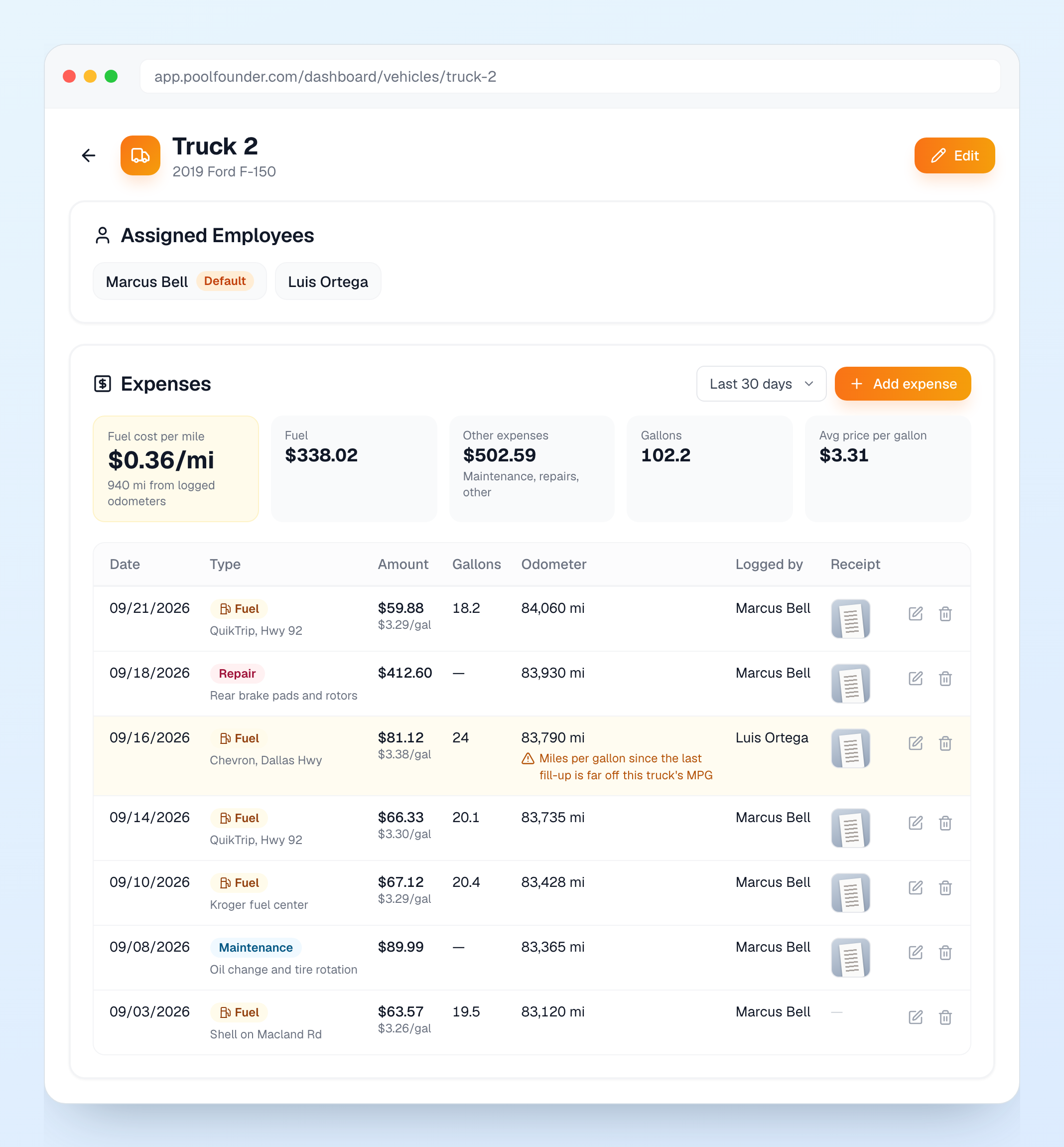
6. Fuel and expense log for every truck
Techs log fuel, maintenance, repairs, and anything else a truck costs from the app, with the odometer and a receipt photo. On the web, each truck under Vehicles gets an Expenses section with totals for the period and a real fuel cost per mile, and the trucks list shows the last 30 days of fuel. If an odometer reading goes backwards or a fill-up works out to an MPG way off the truck’s, the entry still saves but gets flagged in amber so you can ask about it. Techs can fix their own entries for 24 hours, after that it is the office.
7. Video on field alerts
A leak dripping, a pump grinding, a heater short-cycling. A photo does not show any of that. Techs can now attach one video, up to 30 seconds, when they Report an Issue from the app, and it plays right on the alert on the Technician Alerts page. Video needs a connection, photos still work offline. It is on alerts only for now, not on regular service visits.
8. Filter pressure, tracked
Filter pressure (psi) is now a built-in reading, optional by default (make it required under Water Chemistry). Next to it in the app is a Filter cleaned today switch that sets the pool’s last-cleaned date and its clean baseline. The pool page reads like “Filter: 18 psi · clean baseline 12 psi · last cleaned 34 days ago,” and turns amber once it is 10 psi over the baseline, so filters get cleaned when they need it instead of by the calendar.
9. Hide customer phone numbers from techs
The worry every owner has: a tech leaves and takes your customers with them. There is a new View customer contact info permission. Nothing changes unless you want it to. Clone the Technician role and uncheck it, and your techs see the customer’s name with Text and Call buttons instead of the number. Texts go out from your business number inside the app and calls connect through it, so the number never lands on their phone. The buttons need a Pool Founder business number.
10. Smaller things
Job costs: log a dump fee, a subcontractor, or a pump you grabbed at the supply house against a visit, even after it is invoiced and paid. They never bill the customer, they just come out of that job’s profit. And you can now add parts to a finished visit that had none. Low Stock alerts fire when a chemical or part drops to its Low Stock Alert level. Chemistry trends now show on the job and customer pages, not just the pool. When an email bounces, it now says why right under the Bounced status (usually a typo in the address) instead of hiding it in a tooltip. In the app, typing over a prefilled chemistry reading now replaces it instead of tacking digits on the end (7.4 was turning into 7.472, sorry). And if your browser blocks trackers, Phone and Google Reviews were missing from your sidebar. They are back.