What's new in Pool Founder: sales tax, priced tasks, and a To Schedule queue
It has been three weeks since the last one of these and a lot went out, most of it straight off a call with one of you. Here is what is live.
1. Sales tax, finally
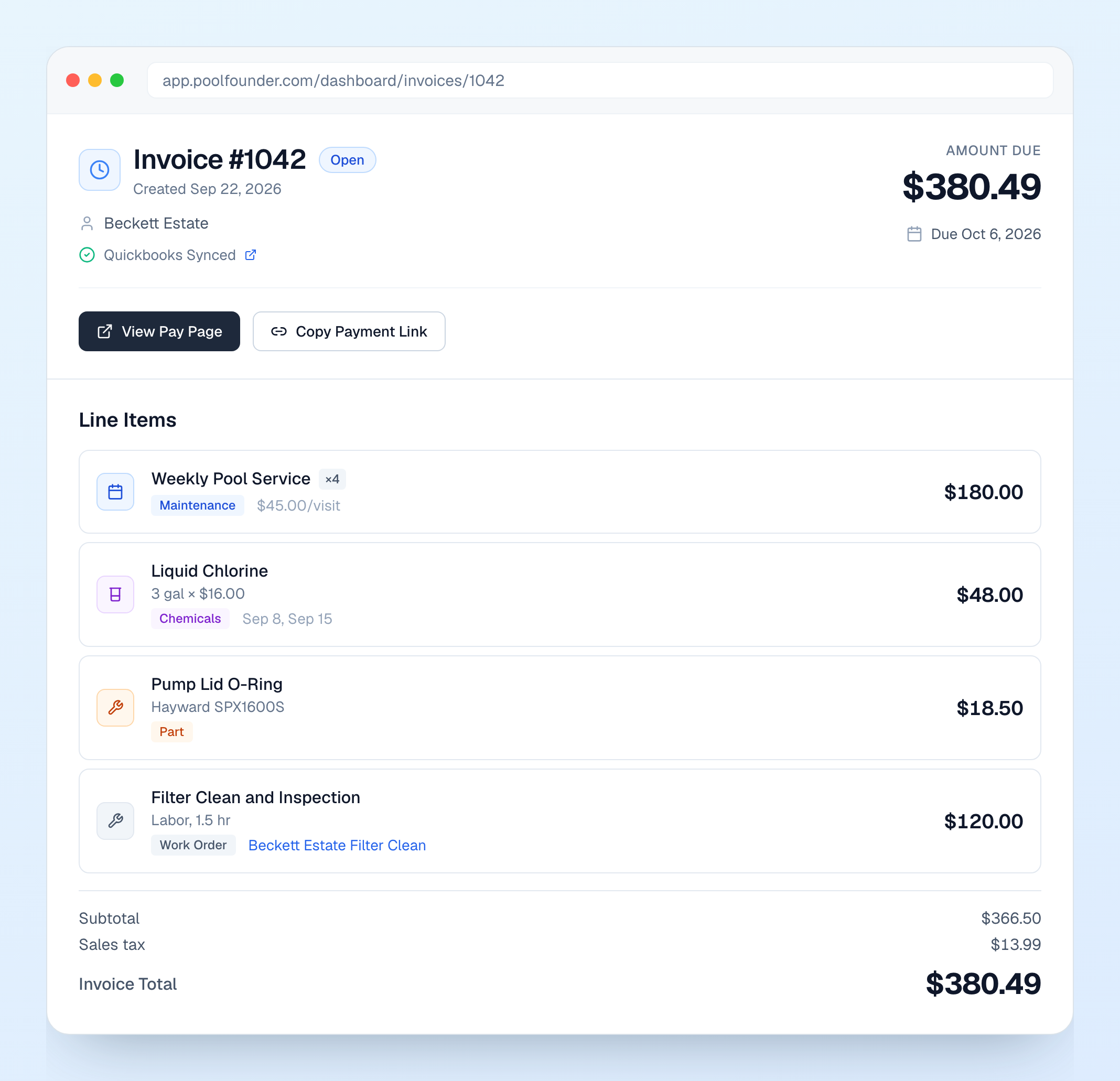
If you charge tax on chemicals and parts, you were doing that math by hand and hoping QuickBooks agreed. Now there is a Sales tax section in Invoice Settings. Set your default rate once and every chemical and part you add picks it up (there is an Apply to all items button for the stuff you already have). Any line on a work order, quote, or invoice can be flipped to Taxable, labor included, and the tax shows as its own row on the invoice, the PDF, the customer portal, and the pay page. If you are connected to QuickBooks the tax goes over as tax, not as a mystery line item. While we were in there, work orders and quotes got an Add from catalog button so you can pull parts and chemicals straight from your list with the right price and tax rate, and a part your tech logs at completion no longer doubles up with the same part already on the work order. This came straight off a customer call. Two things it does not do yet: tax-exempt customers and rates by jurisdiction. If you need either, tell me.
2. Repairs can ride on the monthly invoice, and tasks can have a price
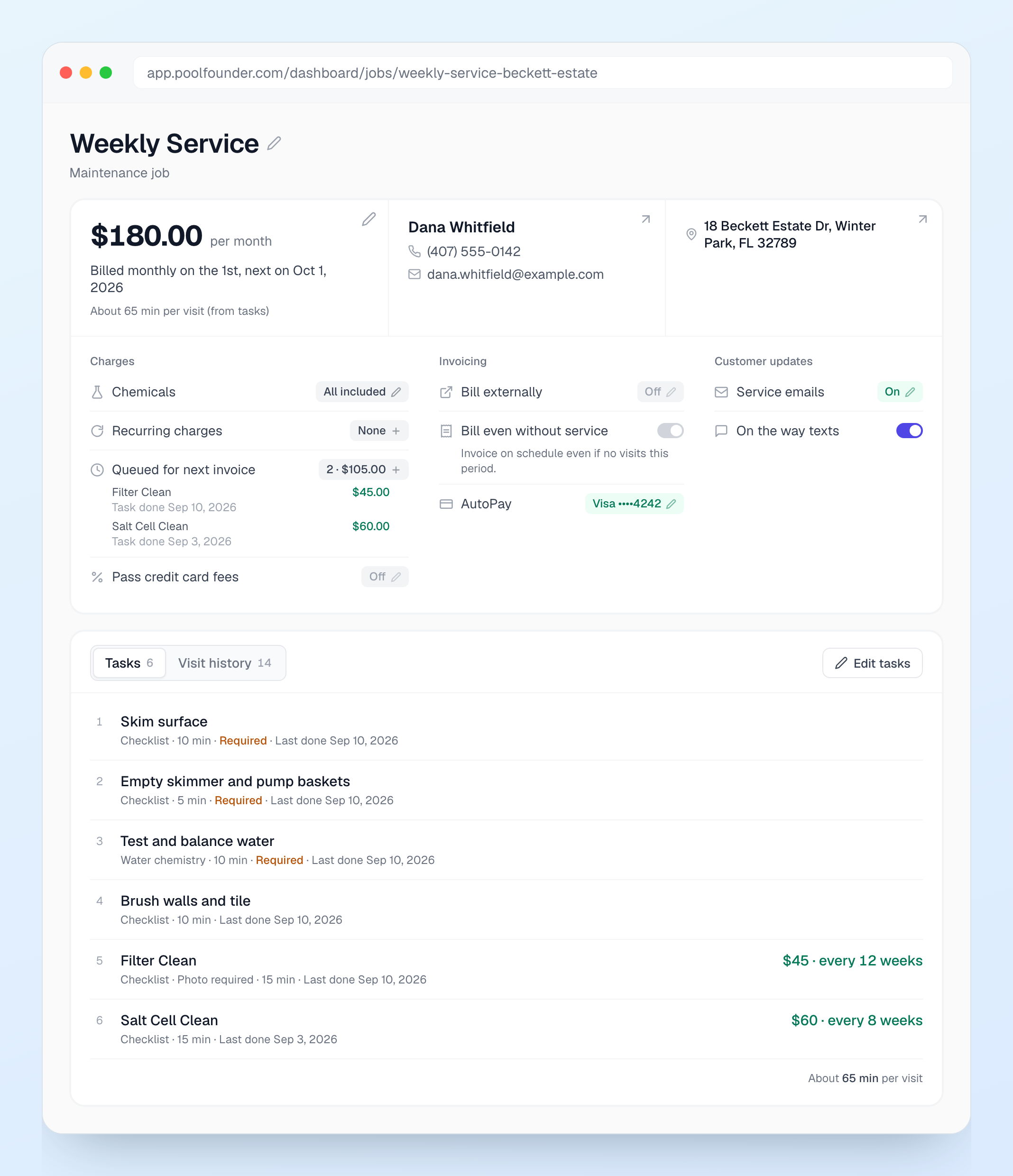
Same call, second ask: can a repair just go on the monthly bill instead of its own invoice? Yes. A completed work order now has Add to Next Maintenance Invoice right next to Create Invoice. It queues the charge on that customer’s recurring job and you can undo it any time before the invoice generates. And tasks on a recurring job can now carry a price. Open Edit tasks, put $45 on Filter Clean every 12 weeks, and when your tech checks it off on a visit the charge lands on the next maintenance invoice on its own. Skip it and nothing is charged. Prices can live on your job templates and task groups too, and they push out to the jobs that use them. The tech never sees the price in the app. Priced tasks need Stripe connected.
3. To Schedule: a home for the pile of work orders
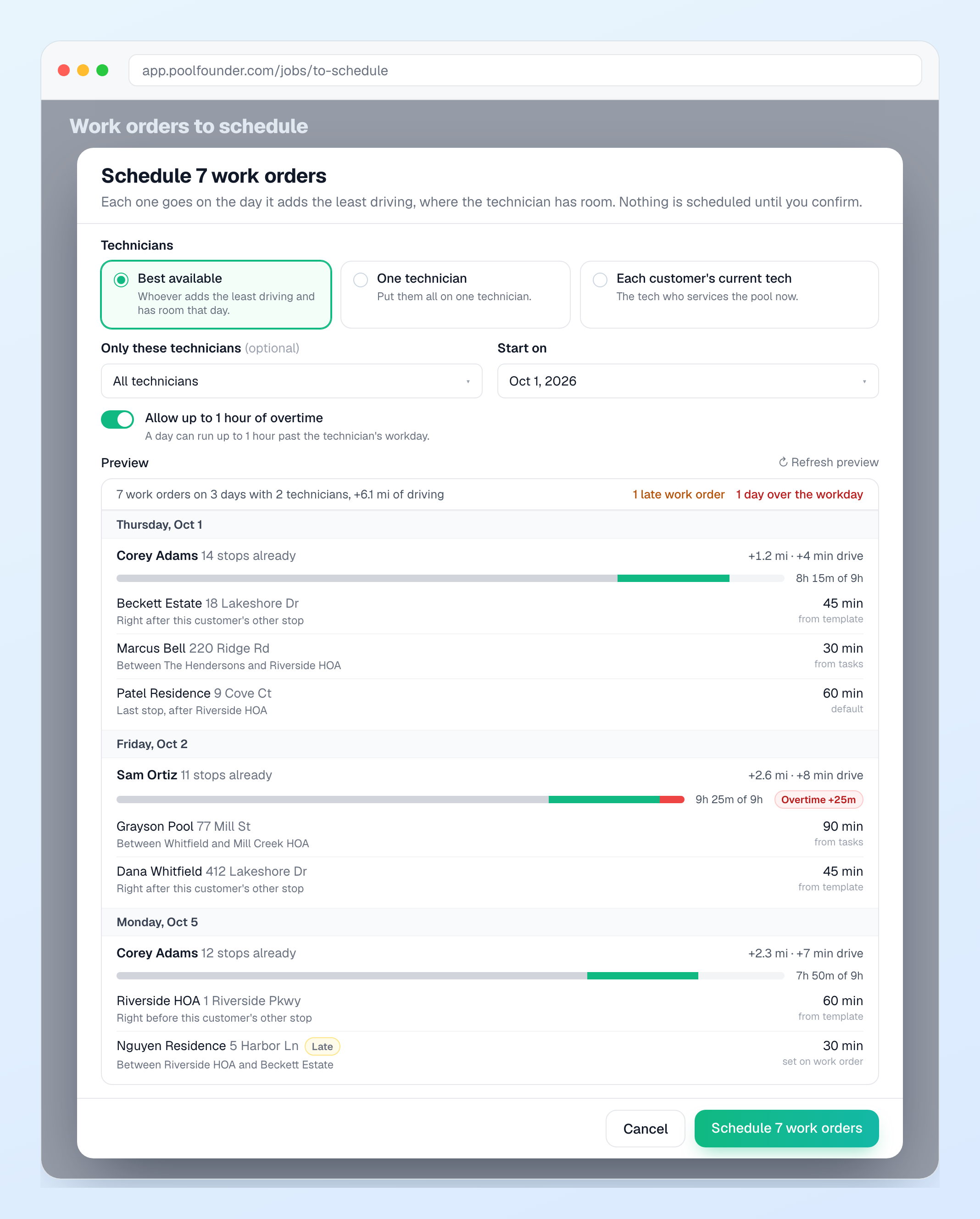
Filter teardowns, a pump swap, the heater that has been “next week” since July. There is a new To Schedule page in the sidebar for that pile. Create work orders whenever they come up, no date or tech required, give them a due window if you want, and the page sorts them into Overdue, Due now, and Upcoming. When you are ready, check the ones you want and hit Schedule. Each one goes on the day that adds the least driving, next to the stops already on that route, and you see the extra miles and minutes for every day before you confirm. It respects each tech’s workday (you can allow up to an hour of overtime), and you can send them to one tech, the customer’s usual tech, or whoever is best available. You can also create work orders in bulk from a template for every pool on a maintenance plan, which is what I would use for openings and closings. Scheduling a single work order got the same brain: the Schedule page now shows the best fit and the best days with the added drive for each.
4. Merge duplicate customers
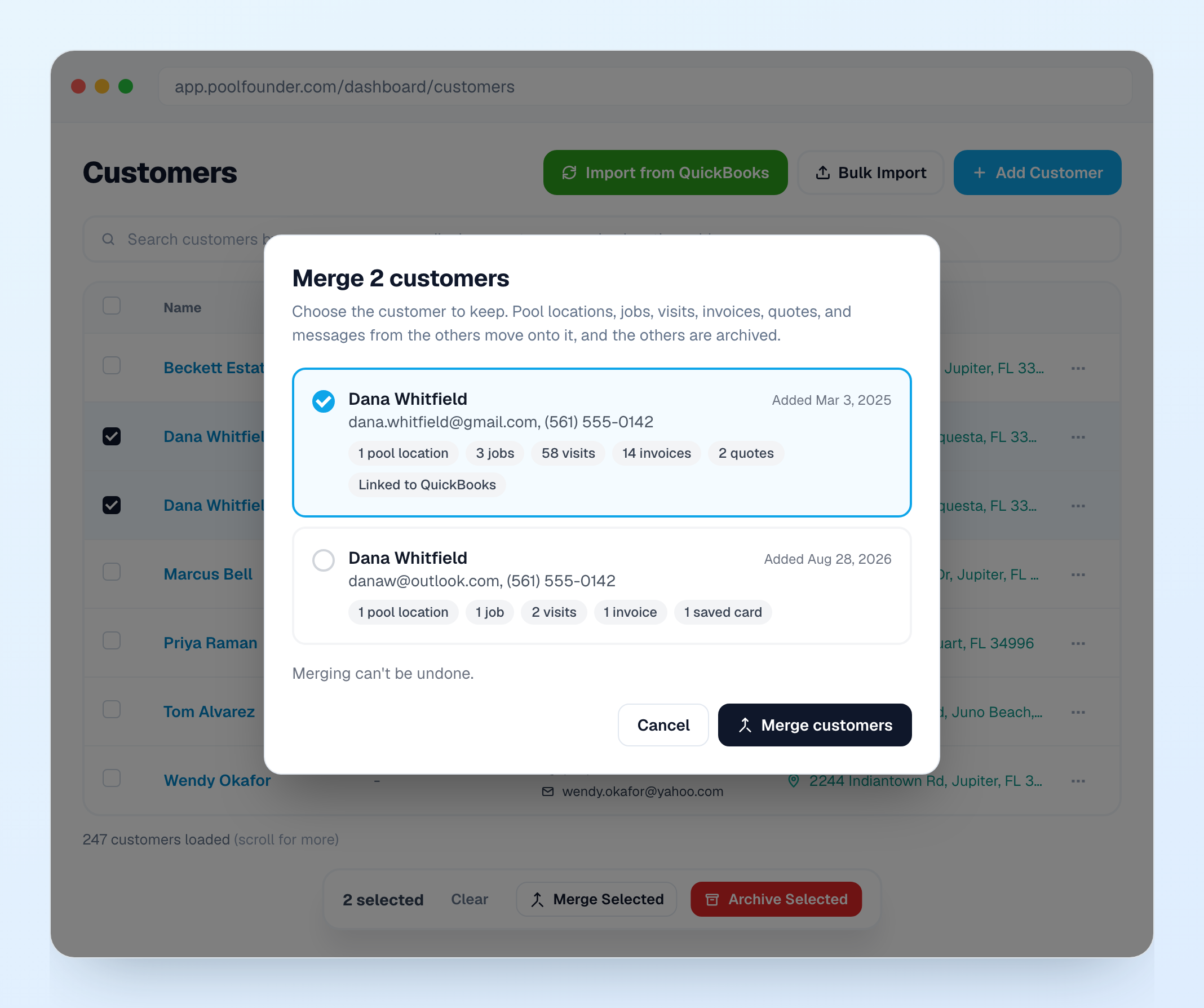
We noticed a lot of accounts had the same customer in there twice, usually a QuickBooks import plus a website signup, with the pool on one record and the invoices on the other. On the Customers page, tick the duplicates, click Merge Selected, and pick the one to keep. Pool locations, jobs, visits, invoices, quotes, texts, and notes move over, blanks get filled in, and the extra record is archived with a link back. It cannot be undone, so the dialog makes you look before you click. The QuickBooks import now catches this on the way in too: customers sharing an email come in as one customer, with the extra addresses as extra pools.
5. QuickBooks got a lot tighter
Every line on a work order, quote, or invoice, plus recurring charges and priced tasks, now has a QuickBooks item dropdown, so your bookkeeper’s income accounts stay clean. The picker is searchable, because some of you have thousands of items. Service plans post to the item on the job template and chemical lines post to the chemical’s own item. And if QuickBooks drops the connection on its side, you now see a Reconnect needed badge on the QuickBooks page and get a notification, instead of syncs silently failing for weeks. That last one bit a few of you and we found it late. Sorry.
6. On the way and Invoice ready texts, without a business line
Those two texts now go out for every company from a shared Pool Founder number, no phone line add-on needed. They are send-only, so customers cannot reply to them. Everything to control them is under Communication, then Phone, then Automated texts: on and off per message, quiet hours, a per-customer daily cap, and the wording. If you do have your own business number, review requests by text are in there too, sent a bit after a thumbs-up on a service report and skipping anyone who already reviewed you on Google. The rest of texting (reminders, the two-way inbox, broadcasts) still needs your own number.
7. Profitability week by week, and a floor under your rates
The Profitability page now opens on an Over Time tab: last week’s profit, this week so far, and profit per hour, all from the route time your techs already track. Flip it to daily or monthly. And Route Fit will no longer suggest a rate under what you already charge comparable customers. There is a Your going rate row in the math and the suggestion never goes below it.
8. Chemical usage and cost
Every chemical now has an Insights tab: how much you used, what it cost you, what you billed (or the average per visit if chemicals are included in the rate), and how long your stock will last. The same numbers show on the customer, job, and pool pages, and there is a Chemicals tab on Profitability. Every pool gets chemistry trend charts, one per parameter with the target range shaded. It is on mobile too, under Account, then Chemical Insights, for owners.
9. Tech app roundup
The app no longer sits on “loading” for minutes when a tech reopens it on weak signal, and completion photos upload three to four times faster. That rolled out to everyone today, so if a tech still sees it, reply and tell me. Fraction buttons (¼, ½, ¾ and so on) under every chemical amount, and service reports can show fractions instead of decimals. Owners and office staff can edit jobs from the app under Job Details, then Job setup. Optimize the remaining stops mid-route. A banner the morning after missed stops with a one-tap reschedule. Skip reasons (gate locked, dog in yard, and so on) that show up in the office. A Last completed date under each task. And a Swipe Back toggle in Account for anyone who kept triggering it by accident.
10. Smaller things
Notifications got de-duplicated: a burst of the same alert is one push, and we only email if the push could not reach your phone (one company got 55 pushes and 55 emails in one second, sorry about that). Owners get a Payment Failed alert when autopay declines. Invoices have a sort dropdown (Last sent, Last paid, Newest, Due date) on web and mobile. You can edit your business address in Invoice Settings, and a PO Box works now. Quote messages support formatting and can be saved as templates. A lead can be saved with just an address, and leads can carry pool details so Route Fit prices chemicals off similar pools you already service. The job page was redesigned into one card with everything on it. Card fees on the pay page now show as a dollar amount and are capped at 3% (2% in Colorado and Oklahoma, and not allowed in New York). And there is a new Delete notes permission.