Why Does the Technician App Matter More Than Any Other Software Feature?
Pool technicians spend 6-8 hours daily interacting exclusively with their mobile app, making the field-facing interface the single feature that determines whether software adoption succeeds or fails across your entire team. A poorly designed technician app adds 15-30 minutes of daily friction per tech through clunky navigation, slow photo uploads, and chemical logging screens that require too many taps, costing a five-technician company $15,000-$30,000 annually in lost productivity. The best technician apps reduce per-stop administrative time to under 90 seconds while capturing the chemical readings, photos, and service notes that protect your business and impress your customers.
This guide evaluates pool technician apps from the perspective of the person holding the phone at poolside, not the business owner sitting at a desktop. The features that matter most in the field are not the same features that dominate marketing pages. Job completion speed, offline reliability, GPS navigation chaining, and one-tap chemical logging separate apps that technicians love from apps they work around.
What Features Should a Pool Technician App Include?
A complete pool technician app must handle job completion with task checklists, chemical reading entry with dosing calculations, and photo documentation with automatic attachment to the service record, all within a workflow that takes under two minutes per stop. Missing any one of these three core functions forces technicians to use workarounds, from separate camera apps to handwritten notes, that fragment your service data and create gaps in customer records.
Which Core Mobile Features Separate Pool Apps From Generic Field Service Apps?
Pool-specific mobile apps include chemical logging with LSI calculations, filter pressure tracking, and before/after photo workflows designed for outdoor conditions, three capabilities that generic field service apps lack entirely and cannot replicate with custom fields alone.
| Feature | Why It Matters in the Field | Time Saved Per Stop |
|---|---|---|
| One-tap job start/complete | Eliminates multi-screen navigation to begin and finish a service stop | 30-45 seconds |
| Chemical logging with dosing | Records pH, chlorine, alkalinity, CYA, and calculates recommended doses in one screen | 1-2 minutes vs. manual calculation |
| Photo capture with auto-attach | Photos taken in-app automatically link to the job record without manual upload | 45-60 seconds |
| Task checklists | Ensures every step is completed consistently across all technicians | Eliminates callbacks from missed tasks |
| GPS navigation chaining | Launches turn-by-turn to the next stop without returning to a map screen | 1-2 minutes between stops |
| Offline mode | Allows full job completion in dead zones; syncs when connectivity returns | Prevents 10-15 min delays from retry loops |
| Time tracking per stop | Automatically logs arrival and departure for labor analysis | Eliminates manual timesheets |
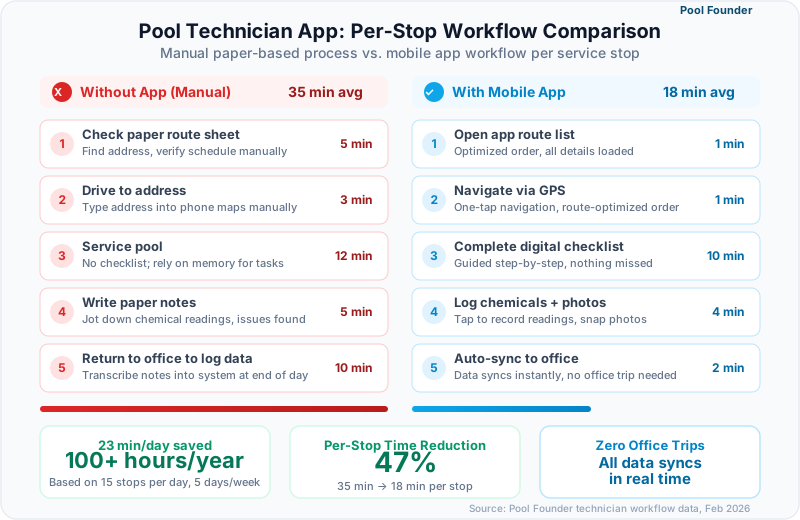
23 minutes/day
Average time saved per technician when switching from a generic field service app to a pool-specific mobile app
Source: Pool service operator surveys, 2025
How Does Chemical Logging Work on a Technician App?
The best technician apps present a single screen with fields for pH, free chlorine, total alkalinity, calcium hardness, CYA, salt level, and water temperature, then automatically calculate the Langelier Saturation Index and recommend chemical dosages based on pool volume and current readings. This replaces the laminated dosing chart that has lived in every pool truck since the 1990s and eliminates the mental math that causes dosing errors, particularly for newer technicians who have not yet memorized adjustment ratios.
- Pool Founder: Full chemical panel with LSI calculation, dosing recommendations based on pool volume, historical trend view per pool
- Skimmer: Comprehensive chemical logging; the Orenda-powered LSI calculator and dosing suggestions require the Scaling Up plan
- Jobber: No native chemical fields. Requires custom form setup that technicians find cumbersome in the field
- ServiceTitan: No native pool chemistry support. Requires custom forms built during implementation
- GorillaDesk: Basic chemical fields available but no automatic dosing calculations or LSI
If your technicians currently log chemical readings on paper or in a separate app, you are losing 30-40% of that data to illegible handwriting, forgotten entries, and transcription errors. In-app logging captures 95%+ of readings automatically.
How Do Pool Technician Apps Compare Across Major Platforms?
Pool technician app quality varies dramatically across platforms, from Pool Founder and Skimmer, which were built mobile-first for field technicians, to ServiceTitan, whose mobile app is a scaled-down version of an enterprise desktop system that pool techs find overwhelming for simple maintenance stops. The comparison below evaluates each app on the seven features technicians interact with most frequently during a typical 12-15 stop day.
| Feature | Pool Founder | Skimmer | Jobber | ServiceTitan | GorillaDesk |
|---|---|---|---|---|---|
| Platform | iOS + Android | iOS + Android | iOS + Android | iOS + Android | iOS + Android |
| Job completion workflow | One-tap with task checklist | Swipe to complete per stop | Multi-step form | Multi-step with required fields | Tap to complete |
| Chemical logging | Full panel + LSI + dosing recs | Full panel + Orenda LSI (Scaling Up plan) | Custom fields only | Custom forms only | Basic fields, no LSI |
| Photo documentation | In-app capture, auto-attached | In-app capture, auto-attached | In-app capture, manual attach | In-app capture, auto-attached | In-app capture, auto-attached |
| GPS navigation | Integrated turn-by-turn chaining | Map link to external nav | Map link to external nav | Integrated navigation | Map link to external nav |
| Offline mode | Full offline with sync | Limited offline support | Partial offline | Limited offline | No offline mode |
| Time tracking | Auto clock-in/out per stop | Manual time entry | Built-in timer per job | GPS-based time tracking | Manual time entry |
| Task checklists | Customizable per job type | Standard service checklist | Custom checklists | Custom checklists | Basic checklists |
| Ease of use rating | Designed for field speed | Simple and fast | Clean but generic | Feature-heavy, steep learning curve | Simple but limited |
What Makes Pool Founder's Technician App Stand Out?
Pool Founder's mobile app was designed for the poolside workflow first, with a single-screen job completion view that combines task checklist, chemical entry, photo capture, and service notes without requiring technicians to navigate between tabs or scroll through irrelevant fields. The app chains GPS navigation between stops automatically so technicians tap "Next Stop" and drive, never opening a separate maps app or looking up the next address.
- Real-time job status updates visible to the office and customer portal as technicians complete each stop
- Chemical readings auto-populate the customer's history and trigger alerts when readings fall outside safe ranges
- Offline mode captures all job data, photos, and chemical readings locally and syncs when signal returns
- Task checklists are customizable per job type, ensuring that a weekly maintenance visit and a green-to-clean follow different workflows
- GPS navigation chains stops in optimized order, eliminating the 1-2 minutes per stop spent switching between apps
How Does Skimmer's Mobile Experience Compare for Technicians?
Skimmer's mobile app delivers the fastest per-stop workflow for basic maintenance with its swipe-to-complete interface, Orenda-powered chemical calculations on its Scaling Up plan, and minimal screen navigation that technicians learn within minutes of first use. The app excels at pure maintenance routing but lacks integrated navigation, which becomes a limitation for companies running complex multi-service jobs. For spotty cell coverage, Skimmer advertises offline mode that syncs when you're back online.
Why Do Enterprise Apps Like ServiceTitan Struggle With Pool Technicians?
ServiceTitan's mobile app was built for HVAC installation techs completing 3-5 complex jobs per day with detailed estimates, material tracking, and customer approval workflows, not pool maintenance techs completing 12-20 stops that each take 15-25 minutes. The required fields, multi-step forms, and enterprise features that justify a platform reportedly priced at $245-$500 per technician monthly create per-stop friction that pool technicians actively resist, leading to incomplete data entry and workarounds that undermine the system.
Before choosing software, hand the mobile app to your least tech-savvy technician and ask them to complete a practice stop. If they cannot finish in under 3 minutes without help, the app will cause adoption problems across your team.
How Important Is Offline Mode for Pool Service Technicians?
Offline mode is a non-negotiable requirement for pool technicians because 15-25% of residential service stops occur in backyard locations with weak or no cellular signal, creating dead zones where apps without offline support freeze, lose entered data, or force technicians to walk back to the street to regain connectivity before completing the job. A single lost chemical reading or unsaved service note per day compounds into hundreds of missing records per year that compromise your service history and customer trust.
18%
Average percentage of pool stops where technicians experience poor or no cellular signal in residential backyards
Source: Field service connectivity studies, 2024-2025
What Happens When a Tech App Loses Connectivity Mid-Job?
Apps without offline mode display loading spinners, error messages, or blank screens when connectivity drops, forcing technicians to choose between waiting for signal, closing the app and losing their work, or skipping data entry entirely and hoping to remember the details later. Each of these outcomes degrades your service records. Apps with proper offline support continue functioning identically whether the phone has signal or not, queuing all data locally and syncing transparently when connectivity resumes.
| Platform | Offline Capability | Data Preserved Offline | Sync Behavior |
|---|---|---|---|
| Pool Founder | Full offline mode | Job completion, chemical logs, photos, notes, time tracking | Automatic background sync when signal returns |
| Skimmer | Limited offline | Basic stop data cached; some features require connectivity | Manual or delayed sync |
| Jobber | Partial offline | Previously loaded job data viewable; limited editing | Sync on reconnect |
| ServiceTitan | Limited offline | Cached job details viewable; forms require connectivity | Sync on reconnect |
| GorillaDesk | No offline mode | No data available without signal | N/A |
How Should You Test Offline Mode Before Committing to a Platform?
The most reliable offline test takes 5 minutes: enable airplane mode on the technician's phone, open the app, complete a full service stop including chemical entry and a photo, then re-enable connectivity and verify that every piece of data synced correctly to the dashboard. Any platform that cannot pass this test will lose data in the field. Run this test during every free trial before making a purchasing decision.
If you service gated communities, rural properties, or homes with metal pool enclosures, offline mode is not optional. These environments consistently block cellular signals and will expose every weakness in an app's offline capabilities.
How Does GPS Navigation Integration Affect Technician Productivity?
Integrated GPS navigation that chains stops in optimized sequence saves pool technicians 8-15 minutes per day by eliminating the repetitive cycle of checking the next address, opening a separate navigation app, and entering the destination manually, a process that adds 30-60 seconds of idle time between every single stop across a 12-15 stop route. Over a 260-day work year, those saved minutes translate to 35-65 additional hours of productive time per technician.
What Is the Difference Between Integrated Navigation and Map Links?
Integrated navigation keeps the technician inside the pool service app with turn-by-turn directions that automatically advance to the next stop upon arrival, while map links open Google Maps or Apple Maps in a separate app, requiring the technician to switch back to the service app after each stop to find the next address. The distinction seems minor until you multiply it across 15 stops per day, 5 days per week, 52 weeks per year.
| Navigation Type | Platforms | Time Per Stop Transition | Annual Time Cost (15 stops/day) |
|---|---|---|---|
| Integrated turn-by-turn | Pool Founder, ServiceTitan | 5-10 seconds | 5-10 hours/year |
| Map link (external app) | Skimmer, Jobber, GorillaDesk | 30-60 seconds | 32-65 hours/year |
| Manual address lookup | Spreadsheets, paper routes | 1-2 minutes | 65-130 hours/year |
How Does Navigation Chaining Work in Pool Founder?
Pool Founder's navigation chaining presents the technician's entire day as a sequenced list of stops with one-tap navigation to the next stop in the optimized order. When a technician completes a job and taps "Navigate to Next," the app launches turn-by-turn directions without requiring the tech to look up addresses, open external apps, or verify they are heading to the right location. The route sequence updates in real time if the office reschedules, adds, or removes a stop mid-day — the field half of the loop that pool service dispatch software runs from the office side.
Ask technicians to track how many times per day they switch between their service app and Google Maps. Multiply that number by 45 seconds. That is the daily time you recover with integrated navigation.
How Do You Choose the Right Technician App for Your Team?
The right technician app depends on three variables: your team's technical comfort level, the complexity of your service visits, and the connectivity conditions in your service area. A team of experienced techs running simple weekly maintenance in urban areas has different app requirements than a team of mixed-experience techs performing maintenance plus repairs across suburban and rural territories with spotty cell coverage.
What Questions Should You Ask During a Free Trial?
Free trial evaluation should focus on field usability rather than dashboard features, because the mobile app is where 90% of daily software interaction happens and where adoption either succeeds or fails within the first two weeks of deployment.
- 1How many taps does it take to complete a standard weekly maintenance stop from start to finish?
- 2Can a technician log chemical readings, take photos, and mark the job complete without leaving a single screen?
- 3Does the app function fully with airplane mode enabled, and does data sync correctly when connectivity returns?
- 4How does GPS navigation work between stops, and does it chain automatically or require manual address entry?
- 5Can task checklists be customized per job type so maintenance visits and repair calls have different workflows?
- 6How quickly does the app load job details on a mid-range smartphone with average cellular signal?
- 7Does time tracking start and stop automatically based on GPS arrival and departure, or does the tech need to remember to tap a timer?
Which App Is Best for Teams With High Technician Turnover?
Companies with frequent technician turnover need apps with minimal training requirements, intuitive interfaces that new hires can learn in under 30 minutes, and structured checklists that enforce consistent service quality regardless of who is holding the phone. Pool Founder and Skimmer both excel here because their mobile workflows guide technicians through each stop rather than presenting open-ended forms that require institutional knowledge to complete correctly.
| Decision Factor | Best Choice | Why |
|---|---|---|
| Technician comfort with technology | Skimmer or Pool Founder | Simplest interfaces with the fewest taps per stop |
| Complex multi-service jobs | Pool Founder or ServiceTitan | Customizable checklists and multi-step job workflows |
| Rural or low-signal service areas | Pool Founder | Full offline mode with automatic background sync |
| Mixed trades (pool + lawn + pest) | Jobber or GorillaDesk | Generic field service supports multiple service types |
| Enterprise with 15+ technicians | Pool Founder or ServiceTitan | Advanced dispatch, GPS tracking, and team analytics |
| Budget under $50/month | Pool Founder or Skimmer | Pool-specific features at the lowest price point |
The ultimate test of a technician app is adoption rate after 30 days. If more than 20% of your techs are finding workarounds, using personal notes, or skipping data entry, the app is failing regardless of what the feature list says.
Ready to streamline your pool service business?
Pool Founder gives you route optimization, automated invoicing, chemical tracking, and everything else you need to run a more profitable pool business.
Frequently Asked Questions
What is the best pool technician app for field teams?
Pool Founder and Skimmer offer the best mobile apps specifically designed for pool technicians. Pool Founder provides integrated GPS navigation chaining, full offline mode, customizable task checklists, and one-screen job completion. Skimmer offers a fast swipe-to-complete interface with Orenda-powered chemical calculations on its Scaling Up plan. Both are purpose-built for the 12-20 stop days that pool technicians run, unlike generic field service apps from Jobber or ServiceTitan that require more taps and navigation per stop.
Do pool technician apps work without cell signal?
It depends on the platform. Pool Founder offers full offline mode where technicians can complete jobs, log chemicals, take photos, and record notes without any cellular signal. All data syncs automatically when connectivity returns. Skimmer advertises offline mode that syncs when back online; Jobber offers limited offline support with some cached data. GorillaDesk has no offline mode. Since 15-25% of residential pool stops involve weak signal areas, offline capability should be a primary evaluation criterion.
How long should it take a technician to complete the digital portion of a pool stop?
A well-designed pool technician app should allow complete digital documentation, including chemical readings, task checklist completion, photos, and service notes, in under 90 seconds per stop. If your technicians are spending more than 2-3 minutes on the digital workflow, the app is adding friction rather than reducing it. Pool Founder and Skimmer both achieve the sub-90-second benchmark for standard weekly maintenance stops.
Can pool technician apps track time automatically?
Pool Founder tracks time automatically using GPS-based arrival and departure detection, so technicians never need to manually start or stop a timer. Jobber includes a manual timer per job. ServiceTitan uses GPS tracking for time records. Skimmer and GorillaDesk require manual time entry. Automatic time tracking eliminates the 5-10 minutes per day technicians spend managing timesheets and provides more accurate labor data for profitability analysis.
Do I need a pool-specific app or will a general field service app work?
If your technicians log chemical readings at every stop, a pool-specific app saves 15-25 minutes per day compared to general field service apps that require custom form workarounds for chemistry data. General apps like Jobber work adequately for companies that do not track chemicals digitally or primarily run repair and renovation work. For maintenance-focused pool companies, the purpose-built chemical logging, dosing calculators, and pool equipment tracking in pool-specific apps justify the specialization.
How do I train technicians on a new mobile app?
The most effective training method is a hands-on walkthrough where each technician completes one practice stop on their own phone, logging chemistry, taking photos, and navigating to a second address. This takes 15-20 minutes per tech and builds more confidence than a classroom demo. Schedule training during a low-volume day, pair new hires with experienced techs for their first real day on the app, and expect full proficiency within 3-5 working days for intuitive apps like Pool Founder or Skimmer.
What phone hardware do pool technicians need?
Any iPhone from iPhone 11 or later, or Android phone from 2020 or later with at least 3GB of RAM runs pool service apps without performance issues. More important than the phone model is a quality protective case rated for water and drop resistance, since technicians work around water and chemicals daily. Budget $50-100 for an OtterBox or LifeProof case. A screen protector that works with wet fingers is also worth the $15-20 investment for poolside usability.
Can multiple technicians use the same pool service app account?
All major pool service platforms support multiple technician accounts under a single business subscription. Pool Founder includes up to 3 technician accounts on the Team plan ($99/month), up to 6 on the Growth plan ($179/month), and up to 10 on the Pro plan ($249/month). Skimmer charges per service location. Jobber charges per user on higher plans. ServiceTitan requires per-technician licensing. Each technician should have their own login for accurate time tracking, job assignment, and performance reporting.
Sources & References
- Skimmer 2026 State of Pool Service Report
- Pool & Spa News Technology Adoption Survey 2025