Why Does Your Business Fall Apart When You Take a Day Off?
If your pool service business requires you to personally handle every new customer signup, every billing question, every rain delay notification, and every equipment issue follow-up, you do not have a business. You have a job that does not let you take a vacation. The fix is not working harder or hiring faster. The fix is building automated workflows that handle repetitive tasks without human intervention.
Businesses that automate scheduling, invoicing, and customer communications typically reduce administrative time by 40-60%. Automated appointment reminders alone reduce missed appointments by up to 80%. The workflow automation market hit $23.77 billion in 2025 and is projected to reach $37.45 billion by 2030, because every industry is discovering the same thing: systems scale, humans do not.
Corey Adams, Pool Founder co-founder and 15-year pool service veteran: "I built five automated workflows over one weekend. New customer welcome texts, service completion reports, auto-billing, review requests, and equipment issue alerts. That one weekend eliminated 5 hours of weekly admin work permanently. Every pool company should do this before they hire their next employee."
What Are the Five Workflows Every Pool Company Should Automate?
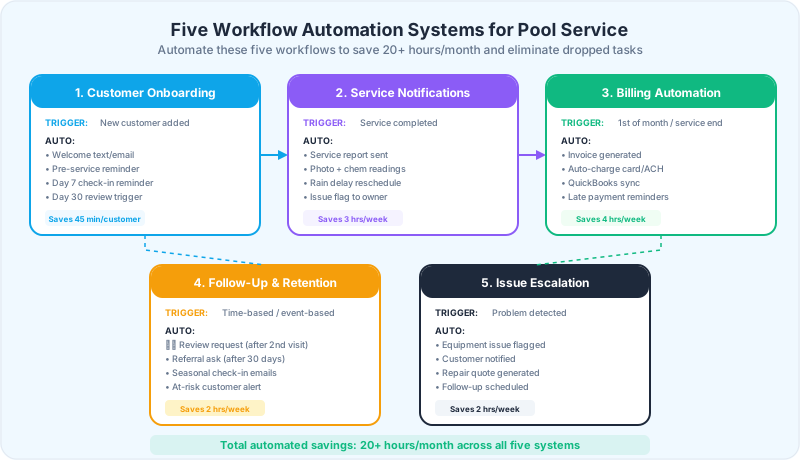
The five workflows that produce the biggest return on automation are customer onboarding, service notifications, billing and invoicing, follow-up and retention, and issue escalation. Together, these five systems save 20+ hours per month and eliminate the dropped tasks that cause customer complaints and cancellations. Each workflow has a trigger (what starts it), an automated action (what the system does), and an outcome (what the business gains).
20+
hours per month saved by automating these five core pool service workflows. That is 240+ hours per year of admin work eliminated.
Source: Pool Founder workflow automation benchmarks
How Do You Automate Customer Onboarding?
The customer onboarding workflow triggers the moment a new customer is added to your system. Without automation, you have to remember to send a welcome message, remember to send a pre-service reminder, remember to check in after the first visit, and remember to do a 30-day review. With five new customers a week during peak season, "remembering" is a system that fails.
The Automated Onboarding Workflow
| Trigger | Delay | Action | Channel |
|---|---|---|---|
| New customer added | Immediately | Welcome message with service day, first visit date, what to expect | Text + email |
| Day before first visit | 24 hours before | Pre-service reminder with tech name and time window | Text |
| First visit completed | Within 2 hours | First visit assessment report with photos and readings | Email + app |
| 7 days after first visit | Day 7 | Check-in reminder to owner/manager (personal call) | Internal task |
| 30 days after signup | Day 30 | 30-day review email with chemistry trends and referral ask |
The onboarding automation saves approximately 45 minutes per new customer. During peak season, with 15-20 new customers per month, that is 11-15 hours of admin work eliminated. More importantly, it ensures every customer gets the same professional onboarding experience regardless of how busy you are.
Keep the Day 7 check-in as a personal touchpoint, not an automated message. Research shows onboarding with a human touchpoint yields 30% better 90-day retention. The automation should remind you to make the call, not replace it.
How Do You Automate Service Notifications?
Service notifications are the communications that keep customers informed about their pool service: when you are coming, what you did, and when the schedule changes. Without automation, these either do not happen (creating the "did they even come?" problem) or they consume hours of manual texting and emailing. With automation, they happen instantly and consistently after every visit.
The Service Notification Workflow
| Trigger | Action | What Customer Sees | Impact |
|---|---|---|---|
| Service day morning | Send service reminder | "Your pool service is scheduled for today" | Reduces gate-locked access issues by 60-70% |
| Tech marks stop complete | Send service report | Photos, chem readings, tasks completed | Eliminates "did they come?" complaints |
| Rain delay detected | Send reschedule notification | "Rain pushed your service to [new day]" | Prevents angry calls about missed service |
| Tech flags an issue | Send issue notification to customer | "We found [issue] at your pool. Here is what we recommend." | Positions you as proactive, creates upsell |
| Route schedule changed | Send updated schedule | "Your service day has changed to [day]" | Prevents confusion and missed access |
Automated service notifications save 3+ hours per week for a 60-pool operation. The bigger impact is on retention. Customers who receive service reports after every visit have measurably lower churn because they can see the value of their service. The automation eliminates the communication gap that is the number one driver of pool service cancellations.
How Do You Automate Billing and Invoicing?
Billing automation is the workflow with the most direct financial impact. Manual billing, creating invoices, sending them, tracking payments, following up on late payments, costs 3-5 hours per week and creates a 30-60 day collection cycle. Automated billing generates invoices, charges cards, syncs to QuickBooks, and sends late payment reminders without any human involvement.
The Billing Automation Workflow
- 1Monthly recurring billing profiles auto-generate invoices on the 1st of each month
- 2Auto-pay customers are charged immediately (credit card or ACH). Receipt sent automatically.
- 3Manual-pay customers receive an invoice via email with a "Pay Now" button
- 4If unpaid after 3 days, send the first reminder: "Just a reminder, your invoice for [amount] is available"
- 5If unpaid after 7 days, send the second reminder with a direct payment link
- 6If unpaid after 14 days, send a firm notice: "Your account is past due. Please remit payment to avoid service interruption."
- 7If unpaid after 30 days, flag the account for service pause and send a final notice
- 8All transactions sync to QuickBooks or Xero automatically. No double entry.
| Billing Scenario | Manual Process | Automated Process | Time Saved |
|---|---|---|---|
| Generate 60 monthly invoices | 2-3 hours | 0 minutes (auto-generated) | 2-3 hours |
| Collect payments | 1-2 hours of check deposits | 0 minutes (auto-charge) | 1-2 hours |
| Follow up on late payments | 30-60 min of calls/texts | 0 minutes (auto-reminders) | 30-60 min |
| Reconcile with QuickBooks | 1-2 hours | 0 minutes (auto-sync) | 1-2 hours |
| Total weekly | 5-8 hours | 15-30 minutes of exceptions | 4-7 hours |
The goal is to get 80%+ of customers on auto-pay. At that threshold, billing becomes a monthly exception-handling task instead of a weekly manual process. The path from 0% to 80% auto-pay takes 3-6 months of consistent enrollment at signup and incentivized conversion of existing customers.
How Do You Automate Follow-Up and Retention?
Retention workflows prevent cancellations by maintaining customer engagement between service visits. The triggers are time-based (30 days after signup, quarterly seasonal check-ins) and event-based (second service visit completed, customer has not logged into portal in 60 days). These are the "touches" that keep your company top of mind and make customers feel valued.
The Retention Automation Workflow
| Trigger | Action | Goal | Expected Result |
|---|---|---|---|
| After 2nd service visit | Send Google review request with direct link | Generate reviews while satisfaction is fresh | 10-20% of recipients leave a review |
| After 30 days | Send referral ask with incentive details | Turn happy customers into referral sources | 5-10% conversion on referral offers |
| Quarterly | Send seasonal advisory email | Educate and maintain engagement | Prevents "I forgot I have pool service" drift |
| 60 days no portal login | Send engagement email with recent reports | Re-engage dormant customers | Recovers 6-22% of at-risk customers |
| Customer cancels | Send win-back sequence at 30, 60, 90 days | Recover lost customers | 5-15% of canceled customers return |
Re-engagement email sequences sent at 30, 60, and 90 days after inactivity recover 6-22% of at-risk customers. For a 100-pool company losing 3 customers per month, recovering even 1 of those 3 with an automated win-back sequence saves $1,860 per year per recovered customer. The automation costs nothing beyond the initial setup.
80%
reduction in missed appointments when automated reminders are implemented. Service reminders alone prevent the most common cause of customer complaints.
Source: Arrivy Field Service Automation Research
How Do You Automate Issue Escalation?
Issue escalation is the workflow that turns problems into revenue. When a technician finds a cracked pump lid, a failing heater, or a filter that needs replacement, the automated workflow should immediately notify the customer, generate a repair estimate, and schedule a follow-up. Without automation, these issues get written on a paper note that sits in the truck for three days before anyone follows up, and the customer calls a competitor.
The Issue Escalation Workflow
- 1Technician flags an issue in the mobile app during service (equipment problem, safety concern, chemical anomaly)
- 2System automatically notifies the business owner/manager with issue details and photos
- 3Customer receives an automated notification: "During today's service, [tech name] identified [issue]. Here is what we recommend."
- 4System generates a repair estimate based on pre-set pricing for common repairs
- 5Customer can approve the estimate directly from the notification (one-click approval)
- 6Approved work is automatically scheduled on the next available service day
- 7After repair, customer receives a completion report with before/after photos
Upsell revenue from equipment repairs and add-on services typically represents 15-30% of total revenue for well-run pool companies. Automated issue escalation captures this revenue by ensuring no issue gets forgotten between the field and the office. Every flagged issue becomes a documented recommendation with a clear path to approval and completion.
The issue escalation workflow also protects you from liability. When a technician documents an equipment problem with photos and the customer is automatically notified, you have proof that you identified the issue and recommended repair. If the customer declines and the equipment fails, the documentation protects you.
How Do You Build These Workflows in Your Software?
The implementation approach depends on your pool service software. Some platforms have built-in automation (onboarding sequences, service reports, billing triggers). Others require connecting tools like Zapier or Make to bridge gaps. The key is building one workflow at a time, testing it for 2 weeks, and then adding the next one.
Implementation Priority Order
| Priority | Workflow | Why First | Time to Build | Monthly Time Saved |
|---|---|---|---|---|
| 1 | Billing automation | Biggest immediate financial impact | 2-4 hours | 16-28 hours |
| 2 | Service notifications | Biggest retention impact | 1-2 hours | 12 hours |
| 3 | Customer onboarding | First impression matters most | 2-3 hours | 8-12 hours (seasonal) |
| 4 | Issue escalation | Revenue capture + liability protection | 1-2 hours | 4-8 hours |
| 5 | Follow-up and retention | Long-term customer value | 2-3 hours | 8 hours |
Start with billing automation because it has the most immediate financial impact. A 60-pool company that moves from manual to automated billing saves 4-7 hours per week and improves collection rate by 5-10%. The cash flow improvement alone pays for the software. After billing, implement service notifications to address the retention gap, then build the remaining three workflows over the following month.
Pool Founder includes built-in automation for all five workflows: customer onboarding sequences, service completion reports, automated billing with auto-pay, review requests, and equipment issue flagging. No Zapier or third-party tools required. The workflows run natively inside the platform.
Ready to streamline your pool service business?
Pool Founder gives you route optimization, automated invoicing, chemical tracking, and everything else you need to run a more profitable pool business.
Frequently Asked Questions
What pool service workflows should you automate first?
Start with billing automation (biggest financial impact) and service notifications (biggest retention impact). Billing automation saves 4-7 hours per week and improves collection rates. Service notifications eliminate "did they even come?" complaints. Build these two first, then add onboarding, issue escalation, and retention workflows.
How much time does workflow automation save a pool service company?
Pool service companies save 20+ hours per month by automating the five core workflows: onboarding (45 min/customer), service notifications (3 hrs/week), billing (4 hrs/week), follow-up (2 hrs/week), and issue escalation (2 hrs/week). That is 240+ hours per year of administrative work eliminated.
Do you need special software to automate pool service workflows?
Pool-specific software with built-in automation (like Pool Founder) handles all five workflows natively. Generic field service software may require Zapier or Make to connect systems. The simplest approach is choosing pool service software that has onboarding, notifications, billing, and reporting built in rather than cobbling together multiple tools.
Can a solo pool service operator benefit from workflow automation?
Solo operators benefit the most because they have the least time for admin work. Automated billing alone eliminates 3-5 hours per week of invoicing. Automated service reports eliminate 2-3 hours of customer communication. A solo operator running 50-60 pools can recover 6-8 hours per week, enough to add 8-10 more pools to the route.
How do you automate rain delay notifications for pool service?
The best approach is a weather-triggered automation in your pool service software. When rain is detected or forecast for a service day, the system automatically reschedules the stop and sends a notification to the customer: "Rain pushed your service to [new day]. No action needed." This prevents confused calls and demonstrates professionalism.