How Do You Choose Pool Service Software Without Wasting Months and Money?
The field service software market hit $6.26 billion in 2026 and is growing at 9.5% annually, which means the number of platforms competing for your dollar has never been higher. That is great for competition but terrible for decision-making. Pool service companies now face 55+ software options on GetApp alone, and 62% of pool businesses switch platforms within two years because they picked based on a polished demo instead of operational fit.
This guide gives you a repeatable framework for evaluating pool service software. It covers the eight features every pool company actually needs, the questions that expose weak spots during demos, pricing models that quietly drain your margins, contract red flags, and a decision matrix that matches software to your company size. No ranked lists. No affiliate links. Just a buying process you can trust.
Corey Adams, Pool Founder co-founder and 15-year pool service veteran, has personally used or evaluated every major platform on this list. The advice here comes from running real routes, managing real techs, and living through the pain of choosing the wrong software twice before building one from scratch.
62%
of pool companies switch software within 2 years of their first purchase
Source: Pool & Spa News Industry Survey 2025
What Are the 8 Features Every Pool Service Company Needs?
Every pool service company, regardless of size, needs eight core features to run efficiently: route optimization, mobile access, scheduling, invoicing with autopay, chemical tracking, customer communication, GPS tracking, and reporting. Skip any of these and you will build workarounds that cost you hours every week.
Why Is Route Optimization the Most Important Feature?
Route optimization is the single highest-ROI feature in pool service software because it directly reduces your largest variable cost: drive time. Companies using route optimization report a 35% reduction in drive time and roughly $400 per month in fuel savings per operation. Software that lets you view all route stops on one screen, drag stops between techs, and auto-minimize drive time is non-negotiable for any company servicing more than 20 pools.
What Mobile App Capabilities Should You Expect?
Your techs live on their phones. The mobile app needs to handle task lists, GPS navigation to the next stop, photo documentation, chemical reading entry, and work order creation from the field. Test the app on the actual phones your techs carry, not the demo laptop. If the app requires more than two taps to log a service and move to the next stop, your techs will stop using it within a month.
Why Does Chemical Tracking Separate Pool Software from Generic Tools?
Chemical tracking is the feature that separates pool-specific software from generic field service tools. Pool-specific platforms include native chemical reading logs with automated dosage calculations, water chemistry history, and LSI (Langelier Saturation Index) calculations. General field service platforms like Jobber or Housecall Pro do not offer these features natively. You would need custom fields that lack calculations, which techs abandon within weeks.
| Feature | Why It Matters | Red Flag If Missing |
|---|---|---|
| Route optimization | 35% less drive time, ~$400/mo fuel savings | Manual route building only |
| Mobile app | Techs log work, photos, chemicals in the field | No offline mode or clunky interface |
| Scheduling + dispatch | Eliminates Sunday night schedule building | Calendar view only, no drag-and-drop |
| Invoicing + autopay | 99% on-time payments, no chasing invoices | Manual invoice creation required |
| Chemical tracking | Dosage calcs, compliance records, LSI | Custom fields only, no calculations |
| Customer service reports | Branded emails after each visit build retention | No automatic customer communication |
| GPS + tech tracking | Know where techs are without calling them | No real-time location visibility |
| Reporting + analytics | Route profitability, tech performance, revenue trends | Only basic export-to-CSV reports |
What Questions Should You Ask During a Software Demo?
The demo is your best opportunity to separate marketing promises from actual product capability. Do not let the sales rep control the screen. Ask to drive the demo yourself, or at minimum, request they walk through your real daily workflow instead of their rehearsed script. If they cannot show a feature live, assume it does not work yet.
What Are the 10 Questions That Expose Weak Software?
These ten questions are designed to surface the gaps that only appear after you have been paying for three months. Ask every one during every demo, and write down the answers. Vague responses or "that is on our roadmap" answers are red flags.
- 1Show me what happens when a tech has no cell signal mid-route. Does the app work offline, and does data sync automatically when signal returns?
- 2I have 150 customers in a CSV file. Show me the import process right now, including how it maps fields.
- 3Walk me through creating a recurring weekly route for three techs across 80 pools. How long does that take?
- 4Show me an actual customer service report email. Can I customize the branding and what information the customer sees?
- 5What happens to my data if I cancel? Can I export everything, including chemical logs and service history, in a standard format?
- 6How does billing work when a customer skips a week or needs an extra service call? Show me the adjustment process.
- 7Show me the mobile app on a phone, not a desktop browser pretending to be a phone. Let me tap through a full service stop.
- 8What integrations are native versus through Zapier? Show me the QuickBooks sync, including how invoice line items map.
- 9How many clicks does it take for a tech to complete a service stop, log chemicals, take a photo, and move to the next stop?
- 10Pull up your actual uptime data for the last 12 months. Have there been any outages during business hours?
Bring your field techs to the demo. They will use the software daily, and their feedback on the mobile experience matters more than how the dashboard looks to you.
What Red Flags Should You Watch for When Evaluating Software?
Red flags during the evaluation process predict problems after you sign up. Spotting them early saves you the pain and cost of switching platforms within a year. Here are the warning signs that experienced pool service owners have learned to catch.
Which Sales Tactics Signal a Bad Fit?
High-pressure annual commitment discounts, roadmap features presented as current capabilities, and "limited time" pricing offers are the three most common sales tactics that lead to regret. If the product is good, they should not need to lock you in before you have validated it with your team.
- Roadmap features sold as reality. "That is coming in Q3" means it does not exist. Evaluate what the product does today, not what it promises tomorrow. Most promised AI features in pool software are 1-2 years from being production-ready.
- No free trial, or trials shorter than 14 days. You cannot evaluate scheduling software in a weekend. A real trial gives you 30-60 days to test with your actual routes and techs.
- Demo only on desktop, not mobile. If they will not show you the mobile app on a real phone during the demo, the mobile experience is likely poor. Your techs live on their phones.
- Pricing that requires a sales call. Transparent pricing is a signal of confidence. If you cannot find the price on their website, expect sticker shock and negotiation games.
- Per-user fees that scale unpredictably. Adding a seasonal tech should not blow up your software budget. Ask what your bill looks like at current team size AND at double your current team size.
- No data export option. If you cannot get your customer list, service history, and chemical logs out in a standard format (CSV or similar), you are trapped.
- Support behind a paywall. Some platforms charge extra for phone or live chat support. That means when something breaks on a Monday morning with 25 stops to hit, you are waiting for an email reply.
How Do Pool Service Software Pricing Models Actually Work?
Pool service software uses three primary pricing models: flat-rate tiers, per-user (per-technician) pricing, and per-location pricing. The model matters as much as the sticker price because it determines how your costs scale as you grow. According to Capterra, 51% of field service management software buyers budget $50 to $100 per user per month, but the real cost depends entirely on which model the vendor uses.
What Is Flat-Rate Tier Pricing?
Flat-rate tier pricing charges a fixed monthly fee based on a tier (usually defined by number of techs or features), with all features included. This is the most predictable model. You know exactly what you pay this month and what you will pay when you add your next tech. Pool Founder uses this model: $49/mo for solo operators, $99/mo for teams up to 3 techs, $179/mo for up to 6, and $249/mo for up to 10.
What Is Per-User Pricing and When Does It Get Expensive?
Per-user pricing charges a base fee plus an additional cost for each technician, dispatcher, or admin user. Field service software rates typically range from $60 to $350 per seat per month. This model works fine for stable teams but becomes expensive fast. A company paying $75 per user monthly faces $375 in software costs for five techs, but that jumps to $750 for ten. Every seasonal hire increases your bill.
What Is Per-Location Pricing?
Per-location pricing charges based on the number of service locations (pools) you manage. This model sounds fair until you grow. At $1-2 per service location per month, 50 pools costs $50-100/mo. But 200 pools costs $200-400/mo. Your software cost scales linearly with revenue growth, eating into the margins that growth is supposed to improve.
| Pricing Model | Cost at 3 Techs / 100 Pools | Cost at 10 Techs / 300 Pools | Best For |
|---|---|---|---|
| Flat-rate tiers | $99 - $189/mo | $249 - $299/mo | Growing companies (predictable costs) |
| Per-user | $180 - $450/mo | $600 - $1,500/mo | Small, stable teams (low entry cost) |
| Per-location | $100 - $200/mo | $300 - $600/mo | Very small operations (scales poorly) |
Always calculate your 12-month total cost at your current size AND your projected size in one year. The cheapest option today may be the most expensive option by December.
What Contract Gotchas Should You Watch For?
Software contracts contain terms that can lock you into a bad deal for months or years. The three biggest contract traps in pool service software are auto-renewal clauses, annual commitment penalties, and data portability restrictions. Read every contract before you sign, and negotiate the terms that matter most.
What Are Auto-Renewal Traps?
Many software contracts auto-renew for a full term unless you cancel within a narrow window, often 30 to 60 days before expiration. Miss that window by a single day and you are locked in for another 12 months. Set a calendar reminder 90 days before any annual renewal date so you have time to evaluate alternatives.
How Do Annual Commitments Affect Your Flexibility?
Annual contracts typically offer 10-20% discounts over month-to-month pricing, but they remove your ability to leave if the product underperforms. Early termination fees can equal the remaining contract value. Start month-to-month for the first 3-6 months, then switch to annual only after you have confirmed the software works for your operation.
Can You Get Your Data Out If You Leave?
Data portability is the most overlooked contract term. Ask specifically: can you export your full customer list with contact details, all service history and notes, chemical reading logs, and invoice/payment records? Some platforms make export difficult or incomplete to create switching costs. If the contract does not guarantee full data export in CSV or similar format, negotiate that in writing before you sign.
- Auto-renewal clause: Look for the cancellation notice window. Anything shorter than 60 days is a trap.
- Price escalation language: Does the contract allow the vendor to increase pricing at renewal? Get rate-lock language if possible.
- Early termination fee: Know the exact dollar amount. Some charge the remaining contract balance, others charge a flat penalty.
- Data ownership: Confirm in writing that you own your data and can export it at any time, not just at cancellation.
- Service level agreement (SLA): What uptime do they guarantee? What happens if they miss it? No SLA means no accountability.
How Do You Match Software to Your Company Size?
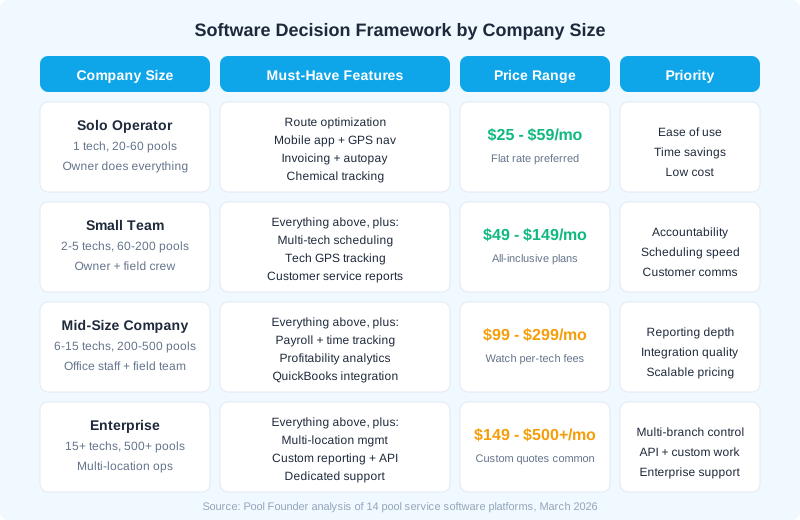
The right software for a solo operator managing 40 pools is not the right software for a 10-tech company managing 400. Company size determines which features matter most, what pricing model works best, and how much complexity you can absorb during setup. Use this framework to narrow your shortlist before scheduling demos.
What Should Solo Operators Prioritize?
If you are a one-person operation running 20 to 60 pools, your top priorities are ease of use and time savings. You do not need enterprise reporting or multi-location management. You need software that takes five minutes to learn, logs your service stops fast, sends invoices automatically, and optimizes your route so you finish earlier. Look for flat-rate pricing under $60/mo with no per-tech fees. Our best pool service software guide covers the options built for this stage.
What Changes When You Have 2-5 Techs?
With a small team, accountability becomes the priority. You need to see where your techs are, confirm they completed every stop, and know if a customer was skipped. Multi-tech scheduling, GPS tracking, and customer-facing service reports become essential. All-inclusive plans in the $99-179/mo range work best here because adding a seasonal tech should not change your monthly bill.
What Do Mid-Size Companies (6-15 Techs) Need?
At this size, you likely have office staff handling admin. Integration quality matters most, especially QuickBooks sync for accounting and payroll tracking for compliance. You also need profitability analytics to understand which routes make money and which ones drain it. Watch for per-user pricing that makes your software bill jump significantly as you hire.
When Does Enterprise Software Make Sense?
Enterprise-grade platforms like ServiceTitan do not publish pricing at all, with user-reported costs running $245-$500 per technician per month, and they are built for multi-trade companies with 15+ techs and $1M+ revenue. Our ServiceTitan pricing breakdown covers all the tiers and hidden costs. If you are running multiple locations and need custom reporting, API access, and dedicated account management, enterprise software is worth the premium. If you are not at that scale, you are paying for features you will never use.
Pool-Specific vs. General Field Service: Which Category Do You Need?
Five platforms in 2026 are built exclusively for pool service: Pool Founder, Skimmer, PoolBrain, Pool Office Manager, and PoolCarePRO. The remaining 50+ options are general field service tools adapted from HVAC, plumbing, and electrical industries. If more than 70% of your revenue comes from recurring weekly pool maintenance, you need pool-specific software. The chemical tracking, water chemistry logging, and pool-aware routing these platforms offer cannot be replicated with custom fields in generic tools.
What Do Pool-Specific Platforms Do That General Tools Cannot?
Pool-specific platforms include native chemical reading logs with automated dosage calculations, water chemistry history tracking tied to individual pools, LSI calculations, and equipment profiles per customer. General platforms offer none of this natively. Jobber, for example, has over 800 reviews on Capterra (4.5 out of 5 rating) and is an excellent general tool, but it has no chemical tracking, no water balance calculations, and no pool-specific service report templates. For a detailed look at how general tools stack up, see our Jobber vs ServiceTitan comparison.
| Capability | Pool-Specific Platforms | General Field Service Tools |
|---|---|---|
| Chemical tracking | Native with dosage calculations | Custom fields only (no calculations) |
| LSI / water balance | Automated calculations built in | Not available |
| Service reports to customers | Branded, auto-sent with chemical data | Generic job completion notices |
| Equipment tracking per pool | Pump, filter, heater profiles | Basic asset fields only |
When Should You Choose a General Platform Instead?
If your business does significant renovation, equipment installation, or multi-trade work alongside pool maintenance, a general field service platform may be a better fit. Housecall Pro (4.7 out of 5 on Capterra, nearly 2,800 reviews) offers strong marketing tools and call tracking that pool-specific platforms typically lack. The trade-off is losing pool-specific chemical workflows.
What Is the Best Evaluation Process from Start to Finish?
A structured evaluation process takes 4-6 weeks and prevents the most expensive mistake in software buying: choosing based on a single impressive demo instead of real-world testing with your team. Follow these seven steps in order.
- 1Define your requirements (Week 1). List every task you do weekly: scheduling, routing, invoicing, chemical logs, customer communication. Rank them by time spent. The features that save the most time should be your non-negotiables.
- 2Shortlist 3 platforms (Week 1). Use the company size framework above to narrow from 55+ options to 3. Resist the temptation to demo more than 3. Decision fatigue leads to bad choices.
- 3Schedule demos with your team (Week 2). Bring at least one field tech and your office admin if you have one. Use the 10 demo questions above. Record the demo if the vendor allows it.
- 4Start free trials on your top 2 (Weeks 2-4). Import a subset of your real customer data. Build one actual route. Have a tech use it for a real day of service. Test invoicing on real customers.
- 5Calculate 12-month total cost (Week 4). Include subscription fees at current AND projected team size, payment processing fees, any add-on costs, and training time at your hourly rate.
- 6Check contract terms (Week 5). Review auto-renewal, cancellation, data export, and price escalation clauses. Negotiate anything that concerns you before signing.
- 7Go month-to-month first (Week 5-6). Even if annual is cheaper, start monthly. Switch to annual after 3-6 months of confirmed satisfaction.
The best time to switch software is October through February when service volume drops 40-70%. You get 4-8 weeks of low-pressure operation before spring volume hits.
Ready to streamline your pool service business?
Pool Founder gives you route optimization, automated invoicing, chemical tracking, and everything else you need to run a more profitable pool business.
Try Pool Founder free for 30 daysFrequently Asked Questions
How much should pool service software cost per month?
Most pool service companies should budget $49-249 per month for software. Solo operators can find good options under $60/mo, while teams of 2-10 techs typically pay $99-249/mo for all-inclusive plans. Be cautious of per-user pricing that starts low but scales to $300+ as you add technicians. According to Capterra, 51% of field service software buyers budget $50-100 per user per month.
Do I need pool-specific software or will a general field service tool work?
If more than 70% of your revenue comes from recurring weekly pool maintenance, choose pool-specific software. You need native chemical tracking, dosage calculations, and water chemistry logging that general tools like Jobber and Housecall Pro cannot provide without clunky workarounds. If you split revenue between pool service and other trades like plumbing or HVAC, a general platform may be the better fit.
What is the biggest mistake pool companies make when choosing software?
Choosing based on a polished demo instead of real-world testing. 62% of pool companies switch software within two years, and most cite the same reason: the product looked great during the sales presentation but did not match their daily workflow. Always run a free trial with your actual routes, your real techs, and your current customer data before committing.
Should I sign an annual contract for pool service software?
Not right away. Start month-to-month for the first 3-6 months to confirm the software fits your operation. Annual contracts offer 10-20% discounts but lock you in. If the software is not working, early termination fees can equal the remaining contract balance. Switch to annual only after your team has validated the product.
How long does it take to switch pool service software?
A well-planned switch takes 2-4 weeks total: one week for data export and import, one week for route building and configuration, and 1-2 weeks for team training and parallel operation. The ideal migration window is October through February when service volume is lower and your team has bandwidth to learn a new system.
Can I get my data out if I decide to leave a platform?
Not always. Some platforms restrict data export to create switching costs. Before signing up, confirm in writing that you can export your full customer list, service history, chemical logs, and invoice records in CSV or similar format at any time. If the vendor will not guarantee this, choose a different platform.
Sources & References
- GetApp — Pool Service Software Category (55+ Tools Reviewed)
- Capterra — Best Pool Service Software 2026
- Capterra — Jobber Reviews (936 Reviews, 4.5/5 Rating)
- Mordor Intelligence — Field Service Management Market Size & Share (2026-2031)
- Grand View Research — Field Service Management Market Size & Share Report 2030
- BuildOps — Field Service Software Pricing & Costs Shopping Guide
- TrueContext — 5 Software Demo Questions Every Field Service Buyer Should Ask
- Software Advice — Questions to Ask a Software Vendor Before You Buy
- IFS — 5 Common Failure Points of Field Service Software Implementations
- Pool & Spa News Industry Survey 2025
- PoolDial — Pool Service Software Landscape: A Comprehensive Industry Analysis
- ProValet — Field Service Software Adoption Rates