Why Is Route Optimization the Highest-ROI Feature in Pool Service Software?
Route optimization directly impacts the three numbers that determine pool service profitability — stops per day, fuel cost per stop, and total windshield time — making it the single feature with the most measurable dollar-for-dollar return in any software category. A well-optimized 60-pool route eliminates 45-90 minutes of daily drive time compared to a manually sequenced route, translating to 2-4 additional billable stops per day or $150-$400 in added daily revenue. Despite this, over 60% of pool service operators still sequence routes manually using memory, Google Maps, or static spreadsheets.
This guide breaks down what route optimization actually means in pool service software, compares the optimization capabilities of every major platform, and quantifies the real savings you should expect from switching to software-managed routing. Not all route optimization is created equal — the difference between basic drag-and-drop reordering and AI-powered geographic clustering is the difference between saving 5 minutes and saving 50.
What Does Pool Route Optimization Actually Mean in Practice?
Pool route optimization is the automated process of sequencing service stops to minimize total drive time, balance workload across days, and account for real-world constraints like gate codes, time windows, and traffic patterns — far more than simply plotting addresses on a map and connecting the dots. True optimization uses geographic clustering algorithms that group nearby stops together, then sequences those clusters into the most efficient travel path, recalculating dynamically as you add, remove, or reschedule customers.
What Are the Core Components of Route Optimization?
Effective route optimization combines four technical components — geographic clustering, sequential ordering, day balancing, and constraint handling — each solving a distinct inefficiency that costs pool operators time and fuel when managed manually.
| Component | What It Does | Impact on a 60-Pool Route |
|---|---|---|
| Geographic clustering | Groups nearby stops into tight service zones to eliminate cross-town backtracking | Reduces daily mileage by 20-35% |
| Sequential ordering | Optimizes the stop-to-stop sequence within each cluster using shortest-path algorithms | Saves 15-25 minutes per day on drive time |
| Day balancing | Distributes stops evenly across service days so no day is overloaded or underutilized | Prevents burnout days and underperforming days |
| Constraint handling | Accounts for time windows, service frequency, gate access, and customer preferences | Eliminates missed appointments and wasted trips |
How Is AI-Powered Optimization Different From Basic Route Planning?
AI-powered optimization continuously recalculates routes as your customer base changes, using machine learning to identify patterns that static algorithms miss — like recognizing that a Tuesday-Thursday biweekly customer creates a geographic gap on off-weeks that should be filled with a nearby one-time job. Basic route planning tools let you drag and drop stops on a map and maybe calculate drive times, but they do not rebalance your entire week when one customer cancels or three new ones sign up in the same neighborhood.
- Basic planning: Static map with drag-and-drop ordering, manual sequencing, no automatic rebalancing
- Standard optimization: One-time route calculation using driving distance, requires manual re-runs when routes change
- AI-powered optimization: Continuous learning from your service patterns, automatic rebalancing, dynamic rerouting on the fly, and proactive suggestions for schedule improvements
A solo operator adding 3 new customers per week to a 120-pool route will need to re-optimize routes at least monthly. With basic tools, that is a 2-hour evening project. With AI-powered tools like Pool Founder, it happens automatically in the background.
How Much Time and Money Does Route Optimization Actually Save?
Pool service companies that switch from manual route sequencing to software-optimized routes report 15-25% reductions in total daily drive time, 18-30% reductions in fuel costs, and the ability to add 2-4 additional stops per day — translating to $30,000-$75,000 in additional annual revenue for a solo operator running five days per week. These savings compound over time as optimization algorithms learn traffic patterns, identify clustering opportunities, and eliminate the gradual route drift that occurs when customers are added ad-hoc without strategic geographic placement.
22%
Average drive time reduction when switching from manual to optimized routing
Source: Pool industry operator surveys, 2024-2025
What Does an Unoptimized 60-Pool Route Actually Cost You?
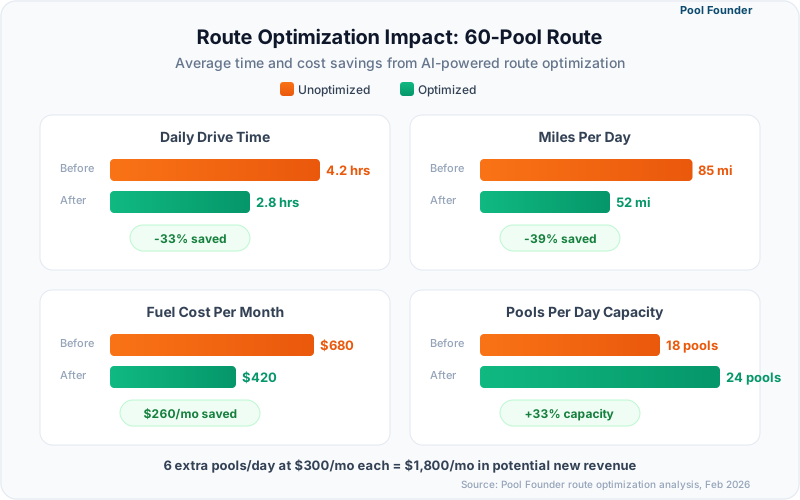
An unoptimized 60-pool route serviced over five days typically includes 35-50 miles of unnecessary daily driving, 45-75 minutes of wasted windshield time, and 2-3 missed opportunities for additional stops — a combined annual cost of $8,000-$15,000 in lost revenue and excess fuel expense. The inefficiency compounds silently because operators rarely measure drive time as a distinct cost center.
| Metric | Unoptimized Route (60 Pools/5 Days) | Optimized Route (60 Pools/5 Days) | Annual Difference |
|---|---|---|---|
| Average daily drive time | 2.5 hours | 1.75 hours | 195 hours saved/year |
| Daily miles driven | 85 miles | 55 miles | 7,800 fewer miles/year |
| Fuel cost per day | $28 | $18 | $2,600 saved/year |
| Stops per day | 12 | 14-15 | 520-780 added stops/year |
| Revenue per stop | $55 avg | $55 avg | $28,600-$42,900 added revenue |
| Vehicle wear (est.) | $0.21/mile | $0.21/mile | $1,638 saved/year |
How Quickly Do Route Optimization Savings Pay for the Software?
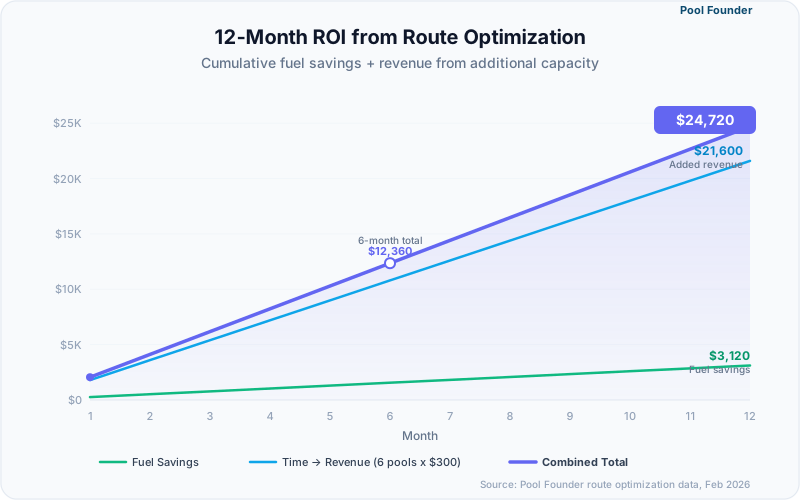
A pool service platform costing $49/month pays for itself within the first week of optimized routing — the math is not close. Even at the conservative end of savings (15% drive time reduction on a 60-pool route), you recover $150-$250 in the first month through fuel savings and added stops alone, creating a 3-4x return on the monthly software cost.
Run this calculation for your own route: Count your daily stops, estimate your drive time between them, and calculate what 2 extra stops per day at your average service rate would add annually. For most operators, the number exceeds $25,000.
How Do Pool Software Platforms Compare on Route Optimization?
Route optimization capabilities vary dramatically across pool service software — ranging from Pool Founder's AI-powered automatic clustering and rebalancing to GorillaDesk's basic manual map-based ordering — and the gap between the best and worst options represents a 30-50 minute daily difference in drive time. Operators choosing software primarily for route efficiency should evaluate three specific capabilities: automatic geographic clustering, dynamic rebalancing when routes change, and mobile turn-by-turn integration.
| Platform | Optimization Level | Geographic Clustering | Auto-Rebalancing | Mobile Navigation | Drag-and-Drop | Monthly Cost |
|---|---|---|---|---|---|---|
| Pool Founder | AI-powered | Yes — automatic | Yes — continuous | Integrated turn-by-turn | Yes | $49-$249 |
| ServiceTitan | Advanced | Yes — algorithm-based | Manual trigger | Integrated | Yes | Quote-only (reported $245+/tech) |
| Jobber | Good | Yes — basic algorithm | Manual trigger | Map link (not integrated) | Yes | $49-$499 |
| Skimmer | Good (Scaling Up plan) | Yes — optimizer (Scaling Up+) | No | Map link | Yes | $1-$2/location ($49-$98 min) |
| GorillaDesk | Good (Pro+) | Yes — routing optimizer (Pro+) | No | Map link | Yes | $49-$149/route |
What Makes Pool Founder's Route Optimization Stand Out?
Pool Founder uses AI-driven optimization that automatically clusters new customers into the closest geographic route day, rebalances stop sequences when accounts are added or removed, and provides one-tap navigation that chains stops without requiring manual map lookups between each service. The system learns from your actual service patterns — accounting for how long each pool takes, which neighborhoods have traffic at certain times, and which customers have gate codes that add access time.
- Automatic geographic clustering assigns new customers to the optimal route day based on existing stop locations
- One-click full-route reoptimization recalculates the best sequence for all stops on any given day
- Visual route mapping shows your daily path with color-coded stops and drive time estimates
- Drag-and-drop override lets you manually adjust when automation does not account for special circumstances
- Route analytics track your actual vs. estimated drive times so optimization improves over time
How Does ServiceTitan's Routing Compare to Pool-Specific Options?
ServiceTitan offers the most technically advanced routing engine on the market with real-time traffic integration, capacity-based scheduling, and multi-technician dispatch optimization — capabilities that justify its quote-based pricing (reportedly $245-$500 per technician monthly) for large operations but represent significant overspend for companies under 10 technicians. The routing is excellent, but it is embedded in an enterprise platform that requires 2-4 weeks of implementation and ongoing admin overhead that negates the drive-time savings for small teams.
Why Do Basic Route Tools Fall Short for Growing Companies?
Basic route tools like GorillaDesk offer drag-and-drop stop ordering on a map view but lack the algorithmic intelligence to identify inefficiencies, suggest improvements, or adapt when your customer base shifts — creating a ceiling where manual route management consumes 2-4 hours per month as your pool count grows past 80-100 accounts. Skimmer added a route optimizer on its Scaling Up and Enterprise plans, narrowing this gap for paid users. The gap between basic and optimized routing widens with scale: at 40 pools the difference is negligible, but at 120 pools an unoptimized route wastes 60+ minutes daily.
If you are currently using a basic route tool and service more than 80 pools, run this test: Export your Monday stops, paste the addresses into Google Maps route planner, and compare the suggested sequence to your current order. If Google Maps finds a faster route, your software is not optimizing.
What Should You Look for When Choosing Route Optimization Software?
The three non-negotiable features in route optimization software are automatic stop sequencing based on geography (not just manual drag-and-drop), dynamic rebalancing when customers are added or removed, and integrated mobile navigation that chains your stops without per-stop map lookups — any platform missing one of these three forces you to do optimization work manually. Beyond these fundamentals, evaluate how the platform handles recurring service patterns (weekly vs. biweekly vs. monthly customers), multi-day route views, and constraint management for time-sensitive stops.
How Do You Evaluate Route Optimization During a Free Trial?
The fastest way to evaluate route optimization is to import one full day of real stops (12-15 addresses), let the software optimize the sequence, then compare the estimated drive time against your current route order — a difference of more than 10 minutes confirms the platform is finding efficiencies you are missing. Run this test on your longest or most spread-out route day for the most dramatic results.
- 1Import or manually enter 12-15 real addresses from your busiest route day
- 2Let the software auto-optimize the sequence (do not drag-and-drop manually)
- 3Note the total estimated drive time and mileage for the optimized route
- 4Compare against your current route sequence using Google Maps with the same addresses in your usual order
- 5Calculate the daily time savings and multiply by 260 work days for annual impact
- 6Test adding 2-3 new "customers" mid-route and check if the software re-sequences intelligently
Does Route Optimization Work for Biweekly and Monthly Customers?
Handling mixed service frequencies (weekly, biweekly, and monthly customers on the same route days) is the hardest optimization problem in pool service routing and the area where AI-powered tools show the biggest advantage over basic planners. A biweekly customer who is only serviced on alternating Tuesdays creates a geographic gap on off-weeks that should ideally be filled by a nearby biweekly customer on the opposite schedule — a pattern that AI routing identifies automatically but manual planning almost never captures.
- Pool Founder: Handles mixed frequencies natively, auto-fills gaps with complementary schedules
- ServiceTitan: Supports complex scheduling rules, capacity-based day planning
- Jobber: Supports recurring schedules, basic frequency mixing but manual gap management
- Skimmer: Supports biweekly scheduling, no automatic geographic gap-filling
- GorillaDesk: Supports recurring schedules, manual route adjustment for mixed frequencies
If more than 20% of your customers are biweekly or monthly, route optimization becomes exponentially more valuable. The alternating-week pattern creates geographic inefficiency that only algorithmic optimization can reliably solve.
How Do You Implement Route Optimization Without Disrupting Current Operations?
The safest implementation approach is a one-day-at-a-time migration — optimize Monday first, run it for a week, then optimize Tuesday — because completely reshuffling all five route days simultaneously confuses technicians, upsets customers who expect service on specific days, and makes it impossible to isolate what is working and what is not. Full route restructuring in a single weekend is the most common cause of failed software adoptions in pool service.
What Is the Step-by-Step Process for Migrating Routes?
A phased route migration takes 3-5 weeks to fully complete but generates measurable time savings starting on day one, minimizes customer disruption, and allows you to validate the optimization quality before committing your entire schedule to a new platform.
- 1Week 1: Import all customers and assign them to their current route days (preserve existing day assignments)
- 2Week 1: Optimize the stop sequence within Monday only — same customers, better order
- 3Week 2: Run optimized Monday, compare actual drive time vs. old Monday, measure savings
- 4Week 2: If Monday improved, optimize Tuesday and Wednesday stop sequences
- 5Week 3: Run all optimized weekdays, fine-tune any stops where the new order creates issues
- 6Week 4-5: Consider day-rebalancing — moving select customers between days for geographic tightness (notify affected customers of day changes)
How Should You Communicate Route Changes to Customers?
Customers who receive at least 7 days advance notice of a service day change have a 95% acceptance rate, while same-week notifications drop acceptance to under 70% and generate complaint calls that consume the time you saved through optimization. The communication should be proactive, brief, and framed as an improvement to service reliability.
Template: "Hi [Name], starting [date], your weekly pool service will move from [old day] to [new day]. This change allows us to provide more consistent arrival times and faster response for service requests. Your service quality and pricing remain exactly the same."
2-4 extra stops/day
Average capacity gain after full route optimization for a 60-pool operator
Source: Pool Founder user data, 2025
Ready to streamline your pool service business?
Pool Founder gives you route optimization, automated invoicing, chemical tracking, and everything else you need to run a more profitable pool business.
Frequently Asked Questions
How much drive time can route optimization software actually save?
Most pool service operators see a 15-25% reduction in total daily drive time after implementing route optimization software. On a typical 60-pool route across five days, that translates to 45-75 fewer minutes of driving per day, 7,000-10,000 fewer miles per year, and $2,000-$4,000 in annual fuel savings. The exact savings depend on your service area density — spread-out rural routes see larger percentage improvements than tight urban clusters.
Is AI-powered route optimization worth the cost over basic route planning?
Yes, particularly for operators with more than 80 pools or mixed service frequencies (weekly, biweekly, monthly). AI-powered optimization continuously rebalances routes as your customer base changes, identifies geographic gaps created by biweekly schedules, and automatically sequences new customers into the most efficient position. Basic route planning requires manual re-sequencing every time your route changes, which costs 1-3 hours per month at scale.
Can I optimize routes if I have customers who require specific service days?
Yes. All major route optimization platforms support customer-level constraints like fixed service days, time windows, and access restrictions. The optimization works within these constraints — a customer locked to Wednesday will stay on Wednesday, and the software optimizes the sequence around that fixed point. Pool Founder and ServiceTitan handle constraints most gracefully, while basic tools require manual adjustment after optimization.
How long does it take to see ROI from route optimization software?
Most operators see positive ROI within the first week. If route optimization saves 30 minutes of drive time per day and enables 2 additional stops at $55 each, that is $550/week in added capacity against a $49/month software cost. Even if you only capture half those additional stops initially, the payback period is under 7 days. Fuel savings alone typically cover the monthly software subscription.
Will route optimization change the days my customers are serviced?
Only if you choose to rebalance days for geographic efficiency. The initial optimization step — reordering stops within existing days — does not change any customer service days. Day rebalancing is an optional second phase that moves customers between days to create tighter geographic clusters. This step generates the largest savings but requires customer communication and should be done gradually.
What is the difference between route optimization and route planning?
Route planning is the manual process of deciding which customers to visit on which days and in what order. Route optimization uses algorithms to calculate the mathematically most efficient sequence and day assignments based on geography, drive time, service frequency, and constraints. Planning answers "who do I visit today?" — optimization answers "what is the fastest way to visit everyone this week?"