Why Is CRM the Most Overlooked Revenue Driver in Pool Service Software?
Pool companies with structured CRM practices retain 23% more customers annually, generate 31% higher revenue per account through documented upsell opportunities, and spend 45% less time on inbound service calls because proactive communication prevents the "what did you do at my pool?" conversations that consume office staff hours. Despite these numbers, fewer than 30% of pool service operators use any formal CRM system, relying instead on scattered text messages, mental notes, and spreadsheet customer lists that break down the moment a second technician joins the team.
This guide examines what CRM actually means for pool service companies (it is not the same as Salesforce-style lead tracking), compares how five major platforms handle customer data and communication, and identifies the specific CRM features that produce measurable revenue lift for pool businesses between 50 and 500 accounts.
What Does CRM Actually Mean for a Pool Service Company?
Pool service CRM encompasses the complete customer data ecosystem: service addresses with pool and equipment details, every chemical reading and photo from every visit, communication logs across email, text, and phone, billing history, and the automated triggers that turn passive record-keeping into active revenue generation through follow-ups, equipment replacement alerts, and seasonal upsell campaigns. This is fundamentally different from traditional sales-focused CRM systems that track leads through a pipeline, because pool companies manage long-term recurring relationships where the value is retention and expansion, not closing deals.
What Customer Data Should Pool CRM Software Track?
Effective pool CRM tracks three data layers: property-level details (pool type, equipment inventory, access instructions), service-level history (every visit with chemical readings, photos, and technician notes), and relationship-level records (communication logs, billing history, complaints, and upsell opportunities). Missing any layer creates blind spots that cost revenue.
| Data Layer | Key Fields | Revenue Impact When Missing |
|---|---|---|
| Property details | Pool type, gallonage, surface, equipment make/model/age, access codes | Missed equipment replacement upsells ($800-$2,500 per opportunity) and wasted time on every first visit |
| Service history | Chemical readings, photos, technician notes, time on site, services performed | Cannot justify pricing, prove service quality, or diagnose recurring water chemistry issues |
| Communication log | Emails, texts, phone call notes, customer portal messages | Repeated conversations, lost context when a different staff member answers, and customer frustration |
| Billing and payments | Invoice history, payment status, outstanding balance, payment method on file | Delayed collections, manual follow-up on every late payment, and inaccurate aging reports |
| Body of water specifics | Water features, attached spa, special chemistry requirements, LSI targets | Incorrect chemical dosing, equipment damage from improper treatment, and warranty liability |
How Is Pool CRM Different From Generic CRM Software?
Generic CRM platforms (HubSpot, Salesforce, Zoho) are built for sales pipelines and lead tracking, not for managing recurring service relationships with property-specific technical data, making them a poor fit for pool companies that need to associate chemical logs, equipment inventories, and body-of-water details with specific service addresses rather than contact records. A pool company using generic CRM must build custom fields for pool type, equipment, and chemical history, then maintain those fields manually with zero integration to field operations.
The defining question that separates pool CRM from generic CRM: "Can a technician pull up this customer's complete pool specs, last 12 chemical readings, and equipment warranty dates from their phone in under 10 seconds?" If the answer is no, your CRM is not built for pool service.
How Do Pool Software Platforms Compare on CRM Features?
CRM capabilities across pool software platforms range from Pool Founder's comprehensive customer profiles with body-of-water tracking, service history, and customer portal to GorillaDesk's basic contact records with limited service documentation, and the depth of customer data directly correlates with retention rate, upsell revenue, and time spent on administrative customer management. The comparison reveals that pool-specific platforms outperform general field service tools on property-level data while general platforms lead on marketing automation and lead tracking.
| CRM Feature | Pool Founder | Skimmer | Jobber | ServiceTitan | HousecallPro |
|---|---|---|---|---|---|
| Customer profiles | Full — multi-property, multi-contact | Good — per-location profiles | Full — with custom fields | Enterprise — deep profile hierarchy | Good — standard contact fields |
| Service location management | Yes — multiple locations per customer | Yes — location-based records | Yes — property records | Yes — multi-location hierarchy | Yes — basic property records |
| Body of water tracking | Yes — pool type, gallonage, surface, features | Yes — detailed pool specs | No — custom fields only | No — custom fields only | No — custom fields only |
| Equipment inventory | Yes — make, model, age, warranty | Yes — equipment per location | No native — manual notes | Yes — asset tracking module | No native — manual notes |
| Chemical reading history | Full log with trends | Full log; Orenda LSI on Scaling Up plan | No | No | No |
| Service visit photos | Yes — per-visit gallery | Yes — photo documentation | Yes — job-level photos | Yes — photo attachments | Yes — photo attachments |
| Communication log | Yes — email, notes | Basic — notes per visit | Yes — email and SMS log | Yes — full omnichannel log | Yes — email and SMS |
| Customer portal | Yes — service history, billing, photos | Yes — service reports | Yes — client hub | Yes — customer-facing app | Yes — online booking portal |
| Automated follow-ups | Yes — service reminders and alerts | Limited | Yes — follow-up automation | Yes — marketing automation suite | Yes — automated marketing |
What Makes Pool Founder's CRM Purpose-Built for Pool Companies?
Pool Founder structures customer data around the service location and body of water rather than the contact record, so every pool has its own equipment inventory, chemical history, and service log that persists even if the property changes ownership. This location-first architecture means a technician pulling up an address sees the pool's complete profile (surface type, gallonage, equipment ages, last 20 chemical readings, recent photos, and gate code) without navigating through a contact-based CRM hierarchy that buries property details two clicks deep.
- Multi-property support handles customers who own multiple homes with pools, each with independent service schedules, equipment inventories, and billing
- Body of water tracking stores pool type (plaster, pebble, fiberglass, vinyl), gallonage, water features, attached spa, and special chemistry notes at the location level
- Equipment inventory records make, model, install date, and warranty expiration for every pump, filter, heater, salt system, and automation controller
- Service history provides a complete timeline of every visit with chemical readings, photos, technician notes, and time on site
- Customer portal gives homeowners self-service access to their service history, upcoming schedule, chemical readings, photos, and billing
How Does Skimmer's CRM Compare for Chemical-Focused Operations?
Skimmer's CRM strength is its deep chemical data integration through the Orenda partnership, providing LSI calculations and dosing recommendations tied to each service location's water chemistry profile on its Scaling Up plan. For operators whose primary value proposition is water quality, Skimmer's CRM delivers superior chemical-specific insights. The trade-off is a lighter feature set for billing automation, equipment lifecycle tracking, and multi-property customer management compared to Pool Founder and ServiceTitan.
When Does a General Field Service CRM Outperform Pool-Specific Options?
ServiceTitan and HousecallPro outperform pool-specific CRM for companies generating 30%+ of revenue from repair, renovation, and equipment installation work where lead tracking, estimate conversion rates, and marketing campaign attribution matter more than chemical log depth. ServiceTitan's CRM tracks the full customer lifecycle from marketing touch to closed deal to recurring service, providing attribution data that pool-specific platforms do not capture. HousecallPro's online booking and reputation management tools generate new leads from the CRM itself.
If a technician at the door of a new-to-them customer cannot see the pool's equipment list, last chemical reading, gate code, and any special instructions within 10 seconds of pulling up the address, the CRM is failing at its core job. This is the only CRM test that matters for field operations.
How Does a Customer Portal Reduce Churn and Administrative Work?
Customer portals reduce inbound service calls by 50-65%, decrease churn by 12-18% through transparency, and increase upsell acceptance rates by 25-30% because homeowners who can see their pool's chemical trends, service photos, and equipment ages make faster purchasing decisions without requiring a sales conversation. The portal transforms the customer relationship from "I hope they showed up" uncertainty into documented proof of value at every visit.
50-65%
Reduction in inbound service calls when customers have portal access to service reports and photos
Source: Pool service operator surveys, 2024-2025
What Should a Pool Service Customer Portal Include?
The highest-impact portal features are service visit history with photos (eliminates "what did you do?" calls), upcoming schedule visibility (eliminates "when are you coming?" calls), and online payment (eliminates late-payment follow-up). Each feature directly removes a specific category of customer inquiry that consumes office staff time.
| Portal Feature | Customer Benefit | Operator Benefit | Time Saved Per Account/Month |
|---|---|---|---|
| Service visit history with photos | Sees exactly what was done at each visit | Eliminates "what did you do?" calls | 8-12 minutes |
| Chemical reading trends | Visualizes water quality over time | Justifies pricing and builds trust | 5-8 minutes |
| Upcoming schedule | Knows when the next visit is | Eliminates "when are you coming?" calls | 5-10 minutes |
| Online payment | Pays invoices instantly from the portal | Reduces average payment time from 18 to 3 days | 10-15 minutes |
| Equipment records | Sees what equipment they have and its age | Primes equipment replacement conversations | 3-5 minutes |
| Service request submission | Submits non-urgent requests without calling | Captures requests in writing with context | 5-8 minutes |
How Does Portal Access Change the Customer Retention Conversation?
Customers with portal access see documented proof of every service visit, creating a transparent record that makes cancellation psychologically harder because the value of service is visible rather than abstract. Pool companies report that customers who regularly view their portal are 2.5x less likely to cancel than customers without portal access, and they accept equipment replacement recommendations 30% faster because they can see the age and service history of their existing equipment.
Send every new customer a portal invitation within 24 hours of their first service visit, with a direct link to the photo and chemical report from that visit. Portal activation rates jump from 30% to 70% when the first email includes actual service data instead of a generic welcome message.
How Does CRM Data Drive Upsell Revenue for Pool Companies?
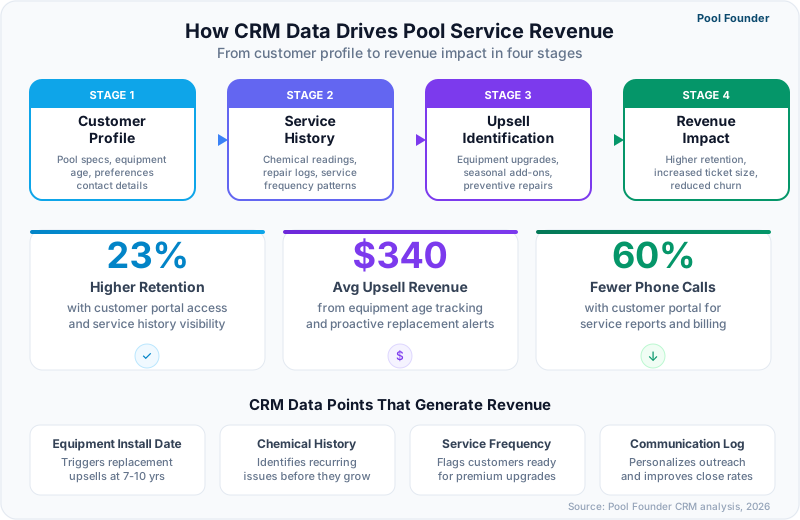
Structured CRM data converts passive customer records into automated revenue triggers, where equipment age alerts generate $800-$2,500 replacement sales, chemical trend anomalies prompt water feature or resurfacing recommendations, and service history patterns identify customers ready for premium service tier upgrades. Pool companies using CRM-driven upselling report 25-40% higher revenue per customer compared to operators who rely on technician memory and ad-hoc sales conversations.
$1,200-$1,800
Average annual upsell revenue per customer when equipment age and service data drives automated alerts
Source: Pool & Spa News operator surveys, 2025
What Automated CRM Triggers Generate the Most Revenue?
Equipment age alerts, filter replacement reminders, and seasonal service upgrade prompts produce the highest conversion rates because they are tied to objective data (install dates, service intervals, calendar dates) rather than subjective sales judgment, removing the awkwardness that prevents many technicians from initiating upsell conversations.
| CRM Trigger | Data Source | Average Revenue per Conversion | Typical Conversion Rate |
|---|---|---|---|
| Pump replacement (age > 8 years) | Equipment install date | $1,200-$2,500 | 15-25% |
| Filter replacement (age > 5 years) | Equipment install date | $400-$900 | 20-35% |
| Salt system upgrade | Equipment type (chlorine tablet) | $1,500-$3,000 | 8-12% |
| Resurfacing recommendation | Surface age and chemical history | $5,000-$12,000 | 3-6% |
| Seasonal deep clean | Calendar date + service history | $150-$350 | 40-55% |
| Premium tier upgrade | Service frequency + complaint history | $50-$100/month ongoing | 10-18% |
How Do Equipment Lifecycle Alerts Work in Pool CRM?
Equipment lifecycle alerts trigger notifications when pool equipment approaches the end of its expected lifespan, giving the operator a proactive sales opportunity months before a breakdown forces an emergency replacement at a less profitable margin. Pool Founder tracks install dates for every piece of equipment at each service location and generates alerts when items reach manufacturer-recommended replacement intervals. A pool company managing 200 accounts with full equipment data typically identifies 30-50 replacement opportunities per year that would otherwise surface only as emergency breakdown calls.
For every customer, ask the technician to record equipment make, model, and install year during the first three visits. Populating this data across 200 accounts typically takes 4-6 weeks of gradual collection and generates the first equipment alert within 30 days.
How Do You Migrate Customer Data to a New Pool CRM Platform?
CRM data migration determines whether your new platform starts with the rich customer history that drives retention and upsells or begins as a blank slate that takes months to rebuild, making the migration process the single highest-impact action in any software transition. The most common migration failure is importing contact names and addresses without service history, equipment records, and communication logs, which strips the CRM of the data layers that generate its ROI.
What Data Should You Prioritize During CRM Migration?
Customer contact information and service addresses are table stakes. The data that actually drives CRM value, and that most operators forget to migrate, includes equipment inventories, chemical reading history, service notes, payment history, and communication logs, ranked here by the revenue impact of losing each category.
- 1Customer contacts and service addresses (critical — without this, the platform is empty)
- 2Equipment inventories with install dates (high — drives $1,200+/year in upsell revenue per account)
- 3Service visit history with notes (high — provides continuity when technicians change)
- 4Billing and payment history (medium — informs collection priorities and creditworthiness)
- 5Chemical reading history (medium — valuable for trend analysis but can be rebuilt in 4-6 weeks)
- 6Communication logs (low — helpful context but rarely referenced after 90 days)
- 7Photos and attachments (low — large file volumes slow migration; archive separately)
How Does Pool Founder Handle Customer Data Import?
Pool Founder supports CSV import with automatic field mapping for customer records, service addresses, and equipment inventories, plus a QuickBooks Online sync that brings in billing history, payment status, and customer balances automatically. The import process geocodes service addresses to enable immediate route optimization, so imported customers are route-ready without manual address cleanup. Most Pool Founder migrations from Skimmer, Jobber, or HousecallPro complete within 5-7 business days with full data verification.
Before canceling your old platform, export everything: customer lists as CSV, chemical logs as CSV or PDF, photos as a bulk download, and any reports you reference regularly. Keep the old account active for 30 days after go-live as a reference backup.
Ready to streamline your pool service business?
Pool Founder gives you route optimization, automated invoicing, chemical tracking, and everything else you need to run a more profitable pool business.
Frequently Asked Questions
Do pool service companies really need CRM software?
Yes, any pool company with more than 30 accounts benefits from CRM. Below 30 accounts, a solo operator can keep customer details in memory. Above 30, details start falling through cracks: forgotten gate codes, missed equipment warranty dates, lost context when a different tech visits, and inability to track which customers have been contacted about upsell opportunities. CRM does not need to be a separate product — pool-specific platforms like Pool Founder include CRM as part of the core service management workflow.
What is the difference between pool CRM and generic CRM like Salesforce?
Pool CRM organizes data around service locations and bodies of water rather than sales pipelines and deal stages. A pool CRM tracks chemical reading history, equipment inventories, pool specifications, service visit photos, and recurring service schedules tied to specific addresses. Generic CRM tracks leads, opportunities, deal values, and sales team activity. Pool companies using generic CRM must build extensive custom fields for pool-specific data and get no integration with field operations, chemical logging, or route management.
How does CRM help with customer retention in pool service?
CRM reduces churn through three mechanisms: proactive communication (automated service reports with photos prove value at every visit), issue prevention (chemical trend tracking catches water problems before they become complaints), and relationship continuity (any staff member can access the full customer history without asking the customer to repeat information). Pool companies with structured CRM practices report 15-23% lower annual churn compared to those without.
Can pool CRM track multiple pools for the same customer?
Pool Founder, Skimmer, and ServiceTitan all support multi-property customer records where a single customer account links to multiple service locations, each with independent pool specs, equipment inventories, chemical logs, and billing. Jobber supports multiple properties but lacks pool-specific fields at the location level. HousecallPro handles multiple addresses per customer but without pool-specific data structures.
How does body of water tracking work in pool CRM software?
Body of water tracking stores the physical characteristics of each pool (type, surface material, gallonage, water features, attached spa) and links that data to chemical readings and equipment records. Pool Founder and Skimmer offer native body of water fields. General platforms like Jobber and ServiceTitan require custom fields that technicians must fill manually with no validation or integration to chemical dosing calculations.
What is a customer portal and do pool companies need one?
A customer portal is a web or app interface where homeowners view their service history, chemical readings, photos, upcoming schedule, and invoices. Pool companies with portals report 50-65% fewer inbound calls, 12-18% lower churn, and faster payment collection. The portal is particularly valuable for pool companies charging premium rates because it documents the service quality that justifies the price.
How much does pool CRM software cost?
Pool CRM is typically bundled into pool service management platforms rather than sold separately. Pool Founder includes full CRM in all plans ($49-$249/month). Skimmer includes CRM at per-location pricing ($1-$2/location with $49-$98 monthly minimums). Jobber includes basic CRM starting at $49/month. ServiceTitan includes enterprise CRM at quote-based pricing (reportedly $245-$500 per technician monthly). HousecallPro includes CRM starting at $79/month. Standalone generic CRM (Salesforce, HubSpot) costs $25-$150/user/month and requires extensive customization for pool service.
Can CRM data help when selling a pool service business?
Yes, comprehensive CRM data significantly increases business valuation. Buyers pay a premium for pool companies with documented customer histories, equipment inventories, and chemical logs because these records prove service quality, predict equipment upsell revenue, and reduce the operational risk of ownership transfer. A pool business with 5 years of structured CRM data typically commands a 10-20% valuation premium over a comparable business with no documented customer history.
Sources & References
- Pool & Spa News Industry Technology Survey 2025
- Skimmer 2026 State of Pool Service Report