Why Is Invoicing the Feature Where Pool Companies Lose the Most Money?
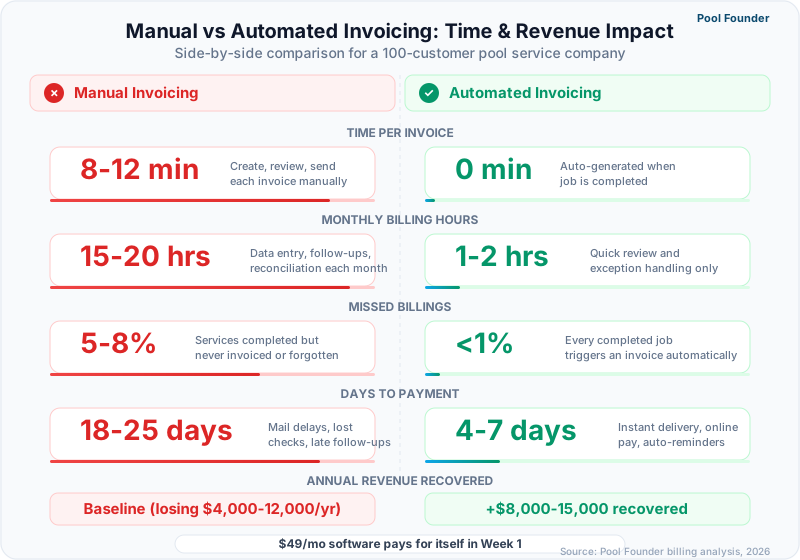
Pool service companies using manual invoicing lose an average of 8-12 days in payment collection time, miss billing for 3-7% of completed services due to data entry oversights, and spend 6-10 hours per month on invoice creation and payment follow-up that automated systems eliminate entirely. These three leaks, delayed payments, missed billings, and administrative overhead, compound into $8,000-$25,000 of annual revenue loss for a 200-pool operation, making invoicing the single feature where software ROI is most directly measurable in dollars recovered.
This guide compares how five major pool service software platforms handle the billing workflow from service completion to payment collection, examines the specific invoicing capabilities that prevent revenue leakage, and provides the pricing and payment processing cost data operators need to calculate the true cost of each platform's invoicing system.
What Does Automated Invoicing Actually Mean for Pool Service Companies?
Automated invoicing generates invoices directly from completed service records without manual data entry, delivers them to customers via email or customer portal automatically, and processes payments through stored payment methods or online payment links, eliminating every manual step between service completion and cash in the bank. For pool companies running 85%+ recurring maintenance revenue, this means the monthly billing cycle that previously consumed 6-10 office hours drops to a 15-minute review-and-send process.
What Are the Core Components of Pool Service Invoicing?
Pool service invoicing requires five integrated components: service-to-invoice generation (automatically creates invoices from completed work), batch billing (processes hundreds of recurring invoices simultaneously), payment collection (online credit card and ACH processing), accounting sync (QuickBooks or Xero integration), and aging management (automated follow-up on overdue balances).
| Component | What It Does | Impact When Missing |
|---|---|---|
| Auto-generated invoices | Creates invoices from completed service records with line items, chemical costs, and service notes | 3-7% of completed services never get billed due to manual entry gaps |
| Batch billing | Generates and sends all recurring invoices for the month in a single action | 6-10 hours/month spent creating individual invoices for each customer |
| Online payments | Credit card and ACH payment via email link or customer portal | Average payment time increases from 3 days to 18 days with check-only billing |
| QuickBooks/Xero sync | Pushes invoices and payments to accounting software automatically | Double data entry, reconciliation errors, and delayed financial reporting |
| Automated reminders | Sends payment reminders at configurable intervals before and after due date | Manual follow-up on every late payment consumes 2-4 hours/month |
| Recurring billing profiles | Stores fixed monthly rates with automatic invoice generation on set dates | Re-entering the same invoice amount for 200 customers every month |
How Does Pool Invoicing Differ From Standard Field Service Billing?
Pool service billing is 85-90% recurring flat-rate monthly charges with the remaining 10-15% from one-time repairs and chemical surcharges, creating a billing pattern where batch processing of identical recurring invoices matters more than the per-job estimate-to-invoice workflow that dominates HVAC and plumbing billing. Standard field service invoicing tools optimize for variable job pricing, detailed labor/material breakdowns, and estimate-to-invoice conversion, while pool companies need fast batch generation, automatic recurring charges, and the ability to add chemical surcharges or one-time repairs to existing monthly invoices.
The number one invoicing failure in pool service is not incorrect amounts — it is missed invoices. Every month that a customer receives service without receiving an invoice costs the full monthly rate ($125-$250) in revenue that is nearly impossible to collect retroactively.
How Do Pool Software Platforms Compare on Invoicing Features?
Invoicing capabilities range from Pool Founder's fully automated service-to-payment pipeline with batch billing, online payments, and QuickBooks sync to basic platforms that generate invoices but require manual email delivery and check-only payment collection, and the gap between these extremes translates to 8-15 days of payment delay and 4-8 hours of monthly administrative overhead. The comparison below evaluates every platform on the six capabilities that determine invoicing ROI for pool companies.
| Invoicing Feature | Pool Founder | Skimmer | Jobber | ServiceTitan | HousecallPro |
|---|---|---|---|---|---|
| Auto-generated invoices | Yes — from completed service records | Yes — from route completions | Yes — from completed jobs | Yes — from work orders | Yes — from completed jobs |
| Batch invoicing | Yes — one-click monthly batch for all recurring accounts | Yes — batch billing | Yes — batch invoicing | Yes — automated billing runs | Yes — batch invoicing |
| Credit card payments | Yes — Stripe integration | Yes — integrated payments | Yes — Jobber Payments | Yes — ServiceTitan Payments | Yes — HCP Payments |
| ACH/bank transfer | Yes — lower processing fees | Yes | Yes | Yes | Yes |
| QuickBooks Online sync | Yes — two-way sync | Yes — one-way sync (invoices, payments, customers) | Yes — two-way sync | Yes — deep integration | Yes — two-way sync |
| Recurring billing profiles | Yes — fixed monthly with auto-generation | Yes — per-location recurring | Yes — recurring invoicing | Yes — memberships and agreements | Yes — recurring billing |
| Automated payment reminders | Yes — configurable intervals | Yes — automatic reminders | Yes — customizable sequences | Yes — automated collections | Yes — automated reminders |
| Chemical surcharge billing | Yes — automatic surcharge calculation | Manual line item | Manual line item | Manual line item | Manual line item |
| Customer portal payments | Yes — pay from portal | Limited | Yes — client hub payment | Yes — customer app payment | Yes — online payment page |
What Makes Pool Founder's Invoicing System Stand Out?
Pool Founder connects every completed service visit to the billing system automatically, so invoices generate from actual work performed rather than from a static recurring template that bills regardless of service completion. This means skipped visits automatically adjust billing, additional services get added to the next invoice without manual line-item entry, and chemical surcharges calculate based on recorded usage rather than estimates. The batch invoicing feature generates and delivers all monthly recurring invoices in a single action with individual email delivery to each customer.
- Auto-generated invoices pull service dates, chemical usage, and technician notes directly from completed visit records
- Batch invoicing processes all recurring accounts in one click, generating individual invoices with customer-specific line items
- Online payments via Stripe accept both credit card and ACH, with ACH offering lower processing fees for recurring payments
- QuickBooks Online sync pushes invoices, payments, and customer records bidirectionally without manual reconciliation
- Automated payment reminders send at configurable intervals (3 days before due, on due date, 7 days past due) with escalating urgency
- Customer portal displays invoice history with one-click payment, reducing the friction between receiving an invoice and paying it
How Do Payment Processing Fees Compare Across Platforms?
Payment processing fees are the hidden cost of invoicing software that most operators overlook during evaluation, and the difference between platforms processing $15,000/month in payments ranges from $375 to $600/month in fees depending on the rate structure and payment method mix.
| Platform | Credit Card Rate | ACH Rate | Monthly Fee | Cost on $15K/Month (Cards) | Cost on $15K/Month (ACH) |
|---|---|---|---|---|---|
| Pool Founder (Stripe) | 2.9% + $0.30 | 0.8% (max $5) | $0 | ~$465 | ~$120 |
| Skimmer | 2.9% + $0.25 | 1% + $0.25 (max $10) | $0 | ~$460 | ~$185 |
| Jobber Payments | 2.9% + $0.30 | 1% ($1 min) | $0 | ~$465 | ~$150 |
| ServiceTitan Payments | ~2.6-3.2% | Available | Included in subscription | ~$390-$480 | Varies |
| HousecallPro Payments | ~2.59% | Available | $0 | ~$449 | Varies |
Encourage ACH payment for recurring customers. At $150/month average billing, switching one customer from credit card to ACH saves $3-4/month in processing fees. Across 200 recurring accounts, ACH adoption of 50% saves $3,600-$4,800 annually in processing costs.
How Does QuickBooks Integration Work With Pool Service Invoicing?
QuickBooks integration eliminates the double data entry that consumes 3-5 hours per month, prevents the reconciliation errors that cause 2-4% discrepancy in monthly financial reports, and gives pool company owners real-time visibility into revenue, expenses, and profitability without waiting for their bookkeeper or accountant to process transactions manually. For pool companies, the integration quality matters more than the feature checkbox because a poor sync creates more problems than no sync at all.
What Is the Difference Between One-Way and Two-Way QuickBooks Sync?
One-way sync pushes invoices and payments from the pool software to QuickBooks but does not pull changes back, meaning any adjustments made directly in QuickBooks (write-offs, credits, manual payments) are not reflected in the pool software and create data conflicts. Two-way sync maintains parity between both systems, so a payment recorded in QuickBooks automatically marks the invoice as paid in the pool platform and vice versa. Pool Founder, Jobber, and HousecallPro offer two-way sync. Skimmer provides one-way sync — invoices, payments, and customers push to QuickBooks, but QBO changes do not flow back.
| Sync Capability | Pool Founder | Skimmer | Jobber | ServiceTitan | HousecallPro |
|---|---|---|---|---|---|
| Invoice push to QB | Yes — automatic | Yes — automatic | Yes — automatic | Yes — automatic | Yes — automatic |
| Payment sync to QB | Yes — automatic | Yes | Yes — automatic | Yes — automatic | Yes — automatic |
| Customer sync | Yes — bidirectional | One-way push | Yes — bidirectional | Yes — bidirectional | Yes — bidirectional |
| QB changes sync back | Yes | No | Yes | Yes | Yes |
| Chart of accounts mapping | Yes — custom mapping | Basic | Yes — custom mapping | Yes — advanced mapping | Yes — custom mapping |
| Sync frequency | Real-time | Daily | Real-time | Real-time | Near real-time |
What Common QuickBooks Sync Errors Should Pool Companies Watch For?
The three most common QuickBooks sync errors for pool companies are duplicate customer records (when the pool software creates a new QB customer instead of matching an existing one), unmapped service items (when invoice line items do not link to QB products/services, causing revenue to land in the wrong account), and tax calculation conflicts (when the pool software and QB apply different tax rates). Each error is preventable with proper initial setup but difficult to fix retroactively after months of incorrect syncing.
- 1Before enabling sync, clean up your QuickBooks customer list to remove duplicates and standardize naming
- 2Map every invoice line item (monthly service, one-time repair, chemical surcharge) to the correct QB product/service and income account
- 3Set tax rates in the pool software to match your QB tax configuration exactly
- 4Run the first sync with 5-10 test invoices and verify each one appears correctly in QB before processing the full batch
- 5Check the sync log weekly for the first month to catch mapping errors before they compound
The most expensive QuickBooks sync mistake is not setting up chart of accounts mapping before the first batch invoice run. Remapping 200+ invoices in QuickBooks after they have been synced to the wrong income account costs 4-8 hours of bookkeeper time.
How Much Does Invoicing Software Actually Save a Pool Company?
A 200-pool operation switching from manual invoicing (spreadsheets, Word templates, or handwritten invoices) to automated invoicing recovers $12,000-$25,000 annually from three sources: eliminated missed billings ($4,000-$10,000), faster payment collection ($3,000-$8,000 in improved cash flow), and reduced administrative time ($5,000-$7,000 in labor cost). These figures assume average monthly billing of $150 per account, a 4% missed billing rate under manual processes, and 8-hour monthly time savings at $30/hour office labor rate.
$12,000-$25,000
Annual revenue recovered by a 200-pool operation switching from manual to automated invoicing
Source: Pool service industry benchmarks, 2024-2025
What Is the True Cost of Manual Pool Service Invoicing?
Manual invoicing costs extend far beyond the obvious time spent creating and sending invoices, encompassing missed billings that are never recovered, delayed payments that strain cash flow, reconciliation errors that compound over months, and the opportunity cost of office staff time that could be spent on customer acquisition and retention activities instead of data entry.
| Cost Category | Manual Invoicing (200 Pools) | Automated Invoicing (200 Pools) | Annual Difference |
|---|---|---|---|
| Invoice creation time | 8-10 hours/month | 15-30 minutes/month | 96-114 hours saved/year |
| Missed billings (% of revenue) | 3-7% of monthly revenue | < 0.5% of monthly revenue | $9,000-$23,400 recovered |
| Average days to payment | 18-25 days | 3-7 days | 11-18 days faster per invoice |
| Late payment follow-up | 3-5 hours/month | Automated reminders | 36-60 hours saved/year |
| QB reconciliation time | 4-6 hours/month | Automatic sync | 48-72 hours saved/year |
| Payment processing effort | Manual check deposits, cash tracking | Automatic ACH/card processing | 2-3 hours/month saved |
How Quickly Does Invoicing Software Pay for Itself?
Invoicing software pays for itself in the first billing cycle for any pool company managing more than 50 accounts. A platform costing $49-$249/month that eliminates even 2% of missed billings on a 200-pool route at $150/month average billing recovers $600/month ($7,200/year) in previously lost revenue, creating a 4-12x return on the software subscription. The faster payment collection alone, reducing average collection time from 18 days to 5 days, improves cash flow by $35,000-$50,000 in reduced outstanding receivables.
Calculate your own missed billing rate: compare the number of completed service visits last month against the number of invoices generated. If the invoice count is lower, the difference is unbilled revenue. Most operators who run this check for the first time discover 2-5% leakage.
How Do You Choose the Right Invoicing Platform for Your Pool Company?
The right invoicing platform depends on three variables: your recurring-to-repair revenue ratio (determines whether batch recurring billing or per-job invoicing matters more), your payment collection method preference (credit card, ACH, or mixed), and your accounting software (QuickBooks Online, QuickBooks Desktop, Xero, or none). Matching these three variables to platform capabilities prevents the most common selection mistake: choosing an invoicing tool optimized for project-based billing when 90% of your revenue is recurring.
Which Platform Best Fits Each Pool Company Profile?
Business size, revenue model, and accounting setup determine which platform delivers the highest invoicing ROI, and mismatching these factors explains why 40% of pool companies report dissatisfaction with their billing software within the first year.
| Company Profile | Best Invoicing Fit | Why | Monthly Cost |
|---|---|---|---|
| Solo operator, 40-80 pools, QBO | Pool Founder | Batch recurring billing, auto-invoices from completed routes, QBO two-way sync, low cost | $49-$99 |
| Solo operator, 40-100 pools, no accounting software | Skimmer | Simple per-location billing, built-in payments, minimal setup | $1-$2/location ($49 min) |
| Small team, 100-300 pools, QBO | Pool Founder or Jobber | Pool Founder for route-focused billing; Jobber if repair revenue is 30%+ | $99-$179 / $49-$139 |
| Mid-size company, 300-800 pools, QBO or Xero | Pool Founder | Batch processing at scale, multi-tech billing, ACH cost savings, robust QBO sync | $179-$249 |
| Enterprise, 800+ pools, full ERP | ServiceTitan | Enterprise billing rules, multi-entity support, deep accounting integration | Not published (reported $245+/tech) |
| Marketing-focused, high repair revenue | HousecallPro | Strong estimate-to-invoice flow, online booking revenue, marketing attribution | $79+ |
What Should You Test During an Invoicing Software Trial?
The most revealing invoicing test takes 20 minutes: create 10 recurring customers with monthly billing, generate a batch of invoices, send one, process a test payment, and verify the transaction appears in QuickBooks. These five steps expose whether the platform handles pool-specific recurring billing natively or forces you through a workflow designed for one-time project invoicing.
- 1Create 10 customers with recurring monthly service rates ranging from $100-$250
- 2Run a batch invoice generation for all 10 and measure how many clicks and how much time it takes
- 3Send one invoice via email and check what the customer sees — is there a direct payment link?
- 4Process a test credit card and ACH payment to confirm the payment flow works end to end
- 5Connect QuickBooks and verify the invoice and payment sync correctly with proper account mapping
- 6Add a one-time repair charge to an existing customer's next invoice and confirm it merges cleanly with the recurring amount
If batch invoicing for 200 recurring accounts takes more than 5 minutes or requires clicking into each customer individually, the platform is not built for pool service billing at scale. Pool Founder processes batch invoices for all recurring accounts in a single action.
Best Pool Service Invoice App by Business Type
Not every pool company needs the same invoicing features. A solo operator billing 60 residential pools monthly has different requirements than a multi-crew operation handling 400 accounts with a mix of residential, commercial, and HOA contracts. Choosing the right invoice app depends on your billing complexity, payment volume, and accounting workflow.
| Business Type | Key Invoicing Need | Best Invoice App | Why It Fits |
|---|---|---|---|
| Solo operator (30-80 pools) | Simple recurring billing with autopay | Pool Founder | One-click batch invoicing for all accounts, autopay enrollment, $49/mo flat rate with no per-invoice fees |
| Small team (2-4 techs, 80-200 pools) | Batch billing + QuickBooks sync | Pool Founder | Two-way QuickBooks integration eliminates double-entry; batch invoicing scales to hundreds of accounts without per-click processing |
| Mid-size (4-8 techs, 200-500 pools) | Automated billing with chemical surcharges | Pool Founder or Jobber | Pool Founder handles chemical surcharge rules automatically; Jobber offers solid invoicing but lacks pool-specific surcharge automation |
| Commercial + residential mix | Multi-rate billing with contract terms | Pool Founder or ServiceTitan | Commercial contracts need custom billing schedules, net-30 terms, and separate rate structures. Pool Founder supports mixed billing on flat-rate plans from $49/mo; ServiceTitan pricing is unpublished (reported $245+ per technician) |
| HOA and property management focused | Bulk billing with detailed reporting | Pool Founder | HOA accounts need itemized invoices showing per-pool costs across multiple properties. Pool Founder generates these without manual line-item entry |
| Multi-trade (pools + other services) | Unified invoicing across services | Jobber or Housecall Pro | If pool service is under 50% of revenue, general platforms avoid running two billing systems. Accept limited pool-specific surcharge features |
Invoice App Features That Matter Most by Revenue Level
At $5,000-$15,000 in monthly billing, basic recurring invoicing and online payment links are sufficient. At $15,000-$50,000/month, batch invoicing and QuickBooks sync become essential — manual billing at this volume wastes 8-12 hours per month. Above $50,000/month, automated surcharges, payment reconciliation, and aging reports are the difference between clean books and a cash flow crisis.
The most expensive invoice app is the one that requires manual work at scale. A free or cheap platform that needs per-customer invoice creation costs more in labor at 200+ accounts than a $49/mo platform with one-click batch billing.
Common Invoicing Mistakes Pool Companies Make
Even with good invoicing software, pool companies commonly make billing mistakes that leak revenue or damage customer relationships. Identifying and correcting these patterns can recover thousands of dollars annually.
- 1Not billing for skipped-then-rescheduled visits: When a service is skipped due to rain or access issues and rescheduled, the extra visit often goes unbilled. Automated systems should track rescheduled services and bill accordingly.
- 2Absorbing chemical costs: Many operators eat chemical costs instead of passing them through as surcharges. At $15-25 per visit in chemicals for problem pools, this adds up to hundreds per month in lost revenue.
- 3Waiting until month-end to invoice: Sending invoices weekly or bi-weekly instead of monthly reduces average payment time by 5-8 days and improves cash flow predictability.
- 4Not offering autopay: Companies that default customers to autopay collect 90%+ of revenue without any manual follow-up. Make autopay the default option during onboarding.
- 5Manual payment reconciliation: Matching payments to invoices manually in QuickBooks wastes 2-4 hours per month. Two-way sync between your pool software and QuickBooks eliminates this entirely.
- 6No late payment policy: Without a clear late fee policy (typically $10 or 1.5% monthly), customers have no incentive to pay on time. Include late fee terms in your service agreement and enforce them automatically.
- 7Inconsistent pricing across customers: Without software tracking rates by customer, similar pools in the same neighborhood may have different rates set months or years apart. Audit pricing annually and normalize rates.
The biggest invoicing mistake is not billing at all. Pool companies that rely on memory to track one-time repairs, chemical treatments, and equipment replacements leave an estimated 5-10% of billable work uninvoiced each year.
Step-by-Step: Automating Your Pool Service Invoicing Workflow
Moving from manual to automated invoicing typically takes 1-2 weeks and follows a predictable sequence. This step-by-step guide covers the transition from spreadsheet or QuickBooks-only billing to a fully automated pool service invoicing workflow.
- 1Import your customer list with service rates, billing frequency, and payment method preferences into your pool service software.
- 2Set up recurring billing profiles for each customer with the correct rate, billing day, and any chemical surcharge rules.
- 3Connect your payment processor (Stripe or similar) and configure autopay as the default payment method.
- 4Link QuickBooks and map your income accounts, tax settings, and customer records for two-way sync.
- 5Run a test billing cycle for 5-10 customers to verify invoices generate correctly with the right amounts, tax calculations, and payment links.
- 6Send a customer communication explaining the new billing system, payment portal access, and autopay setup instructions.
- 7Go live with batch invoicing for all customers. Monitor the first full cycle for sync errors, failed payments, and customer questions.
- 8Set up automated payment reminders: 3 days before due date, on due date, and 7 days past due.
- 9Review your first month of automated billing: compare total invoiced vs. total collected, identify any missed billings, and adjust surcharge rules as needed.
Most pool companies complete this transition in under a week of active work, spread across two billing cycles. The second month is when the time savings become obvious: what previously took 6-10 hours of manual invoicing now happens with a single batch action.
Ready to streamline your pool service business?
Pool Founder gives you route optimization, automated invoicing, chemical tracking, and everything else you need to run a more profitable pool business.
Frequently Asked Questions
How does automated invoicing prevent missed billings in pool service?
Automated invoicing generates invoices directly from completed service records, so every service visit that a technician marks complete automatically triggers a billing entry. Manual invoicing requires someone to cross-reference completed routes against a billing list, and the 3-7% error rate in this manual process represents $4,000-$10,000 in annual lost revenue for a 200-pool operation. Automated systems reduce this gap to under 0.5% because the billing is generated from the service data itself.
What payment methods should pool companies accept?
Pool companies should accept both credit card and ACH (bank transfer) payments. Credit cards offer convenience and faster adoption but cost 2.9% + $0.30 per transaction. ACH costs 0.8-1.0% per transaction (often capped at $5) and is ideal for recurring monthly payments. A pool company billing $30,000/month saves $3,600-$5,000 annually by shifting 50% of recurring customers from credit card to ACH. Avoid check-only billing, which delays payment by 15-20 days on average.
How does batch invoicing work for pool service companies?
Batch invoicing generates all recurring invoices for a billing period (typically monthly) in a single action. The system pulls each customer's recurring rate, adds any one-time charges from the period, applies credits for skipped services, and generates individual invoices for every account simultaneously. Pool Founder processes batch invoices with one click and automatically delivers each invoice via email with a payment link. Without batch capability, a 200-account billing cycle requires creating each invoice individually.
Does pool service invoicing software sync with QuickBooks?
Most pool service platforms sync with QuickBooks Online. Pool Founder, Jobber, and HousecallPro offer two-way sync where invoices, payments, and customer records stay synchronized between both platforms. Skimmer provides one-way sync that pushes invoices, payments, and customers to QuickBooks, though QBO-side changes do not flow back. ServiceTitan offers deep integration with both QuickBooks Online and Desktop. The quality of sync matters: two-way sync prevents the data discrepancies that one-way push creates when payments or adjustments are recorded directly in QuickBooks.
How much do payment processing fees cost pool companies?
Credit card processing fees average 2.9% + $0.30 per transaction across most platforms. ACH fees are typically 0.8-1.0% per transaction (often capped at $5). A pool company processing $180,000/year in payments pays approximately $5,400 in credit card fees or $1,440 in ACH fees. The $3,960 annual difference makes ACH adoption for recurring customers a significant cost reduction strategy. Most platforms do not charge additional payment processing fees beyond these standard rates.
Can invoicing software handle chemical surcharges and variable pricing?
Pool Founder supports automatic chemical surcharge calculation based on recorded chemical usage, adding the surcharge to the next invoice without manual line-item entry. Other platforms (Skimmer, Jobber, ServiceTitan, HousecallPro) require manual line-item addition for chemical surcharges and variable pricing. For companies that pass chemical costs to customers, automatic surcharge billing prevents the common problem of absorbing chemical costs that should be billed.
How do automated payment reminders affect collection rates?
Automated payment reminders reduce average days-to-payment from 18-25 days to 5-8 days and decrease the percentage of accounts requiring manual follow-up from 25-30% to under 10%. A typical three-step reminder sequence (3 days before due date, on due date, 7 days past due) catches most late payments without requiring office staff intervention. Pool companies report that automated reminders recover 85-90% of overdue payments without any manual collection effort.
Is it worth switching invoicing platforms if I already use QuickBooks for billing?
Yes, if you are creating invoices manually in QuickBooks rather than generating them from service records in pool software. QuickBooks is an accounting tool, not a service management tool. It cannot generate invoices from completed route stops, batch-process recurring pool service billing, or connect payment collection to service documentation. Pool-specific invoicing generates invoices from actual service data, prevents missed billings, and still syncs everything to QuickBooks for accounting purposes.
Sources & References
- Pool & Spa News Industry Technology Survey 2025
- Skimmer 2026 State of Pool Service Report
- Stripe Payment Processing Pricing 2026