What Are the Best Alternatives to Pool Office Manager?
The main Pool Office Manager alternatives are Pool Founder ($45 per tech, office staff free), Pool Brain (per tech with unlimited office users, for bigger fleets), Skimmer and PoolDial (per pool with unlimited users) and PoolCarePRO (the lowest published price). If your books live in QuickBooks Desktop, read that section first: it may decide this for you.
Pool Office Manager (POM) is a long-running, pool-only platform. It charges $125 a month for the first user and $25 for each extra active user, and office users count, so an owner, an office manager and five techs is seven seats. QuickBooks Online sync, texting and video storage are add-ons. If the per-user bill or the add-ons are why you are looking, the options below price differently.
Prices checked November 22, 2026, on each vendor's own pricing page. Disclosure: Pool Founder publishes this page and competes with Pool Office Manager. We've tried to say plainly where another product is the better fit.
What do the Pool Office Manager alternatives cost?
Every option here costs less than POM for a one-tech company, from $39.95 on PoolCarePRO to $115 on Pool Brain, against $125 on POM. The bigger difference is office staff: Pool Founder, Pool Brain, Skimmer and PoolDial charge nothing for office users, while POM and PoolCarePRO count them as users.
| Software | Price (monthly) | Office users | Best fit |
|---|---|---|---|
| Pool Office Manager (for reference) | $125 first user + $25 per extra; QuickBooks Online sync +$25; texting from $10 + usage | Count as users | Companies on QuickBooks Desktop |
| Pool Founder | $45 per tech; every feature; AI Front Desk add-on $49 | Free | Owner-operators and growing teams |
| Pool Brain | $50 base + $65 per field tech; every feature, free setup | Unlimited, in the base | Larger fleets that use test hardware |
| Skimmer | $1/location (from $49, pitched for 0 to 49 pools) or $2/location (from $98) | Unlimited techs and admins | Small routes, or big crews with few pools per tech |
| PoolDial | $2 per serviced pool, $40 minimum | Unlimited | Teams that prefer per-pool pricing |
| PoolCarePRO | $39.95 (3 users) to $99.95 (40 users) | Count as users | The lowest software bill |
How much does each one cost with your office staff?
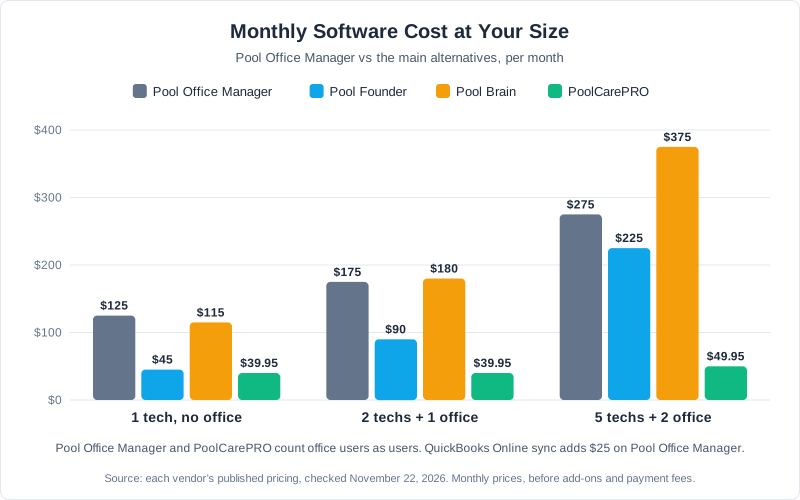
With five techs and two office staff, POM is $275 a month ($300 with QuickBooks Online sync), Pool Founder $225, Pool Brain $375 and PoolCarePRO $49.95. With one tech and no office it is $125 on POM against $45 on Pool Founder. Count every login, not just your techs, before you compare.
| Company | Pool Office Manager (+ QBO sync) | Pool Founder | Pool Brain | PoolCarePRO |
|---|---|---|---|---|
| 1 tech, no office staff | $125 ($150) | $45 | $115 | $39.95 |
| 2 techs + 1 office | $175 ($200) | $90 | $180 | $39.95 |
| 5 techs + 2 office | $275 ($300) | $225 | $375 | $49.95 |
Per-pool products depend on your pool count, not your team: for 150 pools Skimmer is $300 on Scaling Up (its $1 tier is pitched for 0 to 49 pools) and PoolDial $300. Pool Founder's QuickBooks Online sync is included; on POM it is $25/month.
In short: if you are on QuickBooks Online, POM costs more than Pool Founder at every size in this table; against Pool Brain it depends on how many office staff log in. If you are on QuickBooks Desktop and staying there, POM is the one to keep.
Which Pool Office Manager alternative works with QuickBooks Desktop?
None that we could confirm. POM's pricing page says it "Works with QuickBooks Desktop too!", and its features page offers to import your Desktop files for you. Pool Founder and Skimmer sync with QuickBooks Online only. If you are not ready to move to QuickBooks Online, staying on POM is the honest answer.
Ask POM how ongoing Desktop sync works for your file, and ask any other vendor directly before you switch. If you are moving to QuickBooks Online anyway, every option on this page becomes open to you.
Is Pool Founder a good Pool Office Manager alternative?
If you are on QuickBooks Online, yes. Pool Founder is $45 a month per technician, the first tech included, with office staff free, every feature on every plan and QuickBooks Online sync included. It is monthly only with no contract and a 30-day trial with no card, so five techs and two office staff are $225 instead of $275 on POM.
The one optional extra is the AI Front Desk, a $49/month add-on that answers calls and texts, takes messages and captures leads; it never books or quotes. Pool Founder was built with Corey Adams, who ran pool routes for 15+ years at DC Pool Services and now runs his own company on it.
- Chemistry: automatic LSI, test-strip scanning, and doses in your own products from the Balance card, which works offline.
- Tech app: iOS and Android; routes, checklists, photos, chemistry and dosing work offline and sync later. See the technician app.
- Billing: per visit or flat rate, consolidated billing, autopay with automatic retries at 24 hours, 72 hours and 7 days, and Stripe at 2.9% + $0.30 per card.
- AI: George, included, can make changes in the app (move a stop, skip a visit, add a customer, text a customer) as the person asking and within their role; changes you can undo happen right away with Undo, and texts, deletes and billing changes wait for your OK.
Honest limits: no QuickBooks Desktop, and no LaMotte or other test-hardware integration. Feature by feature: Pool Founder vs Pool Office Manager.
Is Pool Brain a good Pool Office Manager alternative?
For a larger fleet with a big office, yes. Pool Brain is $50 a month for unlimited office users plus $65 per field tech, with every feature and free setup, so office staff never add to the bill. It calculates dosing when a tech enters readings, integrates with Orenda, LaMotte Spin Touch, WaterGuru and Pentair, works offline, and enforces required tasks.
It says it handles all your billing without any need for QuickBooks. Against POM it depends on headcount: one tech and no office is $115 against $125, but two techs and one office is $180 against $175. The more office staff you have, the better Pool Brain looks. See Pool Brain alternatives.
Are Skimmer and PoolDial good Pool Office Manager alternatives?
For a team with several office users and a modest pool count, yes: both charge per pool with unlimited users. Skimmer is $1 a location on Getting Started (from $49, pitched for 0 to 49 pools) or $2 on Scaling Up (from $98). PoolDial is $2 per serviced pool with a $40 minimum, a 14-day trial and every feature on one plan.
On Skimmer, quotes, recurring work orders, route optimization, the Orenda-powered LSI and dosing calculator and LaMotte are on Scaling Up, and AI Phone is a $99/month add-on. See Skimmer alternatives. PoolDial includes automatic LSI and dosing and, per its pricing page, the Cody assistant and a 24/7 AI receptionist. See PoolDial alternatives and PoolDial vs Skimmer.
What is the cheapest Pool Office Manager alternative?
PoolCarePRO: $39.95 a month for up to 3 users, $49.95 for 10, $69.95 for 20 and $99.95 for 40, with a 30-day trial and no card. It costs less than POM at every size. The trade-off: it is a browser app that, per its site, needs a cell connection, and we found no route optimization, LSI or dosing listed.
POM, by contrast, lists route optimization and auto-calculated dosing on its features page. See PoolCarePRO alternatives.
When should you stay on Pool Office Manager?
Stay if your books are in QuickBooks Desktop and staying there, or if you are a small team with few office logins where per-user pricing stays modest. POM lists route optimization, auto-calculated dosing and custom reports, so if those fit how you work, the bill may be worth keeping. Switching costs real time.
- Your books are in QuickBooks Desktop and you plan to keep them there.
- You're a small team with few office users, where per-user pricing stays modest.
- You use its route optimization, dosing calculator and custom reports and they fit how you work.
- Your team knows it well.
How do you switch from Pool Office Manager?
Get a file of your customers out of POM, import it into the new system, and set what the file misses, such as service days and techs. If you are also moving from QuickBooks Desktop to QuickBooks Online, do that first. We found no export steps on POM's site, so ask its support for the customer export.
- 1Ask Pool Office Manager's support for an export of your customer list (its site describes no export steps).
- 2Import it into the new system. In Pool Founder, the AI column mapper matches the columns, so you don't reformat the file.
- 3Set what the file misses, such as service days and techs (in Pool Founder, type the tech in the review sheet or let Auto-Assign build routes).
- 4If you are moving from QuickBooks Desktop to QuickBooks Online at the same time, do that first, then connect the new system to QuickBooks Online.
- 5Or skip the work: "Set it up for me" in Pool Founder sets up customers, pools, services and routes the same day from the file you send.
Our switching page covers Pool Office Manager and other software step by step.
Ready to streamline your pool service business?
Pool Founder gives you route optimization, automated invoicing, chemical tracking, and everything else you need to run a more profitable pool business.
Frequently Asked Questions
How much does Pool Office Manager cost?
$125/month for the first user and $25 for each extra active user, so seven users is $275. QuickBooks Online sync is +$25/month, texting starts at $10/month plus usage and video storage is +$25/month. The 30-day trial asks for a card. Checked November 22, 2026.
What is the cheapest Pool Office Manager alternative?
PoolCarePRO, at $39.95/month for up to 3 users and $49.95 for up to 10. For one tech, Pool Founder is $45/month and Skimmer Getting Started starts at $49.
Which alternative works with QuickBooks Desktop?
Pool Office Manager is the one on this page that says it works with QuickBooks Desktop. Pool Founder and Skimmer support QuickBooks Online only. Check with any other vendor before you switch.
Do office users cost extra?
On Pool Office Manager and PoolCarePRO, yes: they count as users. Pool Founder (office staff free), Pool Brain (unlimited office users), Skimmer (unlimited techs and admins) and PoolDial (unlimited users) do not charge for them.
Does Pool Office Manager have a free trial?
Yes, 30 days with every feature, but it asks for a card at signup and charges nothing until day 30. Pool Founder and PoolCarePRO offer 30-day trials with no card. Checked November 22, 2026.
Sources & References
- Pool Office Manager's published pricing and features pages, checked November 22, 2026
- Pool Brain's published price calculator and home page, checked November 22, 2026
- Skimmer's published pricing and help center (QuickBooks), checked November 22, 2026
- PoolDial's published pricing and features pages, checked November 22, 2026
- PoolCarePRO's published pricing and features pages, checked November 22, 2026
- Stripe pricing (US card processing)
- Pool Founder pricing