Two General Platforms, One Pool-Shaped Gap
Jobber and Housecall Pro are the two most popular field service management platforms for small to mid-size home service businesses. Jobber serves 200,000+ businesses with pricing starting at $49/month billed monthly ($29/month prepaid annual). Housecall Pro serves 40,000+ businesses starting at $79/month billed monthly ($59/month annual). Both offer scheduling, invoicing, mobile apps, and customer communication tools. Neither was built for pool service, and neither includes chemical tracking, water chemistry logging, or pool-specific service reports.
Pool companies choosing between Jobber and Housecall Pro are essentially picking between two general-purpose tools and deciding which set of non-pool features matters more. This comparison evaluates both platforms through a pool service lens: daily route management, mobile field experience, billing for recurring maintenance, customer communication, and total cost at common pool company sizes.
Pricing reflects publicly available information as of July 2026. Jobber pricing from getjobber.com/pricing. Housecall Pro pricing from housecallpro.com/pricing.
How Do Scheduling and Routing Compare for Pool Routes?
Pool service runs on recurring weekly routes, not one-off dispatched jobs. A pool technician needs to see an ordered list of 15 to 25 stops, navigate between them efficiently, and repeat the same sequence every week with minimal variation. Both Jobber and Housecall Pro support recurring jobs, but their approaches to scheduling and routing differ meaningfully for pool operations.
| Scheduling Feature | Jobber | Housecall Pro |
|---|---|---|
| Recurring job scheduling | Yes | Yes |
| Route optimization | Yes | Alpha only (single-tech drive-time reorder) |
| Route view (ordered stop list) | Yes | Limited (calendar-focused) |
| Drag-and-drop scheduling | Yes | Yes |
| Real-time dispatching | Basic | Yes (stronger dispatch tools) |
| GPS technician tracking | Yes (Connect+) | Yes (Essentials+) |
| Multi-day route templates | Yes | Partial |
| Conflict detection | Yes | Yes |
Jobber has a slight edge for pool route management because it supports a cleaner route view that technicians can follow stop-by-stop. Housecall Pro leans more toward a calendar and dispatch model designed for one-off service calls where a dispatcher assigns jobs to the nearest available technician. Pool companies do not dispatch. They run predetermined routes. Jobber's scheduling model fits that workflow better.
How does route optimization compare?
Jobber includes full route optimization that groups and orders stops by proximity, which works reasonably well for pool routes. Housecall Pro is behind here: its route optimization is still an alpha feature limited to reordering a single technician's day by drive time, not true multi-technician route optimization. For pool companies, even Jobber's routing is not as sophisticated as pool-specific tools that account for service frequency, gate codes, time-of-day restrictions, and pool-specific constraints.
Which Mobile App Works Better for Pool Technicians?
Both Jobber and Housecall Pro have well-rated mobile apps (4.5+ stars on iOS and Android). For pool technicians, the key mobile tasks are: viewing the daily route, navigating to the next stop, logging service details, taking photos, and marking the stop complete. Both apps handle these basics, but the user experience differs.
| Mobile Feature | Jobber | Housecall Pro |
|---|---|---|
| App Store rating (iOS) | 4.5+ stars | 4.6+ stars |
| Daily route view | Yes (list with map) | Yes (calendar with map) |
| One-tap navigation | Yes | Yes |
| Photo documentation | Yes | Yes |
| Mobile invoicing | Yes | Yes |
| Mobile payment collection | Yes | Yes |
| Chemical reading entry | No (manual notes only) | No (manual notes only) |
| Time tracking | Yes | Yes |
| Offline capability | Partial | Partial |
| In-app chat with office | No | Yes |
Housecall Pro's mobile app has a slight edge in polish and user experience. It was designed from the start as a mobile-first platform, and the interface is clean and intuitive. Jobber's app is solid but feels slightly more like a desktop app adapted for mobile. For pool technicians specifically, neither app is optimized. Both require manual notes for chemical readings instead of dedicated input fields, and neither sends pool-specific service reports with chemistry data.
Neither Jobber nor Housecall Pro has dedicated chemical reading input screens. Pool technicians must type chemical values into generic note fields, which is slower, inconsistent, and cannot generate automated dosage recommendations or customer-facing chemistry reports.
How Do Billing and Invoicing Compare for Pool Maintenance?
Billing is a core strength for both platforms, and both handle recurring pool maintenance billing adequately. Jobber has more mature invoicing with stronger customization and batch processing. Housecall Pro has better marketing automation and automated review requests tied to completed jobs. For pool companies that bill monthly for recurring service, either platform works.
| Billing Feature | Jobber | Housecall Pro |
|---|---|---|
| Recurring billing | Yes | Yes |
| Batch invoicing | Yes | Yes |
| Custom invoice templates | Yes | Yes |
| Automated payment reminders | Yes (configurable sequences) | Yes |
| Online payment portal | Yes (Client Hub) | Yes |
| Mobile payment collection | Yes | Yes |
| Credit card processing | Yes (Stripe) | Yes (Housecall Pro Payments) |
| ACH / bank transfer | Yes | Yes |
| QuickBooks sync | Yes (strong two-way) | Yes (two-way) |
| Estimates / quotes | Yes (with approval tracking) | Yes |
| Automated review requests | Limited | Yes (strong) |
Which is better for repair work billing?
Jobber wins on repair and project billing. Its estimate workflow allows detailed line items, customer approval tracking, automatic conversion to jobs, and then invoicing upon completion. Housecall Pro also handles estimates but Jobber's workflow is more polished for complex multi-line quotes. If your pool company does significant equipment installation or renovation work alongside maintenance, Jobber's quoting capabilities are a meaningful advantage.
Which is better for customer communication?
Housecall Pro excels at customer communication and marketing. It includes automated review request campaigns, email and postcard marketing tools, a consumer-facing app for booking services, and two-way texting. Jobber offers basic automated notifications and follow-ups but does not match Housecall Pro's marketing depth. For pool companies that want to build their Google review presence and automate customer outreach, Housecall Pro has a clear edge.
How Does Pricing Compare at Pool Company Sizes?
Jobber is cheaper at every tier, but Housecall Pro includes marketing tools that Jobber charges extra for. The real cost comparison needs to account for add-ons that pool companies commonly need. Billed monthly, Jobber starts at $49/month for a single user ($29/month prepaid annual). Housecall Pro starts at $79/month billed monthly ($59/month annual). The table below uses monthly billing on both sides.
| Company Size | Jobber | Housecall Pro | Monthly Difference |
|---|---|---|---|
| Solo (1 tech) | $49/mo (Core) | $79/mo (Basic) | Jobber saves $30/mo |
| Small (3 techs) | $139/mo (Connect) | $189/mo (Essentials) | Jobber saves $50/mo |
| Growing (5 techs) | $139/mo (Connect, 5 users) | $189/mo (Essentials, up to 5) | Jobber saves $50/mo |
| Mid-size (10 techs) | $299/mo (Grow, 10 users) | $399/mo (MAX + 2 extra users) | Jobber saves $100/mo |
What about add-on costs?
Housecall Pro charges $35 per additional user per month beyond the MAX plan limit of 8 users, and paid add-on features like advanced reporting and marketing tools raise the bill further. Jobber charges $29 per additional user. Both charge standard payment processing fees (approximately 2.9% + $0.30 per transaction). At 10+ technicians, both platforms land in the $300 to $500 per month range.
A three-technician pool company pays roughly $139/month on Jobber or $189/month on Housecall Pro, billed monthly. Neither includes chemical tracking. Pool Founder costs $99/month flat for up to three technicians with chemical tracking, AI route optimization, and every feature included. No per-user charges, no add-on fees.
Jobber vs. Housecall Pro: Which Should Pool Companies Choose?
The honest answer for most pool service companies is that neither Jobber nor Housecall Pro is the ideal platform because both lack the pool-specific features that maintenance companies use every day. But if your operation does not rely on chemical tracking, or if you run a multi-trade business where pool service is only part of your revenue, here is how to choose between them.
Choose Jobber if:
- Budget is a priority and you want the lowest starting cost ($49/mo billed monthly, $29/mo prepaid annual)
- You need strong quoting and estimating for equipment repair and renovation work
- Route management and stop-by-stop scheduling are important for your daily workflow
- You want mature QuickBooks integration for clean bookkeeping
- You prefer a simpler interface with a shorter learning curve
Choose Housecall Pro if:
- Customer acquisition and marketing automation are top priorities
- You want automated Google review requests after every completed job
- A consumer-facing booking app for new customer leads matters to your growth strategy
- Two-way texting with customers is important for your communication workflow
- You value a more polished mobile app experience
Choose pool-specific software if:
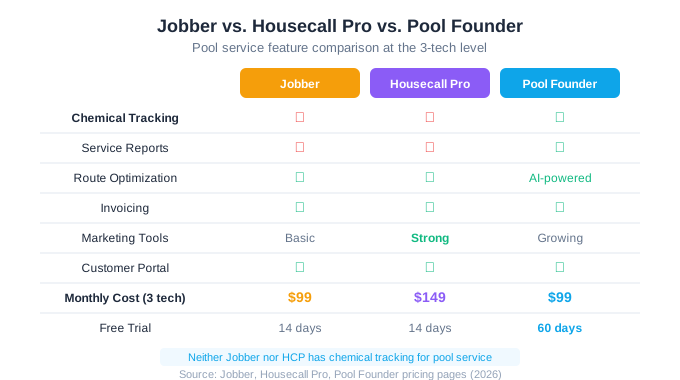
If weekly pool maintenance is your primary service and you need chemical tracking, water chemistry documentation, and customer-facing service reports, pool-specific software is the right choice. Pool Founder gives you everything Jobber and Housecall Pro offer (scheduling, invoicing, route optimization, customer portal) plus the pool-specific features neither general platform provides, at a flat $99/month for a team of up to three technicians.
| Feature | Jobber | Housecall Pro | Pool Founder |
|---|---|---|---|
| Chemical tracking | No | No | Yes |
| Customer service reports | No | No | Yes |
| Route optimization | Yes | Alpha (single-tech) | Yes (AI-powered) |
| Invoicing / billing | Yes | Yes | Yes |
| Marketing tools | Basic | Strong | Growing |
| Customer portal | Yes | Yes | Yes |
| Monthly cost (3 techs) | $139 | $189 | $99 |
| Free trial | 14 days | 14 days | 30 days |
Pool Founder offers a 30-day free trial with full access to every feature. If you are comparing Jobber and Housecall Pro for pool service, test Pool Founder alongside them to see whether a single pool-specific platform replaces the need to choose between two general tools.
Ready to streamline your pool service business?
Pool Founder gives you route optimization, automated invoicing, chemical tracking, and everything else you need to run a more profitable pool business.
Frequently Asked Questions
Does Jobber or Housecall Pro have chemical tracking for pool service?
Neither Jobber nor Housecall Pro includes chemical tracking, water chemistry logging, dosage calculations, or pool-specific service reports. Both are general field service platforms designed for HVAC, plumbing, electrical, and other home service trades. Pool companies using either platform must track chemical readings manually using notes, spreadsheets, or a separate application.
Is Jobber cheaper than Housecall Pro?
Yes. Billed monthly, Jobber starts at $49/month for a solo user vs. Housecall Pro at $79/month. At the team level, Jobber's Connect plan is $139/month for up to 5 users vs. Housecall Pro's Essentials at $189/month. Jobber is $30 to $50 per month cheaper at most company sizes (both discount for annual billing), though Housecall Pro includes marketing tools that Jobber charges separately for.
Which has a better mobile app for pool technicians?
Both have highly-rated mobile apps (4.5+ stars). Housecall Pro's app is slightly more polished with a mobile-first design, in-app customer texting, and a cleaner interface. Jobber's app has a better route view for stop-by-stop navigation. Neither app has dedicated chemical input screens, so both require manual notes for pool service documentation.
Which is better for a pool company that also does other services?
Jobber is the better choice for multi-trade businesses because its scheduling, quoting, and invoicing tools handle different service types more flexibly. Housecall Pro is also multi-trade capable but its marketing tools are the main differentiator. If pool service is your primary revenue stream, a pool-specific platform will serve you better than either general tool.
Can I switch from Housecall Pro to Jobber or vice versa?
Yes. Both platforms support CSV export of customer data, job history, and invoicing records. Plan 1-2 weeks for the migration and run both systems in parallel for one full service week to verify data accuracy. If you are switching anyway, consider evaluating pool-specific platforms like Pool Founder that include the chemical tracking features neither Housecall Pro nor Jobber provides.
Sources & References
- Jobber Pricing Page (2026)
- Housecall Pro Pricing Page (2026)
- Housecall Pro vs Jobber Comparison (FieldPulse, 2026)
- Jobber vs Housecall Pro (SelectHub, 2026)
- Skimmer - Jobber vs Housecall Pro for Pool Service
- Capterra - Housecall Pro Reviews