Should You Choose Skimmer or PoolBrain for Your Pool Company?
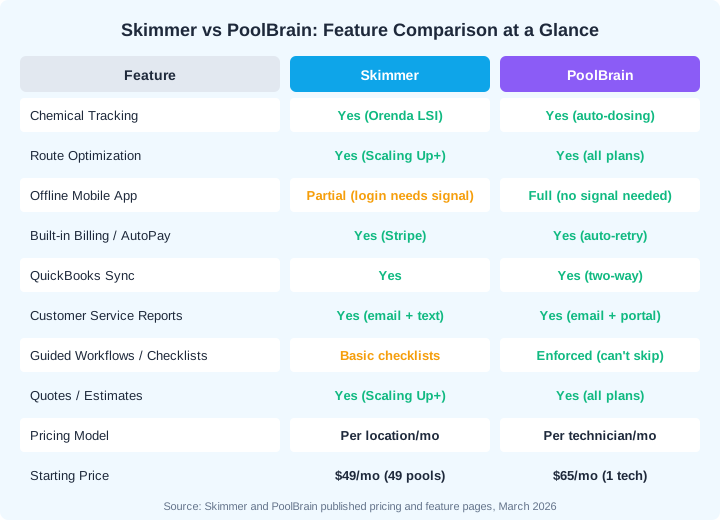
Skimmer and PoolBrain are both built exclusively for the pool service industry, but they serve different types of operations and charge in fundamentally different ways. Skimmer is the market leader with 35,000+ pool pros and a per-location pricing model that starts at $49/month. PoolBrain is a newer, automation-heavy platform built for medium-to-large operations that charges a $50/month base covering all office users plus $65 per technician per month. The right pick depends on your team size, pool count, and whether you need depth in automation or breadth in community support.
35,000+
pool professionals trust Skimmer, making it the most widely adopted pool-specific software in North America
Source: Skimmer, 2026
This comparison breaks down the two platforms across pricing at real business sizes, chemical management, mobile apps, billing, customer communication, and overall fit. Both are solid tools built by people who understand pool service. Understanding the tradeoffs will save you from switching platforms six months in.
All pricing and feature data reflects publicly available information as of July 2026, verified against each platform's current website.
How Does Pricing Compare Between Skimmer and PoolBrain?
Skimmer and PoolBrain use completely different pricing models, and which one costs less depends entirely on your ratio of technicians to pools. Skimmer charges per service location per month, starting at $1/pool on the Getting Started plan and $2/pool on the more popular Scaling Up plan. PoolBrain charges a $50/month base that includes unlimited office users, plus $65 per active field technician per month. That means Skimmer gets more expensive as you add pools, while PoolBrain gets more expensive as you add techs.
| Plan Detail | Skimmer | PoolBrain |
|---|---|---|
| Pricing Model | Per service location per month | Per technician per month |
| Entry Price | $49/mo (Getting Started, 49 pools) | $115/mo (1 tech + office) |
| Mid-Tier Price | $98/mo (Scaling Up, 49 pools) | $180/mo (2 techs + office) |
| Enterprise | Custom pricing (1,000+ pools) | Same rate, scales with techs |
| Features Gated by Plan | Yes (LSI, route optimizer, recurring work orders on Scaling Up+) | No, all features included |
| Free Trial | 1 month free (Scaling Up) | 30-day free trial |
What Does Each Platform Actually Cost at Common Business Sizes?
The crossover point between Skimmer and PoolBrain pricing depends on the plan tier you choose. On Skimmer's Getting Started plan ($1/pool), the cost stays competitive for smaller operations. On the Scaling Up plan ($2/pool), the per-location fee compounds quickly as your customer base grows. Meanwhile, PoolBrain's cost only increases when you hire another technician.
| Business Size | Skimmer (Getting Started) | Skimmer (Scaling Up) | PoolBrain |
|---|---|---|---|
| 50 pools, 1 tech | $50/mo | $100/mo | $115/mo |
| 80 pools, 2 techs | $80/mo | $160/mo | $180/mo |
| 150 pools, 3 techs | $150/mo | $300/mo | $245/mo |
| 250 pools, 5 techs | $250/mo | $500/mo | $375/mo |
| 400 pools, 7 techs | $400/mo | $800/mo | $505/mo |
At 150+ pools on Skimmer's Scaling Up plan, you are paying $300/month or more and the gap keeps widening. PoolBrain stays at $245/month for a 3-tech operation regardless of pool count. But Skimmer's Getting Started plan at $1/pool keeps things closer. The tradeoff: Getting Started locks you out of route optimization, the LSI calculator, and recurring work orders.
Are There Hidden Costs with Either Platform?
Both platforms charge payment processing fees when you collect payments through their system. Skimmer uses Stripe at 2.9% + $0.25 per card transaction, with an additional 0.5% on keyed or recurring transactions like AutoPay. PoolBrain's biggest hidden cost is the per-tech fee that adds up fast for larger crews. Skimmer's biggest hidden cost is the plan upgrade required to access core features like route optimization and the LSI calculator, which only come with the Scaling Up plan at $2/pool.
How Do Skimmer and PoolBrain Compare on Chemical Tracking?
Both platforms include chemical tracking with dosage calculations, but the implementation differs significantly. Skimmer partners with Orenda to provide LSI (Langelier Saturation Index) calculations and dosing recommendations directly in the app, available on Scaling Up and Enterprise plans. PoolBrain auto-displays dosage recommendations when technicians enter readings and automatically tracks chemical costs by customer, job, property, body of water, technician, and total company spend.
| Chemical Feature | Skimmer | PoolBrain |
|---|---|---|
| Chemical Reading Entry | Yes, dedicated input screens | Yes, with auto-dosing display |
| LSI Calculator | Yes, Orenda-powered (Scaling Up+) | Yes, Orenda integration |
| Dosage Recommendations | Yes, based on LSI readings | Yes, auto-calculated on entry |
| Chemical Cost Tracking | Limited tracking | Yes, by customer/tech/property/company |
| LaMotte Spin Touch Integration | Yes (Scaling Up+) | Yes |
| Equipment-Based Workflow Adjustment | No | Yes, workflows change per equipment |
PoolBrain has an edge on chemical cost tracking. Knowing exactly how much you spend on chemicals per customer, per technician, and per body of water lets you spot waste and price your routes accurately. Skimmer's Orenda-powered LSI calculator is industry-respected and widely trusted, but the platform does not automatically track chemical spend at the granular level PoolBrain does.
PoolBrain claims their chemical cost tracking can save up to $500/month by identifying waste and over-dosing patterns. Skimmer also claims up to $500/month in chemical savings through its LSI calculator. Both numbers are marketing estimates, but the underlying principle is sound: knowing exactly what you are adding and why reduces waste.
Which Platform Has a Better Mobile App?
Both Skimmer and PoolBrain offer mobile apps designed for pool technicians in the field, but they take different approaches to offline capability and workflow enforcement. Skimmer's app is fast, clean, and built mobile-first with a UX team focused on reducing tap count at each stop. PoolBrain's app is designed to work without any cell signal or login requirement, and it enforces guided workflows that prevent technicians from skipping steps.
| Mobile Feature | Skimmer | PoolBrain |
|---|---|---|
| Offline Capability | Advertised offline with sync on reconnect | Full (no signal, no login needed) |
| Workflow Enforcement | Checklists (can be skipped) | Guided workflows (cannot be skipped) |
| Chemical Entry | Dedicated screens per reading | Auto-dosing displays on entry |
| Photo Documentation | Yes (5-30 per visit by plan) | Yes (unlimited) |
| Route View / Map | Yes, with optimization | Yes, with one-tap optimization |
| Issue Reporting | Notes-based | Dedicated issue reports with photos |
| Service Completion Alerts | Automatic email + text | Automatic email to customer |
Does PoolBrain's Offline Mode Really Work Without Signal?
Yes. PoolBrain's app was specifically designed to function in areas with poor cellular coverage, which is common at pool locations behind walls, in basements, or in rural areas. Technicians do not need to log in with a signal, and all data syncs automatically when connectivity returns. Skimmer also advertises offline functionality, with data syncing once you are back online. For companies with techs who regularly work in dead zones, PoolBrain's no-signal login and offline-first design are a meaningful advantage.
What About Skimmer's Service Texts Feature?
Skimmer offers a service texts feature that automatically sends SMS notifications to customers when a tech is on the way, finishes a service, or skips a stop. This is available on Scaling Up plans and above with free service texts included. PoolBrain sends automatic proof-of-service emails when a route stop is completed, including labeled photos based on the workflow. Both approaches keep customers informed, but Skimmer's text messages tend to have higher open rates than email.
How Do Billing and Invoicing Compare?
Both platforms handle recurring billing for weekly maintenance, but PoolBrain's billing automation goes deeper. PoolBrain generates invoices automatically every month, charges credit cards or ACH automatically with auto-retry on declined payments, and emails invoices without manual intervention. Skimmer offers invoicing through Skimmer Billing with Stripe integration, recurring billing, and AutoPay, but some users report that the billing setup process is more manual.
| Billing Feature | Skimmer | PoolBrain |
|---|---|---|
| Recurring Billing | Yes, with AutoPay | Yes, fully automated monthly |
| Auto-Retry on Declines | Not confirmed | Yes, automatic retry |
| Quotes / Estimates | Yes (Scaling Up+) | Yes, with photo support |
| Payment Processing | Stripe (credit card, ACH) | Built-in (credit card, ACH) |
| QuickBooks Sync | Yes, real-time sync | Yes, two-way sync |
| Per-Visit or Flat-Rate Billing | Flat-rate recurring | Both per-visit and flat-rate |
| Customer Portal for Payments | Yes | Yes |
PoolBrain's support for both per-visit and flat-rate billing gives it more flexibility for companies that mix service types. If you charge different rates for different service levels on the same route, PoolBrain handles that natively. Skimmer is optimized for the standard flat-rate recurring model that most weekly maintenance companies use.
How Do QuickBooks Integrations Compare?
Both platforms integrate with QuickBooks Online. PoolBrain offers a two-way sync that pushes customers, invoices, payments, refunds, products, and services between the two systems. Skimmer's QuickBooks integration syncs invoices and payments in real-time. Multiple users report that both integrations work reliably, though PoolBrain's two-way sync means changes made in QuickBooks also flow back into PoolBrain.
How Do Route Management and Scheduling Compare?
Both platforms include route optimization, but Skimmer gates it behind the Scaling Up plan ($2/pool) while PoolBrain includes it on all plans. Skimmer's route optimizer claims to cut drive time by up to 25%. PoolBrain offers one-tap route optimization with drag-and-drop scheduling and real-time progress tracking across all technicians.
| Scheduling Feature | Skimmer | PoolBrain |
|---|---|---|
| Route Optimization | Yes (Scaling Up+ only) | Yes (all plans) |
| Drag-and-Drop Scheduling | Yes | Yes, multi-view |
| Real-Time Tech Progress | Manual refresh | Auto-updating |
| Filter Clean Auto-Scheduling | Manual setup | 1-click with auto-created jobs |
| One-Time Job Management | Yes, via work orders | Yes, separate from route stops |
| Workload Balancing | Yes | Yes, with map filters |
PoolBrain's filter clean auto-scheduling stands out. You set the schedule once, and PoolBrain automatically creates filter and salt cell cleaning jobs, sorts them into categories, and lets you drag-and-drop them onto technician schedules. Skimmer handles filter cleans through manual work order creation. For companies servicing 200+ pools, the automation difference adds up to hours saved every month.
If you are on Skimmer's Getting Started plan ($1/pool), you do not get route optimization. That means your technicians are driving routes you planned manually or using a separate mapping tool. Upgrading to Scaling Up doubles your per-pool cost. PoolBrain includes route optimization at every price point.
What Do Actual Users Say About Skimmer vs PoolBrain?
Skimmer has significantly more user reviews, with 230 verified reviews on Capterra and a 4.9/5 rating. PoolBrain has a smaller but enthusiastic user base with approximately 25 Capterra reviews and a 4.8/5 rating. The volume difference reflects Skimmer's longer market presence and larger install base, not necessarily product quality.
What Do Skimmer Users Praise and Criticize?
Skimmer users consistently praise the mobile app's ease of use, calling it intuitive and fast for daily route work. The customer support team gets high marks, with a U.S.-based support and success organization that includes 10 support reps and 5 dedicated customer success managers. Capterra awarded Skimmer Best Ease of Use and Best Value multiple years running. The most common complaints focus on pricing: several users report that per-pool fees have increased significantly over the past few years, and billing setup can feel time-consuming.
- Praise: "The app layout is great, pretty intuitive to figure out" (Capterra reviewer)
- Praise: "Since switching to Skimmer, scheduling is more efficient and workflow is more organized" (Capterra reviewer)
- Criticism: "Pricing has quadrupled over the last 5 years" (Software Advice reviewer)
- Criticism: "Having to set up a specific work order to draw auto pay can be time consuming" (Capterra reviewer)
What Do PoolBrain Users Praise and Criticize?
PoolBrain users highlight the depth of automation, with one reviewer stating it "replaced the workload of 3 or 4 people, and does it without human error." Customer support gets strong marks, with users describing it as "top notch" and responsive. The most common criticism is occasional slow loading times when the system has large amounts of data.
- Praise: "Clear that it was created by someone with real experience in the pool industry" (Software Finder reviewer)
- Praise: "Automatic billing saves hours of work" (Capterra reviewer)
- Criticism: "Sometimes the software runs slow...even if it ran just a little faster that would make things easier" (Capterra reviewer)
- Criticism: Smaller user community means fewer peer resources and third-party integrations
Skimmer vs PoolBrain: Which Should Your Pool Company Choose?
The decision between Skimmer and PoolBrain depends on your team size, pool count, and what you value most. Neither platform is wrong for a pool company. They are both purpose-built for pool service, and either one will be a significant upgrade over spreadsheets and paper. The question is which tradeoffs you can live with.
When Should You Choose Skimmer?
Skimmer is the better choice for smaller pool companies, solo operators, and anyone who values a large user community and proven track record. With 35,000+ users, Skimmer has the largest pool-specific user community in North America. That means more Facebook groups, more peer troubleshooting, and more third-party tools that integrate with Skimmer. The mobile app is clean, fast, and requires minimal training.
- You run under 100 pools and want the lowest entry price ($49/month)
- Ease of use and minimal training time are your top priorities
- You value a large user community for peer support and troubleshooting
- Customer-facing service texts (SMS) are important to your workflow
- You want the most proven, battle-tested platform in the pool industry
- Your business is primarily weekly maintenance with simple billing
When Should You Choose PoolBrain?
PoolBrain is the better choice for growing and mid-size operations that need deep automation, granular cost tracking, and predictable pricing that does not penalize you for adding customers. The per-technician model means your software cost stays flat as you grow your pool count, and every feature is included from day one.
- You have 150+ pools and want to avoid per-location pricing that compounds
- Deep automation (auto-billing, auto-retry, auto-scheduling) matters more than community size
- Chemical cost tracking by customer, tech, and property is a priority
- Your techs work in areas with poor cell coverage (full offline app)
- You want enforced workflows that prevent technicians from skipping steps
- You manage multiple bodies of water per property
Is There a Third Option Worth Considering?
Both Skimmer and PoolBrain require tradeoffs. Skimmer's per-pool pricing punishes growth. PoolBrain's smaller user base means fewer integrations and community resources. Pool Founder offers a different approach: flat-rate pricing with every feature included at every tier, an AI assistant for natural-language business management, and pool-specific features like chemical tracking alongside modern tools like mobile invoicing and GPS tracking.
| Capability | Skimmer | PoolBrain | Pool Founder |
|---|---|---|---|
| Chemical Tracking | Yes (Orenda LSI) | Yes (auto-dosing) | Yes (dosing recommendations) |
| Route Optimization | Scaling Up+ only | All plans | All plans, AI-powered |
| Offline Mobile App | Advertised, with sync | Full offline | Yes |
| Guided Workflows | Basic checklists | Enforced workflows | Customizable checklists |
| AI Assistant | Add-ons ($99/mo AI Phone); no in-app assistant | No | Yes (George) |
| GPS Tracking | No | No | Yes |
| Pricing (3 techs, 150 pools) | $150-$300/mo | $245/mo | $99/mo (Team) |
Pool Founder charges $49/month for solo operators, $99/month for teams of up to 3 techs, $179/month for up to 6 techs, and $249/month for up to 10 techs. No per-pool fees. No feature gating. A 3-tech company servicing 150 pools pays $99/month total, compared to $245/month on PoolBrain or $150-$300/month on Skimmer depending on the plan. Pool Founder also includes an AI assistant, GPS tracking, and mobile invoicing that neither Skimmer nor PoolBrain currently offers.
Pool Founder offers a 30-day free trial with full access to every feature, no credit card required. If you are weighing Skimmer vs PoolBrain and want to see how a flat-rate platform compares, test it side by side before committing.
Ready to streamline your pool service business?
Pool Founder gives you route optimization, automated invoicing, chemical tracking, and everything else you need to run a more profitable pool business.
Frequently Asked Questions
Is Skimmer or PoolBrain cheaper for a solo pool operator?
For a solo operator running 50 pools, Skimmer's Getting Started plan costs $50/month while PoolBrain costs $115/month ($50 base + $65 for 1 tech). Skimmer is cheaper for solo operators with fewer than 115 pools on the Getting Started plan. However, PoolBrain includes all features (route optimization, quoting, guided workflows) at every price point, while Skimmer's Getting Started plan excludes route optimization, the LSI calculator, and recurring work orders.
Does PoolBrain have an LSI calculator like Skimmer?
Yes. PoolBrain integrates with the Orenda Calculator for LSI calculations, similar to Skimmer's Orenda-powered LSI feature. Both platforms provide water balance calculations to help technicians maintain proper chemistry. PoolBrain additionally auto-displays dosage recommendations when technicians enter readings and tracks chemical costs at a granular level by customer, technician, and property.
Can I switch from Skimmer to PoolBrain or vice versa?
Yes. Both platforms support data export and import. Skimmer exports customer lists, pool data, and chemical reading history. PoolBrain integrates with QuickBooks, which simplifies migration of customer and billing data. Plan 1-2 weeks for the transition and run both systems in parallel for at least one full service cycle to verify accuracy. Pool Founder also offers free migration assistance if you want to evaluate a third option.
Which platform has better customer support?
Skimmer has a larger U.S.-based support and success organization, with 10 support reps, 5 dedicated customer success managers, plus onboarding and account managers. They won a Bronze Stevie Award for Customer Service in 2024. PoolBrain's support team is smaller but consistently rated highly by users who describe it as responsive and knowledgeable. Both platforms rate 4.8+ on Capterra for customer support.
Does Skimmer work offline like PoolBrain?
Skimmer advertises that its app works offline, with data syncing when connectivity returns. PoolBrain's app was designed to work without any signal from the start, including the initial login. For technicians who regularly service pools in areas with poor cell coverage, PoolBrain's full offline mode is a tangible advantage.
Is there a pool service software that is cheaper than both Skimmer and PoolBrain?
Pool Founder starts at $49/month for a solo operator with flat-rate pricing and no per-pool or per-tech surcharges. A team of 3 technicians pays $99/month regardless of pool count. That is $146/month less than PoolBrain and $51-$201 less than Skimmer at 150 pools. Pool Founder includes chemical tracking, route optimization, AI features, and mobile invoicing at every tier.
Sources & References
- Skimmer Pricing Page, July 2026
- PoolBrain Pricing Page, July 2026
- PoolBrain Features Page, March 2026
- Skimmer on Capterra, 230 verified reviews, 4.9/5 rating
- PoolBrain on Capterra, 22+ verified reviews, 4.8/5 rating
- PoolBrain on Software Finder, 25 reviews, 4.8/5 rating
- Skimmer on Software Advice, verified reviews 2026
- Pool & Hot Tub Alliance Industry Statistics