Is RazorSync Still a Competitive Option for Pool Service Companies?
RazorSync has been in the field service management space for over a decade, earning a reputation as a reliable workhorse for small service businesses. With strong offline capabilities and competitive pricing, it carved out a niche among contractors who needed mobile access in areas with unreliable cell coverage. But a decade of service also means the platform faces questions about whether its architecture and feature set have kept pace with modern expectations.
For pool service companies specifically, the question is whether RazorSync's general-purpose field service tools and reliable offline mode can compensate for the absence of pool-specific features that newer, purpose-built platforms now offer. This review provides an honest assessment of where RazorSync delivers value and where pool companies will find themselves working around the platform's limitations.
What Is RazorSync?
RazorSync is a cloud-based field service management platform launched in the early 2010s. It provides scheduling, dispatching, customer management, invoicing, and a mobile app for field technicians across a range of service industries including HVAC, plumbing, electrical, cleaning, and general contracting. The platform runs on iOS, Android, and web browsers.
RazorSync positions itself as an affordable, straightforward solution for small to mid-sized service businesses that need core field service management without enterprise complexity. The platform has maintained a loyal user base, particularly among businesses that value its offline functionality and simple learning curve.
Features That Work for Field Service
RazorSync covers the fundamental field service management features that any service business needs to move from paper-based operations to digital workflows.
Scheduling and Dispatch
RazorSync offers calendar-based scheduling with drag-and-drop job assignment, recurring appointment support, and technician dispatching. The scheduling interface is functional if not modern, and it handles the basic requirements of assigning work to field technicians. Recurring jobs can be set up for weekly, bi-weekly, or monthly schedules.
Customer Management
Customer records include contact information, service address, service history, and notes. You can attach photos and documents to customer records. The CRM is straightforward and covers the basics without the depth of more modern platforms. QuickBooks integration is available for syncing customer and invoice data.
Invoicing and Payments
RazorSync supports invoice creation in the field, payment processing through PaySimple integration, and invoice-to-QuickBooks sync. Invoices can be emailed to customers directly from the app, and recurring billing is supported for subscription-based services.
Standout Strength: Offline Mode
RazorSync's offline capability is genuinely strong and worth highlighting. The mobile app allows technicians to view their schedule, access customer information, complete jobs, capture photos, and create invoices while completely offline. Data syncs automatically when connectivity returns. This is not a limited read-only cache — it is a full working mode.
For pool companies servicing rural properties, gated communities with poor cell coverage, or backyards where signals drop, reliable offline access is not a luxury — it prevents service delays and data loss. Many newer platforms offer partial offline support, but few match RazorSync's depth of offline functionality.
If your service area includes significant dead zones for cellular coverage, RazorSync's offline capability may be its most compelling feature. Test your cell coverage on actual pool routes before dismissing this advantage.
RazorSync as a Water Treatment CRM
Some water treatment and pool service companies evaluate RazorSync as a CRM for managing customer relationships, service history, and recurring appointments. RazorSync does handle the basic CRM functions: customer contact records, service address management, job history, notes and photo attachments, and QuickBooks integration for invoice syncing. For general water treatment businesses that do not need to track specific chemical readings or water quality metrics per visit, these CRM capabilities are adequate.
However, RazorSync lacks the water-treatment-specific features that dedicated platforms provide. There are no built-in fields for recording water chemistry parameters like pH, chlorine, alkalinity, calcium hardness, or cyanuric acid. There are no dosing calculators, no Langelier Saturation Index computations, and no treatment history tracking per property. Water treatment companies that need to document treatment applications, monitor water quality trends over time, or generate compliance reports will find RazorSync insufficient for those workflows. Pool Founder, by contrast, integrates chemical tracking with LSI calculations directly into the service workflow, making it a more complete CRM for water treatment operations.
Where RazorSync Falls Short for Pool Service
Like other general-purpose field service platforms, RazorSync was not designed for the specific workflows that define professional pool service. The gaps mirror those found in FieldPulse and Housecall Pro, but RazorSync adds an additional concern: an aging user interface that has not kept pace with modern design standards.
| Limitation | Impact on Pool Operations |
|---|---|
| No chemical tracking or water chemistry logs | Cannot record chlorine, pH, alkalinity, CYA, or other chemical readings per pool visit. |
| No LSI calculator | No built-in water balance calculations for plaster protection. |
| Route optimization as paid add-on | Route optimization is available as a $50/month add-on for Solo and Team plans, and included with Pro+. However, it is not designed for recurring weekly pool routes with multi-day balancing. |
| No pool equipment profiles | No dedicated fields for pump, filter, heater models, serial numbers, or warranty tracking. |
| No customer-facing service reports | No automated post-service reports with chemical readings and photos sent to homeowners. |
| Aging user interface | The UI has not been modernized significantly in recent years. Technicians accustomed to modern apps may find the experience dated. |
| Limited integrations | Fewer third-party integrations compared to newer platforms. No Zapier or advanced API ecosystem. |
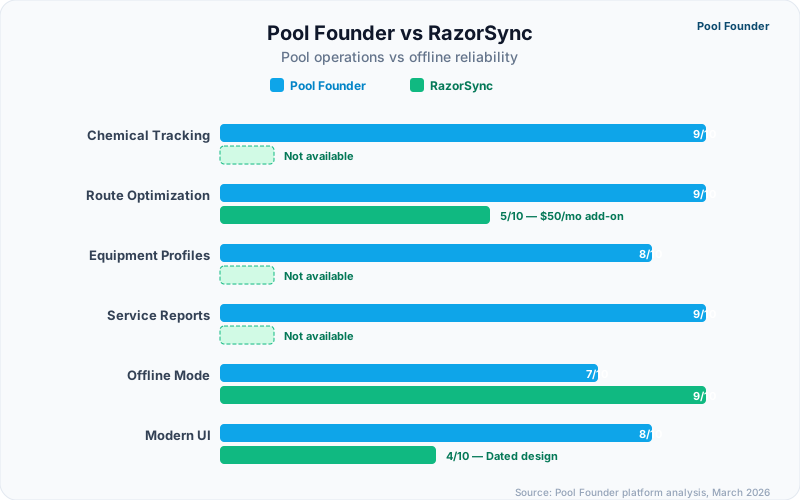
The aging interface is worth discussing honestly. While RazorSync is functional, the visual design and interaction patterns feel noticeably older compared to platforms like Pool Founder, Housecall Pro, or even Jobber. For pool companies trying to recruit younger technicians who expect modern app experiences, this can affect adoption and daily satisfaction.
RazorSync Pricing
RazorSync uses a tiered pricing model based on team size, with a 14-day free trial. Pricing is higher than many competitors at every tier, particularly for growing teams.
| Plan | Price | Includes |
|---|---|---|
| Solo | $90/month ($85/mo billed annually) | Up to 2 users, core features, mobile app, QuickBooks available as $20/mo add-on |
| Team | $225/month ($195/mo billed annually) | Up to 7 users, all features, GPS tracking, QuickBooks included |
| Pro | $499/month ($439/mo billed annually) | Up to 15 users, advanced reporting, priority support, route optimization included |
| Enterprise | Custom pricing | Unlimited users, dedicated account management, API access |
At $90/month for a solo operator (up to 2 users), RazorSync costs nearly double Pool Founder's $49/month Solo plan. At the team level the sticker prices are closer — RazorSync's $225/month for up to 7 users sits between Pool Founder's Growth plan ($179/month, up to 6 technicians) and Pro plan ($249/month, up to 10) — but RazorSync still lacks chemical tracking and pool-specific workflows, and route optimization costs another $50/month on the Team plan.
Pros and Cons for Pool Service Companies
Pros
- Best-in-class offline mode with full functionality without connectivity
- Solo plan starts at $90/month for up to 2 users
- Proven reliability with over a decade of continuous service
- Straightforward interface with a manageable learning curve
- QuickBooks integration for invoice and customer sync
- Recurring job scheduling for weekly maintenance visits
Cons
- No chemical tracking, water chemistry logging, or LSI calculator
- Route optimization only as $50/month add-on (Solo/Team) — not pool-route specific
- No pool equipment profiles or warranty tracking per property
- No automated customer-facing service reports with chemical data
- Aging user interface that may affect technician adoption
- Limited third-party integrations compared to modern platforms
- Per-seat pricing is expensive — $90/mo for 2 users, $225/mo for 7, $499/mo for 15
Who Should Consider RazorSync?
RazorSync is a reasonable choice for solo operators or very small service businesses that work in areas with poor cellular coverage and need reliable offline access above all else. If you are a one-person pool and general handyman operation where offline functionality is critical and you do not need pool-specific chemical tracking, RazorSync provides a stable, affordable foundation.
RazorSync is not the right fit for dedicated pool service companies running multi-technician route operations. The lack of chemical tracking, route optimization, and modern UI — combined with per-seat pricing that adds up at the team level — means growing pool companies will quickly outgrow the platform or find themselves building manual workarounds for core pool workflows.
Switching From RazorSync: Migration, Costs, and Timeline
If you are currently on RazorSync and evaluating a switch, the migration process is a key decision factor. RazorSync allows CSV export of customer data and job history, but the export lacks chemical readings (since RazorSync does not track them) and equipment profiles. Plan for 1-2 weeks of manual data cleanup during any migration.
| Migration Factor | RazorSync | Pool Founder |
|---|---|---|
| Data export format | CSV export of customers, jobs, invoices | CSV import with guided mapping wizard |
| Typical setup time | N/A (you are already on it) | 2-4 hours for full migration |
| Onboarding support | Email support, knowledge base | Live onboarding call + data migration assistance |
| Contract commitment | Monthly or annual (cancel anytime) | No contract — 30-day free trial, cancel anytime |
| Switching cost estimate | N/A | $0 (free trial covers migration period) |
| Time to full productivity | N/A | 1-2 weeks including technician training |
Key consideration: RazorSync does not export chemical logs or equipment data (because it does not track them). If you have been keeping separate spreadsheets for chemical readings, you will need to import those separately or start fresh with a pool-specific platform.
Modern Pool-Specific Alternative: Pool Founder
Pool Founder provides every core field service feature RazorSync offers — scheduling, CRM, invoicing, mobile app — plus the pool-specific tools that RazorSync lacks: chemical tracking with LSI calculations, AI-powered route optimization, per-pool equipment profiles, and automated customer service reports. The modern interface is designed for how pool technicians actually work in the field.
| Feature | RazorSync | Pool Founder |
|---|---|---|
| Chemical tracking | Not available | Built-in with LSI calculator |
| Route optimization | $50/mo add-on (Solo/Team), included Pro+ | AI-powered recurring routes |
| Equipment profiles | Not available | Per-pool equipment inventory |
| Service reports | Not available | Automated with photos and chemicals |
| Offline mode | Excellent — full offline functionality | Mobile app with offline support |
| User interface | Functional but dated | Modern, pool-specific design |
| Pricing | $90-$499/month by team size | $49-$249/month by team size |
| Best for | Solo operators needing offline access | Pool companies of any size |
For pool service companies ready to move beyond general-purpose tools and adopt software designed specifically for pool operations, Pool Founder delivers the industry-specific depth that RazorSync — despite its reliability and longevity — was never built to provide.
Ready to streamline your pool service business?
Pool Founder gives you route optimization, automated invoicing, chemical tracking, and everything else you need to run a more profitable pool business.
Frequently Asked Questions
Can RazorSync be used as a water treatment CRM?
RazorSync functions as a basic CRM for water treatment businesses, offering customer management, scheduling, dispatching, invoicing, and QuickBooks integration. However, it lacks specialized water treatment features like chemical tracking, water chemistry logging, dosing calculations, and treatment history per property. For pool and spa water treatment companies specifically, RazorSync does not include any tools for recording chlorine, pH, alkalinity, CYA, or other chemical readings. Water treatment businesses that need to track treatment history, chemical applications, and water quality metrics over time will find RazorSync insufficient compared to pool-specific platforms like Pool Founder, which includes built-in chemical tracking with LSI calculations and dosage recommendations alongside full CRM functionality.
Does RazorSync have chemical tracking for pool service?
No. RazorSync does not include chemical tracking, water chemistry logging, dosing calculations, or any pool-specific documentation features. Chemical readings would need to be recorded using a separate system or manual logs.
How good is RazorSync's offline mode?
RazorSync's offline mode is one of the best in the field service software category. Technicians can view schedules, access customer data, complete jobs, take photos, and create invoices while fully offline. All data syncs automatically when connectivity returns. This is particularly valuable for pool routes in rural areas or properties with poor cell coverage.
Is RazorSync still being actively developed?
RazorSync continues to receive updates and maintains active customer support. However, the pace of feature development and UI modernization has been slower compared to newer platforms. The core functionality remains reliable, but businesses expecting frequent feature additions or a cutting-edge interface may be disappointed.
How does RazorSync compare to Pool Founder for pool service?
RazorSync offers solid general field service management with excellent offline capability, while Pool Founder provides pool-specific features including chemical tracking, route optimization, equipment profiles, and automated service reports. Pool Founder's Solo plan costs $49/month versus RazorSync's $90/month for up to 2 users. For dedicated pool companies, Pool Founder is the better operational fit at a lower price point.
How long does it take to switch from RazorSync to another platform?
Most pool companies complete a RazorSync migration in 1-2 weeks. The process involves exporting customer and job data via CSV, importing into the new platform, and training technicians on the new mobile app. RazorSync does not export chemical logs or equipment profiles (since it does not track them), so those records start fresh on a pool-specific platform. Pool Founder offers free migration assistance and a 30-day trial to cover the transition period.
What is the total cost of RazorSync for a pool company with 4 technicians?
For a 4-technician pool company, RazorSync's Team plan costs $225/month (up to 7 users) with QuickBooks sync included, plus a $50/month add-on if you want route optimization — roughly $275/month before payment processing fees. Pool Founder covers the same team size on its Growth plan at $179/month flat with route optimization, chemical tracking, and all other features included.
Sources & References
- RazorSync Official Website
- RazorSync Pricing Page
- Capterra — RazorSync Reviews
- G2 — RazorSync User Reviews