Salt Chlorinators Have Four Main Errors. Here Is How to Fix All of Them.
Salt chlorine generators use electrolysis to convert dissolved salt (sodium chloride) into chlorine. When they work, they are the most hands-off chlorination method available. When they do not, customers call you because their pool is turning green and they have no idea why. The good news is that salt systems have a limited number of failure modes. Most problems come down to salt level, cell condition, water flow, or water temperature.
"Salt pools are my favorite service accounts because when everything is dialed in, the chlorine takes care of itself," says Corey Adams, Pool Founder co-founder and 15-year pool service veteran. "But when a salt cell throws an error, customers panic. They see flashing lights and think the whole system is broken. Usually it is a 15-minute fix." This guide covers every major error code and diagnostic path for the four most common salt chlorinator brands.
How Does a Salt Chlorine Generator Work?
A salt chlorine generator has two components: a control board (power supply) mounted on the equipment pad, and a salt cell (electrolytic cell) plumbed inline after the filter. The control board sends a low-voltage electrical current through the cell. As salt water passes through the cell, the current splits the sodium chloride molecule into sodium and chlorine. The chlorine sanitizes the pool and then recombines with sodium, recycling back into salt. This cycle repeats continuously.
The ideal salt level for most systems is 3,000-3,500 ppm (about 1/10th the salinity of ocean water). The cell generates chlorine proportionally to the output percentage set on the control board and the run time of the pump. More run time and higher output percentage equals more chlorine production.
Salt cells do not last forever. Most cells have a lifespan of 3-5 years, or approximately 10,000 hours of operation. Cell replacement costs $300-800 depending on the brand and cell size. Budget for this when quoting salt system maintenance to customers.
What Does the "Low Salt" Warning Mean?
The low salt warning is the most common salt system alert. It means the control board is reading salt concentration below the minimum operating threshold. But here is the critical detail: the salt reading on the control board is often inaccurate. The board estimates salt level based on electrical conductivity through the cell, which is affected by water temperature, cell scaling, and cell age. Always verify with an independent salt test (drops or electronic meter) before adding salt.
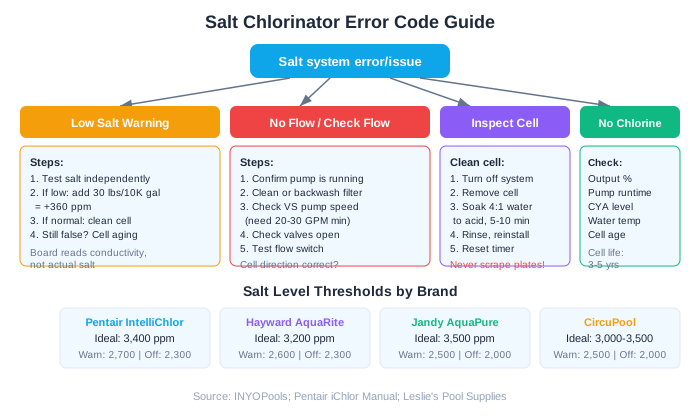
Low Salt Thresholds by Brand
| Brand/Model | Ideal Range (ppm) | Warning Level | Shutdown Level |
|---|---|---|---|
| Pentair IntelliChlor | 3,400 | 2,700 | 2,300 |
| Hayward AquaRite | 3,200 | 2,600 | 2,300 |
| Jandy AquaPure | 3,500 | 2,500 | 2,000 |
| CircuPool | 3,000-3,500 | 2,500 | 2,000 |
Troubleshooting Steps for Low Salt
- 1Test salt level independently using a salt test strip or electronic salt meter. Do not trust the control board reading alone.
- 2If salt is genuinely low, calculate the amount needed. As a rule of thumb, 30 lbs of pool salt raises a 10,000-gallon pool by approximately 360 ppm.
- 3If salt level tests normal but the board reads low, the cell likely needs cleaning. Calcium scale on the cell plates reduces conductivity, making the board think salt is low.
- 4Clean the cell by soaking in a 4:1 water-to-muriatic-acid solution for 5-10 minutes. Rinse thoroughly before reinstalling.
- 5If cleaning does not resolve the false low-salt reading, the cell may be nearing end of life. Cell plates thin over time, changing the conductivity reading.
On Pentair IntelliChlor systems, you can recalibrate the salt reading by pressing the diagnostic button to cycle through readings. If the instant salt reading differs significantly from a lab test, the cell is likely scaled or aging. According to INYOPools, cleaning the cell is the recommended first step before adding salt.
Why Does the Salt System Show "No Flow" or "Check Flow"?
The no-flow error means the salt cell is not detecting water flowing through it. Every salt system has a flow sensor (either a dedicated flow switch or conductivity-based detection) that prevents the cell from energizing without water. Running the cell dry damages the plates and drastically shortens cell life.
Common Causes of No Flow Errors
- Pump not running. The most basic cause. The cell only generates chlorine when the pump is running and water is flowing through the cell.
- Dirty filter. A clogged filter reduces flow rate below the minimum threshold. Clean or backwash the filter.
- Variable speed pump running too slow. Salt cells require minimum flow, typically 20-30 GPM. If the pump is on a low-speed filtration cycle, the flow may not be sufficient. Increase pump speed during chlorination hours.
- Closed or partially closed valves. Check all valves between the pump and the cell, especially diverter valves that may be directing flow to the spa instead of through the cell.
- Failed flow switch. The flow switch itself can fail electrically or get stuck. Test with a multimeter. When the pump is running with adequate flow, the switch should show continuity (closed).
- Cell installed backward. Some cells are directional. The arrow on the cell body must match the direction of water flow. Reverse installation causes the flow sensor to malfunction.
On Hayward AquaRite systems, the "No Flow" LED activates when the flow switch is open. According to Hayward, you should verify the pump is running, check valve positions, and wait 60 seconds after pump startup for the error to clear. If it persists, the flow switch needs testing.
What Does "Inspect Cell" Mean and How Do You Clean a Salt Cell?
The "Inspect Cell" warning is a maintenance reminder based on operating hours. On Hayward AquaRite systems, it appears after approximately 500 hours of cell operation. On Pentair IntelliChlor, the cell indicator light changes from green to yellow to red as the cell ages. This does not necessarily mean the cell is bad. It means you should inspect and clean it.
Salt Cell Cleaning Procedure
- 1Turn off the pump and the salt system.
- 2Disconnect the cell from the plumbing unions. Remove it from the pipe.
- 3Look inside the cell. White calcium scale on the plates means the cell needs cleaning. If the plates are clean, reinstall and reset the timer.
- 4Mix a cleaning solution: 4 parts water to 1 part muriatic acid in a plastic bucket. Always add acid to water, never water to acid.
- 5Place the cell in the solution with the electrical connector end up and out of the liquid. Soak for 5-10 minutes. You will see bubbling as the acid dissolves the calcium.
- 6Remove the cell and rinse thoroughly with a garden hose.
- 7Inspect the plates. If heavy scale remains, repeat the soak for another 5 minutes.
- 8Reinstall the cell and reset the inspect cell timer per the manufacturer instructions.
Never scrape salt cell plates with a metal tool. This damages the precious metal coating on the plates and drastically reduces cell life. If acid soaking does not remove the scale, the cell may need replacement.
Why Is the Salt Cell Not Producing Chlorine Even with No Errors?
This is the most frustrating scenario: no error codes, the cell appears to be running, but free chlorine levels are dropping or the pool is turning green. Several conditions can reduce or eliminate chlorine production without triggering an error.
- Output percentage too low. Check the output setting on the control board. During peak summer heat, most pools need 60-80% output. Many customers set it at 20-40% thinking they are saving the cell, but chlorine demand in summer often exceeds production at low settings.
- Insufficient pump run time. The cell only produces chlorine when the pump is running. If the pump runs 6 hours a day, that is 6 hours of chlorine production. Most salt pools need 8-12 hours of pump run time in summer.
- High CYA levels. Cyanuric acid above 80-100 ppm binds chlorine and reduces its sanitizing effectiveness. Even if the cell is producing chlorine, the chlorine is not effective against algae and bacteria at high CYA levels.
- Water temperature below 60 degrees F. Most salt cells shut down or reduce output significantly when water temperature drops below 60 degrees. This is by design to protect the cell, but it means the pool gets no chlorine production in cold weather.
- Worn-out cell. Salt cells have a finite life of approximately 10,000 hours or 3-5 years. As plates thin, chlorine production drops even when the system shows it is running. If the cell is old and cleaning does not restore production, it is time for replacement.
- High phosphate levels. While debated, very high phosphate levels (1,000+ ppb) can feed algae growth faster than the cell can keep up with chlorine demand.
What Are the Error Codes for Each Major Brand?
Here is a quick-reference table of the most common error codes across the four major salt chlorinator brands. Keep this handy on your phone or printed in your truck for fast field diagnosis.
Pentair IntelliChlor Error Indicators
| Indicator | Meaning | Action |
|---|---|---|
| Cell LED green | Normal operation | No action needed |
| Cell LED yellow | Cell aging, reduced life | Clean cell, plan replacement |
| Cell LED red | Cell near end of life | Replace cell soon |
| Salt LED flashing | Salt below 2,700 ppm | Test and add salt or clean cell |
| Flow LED off | No flow detected | Check pump, filter, valves |
| Power center LED off | No power to unit | Check breaker and wiring |
Hayward AquaRite Error LEDs
| LED Status | Meaning | Action |
|---|---|---|
| No Flow LED on | Flow switch open | Check pump and flow switch |
| Check Salt + Inspect Cell flashing | Salt 2,500-2,600 ppm | Test salt, still producing chlorine |
| Check Salt + Inspect Cell solid | Salt below 2,300 ppm | Production halted, add salt or clean cell |
| High Salt LED on | Salt above 4,500 ppm | Dilute by draining and refilling |
| Inspect Cell on | Maintenance timer expired | Inspect, clean, and reset timer |
On the Hayward AquaRite, when Check Salt and Inspect Cell LEDs flash together, the system is still producing chlorine but at reduced capacity. When both LEDs are solid (not flashing), chlorine production has stopped completely. This distinction matters for prioritizing the service call.
How Do You Extend Salt Cell Life?
A salt cell is the most expensive consumable in a salt pool system at $300-800 per replacement. Extending cell life from 3 years to 5 years saves the customer $300-800 and keeps them on your service. Here are the maintenance practices that maximize cell longevity.
- Maintain proper salt level. Running at the low end of the range forces the cell to work harder. Keep salt at the middle to upper end of the ideal range (3,200-3,500 ppm for most brands).
- Clean the cell regularly. Inspect every 3 months and clean when scale is visible. Do not wait for the inspect cell warning. Calcium scale makes the cell work harder and shortens plate life.
- Keep calcium hardness in check. High calcium hardness (above 400 ppm) accelerates scale formation on the cell plates. Maintain 200-400 ppm and consider a scale inhibitor in hard-water areas.
- Maintain proper pH. High pH (above 7.8) increases scale formation. Keep pH at 7.2-7.6 on salt pools.
- Use a reverse-polarity cell. Most modern cells are self-cleaning via reverse polarity, which reverses the current to shed scale automatically. If the customer has an older non-reversing cell, upgrade at next replacement.
- Do not oversize the cell. A larger cell relative to pool size means the cell runs at a lower output percentage, reducing wear. If replacing, consider going one size up.
Run a pool route?
The business side of what you just read.
Pricing, chemical costs, and the tools owners use to keep the numbers straight.
- Commercial pool service pricing2026 rate tables and the cost-plus formula
- Chemical cost per poolWhat chemicals actually cost per stop
- Chemical tracking softwareLog readings and dosing from the pool deck
- Pool service softwareRoutes, invoicing, and service reports in one app
- Free profit & rate calculatorsProfit per pool, minimum rate, break-even
Frequently Asked Questions
How long do salt chlorinator cells last?
Salt cells typically last 3-5 years, or approximately 10,000 hours of operation. Cell life depends on water chemistry, cleaning frequency, and run time. Maintaining proper salt, pH, and calcium levels and cleaning the cell every 3 months can extend life toward the 5-year mark.
Can you add too much salt to a pool?
Yes. Salt levels above 4,500 ppm can damage the cell and trigger a high-salt error that shuts down chlorine production. The only way to lower salt is dilution through partial drain and refill. Over-salting is expensive to fix, so always test before adding salt.
Why does my salt chlorinator show low salt when salt level tests normal?
Calcium scale on the cell plates reduces electrical conductivity, causing the control board to underestimate salt concentration. Clean the cell with a muriatic acid soak. If the false reading persists after cleaning, the cell plates are thinning from age and the cell needs replacement.
Do salt pools still need regular chlorine?
Yes, occasionally. Salt cells cannot produce chlorine fast enough to overcome high chlorine demand from algae blooms, heavy rain, or large pool parties. Supplemental liquid chlorine or cal-hypo shock may be needed in these situations. Salt pools also do not produce chlorine when water temperature is below 60 degrees F.
How do you reset the inspect cell timer on a Hayward AquaRite?
With the pump running, press and hold the diagnostic button on the AquaRite control board for 3-5 seconds until the Inspect Cell LED turns off. This resets the 500-hour maintenance timer. Only reset after inspecting and cleaning the cell.
Sources & References
- INYOPools - Why Is My Salt System Not Generating Chlorine
- INYOPools - Hayward AquaRite Error Code Guide
- INYOPools - How to Know When a Salt Cell is Bad
- Pentair - iChlor Salt Chlorinator Installation and User Guide
- Discount Salt Pool - Troubleshooting Salt Chlorine Generators
- Leslie's Pool Supplies - How to Troubleshoot a Hayward AquaRite