Three Automation Platforms Dominate the Pool Industry. Here Is What You Need to Know About Each.
Pool automation controls pumps, heaters, lights, valves, chlorinators, and water features from a single panel and a smartphone app. Three manufacturers control the vast majority of the residential and commercial automation market: Pentair (IntelliCenter), Hayward (OmniLogic), and Jandy/Zodiac (iAqualink). Each system uses different communication protocols, has different expansion capabilities, and fails in different ways.
"Automation calls are either really simple or really expensive. There is not much in between," says Corey Adams, Pool Founder co-founder and 15-year pool service veteran. "A loose wire takes five minutes. A dead control board takes $800. The key is knowing how each system communicates so you can trace the problem without guessing." This guide breaks down each platform, how it communicates with equipment, common failure points, and troubleshooting communication errors.
How Does Pentair IntelliCenter Work?
Pentair IntelliCenter is the current-generation automation system replacing the older EasyTouch and IntelliTouch platforms. It communicates with Pentair equipment (IntelliFlo pumps, IntelliChlor salt cells, MasterTemp heaters, IntelliBrite lights) over an RS-485 serial bus. Each piece of equipment has a unique address on the bus, and the IntelliCenter panel acts as the master controller. The system supports up to 40 devices depending on the panel configuration.
Pentair IntelliCenter Key Features
- Touchscreen panel. Full-color touchscreen at the equipment pad with drag-and-drop scheduling.
- Pentair Home app. Remote monitoring and control via smartphone. Requires a ScreenLogic interface or built-in Wi-Fi adapter.
- Multi-body support. Controls pool and spa separately from a single panel, including shared equipment.
- Freeze protection. Automatically runs pump and heater when air temperature drops below threshold.
- Chemistry monitoring. Integrates with IntelliChem for automated pH and chlorine dosing.
Pentair Communication Troubleshooting
- Pump shows offline. Check RS-485 wiring between panel and pump drive. Verify pump address matches panel configuration. Power cycle the pump.
- App cannot connect remotely. The ScreenLogic interface needs a stable Wi-Fi or Ethernet connection to the home router. Check the green LED on the ScreenLogic unit. If flashing, the connection is active. If solid or off, the unit has lost network.
- Heater not responding to commands. Verify heater address in both the IntelliCenter setup menu and the heater firmware. Check RS-485 wiring polarity (swapped A/B wires cause communication failure).
- Panel frozen or unresponsive. Hold the power button for 10 seconds for a hard reset. If the panel does not recover, the control board may need firmware update or replacement.
How Does Hayward OmniLogic Work?
Hayward OmniLogic is a highly customizable automation platform with a modern touchscreen interface and robust app connectivity. It communicates with Hayward equipment (TriStar VS pumps, AquaRite salt systems, Universal H-Series heaters) through a proprietary network. OmniLogic supports "themes" that allow users to create one-touch scenarios like "Party Mode" that activates lights, water features, and heating simultaneously.
Hayward OmniLogic Key Features
- Customizable dashboard. Drag-and-drop interface for building custom control pages.
- Sense and Dispense. Integrated chemical automation for pH and chlorine.
- Theme programming. Create multi-device presets activated with a single tap.
- Voice control. Compatible with Amazon Alexa and Google Home.
- Expandable architecture. Add relay modules and sensor modules as needed.
Hayward Communication Troubleshooting
- Touchscreen shows "No connection to backyard." The touchscreen communicates with the main relay board wirelessly or via Ethernet. Check the cable between the screen and the panel, or verify the wireless bridge is functioning.
- Pump not responding. Hayward VS pumps connect to OmniLogic through a dedicated communication cable. Check for pinched or damaged cables at the pump drive. Verify the pump is configured as a variable speed device in the OmniLogic setup.
- App connectivity lost. OmniLogic uses an HLC (Hayward Logic Connect) module for cloud connectivity. Verify the HLC has a solid green LED indicating network connectivity. Reset the HLC by power cycling it.
- Intermittent relay failures. Relays that control non-communicating devices (like older single-speed pumps or non-Hayward heaters) can fail from heat exposure or contact wear. Listen for the relay click when toggling the device on and off from the panel.
How Does Jandy iAqualink Work?
Jandy (now part of Fluidra/Zodiac) has been in pool automation longer than most competitors. The iAqualink system is the current generation, building on the legacy AquaLink RS platform. It is known for reliable, straightforward automation with a clean web interface and mobile app. Jandy communicates with its own equipment (Jandy VS FloPro pumps, AquaPure salt systems, JXi heaters) through a serial communication bus similar to Pentair.
Jandy iAqualink Key Features
- OneTouch control. Simple one-button presets for common scenarios.
- Web and app control. Browser-based interface and iAqualink mobile app for remote access.
- Legacy compatibility. iAqualink modules can be added to older AquaLink RS panels for app connectivity.
- Alexa and Google Home support. Voice commands for basic pump, heater, and light control.
- Variable speed pump integration. Direct communication with Jandy VS FloPro pumps for speed scheduling.
Jandy Communication Troubleshooting
- iAqualink module not connecting to cloud. The iAqualink module requires a wired Ethernet connection to the home router. Verify the cable and check for a solid green LED on the module. If the LED is flashing amber, the module cannot reach the cloud server.
- Equipment not responding. Each piece of Jandy equipment has a DIP switch or address setting. Verify the address matches the panel configuration. Jandy uses a 2-wire communication bus. Check wiring for breaks or shorts.
- AquaLink RS panel errors. Older panels display alphanumeric error codes on the LCD. Common codes: "SENSOR OPEN" (temperature sensor disconnected), "FLOW" (flow switch fault), "HEATER COOL" (heater cycling on high limit).
- Wireless remote not pairing. Jandy wireless remotes communicate on a specific frequency. If the remote loses its pairing, use the panel to re-pair by entering the linking mode and pressing the remote connect button within 60 seconds.
Can You Mix Automation Brands with Different Equipment Brands?
This is one of the most common questions in pool service, and the answer is: it depends on the equipment type. Each automation system communicates natively with its own brand of equipment using proprietary protocols. Non-communicating devices (devices controlled by simple relay on/off) can be used with any automation system.
| Equipment Type | Cross-Brand Compatible? | Notes |
|---|---|---|
| Single-speed pump | Yes | Relay on/off works with any system. |
| Variable speed pump | Limited | Communication protocol is brand-specific. Some support relay-based speed control. |
| Gas heater | Partial | Fireman switch relay works for on/off. Full communication requires same brand or adapter. |
| Salt chlorinator | Limited | Typically requires same brand for % output control. |
| Lights (12V/120V) | Yes | Relay on/off works. Color sync requires same brand. |
| Actuator valves | Yes | Standard 24V actuators work with any system. |
Never connect a Hayward heater communication wire directly to a Pentair or Jandy automation panel. The protocols are incompatible and direct connection can damage control boards. Use a relay interface for basic on/off control instead.
What Are the Most Common Automation System Failures?
Across all three brands, the most common automation problems fall into five categories. Understanding these patterns helps you diagnose faster regardless of the brand you encounter.
- 1Wi-Fi/cloud connectivity loss. The app stops working. Usually a router issue, ISP outage, or failed network module. The pool equipment still operates on its local schedule; only remote access is lost.
- 2Relay failure. A device stops turning on or off. The relay contacts weld shut (device stays on) or burn out (device stays off). Replace the relay or relay board.
- 3Communication bus failure. Multiple devices stop responding. A single broken wire, water-damaged connection, or short on the RS-485 bus takes down all communication. Isolate by disconnecting devices one at a time.
- 4Sensor failure. Temperature readings are wildly inaccurate (showing 150 degrees or 0 degrees). The thermistor or its wiring has failed. Replace the sensor.
- 5Panel power supply failure. The panel is completely dark. Check the transformer (usually 24V AC for the control board). Transformers fail from power surges and age.
Always install a surge protector at the automation panel. Power surges from lightning or utility switching are the leading cause of control board and transformer failures. A $30 surge protector can save an $800 control board.
How Do You Compare the Three Systems for New Installations?
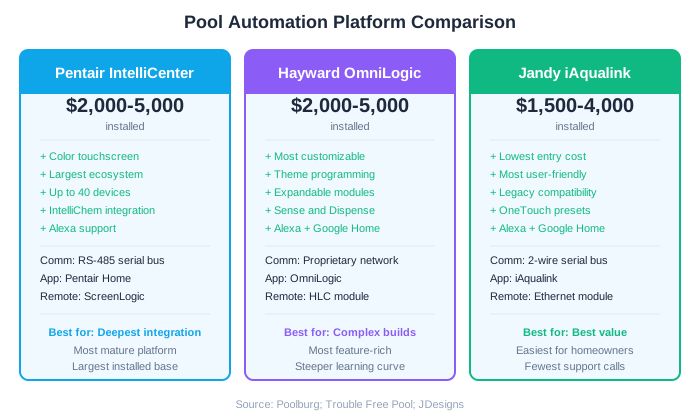
When a customer asks which automation system to install, the answer usually depends on what equipment is already in the ground. Matching the automation brand to the existing pump, heater, and chlorinator brand gives you the best integration with the least hassle. But for new construction or full equipment replacements, here is how the three compare.
| Feature | Pentair IntelliCenter | Hayward OmniLogic | Jandy iAqualink |
|---|---|---|---|
| Typical installed cost | $2,000-5,000 | $2,000-5,000 | $1,500-4,000 |
| Touchscreen panel | Yes (color) | Yes (color) | No (LCD text on base models) |
| App quality | Good (Pentair Home) | Good (OmniLogic) | Good (iAqualink) |
| Voice assistant support | Alexa | Alexa, Google Home | Alexa, Google Home |
| Chemical automation | IntelliChem add-on | Sense & Dispense built-in | iAqualink Chemistry add-on |
| Legacy panel upgrade path | Yes (EasyTouch/IntelliTouch) | Yes (older Pro Logic) | Yes (AquaLink RS) |
| Max devices | Up to 40 | Expandable via modules | Up to 16 (base), expandable |
All three systems are reliable and well-supported. The differences are in the details: Hayward OmniLogic offers the most customization for complex builds. Pentair IntelliCenter has the largest installed base and widest equipment ecosystem. Jandy iAqualink offers the lowest entry cost and the simplest upgrade path from legacy panels.
Run a pool route?
The business side of what you just read.
Pricing, chemical costs, and the tools owners use to keep the numbers straight.
- Commercial pool service pricing2026 rate tables and the cost-plus formula
- Chemical cost per poolWhat chemicals actually cost per stop
- Chemical tracking softwareLog readings and dosing from the pool deck
- Pool service softwareRoutes, invoicing, and service reports in one app
- Free profit & rate calculatorsProfit per pool, minimum rate, break-even
Frequently Asked Questions
What is the best pool automation system?
The best system depends on your existing equipment. Match the automation brand to the equipment brand for the best integration. For new builds, Pentair IntelliCenter has the widest ecosystem, Hayward OmniLogic offers the most customization, and Jandy iAqualink has the lowest entry cost. All three are reliable.
Can you add automation to an existing pool?
Yes. All three major automation systems can be retrofitted to existing pools. Non-communicating equipment (single-speed pumps, basic heaters) is controlled via relays. For full integration, you may need to upgrade key equipment to the same brand as the automation system.
Why does my pool automation app say offline?
The app requires a network module (ScreenLogic for Pentair, HLC for Hayward, iAqualink module for Jandy) to connect to the cloud. Check the module LED status, verify the Ethernet cable or Wi-Fi connection, and confirm your home internet is working. The pool equipment still operates on its local schedule when the cloud is down.
How much does pool automation installation cost?
A basic pool automation installation ranges from $1,500 to $5,000 depending on the system, number of devices, and complexity. Pentair IntelliCenter and Hayward OmniLogic typically run $2,000-5,000 installed. Jandy iAqualink starts around $1,500 for a base configuration.
Can you use a Pentair pump with a Hayward automation system?
A Pentair single-speed pump can be controlled by any automation system via a simple relay. A Pentair IntelliFlo variable speed pump cannot communicate natively with Hayward OmniLogic. You would lose variable speed control and scheduling unless you use a relay interface for basic high/low speed switching.