Three Minutes at the Equipment Pad Prevents 80% of Emergency Callbacks.
Most pool service callbacks are not caused by chemistry problems. They are caused by equipment issues that were visible during the last routine visit but never checked. A pump that was starting to lose prime, a filter running 10 PSI above its clean baseline, a heater throwing an intermittent error code. These are all things you can catch in under three minutes if you have a consistent equipment pad inspection routine. According to the California Pool Association, a structured maintenance checklist catches the majority of equipment failures before they become customer-facing emergencies.
"Early in my career I would walk straight to the pool, check the water, dump chemicals, and leave," says Corey Adams, Pool Founder co-founder and 15-year pool service veteran. "I barely looked at the equipment pad unless something was obviously wrong. Then I started getting callbacks for things I should have caught, a pump seal that had been dripping for weeks, a filter gauge pegged at 30 PSI. Once I built a 5-point pad check into every single visit, my callback rate dropped by half and my repair revenue went up because I was catching problems early and quoting the fix on the spot."
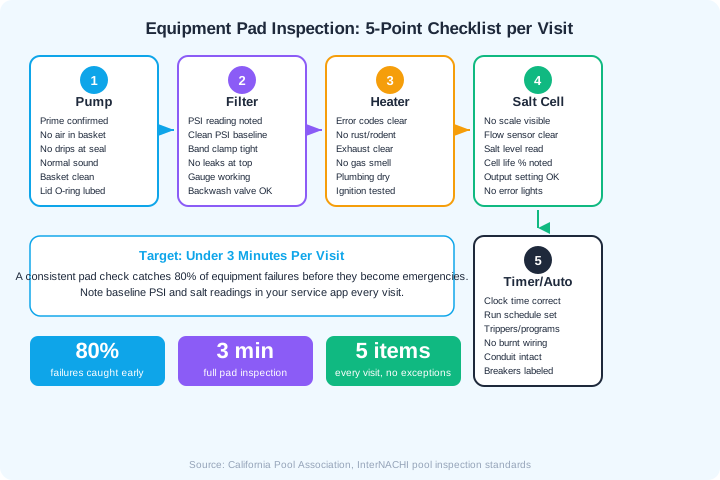
Check 1: Pump Inspection (45 Seconds)
The pump is the heart of the circulation system, and it gives you the most diagnostic information at a glance. A healthy pump has a full strainer basket with no air bubbles, makes a smooth humming sound, and has a dry base. Any deviation from that baseline tells you something is changing.
- 1Look at the strainer basket. It should be full of water with no visible air bubbles. Persistent air bubbles mean a suction-side air leak is developing.
- 2Listen to the motor. A normal pump hums steadily. Grinding means bearing wear. Cavitation (gravel-like rattling) means starved suction. Loud humming without spinning means a failed start capacitor.
- 3Check the base for drips. Water at the base center indicates a shaft seal leak. Water at the lid indicates an O-ring issue. Both are cheap to fix now but expensive to ignore.
- 4Verify the pump basket is clean. A basket packed with debris restricts flow and forces the pump to work harder, shortening motor life.
- 5Check the lid O-ring. It should be pliable and lubricated. A dry, cracked O-ring lets air into the system and should be replaced immediately.
If you run a variable-speed pump, note the RPM and watts displayed. A sudden increase in watts at the same RPM indicates growing restriction in the system, usually a dirty filter or developing clog.
Check 2: Filter Pressure (30 Seconds)
Filter pressure is the single most important number on the equipment pad after water chemistry. Every filter has a clean operating pressure (the PSI reading right after a backwash or cartridge clean) and a dirty operating pressure that rises over time. When pressure reaches 8-10 PSI above the clean baseline, the filter needs service. Recording this number on every visit lets you predict when a filter clean is needed instead of reacting when the customer complains about cloudy water.
- Read and record the pressure gauge. Compare it to the clean baseline. If you do not know the baseline, ask the customer or establish one on the next filter clean.
- Check the gauge itself. A gauge stuck at zero or showing an impossible reading needs replacement. A $10 gauge swap takes 30 seconds and restores your diagnostic visibility.
- Inspect the filter body. Look for water leaks at the band clamp, drain plug, or top of the filter. DE powder on the outside of a DE filter means a cracked grid or manifold.
- Check the backwash valve. On multiport valves, confirm the handle is in the Filter position. A valve left in Backwash or Rinse after the last service sends water straight to waste.
| Pressure Reading | What It Means | Action |
|---|---|---|
| At clean baseline | Filter is clean, flow is normal | Record and move on |
| 5-7 PSI above baseline | Filter is loading normally | Schedule service in 2-4 weeks |
| 8-10 PSI above baseline | Filter needs cleaning now | Clean filter or backwash today |
| Below baseline | Pump issue, valve issue, or gauge failure | Diagnose, do not ignore |
| Zero or stuck reading | Gauge is broken | Replace the gauge ($8-12) |
Check 3: Heater Inspection (30 Seconds)
Not every pool has a heater, but when one is present, a quick visual and diagnostic check can catch problems before they strand a customer with a cold pool on a weekend. Heater repairs are some of the most expensive in pool service, and early detection makes the difference between a $200 sensor replacement and a $3,000 heat exchanger swap.
- 1Check the display for error codes. Most modern heaters (Pentair MasterTemp, Hayward H-Series, Raypak) display diagnostic codes when something is wrong. Write down any codes you see, even intermittent ones that clear on their own.
- 2Inspect for rust, corrosion, or rodent activity. Open the front panel if accessible. Rodent nests on the gas manifold or igniter area are a fire hazard and cause ignition failures.
- 3Verify the exhaust is clear. Blocked exhaust from leaves, debris, or bird nests causes heater lockouts and can trigger CO safety shutdowns.
- 4Smell for gas. Any natural gas or propane odor at the heater or connections means an immediate gas leak concern. Turn off the heater and advise the customer to contact their gas company.
- 5Check plumbing connections for drips. Water leaking onto or into the heater corrodes internal components. Heater bypass valves that drip should be rebuilt.
Common heater error codes to know: Pentair MasterTemp E05 = stack flue sensor (call for service). Hayward H-Series IF = ignition failure (check gas supply and igniter). Raypak R/RP IID2 = ignition lockout (reset and check gas pressure). Keep a cheat sheet on your phone.
Check 4: Salt Chlorinator Cell (30 Seconds)
Salt chlorinator cells are the most expensive consumable in a salt pool system, ranging from $400-800 for a replacement cell. A cell that is scaling up, running at maximum output, or showing low cell life percentage needs attention. Catching these issues early lets you schedule a cell clean or replacement proactively, which earns customer trust and prevents the surprise of a dead cell in the middle of summer.
- Check for scale buildup. Look through the clear cell housing (if equipped) or the inspection cap. White calcium deposits on the plates reduce output and shorten cell life.
- Read the salt level. Note the salt reading on the control panel. If it reads below 2,700 PPM, the cell is working harder than it needs to. If it reads "low salt" or "no flow," diagnose immediately.
- Note the cell life percentage. Many modern controllers (Pentair IntelliChlor, Hayward AquaRite) display cell life remaining. Below 20% means replacement should be planned.
- Check the output setting. A cell running at 100% output constantly means the system is undersized for the pool, the salt level is low, or demand is high. Adjust or advise.
- Verify no error lights. Red lights or flashing indicators mean the controller has detected a problem. Check the manual for the specific code.
$400-800
Average cost to replace a salt chlorinator cell
Source: Leslie's Pool Supplies
Check 5: Timer and Automation System (30 Seconds)
A timer or automation system that is set wrong or malfunctioning can waste energy, cause chemistry problems from insufficient circulation, or run the pump during peak electricity rates. A quick check ensures the system is running as designed and catches electrical issues before they become safety hazards.
- Verify the clock time is correct. Mechanical timers drift, and power outages reset digital timers. A timer that is off by two hours shifts the entire pump schedule.
- Confirm the run schedule. The pump should run long enough for at least one full water turnover per day (typically 8-12 hours for residential pools). Check that trippers or program schedules match the design intent.
- Inspect wiring and conduit. Look for burnt, melted, or discolored wires, especially at high-amp connections like pump circuits. Damaged electrical whips or conduit are a fire hazard.
- Check that breakers are labeled. Unlabeled breakers lead to confusion during service and are a safety concern. Label them on the first visit if they are not marked.
- Test automation features. If the pool has a Pentair IntelliCenter, Hayward OmniLogic, or Jandy iAquaLink, confirm it is connected and responsive. Check for firmware update notifications.
"I cannot tell you how many times I have found a timer set to run the pump from 10 PM to 6 AM because someone bumped the trippers during a filter clean. The pool goes green, the customer blames the chemistry, and the whole time the pump was just running at the wrong hours. Check the timer every visit." - Corey Adams
How to Build the Pad Check Into Your Workflow
The biggest obstacle to a consistent equipment pad inspection is not time. It is habit. Three minutes is nothing compared to the 15-20 minutes you spend on water chemistry and cleaning. The challenge is making the pad check automatic so you do it even when you are rushed.
- 1Start at the pad, not the pool. Reverse your normal workflow. Walk to the equipment pad first, run through the five checks, then go to the pool. This forces the inspection before you get distracted by water issues.
- 2Record baseline readings. Use your service app to log filter PSI, salt readings, and pump data on every visit. Trends are more valuable than individual readings.
- 3Create a photo protocol. Photograph any anomaly: drips, error codes, discolored wires, scale buildup. Photos make quoting repairs easier and give the customer visual proof.
- 4Flag items in your service report. Even if you do not fix it today, note it. "Filter PSI at 22, clean baseline is 12, recommend filter clean next visit." This creates a paper trail and positions you as proactive.
- 5Train your entire team. If you have multiple techs, the pad check must be standard across all of them. Consistency is what makes this work.
Pool Founder lets you record equipment readings, attach photos, and flag maintenance items directly from the field. When the customer sees a service report that includes equipment condition, PSI readings, and proactive recommendations, they trust you more. That trust translates to higher close rates on repair work and lower churn.
Run a pool route?
The business side of what you just read.
Pricing, chemical costs, and the tools owners use to keep the numbers straight.
- Commercial pool service pricing2026 rate tables and the cost-plus formula
- Chemical cost per poolWhat chemicals actually cost per stop
- Chemical tracking softwareLog readings and dosing from the pool deck
- Pool service softwareRoutes, invoicing, and service reports in one app
- Free profit & rate calculatorsProfit per pool, minimum rate, break-even
Frequently Asked Questions
How long should an equipment pad inspection take?
A thorough 5-point equipment pad inspection should take under 3 minutes once you build the habit. The goal is not a deep diagnostic on every visit. It is a quick visual and auditory scan that catches developing problems before they become emergencies.
What is the most important thing to check on the equipment pad?
Filter pressure relative to its clean baseline is the single most diagnostic reading on the pad. A rising pressure trend tells you the filter is loading, the pump is working harder, and the pool will start losing water clarity soon. Record it every visit.
Should I check the equipment pad if the customer did not report a problem?
Yes, every single visit. Most equipment failures develop gradually over days or weeks before they cause a visible problem in the pool. By the time the customer notices green water or low flow, the underlying equipment issue has been worsening for multiple service visits. Proactive checks are the whole point.
What should I do if I find a problem during the pad check?
Document it with a photo, note it in the service report, and provide the customer with a repair estimate before you leave. If it is urgent (gas leak, electrical damage, pump running dry), take immediate action to shut down the affected equipment and notify the customer. If it can wait, schedule the repair for the next visit.
How do I know the clean baseline PSI for each filter on my route?
The clean baseline is the filter pressure reading immediately after a backwash (sand/DE) or cartridge clean with the pump running at normal speed. Record this number after every filter service. If you inherit a route and do not know the baseline, perform a filter clean on the next visit and record the reading as your new baseline.