Why Is the Langelier Saturation Index the Professional Standard for Water Balance?
The Langelier Saturation Index (LSI) is the single number that tells you whether your pool water is balanced, corrosive, or scale-forming. Developed by Dr. Wilfred Langelier in 1936, the LSI calculates calcium carbonate saturation by combining pH, water temperature, calcium hardness, total alkalinity, and total dissolved solids into one value. An LSI of 0.0 means perfect equilibrium. The accepted target range is -0.3 to +0.3, and anything outside that range is actively damaging pool surfaces and equipment.
Most pool techs learn to chase individual chemical ranges: pH 7.2-7.6, alkalinity 80-120 ppm, calcium hardness 200-400 ppm. Those ranges are a starting point, but they do not tell you if the water is actually balanced. You can have every single reading inside the "ideal" range and still have corrosive water. The LSI is the only way to know for sure, and it is the standard used by the Pool & Hot Tub Alliance (PHTA), the National Plasterers Council, and every major pool chemistry manufacturer.
What Is the Langelier Saturation Index?
The Langelier Saturation Index is a calculated value that predicts whether water will deposit calcium carbonate scale or dissolve it from pool surfaces. It uses six water chemistry factors to determine saturation: pH, water temperature, calcium hardness, carbonate alkalinity (total alkalinity corrected for cyanuric acid), total dissolved solids, and cyanuric acid. The result is a single number, typically between -2.0 and +2.0, that tells you exactly what your water wants to do.
Think of it this way: water always wants to reach equilibrium with calcium carbonate. If your water is undersaturated (negative LSI), it will steal calcium from your plaster, grout, and equipment to satisfy itself. If it is oversaturated (positive LSI), it dumps the excess calcium onto your surfaces as scale. The LSI tells you which direction the water is pulling.
Why Do Individual Chemical Ranges Fall Short?
Individual parameter ranges were the industry standard for decades, but they have a critical flaw: they do not account for how the parameters interact with each other. A pool with pH 7.4, alkalinity 80 ppm, calcium hardness 200 ppm, and a water temperature of 60 degrees Fahrenheit has an LSI of approximately -0.4, which means the water is corrosive and actively etching plaster, even though every individual reading falls within the commonly published "ideal" range.
Temperature is the factor most techs overlook. Cold water holds less calcium in solution, which means winter pools in cooler climates need higher calcium hardness to stay balanced. The LSI accounts for this. Individual ranges do not.
What Is the LSI Formula and How Do You Calculate It?
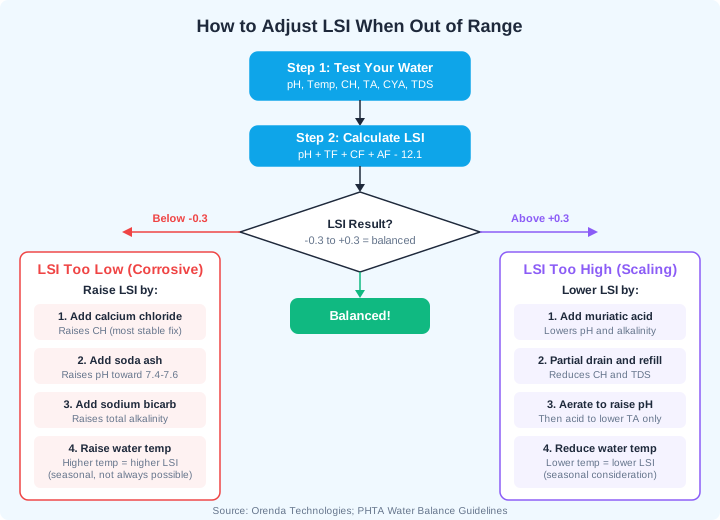
The pool industry uses a simplified version of the original Langelier formula: LSI = pH + TF + CF + AF - 12.1. In this equation, TF is the temperature factor, CF is the calcium hardness factor, AF is the alkalinity factor (corrected for cyanuric acid), and 12.1 is a constant derived from a TDS value of approximately 1,000 ppm. Each factor is looked up in a standard table based on your measured water values.
What Are the LSI Factor Tables?
The temperature factor, calcium hardness factor, and alkalinity factor are logarithmic conversions of your measured values. You do not need to calculate logarithms yourself. Use the standard Langelier factor tables below to convert your test results into the numbers used in the formula.
| Water Temp (F) | TF | Calcium Hardness (ppm) | CF | Alkalinity (ppm) | AF |
|---|---|---|---|---|---|
| 32 | 0.0 | 25 | 1.0 | 25 | 1.4 |
| 46 | 0.2 | 50 | 1.3 | 50 | 1.7 |
| 53 | 0.3 | 75 | 1.5 | 75 | 1.9 |
| 60 | 0.4 | 100 | 1.6 | 100 | 2.0 |
| 76 | 0.6 | 150 | 1.8 | 150 | 2.2 |
| 84 | 0.7 | 200 | 1.9 | 200 | 2.3 |
| 94 | 0.8 | 300 | 2.1 | 300 | 2.5 |
| 105 | 0.9 | 400 | 2.2 | 400 | 2.6 |
How Does Cyanuric Acid Affect the LSI Calculation?
Cyanuric acid (CYA) does not enter the LSI formula directly, but it changes one of the most important inputs: alkalinity. A portion of your total alkalinity reading is actually "cyanurate alkalinity," which does not contribute to calcium carbonate saturation. You must subtract this portion before looking up your alkalinity factor. The standard correction is to multiply your CYA reading by a correction factor that varies with pH: approximately 0.33 at pH 7.5. For a pool with 50 ppm CYA and 100 ppm total alkalinity, the corrected carbonate alkalinity would be roughly 83 ppm (100 minus 17).
The CYA correction is why pools with high stabilizer levels (80+ ppm CYA) often have lower LSI values than expected. High CYA reduces effective carbonate alkalinity, which drives the LSI negative. If you are seeing etching on a pool with "normal" alkalinity and high CYA, this is likely the cause.
What Is an Example LSI Calculation?
Here is a real-world example. Your test results: pH 7.4, water temperature 84 F, calcium hardness 300 ppm, total alkalinity 100 ppm, CYA 100 ppm, TDS under 1,000 ppm. First, correct the alkalinity: 100 - (100 x 0.31 at pH 7.4) = 69 ppm corrected alkalinity. Using the factor tables, the closest AF for 69 ppm is approximately 1.9. Now calculate: LSI = 7.4 + 0.7 + 2.1 + 1.9 - 12.1 = 0.0. This water is perfectly balanced.
Change just one variable, dropping the temperature to 60 F (winter conditions), and the math shifts: LSI = 7.4 + 0.4 + 2.1 + 1.9 - 12.1 = -0.3. That same water is now borderline corrosive just because the temperature dropped. This is exactly why the LSI matters more than individual ranges.
What Is the Target LSI Range for Swimming Pools?
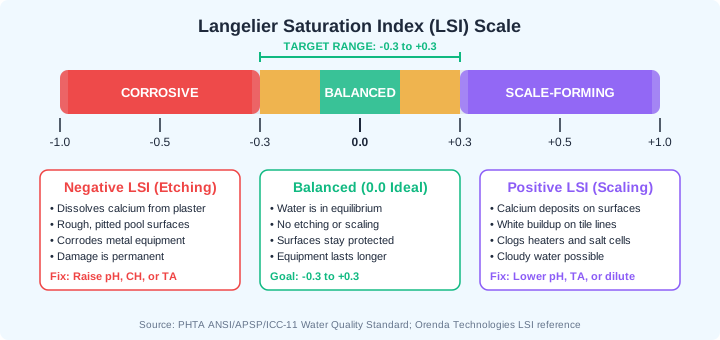
The accepted target LSI range for swimming pools is -0.3 to +0.3, with 0.0 representing perfect calcium carbonate equilibrium. This range is endorsed by the PHTA in their ANSI/APSP/ICC-11 water quality standard and used by leading pool chemistry companies including Orenda Technologies and Taylor Technologies. Water within this range is neither aggressively dissolving surfaces nor depositing scale.
Does the Target Range Differ for Saltwater Pools?
Saltwater pools benefit from a tighter target range of -0.2 to +0.2. Salt chlorine generators run at higher temperatures inside the cell, which locally elevates the LSI and promotes calcium scale buildup on the cell plates. Keeping the overall pool LSI closer to zero gives the generator room to function without excessive scaling. If you are servicing salt pools and seeing frequent cell cleanings, a high LSI is almost always the culprit.
What Does the Orenda Calculator Use for LSI Ranges?
The Orenda Calculator, one of the most widely used LSI tools in the pool industry, uses a color-coded system: green for 0.00 to +0.30 (ideal), yellow for -0.01 to -0.30 (acceptable but close to aggressive), purple for +0.31 and above (scale-forming), and red for -0.31 and below (corrosive). This matches the PHTA standard and is the reference most professional pool operators rely on daily.
What Happens When LSI Is Too Low? Understanding Etching
When LSI drops below -0.3, your pool water becomes undersaturated with calcium carbonate and turns aggressive. Aggressive water seeks equilibrium by dissolving calcium from the nearest available source, which is your pool surfaces. In plaster and pebble pools, this means the water literally eats the finish. The result is called etching, and it is permanent.
What Does Pool Etching Look Like?
Etched plaster feels rough to the touch, like fine sandpaper. In white plaster pools, etching creates an uneven, chalky texture. In colored plaster or pebble finishes, etching strips pigment from the cement matrix, leaving white discoloration marks and light rings around exposed aggregate. The National Plasterers Council identifies rough surface texture as the primary characteristic of etched plaster. Unlike scaling, etching cannot be reversed. It can only be partially smoothed through acid washing or surface sanding, both of which remove additional material.
- Rough, sandpaper-like texture on plaster surfaces
- White marks or rings around aggregate in pebble finishes
- Pitting and delamination in severe cases
- Corroded metal components including heater exchangers, ladders, and light rings
- Deterioration of grout between tile lines
- Damage is irreversible and may void surface warranties
The National Plasterers Council and most plaster manufacturers require proper LSI balance as a condition of their surface warranty. Documented LSI violations below -0.3 are one of the most common reasons warranty claims get denied. If you are servicing a pool with a new plaster finish, tracking LSI is not optional.
What Happens When LSI Is Too High? Understanding Scaling
When LSI rises above +0.3, the water becomes oversaturated with calcium carbonate and begins depositing the excess onto surfaces. This is scaling. Calcium scale appears as white, chalky deposits on tile lines, inside heaters, on salt generator cells, and across plaster surfaces. While scaling is less permanently destructive than etching (you can remove scale without removing surface material), it damages equipment and creates ongoing maintenance problems.
Where Does Scale Form First?
Calcium precipitates out of solution at the warmest points in the system first. This means your heater heat exchanger, salt chlorine generator cell, and sun-exposed tile lines are the first places you will see scale buildup. A pool with an LSI of +0.5 may look fine on the surface while the heater is silently calcifying inside. By the time you see scale on the waterline tile, the equipment has already been affected.
| LSI Range | Water Condition | What Happens | Urgency |
|---|---|---|---|
| Below -0.5 | Highly corrosive | Rapid etching, equipment corrosion, plaster dissolution | Immediate action required |
| -0.3 to -0.5 | Moderately corrosive | Slow etching, gradual surface degradation | Adjust within 24 hours |
| -0.3 to +0.3 | Balanced | No scaling or etching, surfaces protected | No action needed |
| +0.3 to +0.5 | Mildly scale-forming | Light scale on heated surfaces | Adjust within 1 week |
| Above +0.5 | Heavily scale-forming | Visible scale, cloudy water, clogged equipment | Immediate action required |
How Do You Adjust LSI When It Is Out of Range?
Adjusting the LSI means changing one or more of the five input variables: pH, water temperature, calcium hardness, total alkalinity, or TDS. You cannot change temperature on demand in most cases, and TDS only changes significantly through dilution. That leaves three practical levers: pH, calcium hardness, and total alkalinity. The key principle is to build your foundation with calcium hardness first because it is the most stable factor, then fine-tune with alkalinity and pH.
How Do You Raise LSI (Fix Corrosive Water)?
When LSI is below -0.3, you need to raise one or more factors. The most durable fix is adding calcium chloride to raise calcium hardness. Calcium is the most stable variable in pool water. It does not gas off, get consumed by sanitizer demand, or drift with weather. Adding 10 pounds of calcium chloride per 10,000 gallons raises calcium hardness by approximately 100 ppm. For faster but less permanent results, raise pH with soda ash (sodium carbonate) or raise alkalinity with sodium bicarbonate.
How Do You Lower LSI (Fix Scaling Water)?
When LSI is above +0.3, the most effective approach is adding muriatic acid, which lowers both pH and total alkalinity simultaneously. For pools with excessively high calcium hardness (above 400 ppm in standard pools), a partial drain and refill is the most practical solution since you cannot chemically remove calcium from pool water. In high-TDS situations like older saltwater pools, dilution through partial drain and refill also addresses TDS.
Which LSI Factor Should You Adjust First?
Start with calcium hardness. Orenda Technologies and other leading chemistry educators recommend building your water balance foundation with calcium hardness because it changes the least over time. Set calcium to at least 300 ppm for standard pools (400 ppm for pools that freeze in winter), then adjust alkalinity to the 80-100 ppm range, and let pH settle naturally. This approach gives you a stable baseline that requires less ongoing adjustment compared to chasing pH and alkalinity all day.
| To Raise LSI | Chemical | What It Does |
|---|---|---|
| Raise calcium hardness | Calcium chloride | 10 lbs per 10,000 gal raises CH ~100 ppm |
| Raise pH | Soda ash (sodium carbonate) | Raises pH toward 7.4-7.6 |
| Raise alkalinity | Sodium bicarbonate (baking soda) | Raises TA toward 80-120 ppm |
| To Lower LSI | Chemical/Method | What It Does |
|---|---|---|
| Lower pH and TA | Muriatic acid | Lowers both pH and total alkalinity |
| Lower CH and TDS | Partial drain and refill | Dilutes calcium and dissolved solids |
| Lower TA only | Acid + aeration | Acid drops TA, aeration raises pH back up |
Why Does Water Temperature Matter So Much for LSI?
Water temperature is the LSI factor most pool operators underestimate. The temperature factor in the LSI formula ranges from 0.0 at 32 F to 0.9 at 105 F. That 0.9-point swing can move a pool from balanced to corrosive or vice versa without any chemical changes. In practice, a pool that is perfectly balanced at 84 F in summer may be 0.3 points lower (and corrosive) at 60 F in winter, just from the temperature change alone.
How Should You Adjust for Seasonal Temperature Changes?
Professional pool operators recalculate the LSI whenever water temperature changes by more than 10 degrees. During fall and winter, this usually means raising calcium hardness or total alkalinity to compensate for the lower temperature factor. During spring warm-up, the reverse may be needed: monitor for rising LSI as temperatures climb and be ready to add acid if scaling conditions develop. Heated pools and spas need special attention because the heater creates a localized high-temperature zone where scale forms even if the bulk water LSI appears balanced.
If you service pools in a climate with cold winters, plan to raise calcium hardness heading into fall. A pool balanced at 0.0 LSI in 84 F summer water will drop to roughly -0.3 LSI at 60 F with no other changes. Raising calcium from 300 to 400 ppm (CF goes from 2.1 to 2.2) offsets most of the temperature drop.
How Does LSI Apply to Different Pool Surface Types?
The LSI applies to all pool types, but the consequences of being out of range vary significantly by surface material. Cementitious surfaces like plaster, pebble, and quartz finishes are the most vulnerable because they contain calcium that aggressive water can dissolve. Vinyl liner and fiberglass pools are not immune, though. Low-LSI water still corrodes metal equipment, fittings, and heat exchangers in any pool type.
| Surface Type | Low LSI Risk | High LSI Risk | Target LSI |
|---|---|---|---|
| White plaster | Etching, rough texture, chalky appearance | Scale deposits, discoloration | -0.3 to +0.3 |
| Pebble/quartz | Aggregate exposure, white rings, pigment loss | Scale film over finish | -0.3 to +0.3 |
| Vinyl liner | Wrinkling, fading, brittleness over time | Scale on liner surface | -0.3 to +0.3 |
| Fiberglass | Gel coat fading, osmotic blistering | White scale deposits | -0.3 to +0.3 |
Why Is LSI Critical for New Plaster Pools?
New plaster is at its most vulnerable during the first 28 days of curing. The National Plasterers Council startup procedure explicitly requires LSI monitoring during this period. Fresh plaster releases calcium hydroxide ("plaster dust") into the water as it cures, which temporarily raises LSI. If the fill water is aggressive (low LSI) before the pool is filled, it can etch the uncured plaster before the startup process even begins. Professional operators test the fill water LSI before filling a new pool and pre-treat if necessary.
How Do Professional Pool Operators Use LSI in the Field?
In the field, most professional operators do not calculate LSI by hand. They use a mobile app. The Orenda Calculator is the most popular, and it integrates directly with some pool service software platforms. Test your water, enter the values, and the app gives you a real-time LSI reading with color-coded results: green means balanced, yellow means borderline, red means corrosive, purple means scaling. It also calculates the exact chemical doses needed to bring the water back into range.
How Often Should You Check LSI?
At minimum, calculate LSI monthly and whenever water temperature changes significantly (spring warm-up, fall cool-down, after heavy rain dilution). For commercial pools and new plaster pools, weekly LSI checks are standard. High-risk situations like post-drain refills, acid washes, or after adding large chemical doses should always include an LSI calculation before and after treatment.
- Residential pools: calculate LSI at least monthly and at each seasonal transition
- Commercial pools: weekly LSI checks, documented per PHTA ANSI/APSP/ICC-11
- New plaster (first 28 days): daily LSI monitoring during startup
- After any large chemical addition, drain/refill, or acid wash
- Whenever water temperature changes by 10+ degrees
What Should You Document for Customers?
Tracking LSI over time creates a water balance history that protects both you and your customer. If a plaster warranty claim arises, documented LSI records prove you maintained proper water balance. Digital chemical logs that include LSI alongside standard readings (pH, chlorine, alkalinity, calcium hardness) give customers visibility into the quality of your service and differentiate you from competitors who only track chlorine and pH.
Run a pool route?
The business side of what you just read.
Pricing, chemical costs, and the tools owners use to keep the numbers straight.
- Commercial pool service pricing2026 rate tables and the cost-plus formula
- Chemical cost per poolWhat chemicals actually cost per stop
- Chemical tracking softwareLog readings and dosing from the pool deck
- Pool service softwareRoutes, invoicing, and service reports in one app
- Free profit & rate calculatorsProfit per pool, minimum rate, break-even
Frequently Asked Questions
What is a good LSI number for a swimming pool?
A good LSI for a swimming pool is between -0.3 and +0.3, with 0.0 being perfectly balanced. This range is the standard set by the PHTA in their ANSI/APSP/ICC-11 water quality specification. For saltwater pools, aim for the tighter range of -0.2 to +0.2 to protect the salt chlorine generator cell from scaling.
What five factors go into the LSI calculation?
The LSI uses pH, water temperature, calcium hardness, total alkalinity (corrected for cyanuric acid), and total dissolved solids (TDS). The simplified formula is LSI = pH + TF + CF + AF - 12.1, where TF, CF, and AF are factors looked up in standard tables based on your test results. The 12.1 constant accounts for TDS at approximately 1,000 ppm.
What happens if LSI is below -0.3?
Water with an LSI below -0.3 is undersaturated with calcium carbonate and becomes corrosive. It dissolves calcium from plaster surfaces (causing permanent etching), corrodes metal equipment like heater heat exchangers and ladders, and degrades grout between tiles. The damage from low-LSI etching is irreversible, unlike scaling which can be removed.
Can you have "ideal" individual readings but still have unbalanced water?
Yes. A pool with pH 7.4, alkalinity 80 ppm, and calcium hardness 200 ppm looks perfect by individual range standards. But at a water temperature of 60 F, those same readings produce an LSI of approximately -0.4, which is corrosive. Temperature is the most commonly overlooked factor, especially in cooler climates or during winter months.
How does cyanuric acid (CYA) affect the LSI?
CYA does not enter the LSI formula directly, but it reduces your effective alkalinity. A portion of total alkalinity becomes "cyanurate alkalinity" when CYA is present, and only carbonate alkalinity counts toward LSI. The correction factor is roughly 1/3 of CYA at pH 7.5. A pool with 80 ppm CYA effectively loses about 27 ppm from its alkalinity for LSI purposes, which can push the index negative.
What is the fastest way to raise LSI on a service call?
The fastest short-term fix is raising pH with soda ash, which has an immediate effect on LSI. The most durable fix is adding calcium chloride to raise calcium hardness, because calcium stays stable in pool water and does not drift like pH. Add 10 pounds of calcium chloride per 10,000 gallons to raise calcium hardness by approximately 100 ppm.
Sources & References
- PHTA ANSI/APSP/ICC-11 Water Quality Standard for Public Pools and Spas
- Orenda Technologies - Understanding LSI: The Langelier Saturation Index
- Orenda Technologies - LSI Balance and Calcium Management (Pillar 1)
- CL Industries - Water Balance, Scaling, and Etching: Protecting Pool Plaster
- National Plasterers Council - Pool Plaster FAQ and Maintenance
- Pool Masta - Saturation Index SI for Pool Water (Factor Tables)
- AQUA Magazine / PHTA - Water Balance Indexes
- Orenda Technologies - Understanding Cyanurate Alkalinity