Why Do Most Software Trials End Without a Decision?
Most pool service owners sign up for a free trial, click around the dashboard for 10 minutes, get distracted by a route day, and never come back. Two weeks later the trial expires and they are back to spreadsheets. The software was fine. The evaluation process was not. Without a structured plan, a free trial is just a guided tour of features you will never actually test under real conditions.
The three most common mistakes during software trials are choosing based on price alone without evaluating pool-specific features, selecting enterprise software that has 80% of features you will never use, and making a permanent decision based on a 14-day trial that did not include a billing cycle or a rain-delay rescheduling scenario. This 7-day plan eliminates those mistakes by testing every critical feature systematically with your real data and real routes.
Corey Adams, Pool Founder co-founder and 15-year pool service veteran: "I tried four different software platforms before building Pool Founder. The problem was the same every time. I would sign up, add a few customers, think it looked cool, then realize three months later that the billing did not work the way I needed. Test billing before you test anything else. It is the feature that makes or breaks your daily workflow."
What Is the 7-Day Evaluation Plan?
The 7-day plan tests one major feature area per day so you can give each one your full attention. Day 1 covers setup and data entry. Day 2 covers routing. Day 3 is a live field test. Day 4 tests customer communication. Day 5 tests billing and invoicing. Day 6 covers reporting. Day 7 is your decision day. Total investment: about 5 hours across the week, with Day 3 being the only full route day.
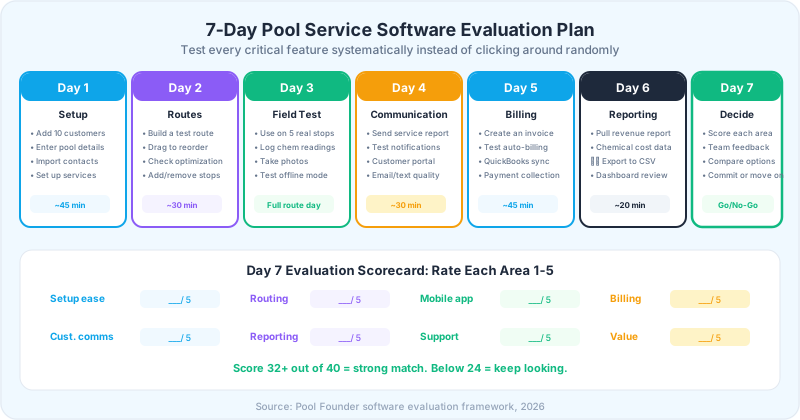
Day 1: Setup and Data Entry
Day 1 answers the question: how easy is it to get your data into this system? Time yourself. If it takes more than 5 minutes to add a single customer with pool details, chemical history, and service schedule, the software is going to create friction every time you onboard a new customer. Good software makes data entry fast. Great software imports your existing customer list from a CSV or another platform.
Day 1 Checklist
- 1Add 10 real customers with full details: name, address, phone, email, pool type, pool size, equipment notes, gate code
- 2If you have a customer list in a spreadsheet, test the import function. Note how many fields import correctly.
- 3Set up your service types (weekly maintenance, one-time clean, opening/closing, equipment repair)
- 4Add your pricing for each service type
- 5Note how long each task takes and where you get stuck
- 6Test on your phone. Can you do the same tasks on mobile that you can on desktop?
The import function is critical if you have more than 30 customers. Re-entering 100 customers manually can take 8-10 hours. If the software cannot import from a C S V file, ask support to help with data migration before committing.
Day 2: Route Building and Optimization
Route optimization is the single most valuable feature in pool service software. Companies using route optimization service 22% more pools per day and reduce driving time by 31%. Day 2 tests whether the routing is actually useful or just a map view of your customer pins.
Day 2 Checklist
- 1Build a route for one day of the week using your 10 test customers
- 2Test drag-and-drop reordering. Can you rearrange stops easily?
- 3If the software has auto-optimization, run it. Does the suggested order make sense geographically?
- 4Add a new stop in the middle of the route. Does the system re-optimize?
- 5Remove a stop (simulating a cancellation). Does the route adjust?
- 6Check the estimated drive time and total route time. Does it match your real-world experience?
- 7Test turn-by-turn navigation integration (Google Maps or Waze link)
The routing test reveals whether the software understands pool service routing or is just a generic field service tool. Pool-specific routing should account for service day assignments, time windows (some customers want morning service), and the ability to move stops between days when you need to rebalance a route.
Day 3: Field Testing on a Real Route
Day 3 is the most important day of the trial. Take the software on a real route day. Use it on at least 5 actual stops. This is where you discover whether the app works in the field or only works in the office. Cell signal drops, wet fingers on screens, sunlight glare, and the pressure of a full schedule expose problems that a desktop demo never will.
Day 3 Field Test Checklist
- 1Open the route on your phone. Navigate to the first stop.
- 2Log chemical readings: free chlorine, pH, alkalinity, CYA. Time how long this takes.
- 3Add service notes and take a photo of the pool. Can you do this from the same screen?
- 4Mark the stop as complete. Does it auto-advance to the next stop?
- 5Test offline mode: put your phone in airplane mode and try to complete a stop. Do the entries save?
- 6Send a test service report to yourself. What does the customer see?
- 7At the end of the day, check: did all your field entries sync to the desktop dashboard?
| Feature | What to Test | Deal Breaker If Missing |
|---|---|---|
| Chemical logging | Speed of entry, number of taps per reading | Yes, this is your daily workflow |
| Photo capture | In-app camera or separate app required? | Yes, photos prove service completion |
| Offline mode | Data entry without cell signal | Yes for rural areas, no if always in city |
| Auto-advance | Moves to next stop after completion | No, but saves significant time |
| GPS tracking | Records location at each stop | No, but valuable for team accountability |
The field test should feel faster than your current process, not slower. If logging a chemical reading takes more taps on the app than writing it on paper, the software will not survive daily use. Your technicians will abandon it within a week.
Days 4-5: Customer Communication and Billing
Day 4 tests customer-facing features. Send yourself a test service report, a notification, and a customer portal login. Look at them from the customer perspective. Are they clear? Professional? Does the service report show chemical readings, tasks completed, and photos? Day 5 tests billing, which is the feature that most directly affects your cash flow and daily operations.
Day 4: Customer Communication Checklist
- Send a service completion report to your own email. Does it look professional?
- Test notification preferences: can customers choose text vs. email?
- Log into the customer portal (if available). Can you see service history, chemical readings, and invoices?
- Test the scheduling notification: does it send a reminder before service day?
- Send a custom message to a test customer. Is the interface intuitive?
Day 5: Billing and Invoicing Checklist
- 1Create a monthly recurring invoice for a test customer
- 2Set up auto-billing (if available). Test a dummy payment.
- 3Generate a one-time invoice for an equipment repair or one-time clean
- 4Test the QuickBooks or Xero sync. Do line items, amounts, and customer names match?
- 5Review payment processing fees. What is the per-transaction rate?
- 6Send an invoice to yourself. What does the customer see?
- 7Test late payment reminders. Can you set automatic follow-up at 3, 7, and 14 days?
QuickBooks sync is the single most requested integration for pool service companies. Test it on Day 5, not after you commit. Create an invoice in the pool software and verify it appears in QuickBooks with the correct customer name, line items, and amount. One-directional sync (pool software to QuickBooks) is usually sufficient.
Days 6-7: Reporting and Final Decision
Day 6 tests reporting capabilities. Even with only a week of data, you should be able to pull meaningful reports. Day 7 is decision day. Score each feature area, collect feedback from anyone else who tested the software, and make a go/no-go decision before the trial expires.
Day 6: Reporting Checklist
- Pull a revenue report. Can you filter by route, customer, or date range?
- Pull a chemical usage or chemical cost report (if available)
- View a technician productivity report (stops completed, time per stop)
- Export a report to CSV or PDF. Does the export include all relevant data?
- Check: does the dashboard show the six key metrics (revenue, chemical cost, churn, productivity, collection, completion)?
Day 7: Decision Scorecard
| Category | Weight | Score (1-5) | Notes |
|---|---|---|---|
| Setup ease and data import | 10% | ___ | How long to add 10 customers? |
| Route building and optimization | 15% | ___ | Does it actually save drive time? |
| Mobile app field experience | 20% | ___ | Fast enough for daily use? |
| Billing and invoicing | 20% | ___ | Auto-billing + QuickBooks sync? |
| Customer communication | 15% | ___ | Professional service reports? |
| Reporting and analytics | 10% | ___ | Can you pull the six key reports? |
| Customer support quality | 5% | ___ | Response time during trial? |
| Value for price | 5% | ___ | Monthly cost vs. time saved? |
A score of 32 or higher out of 40 indicates a strong match. Between 24 and 31 means the software has potential but has gaps you need to evaluate against alternatives. Below 24 means keep looking. Do not settle for software that scores poorly on your top-weighted categories (mobile app, billing, routing) even if it scores well on secondary features.
30 days
is Pool Founder's free trial, with no credit card required, more than double the typical 14-day trial offered by most platforms. Longer trials let you test a full billing cycle.
Source: Pool Founder 2026
What Hidden Costs Should You Check Before Committing?
The monthly subscription price is not the total cost of ownership. Before committing to any pool service software, check for hidden costs that can add 30-50% to the base price. Some platforms charge setup fees, per-customer overages, integration fees, and data export fees that are not obvious during the trial.
| Hidden Cost | Typical Range | How to Check |
|---|---|---|
| Setup/onboarding fee | $0-$2,000 | Ask directly. Some charge after trial ends. |
| Data migration | $0-$1,000+ | Ask if they import from your current system. |
| Payment processing | 2.9% + $0.30/transaction | Check if you can use your own processor. |
| QuickBooks sync | $0-$30/month extra | Some include it, some charge separately. |
| Per-customer overages | $1-$3/customer/month | Check plan limits and overage rates. |
| Data export fees | $0-$500 | Can you export all data if you leave? |
| Training/support | $0-$200/hour | Is onboarding included or billed separately? |
Ask this question before committing: "If I decide to leave in 6 months, can I export all my customer data, service history, and chemical logs?" If the answer is no or comes with a fee, you are locking your data into a system you may not be able to leave easily. Data portability protects your business.
Ready to streamline your pool service business?
Pool Founder gives you route optimization, automated invoicing, chemical tracking, and everything else you need to run a more profitable pool business.
Frequently Asked Questions
How long should a pool service software free trial be?
At minimum, 14 days to test core features. Ideally 30 days to cover a full billing cycle and experience rain delays, rescheduling, and month-end reporting. Pool Founder offers a 30-day trial with full feature access and no credit card required, which is more than double the industry standard 14-day trial.
What is the most important feature to test during a pool service software trial?
The mobile app field experience (Day 3 of the evaluation plan). Pool service software lives or dies on how it performs in the field on your phone. If logging chemical readings takes more taps than writing on paper, your techs will abandon it. Test on a real route day, not just in the office.
Should I import all my customers during a free trial?
No. Start with 10-15 customers on one route. This gives you enough data to test routing, billing, and reporting without the risk of importing your entire database into a system you may not choose. Import everything after you commit.
How much does pool service software cost per month?
Pool service software ranges from $0 (limited free plans) to $500+/month for top-tier plans. Most solo and small pool companies pay $49-$100/month for a platform that includes routing, chemical tracking, billing, and customer communication. The total cost should include payment processing fees, QuickBooks sync charges, and any per-customer overages.
Can I switch pool service software after I commit?
Yes, but switching costs time and disrupts operations. Data migration, team retraining, and customer notification take 1-4 weeks depending on company size. The best way to avoid switching costs is to run a thorough 7-day trial that tests all critical features before committing. Invest the time upfront to save months of pain later.