Why Is Payroll the Most Stressful Part of Growing a Pool Business?
Running routes is what you signed up for. Calculating federal withholding, matching FICA, filing quarterly 941s, and tracking SUTA rates by state is not. But the moment you hire your first employee, payroll becomes your most legally sensitive recurring task. Miss a deposit deadline and the IRS charges penalties starting at 2% and escalating to 15% of the unpaid amount. File a form late and you face $50-$280 per form depending on how late.
The good news: payroll software has made this dramatically easier for small pool companies. For $40-$80 per month, tools like Gusto and QuickBooks Payroll handle calculation, withholding, filing, deposits, and year-end forms automatically. This guide walks through everything you need to understand about payroll even if the software does the math for you, because you still need to know what is being calculated and why.
In 2026, the Social Security wage base increased to $184,500. The combined FICA rate remains 15.3% (7.65% employer, 7.65% employee). These numbers affect every paycheck your technicians receive.
What Payroll Taxes Do Pool Service Employers Owe?
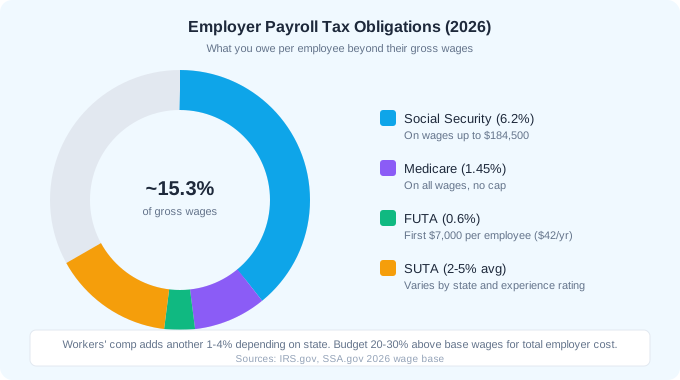
As an employer, you have two types of payroll tax obligations: amounts you withhold from employee paychecks and amounts you pay from your own funds. Understanding both is critical because you are personally liable for payroll taxes even if your business cannot pay them.
Employee Withholdings (You Collect and Remit)
| Tax | Rate | Wage Base | Notes |
|---|---|---|---|
| Federal income tax | Varies by W-4 | All wages | Based on employee W-4 filing status and allowances |
| Social Security | 6.2% | Up to $184,500 | 2026 wage base limit |
| Medicare | 1.45% | All wages | Additional 0.9% on wages over $200,000 |
| State income tax | Varies by state | All wages | FL, TX, NV, WY, WA have no state income tax |
Employer Taxes (You Pay from Business Funds)
| Tax | Rate | Wage Base | Annual Cost per $40K Employee |
|---|---|---|---|
| Social Security match | 6.2% | Up to $184,500 | $2,480 |
| Medicare match | 1.45% | All wages | $580 |
| FUTA | 0.6% (after credit) | First $7,000 | $42 |
| SUTA | 2-5% (varies) | First $7,000-$15,000 | $350-$750 |
| Total employer taxes | ~10-13% | $3,452-$3,852 |
New employers typically receive the highest SUTA rate in their state because they have no claims history. After 2-3 years with no unemployment claims, your rate drops significantly. In Florida, new employer rates start at 2.7% and can drop to 0.1% with a clean history.
How Do You Set Up Payroll from Scratch?
Setting up payroll requires registrations at the federal level, state level, and potentially local level before you process your first paycheck. Here is the complete setup sequence.
- 1Apply for an EIN on IRS.gov (free, instant online). This is your federal employer tax ID.
- 2Register with EFTPS (Electronic Federal Tax Payment System) for depositing payroll taxes. This can take 5-7 business days to receive your PIN by mail.
- 3Register with your state revenue department for state income tax withholding (unless in a no-income-tax state).
- 4Register with your state labor department for SUTA (State Unemployment Tax). Every state requires this.
- 5Obtain workers' compensation insurance. Required in most states from the first employee.
- 6Choose and set up payroll software (Gusto, QuickBooks Payroll, or Square Payroll).
- 7Collect employee documents: W-4 (federal withholding), state withholding form, I-9 (employment eligibility), direct deposit authorization.
- 8Set your pay schedule: biweekly is the most common for small pool companies.
- 9Run your first payroll and verify that withholdings, deposits, and pay stubs are correct.
2-3 hours
total setup time for payroll registrations and software (excluding workers comp shopping)
Which Payroll Software Should Pool Companies Use?
For pool service companies with 1-10 employees, three platforms dominate: Gusto, QuickBooks Payroll, and Square Payroll. Your choice should depend on what accounting software you already use and whether you need HR features beyond basic payroll.
| Feature | Gusto | QuickBooks Payroll | Square Payroll |
|---|---|---|---|
| Base price | $40/mo | $45/mo | $35/mo |
| Per employee | $6/mo | $6/mo | $6/mo |
| Cost for 3 employees | $58/mo | $63/mo | $53/mo |
| Auto tax filing | All plans | All plans | All plans |
| Direct deposit speed | 2 business days | Same day | 1-2 business days |
| QuickBooks integration | Yes (sync) | Native | Yes (sync) |
| Workers comp admin | Yes (pay-as-you-go) | Yes | No |
| Onboarding tools | Excellent | Basic | Basic |
| Benefits admin | Health, 401k, HSA | Health | None |
| Best for | HR + payroll combo | QB accounting users | Simplicity and low cost |
If you already use QuickBooks Online for accounting, QuickBooks Payroll is the obvious choice. The native integration means payroll expenses automatically categorize in your books without manual entry or syncing delays. If you do not use QuickBooks or want more robust HR tools (onboarding checklists, benefits administration, PTO tracking), Gusto is the better option.
Never run payroll manually for ongoing employees. The risk of calculation errors, missed tax deposits, and filing mistakes far exceeds the $40-$80/month cost of software. A single late deposit penalty can cost more than a year of payroll software.
What Is the Payroll Tax Deposit Schedule?
The IRS assigns you a deposit schedule based on your total payroll tax liability during a lookback period. New employers and those with less than $50,000 in payroll taxes during the lookback period are monthly depositors. Larger employers deposit semi-weekly.
Monthly Deposit Schedule (Most Small Pool Companies)
If you are a monthly depositor, payroll taxes for each month are due by the 15th of the following month. January payroll taxes are due February 15th. If the 15th falls on a weekend or holiday, the deposit is due the next business day. For a pool company with 3 technicians earning $40,000 each, monthly payroll tax deposits run approximately $3,000-$3,500.
Quarterly and Annual Filings
- Form 941 (Quarterly): Due by the last day of the month following the quarter end (April 30, July 31, October 31, January 31). Reports total wages, withholdings, and employer FICA.
- Form 940 (Annual): Due January 31 for the prior year. Reports FUTA tax.
- W-2s (Annual): Due to employees by January 31. Due to SSA by January 31.
- State quarterly filings: Varies by state but typically align with federal quarters.
- Year-end reconciliation: Verify total deposits match total liability before filing annual forms.
Payroll software files all of these forms automatically. Gusto and QuickBooks Payroll both handle 941, 940, W-2, and state filings as part of their base subscription. This alone justifies the monthly cost.
How Do You Handle Overtime for Pool Technicians?
Pool service peak season means long days. A technician servicing 18-20 pools per day in June may work 45-50 hours per week. Under the FLSA, non-exempt employees (which includes virtually all pool technicians) must receive 1.5x their regular rate for hours worked over 40 in a workweek.
Overtime Calculation Examples
| Pay Model | Regular Rate | 45-Hour Week Pay | Overtime Cost |
|---|---|---|---|
| Hourly ($18/hr) | $18.00/hr | $810 (40x$18 + 5x$27) | $45 overtime premium |
| Salary ($40K/yr) | $19.23/hr | $826.92 | $48.08 overtime premium |
| Per-stop ($12/stop, 90 stops) | $16.36/hr* | $818 + OT adjustment | Varies by hours worked |
The per-stop overtime calculation is the most complex. You divide total weekly earnings by total hours worked to get the regular rate, then pay an additional 0.5x that rate for each overtime hour. If a technician earns $900 from 90 stops in a 50-hour week, the regular rate is $18/hr and you owe an additional $9/hr (0.5x) for each of the 10 overtime hours, adding $90 to their pay.
California has daily overtime requirements: 1.5x after 8 hours in a single day and 2x after 12 hours. This is in addition to weekly overtime. If your pool company operates in California, this significantly affects payroll calculations during peak season.
What Are Pool Service-Specific Payroll Considerations?
Pool service has several payroll wrinkles that generic small business guides miss. Seasonal fluctuations, drive time compensation, vehicle reimbursements, and chemical allowances all affect how you structure and calculate payroll.
Drive Time Between Pools
Under the FLSA, time spent traveling between work sites during the workday is compensable hours. A technician who spends 2 hours per day driving between pools is working those 2 hours and must be paid. This is not optional. The only travel time you do not need to pay is the normal commute from home to the first stop and from the last stop to home.
Seasonal Layoffs and Unemployment
If you reduce hours or lay off technicians during winter months, they may file for unemployment. Each claim increases your SUTA rate for future years. To minimize this, offer reduced winter schedules (equipment maintenance, repairs, filter cleaning) rather than full layoffs. Keeping technicians at 20-30 hours per week through winter is cheaper than the SUTA rate increase from unemployment claims.
Vehicle and Mileage Reimbursement
If technicians use personal vehicles, the IRS standard mileage rate for 2026 is $0.70 per mile. Mileage reimbursements at or below the IRS rate are not taxable income to the employee and are not subject to payroll taxes. This is a tax-efficient way to compensate for vehicle use. A technician driving 80 miles per day, 5 days per week, 50 weeks per year would receive $14,000 in tax-free reimbursement.
What Are the Most Common Payroll Mistakes?
The IRS assesses approximately $7 billion in civil payroll tax penalties annually according to IRS enforcement data. Small businesses account for a disproportionate share because they are more likely to handle payroll manually or misunderstand the rules. Here are the mistakes pool companies make most often.
- 1Late deposits. Even one day late triggers a 2% penalty. Five days late jumps to 5%. Over 15 days late hits 10%. Use payroll software with automatic deposits to avoid this entirely.
- 2Not paying overtime correctly. Failing to include per-stop bonuses, commissions, or piecework earnings in the overtime rate calculation is a common violation.
- 3Misclassifying employees as 1099 contractors. This triggers back taxes, penalties, and interest from multiple agencies simultaneously.
- 4Not tracking all hours worked, including drive time between stops. This creates FLSA violations and overtime calculation errors.
- 5Paying "off the books" for weekend or emergency work. All compensation must be run through payroll with proper withholding.
- 6Not filing Form 941 quarterly. Even if you deposit taxes monthly, the quarterly filing is a separate requirement.
- 7Forgetting state requirements. Each state has its own filing deadlines, wage bases, and rates that may differ from federal requirements.
40%
of small businesses pay IRS payroll penalties each year (IRS data)
Ready to streamline your pool service business?
Pool Founder gives you route optimization, automated invoicing, chemical tracking, and everything else you need to run a more profitable pool business.
Frequently Asked Questions
How much does payroll cost for a small pool service company?
Payroll software runs $40-$80/month base plus $6/employee. For a company with 3 technicians, expect $58-$98/month for the software. Employer payroll taxes add approximately 10-13% on top of gross wages (FICA match, FUTA, SUTA). Total employer burden including software, taxes, and workers comp is typically 20-30% above base wages.
Can I do payroll myself to save money?
Technically yes, but the risk is not worth the $40-$80/month savings. Manual payroll requires calculating withholdings, making timely deposits, filing quarterly and annual forms, and staying current on tax rate changes. A single mistake can cost more in penalties than a year of software. Use payroll software.
How often should I run payroll for pool technicians?
Biweekly (every two weeks) is the most common schedule for small pool companies. It balances employee satisfaction (consistent paychecks) with administrative simplicity. Weekly payroll is preferred by some technicians but doubles your processing work. Monthly payroll is legal in most states but unpopular with hourly workers.
Do I need to pay pool techs for drive time between pools?
Yes. Under the FLSA, travel time between work sites during the workday is compensable. You do not need to pay for the normal commute from home to the first stop or from the last stop to home, but all travel between pools during the work day must be paid.
What happens if I miss a payroll tax deposit deadline?
The IRS assesses penalties starting at 2% for deposits 1-5 days late, escalating to 15% for deposits more than 10 days past the due date of the IRS notice. Additionally, interest accrues on unpaid amounts. Your payroll software should handle deposits automatically to prevent this.