You Bought the Route. Now the Real Work Starts.
Closing on a pool route purchase feels like the finish line, but it is actually the starting line. The first 90 days after acquisition determine whether you keep 95% of those customers or lose 20%. Most of the churn that kills route value happens in the first three months, and nearly all of it is preventable.
5-15%
typical customer churn in the first 90 days after a pool route acquisition
Source: Industry broker estimates / Sealey Business Brokers
Corey Adams has both bought and integrated pool routes. "The customers do not care about your business deal. They care about whether their pool will still look good on Friday. Your entire integration plan should be built around that one fact."
What Should Happen Before Day One?
The integration starts before you take your first stroke on the new route. Use the gap between closing and your first service day to prepare.
- Import customer data. Transfer every customer record into your system: name, address, service day, rate, gate codes, pool type, equipment notes, and chemical history. Do not lose institutional knowledge.
- Map the route. Plot every new customer on a map alongside your existing route. Identify the optimal sequence to minimize drive time. Look for opportunities to merge new accounts into existing route days.
- Stock chemicals and parts. Check what chemical system each pool uses (liquid chlorine, tabs, salt). Make sure your truck is stocked for the new pools from day one.
- Prepare introduction materials. Draft a personalized letter or email from the seller introducing you. Include your contact information, service expectations, and a reassurance that nothing will change about their service quality.
- Schedule the seller walkthrough. If your purchase agreement includes seller introductions (it should), schedule joint visits to every pool during the first week.
How Do You Introduce Yourself to Acquired Customers?
The introduction is the single most important step in the integration. A warm, personal handoff from the seller to you keeps customers comfortable. A cold switch with no communication triggers cancellations.
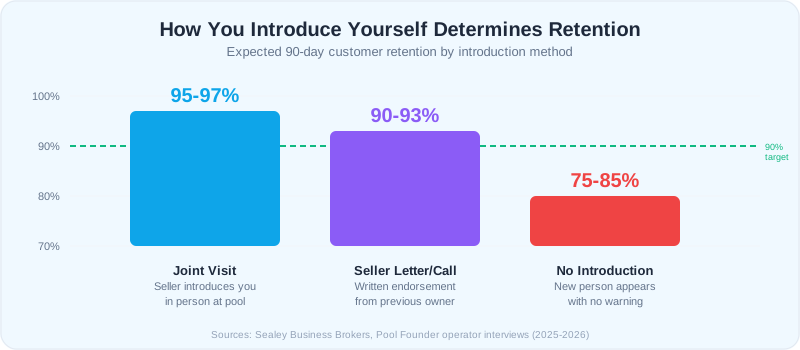
Best: Joint Visit with the Seller
The seller brings you to the property, introduces you in person, and you service the pool together. The customer sees continuity. This takes the most time but produces the lowest churn. Expect to retain 95%+ of customers when you do joint visits.
Good: Personalized Letter or Call from the Seller
The seller sends a personal letter or makes a phone call to each customer explaining the transition and endorsing you. You follow up with your own introduction on the first service day. Retention runs around 90% to 93% with this approach.
Worst: No Introduction
A new person shows up at their pool with no warning. This triggers alarm for many homeowners, especially in gated communities. Expect 15% to 25% churn when customers are not introduced to the new operator.
On your first visit, leave a door hanger or service card with your name, company, phone number, and a brief note: "I am your new pool technician. Same great service, new face. Call or text me anytime." Personal touch goes a long way.
How Do You Handle Price Differences Between Routes?
If the acquired route has rates that are different from your standard pricing, you have a decision to make. Raising prices immediately is the fastest way to lose acquired customers. But running two rate structures forever creates billing headaches.
Strategy: The 90-Day Hold
Keep all acquired customer rates exactly as-is for the first 90 days. No changes. This gives customers time to build trust with you before you ask for anything. After 90 days, you can begin adjusting rates toward your standard pricing.
| Situation | Approach | Timeline |
|---|---|---|
| Acquired rates are lower than yours | Raise gradually: $5-$10/month per adjustment | Start at month 4, reach target by month 12 |
| Acquired rates are higher than yours | Keep them. Higher rates mean more revenue | No change needed |
| Rates vary wildly within acquired route | Standardize by pool size/type over 6-12 months | Start at month 4 |
| Acquired customers have no contracts | Introduce contracts at first rate adjustment | Month 4-6 |
Never raise rates and change the service day at the same time. One change per quarter keeps customers from feeling disrupted. If you need to adjust both, change the service day first, then raise the rate 60 to 90 days later.
How Do You Merge Customer Data from Two Systems?
If both you and the seller use pool service software, merging data is usually straightforward. If the seller used spreadsheets, paper, or nothing at all, you have more work to do.
- 1Export everything possible. Get whatever data the seller has in whatever format they have it. Spreadsheets, screenshots of their app, even handwritten notes. Something is better than nothing.
- 2Standardize the data. Create a consistent format: customer name, address, service day, monthly rate, pool type, equipment list, gate code, special notes, last chemical readings.
- 3Import into your system. Most pool service software supports CSV imports. Map the seller's fields to your system's fields.
- 4Verify on the first visit. Use your first service visit to each pool as a data verification opportunity. Confirm the address, note the equipment, record chemical readings, and update anything that does not match the imported records.
- 5Backfill service history. If you can get service logs from the seller, import them. Historical data helps you understand each pool's patterns, recurring issues, and chemical needs.
The data merge is tedious but critical. Accurate customer data prevents missed services, wrong chemical treatments, and confused billing, all of which drive churn in acquired accounts.
What Churn Rate Should You Expect After an Acquisition?
Even with perfect execution, some customers will leave. They were loyal to the previous operator, not to the route. Understanding normal churn rates helps you plan financially and avoid panic.
| Integration Quality | Expected 90-Day Churn | Key Factor |
|---|---|---|
| Excellent (joint visits, same rates, same day) | 3% - 5% | Personal seller introduction to every customer |
| Good (seller letter, gradual changes) | 5% - 10% | Written introduction but no joint visits |
| Average (email notice, rate adjustments early) | 10% - 15% | Limited seller involvement in transition |
| Poor (no introduction, immediate changes) | 15% - 25% | Customers surprised by new operator |
If you negotiated a retention holdback in your purchase agreement (you should have), the holdback covers abnormal churn. Normal churn at the 5% to 8% level is expected and priced into the deal.
Most post-acquisition churn happens in weeks 2 through 6. The first service visit usually goes fine because the customer is watching. By week 3, customers who were already thinking about canceling will act. After 90 days, churn returns to baseline.
What Is the 90-Day Integration Playbook?
Here is a week-by-week breakdown of what to focus on during the critical first 90 days.
Week 1: First Impressions
Service every pool on the acquired route. Take extra time. Leave the pool looking better than it has in months. Drop a door hanger or service card. Take photos of every pool for your records.
Weeks 2-4: Build Trust
Maintain perfect attendance on the route. Do not miss a single service. Respond to any customer contact within 2 hours. Fix any issue the previous operator left unaddressed. This is your chance to prove you are as good or better.
Weeks 5-8: Stabilize
Optimize the route sequence for efficiency. Begin merging acquired customers into your existing schedule where it makes sense. Address any equipment or pool condition issues you noted during the first month.
Weeks 9-12: Normalize
Evaluate retention. Contact any customer who has gone quiet. Begin introducing service contracts to customers who do not have them. Plan your first rate adjustments for month 4 if needed.
Ready to streamline your pool service business?
Pool Founder gives you route optimization, automated invoicing, chemical tracking, and everything else you need to run a more profitable pool business.
Frequently Asked Questions
How do I keep customers from canceling after buying a pool route?
The most effective retention strategy is a warm personal introduction from the seller to each customer. Follow that with excellent service quality during the first 90 days, no immediate rate changes, and responsive communication. Customers cancel when they feel uncertain or notice a drop in service quality. Remove both triggers and you will retain 90% or more.
Should I change the service day for acquired pool customers?
Not immediately. Keep the same service day for at least 60 to 90 days. Once customers are comfortable with you, you can request schedule changes to optimize route efficiency. Change one thing at a time, never the service day and the rate simultaneously.
How long does it take to fully integrate a purchased pool route?
Most route acquisitions are fully integrated within 90 to 120 days. The first 30 days are about first impressions and data collection. Days 30 to 60 are about building trust and stabilizing the route. Days 60 to 90 are about optimizing and normalizing. After 90 days, the acquired customers should feel like any other customer on your route.
What if the seller used different chemicals than I use?
Transition chemicals gradually. If the seller used liquid chlorine and you prefer trichlor tabs (or vice versa), make the switch over 2 to 3 visits while monitoring water chemistry closely. Abrupt changes can cause water quality fluctuations that alarm customers. The exception is if the seller was using a product incorrectly; fix that immediately.