Auto-Pay Is the Single Biggest Cash Flow Fix for Pool Companies
Over half of small businesses report being owed money from unpaid invoices, averaging $17,500 per business according to QuickBooks 2025 late payments data. For pool service companies with 80 to 200 accounts, late payments create a rolling cash flow problem that compounds every month. The fix is not better collection calls. The fix is getting customers on auto-pay before they ever have a chance to pay late.
56%
of small businesses are owed money from unpaid invoices, averaging $17,500 per business
Source: Intuit QuickBooks 2025 Late Payments Report
The challenge is not the technology. Every billing platform supports auto-pay. The challenge is enrollment. Most pool companies offer auto-pay as an afterthought buried in the footer of an invoice. The companies that achieve 70% or higher auto-pay enrollment treat it as the default, not the exception, and they have specific language for presenting it as a convenience rather than a demand.
Corey Adams learned this the hard way: "I spent years chasing invoices, making reminder calls, and writing off bad debt. When we switched to presenting auto-pay as the standard way customers pay us, our enrollment went from 20% to over 75% in six months. Same customers, same service, different conversation."
Why Does Auto-Pay Enrollment Matter More Than You Think?
The financial impact of auto-pay extends far beyond just getting paid faster. It changes the fundamental economics of your accounts receivable process, your customer retention rate, and your monthly cash flow predictability.
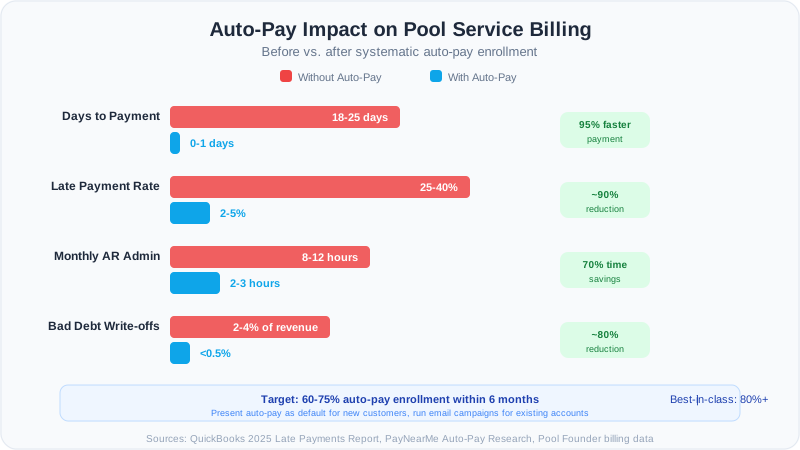
| Metric | Without Auto-Pay | With Auto-Pay | Improvement |
|---|---|---|---|
| Average days to payment | 18-25 days | 0-1 days | 95% faster |
| Late payment rate | 25-40% | 2-5% | 85-90% reduction |
| Monthly AR admin time | 8-12 hours | 2-3 hours | 70% time savings |
| Annual bad debt write-offs | 2-4% of revenue | Under 0.5% | 75-85% reduction |
| Customer churn rate | 15-20% annually | 8-12% annually | 30-40% lower churn |
The churn reduction is the hidden benefit most pool companies overlook. When a customer has a card on file and payments happen automatically, the friction of canceling increases. They have to actively call to stop service. Without auto-pay, they can simply stop paying, and the ambiguity of "are they canceling or just late?" costs you weeks of uncertainty.
The New Customer Enrollment Script
The easiest time to enroll a customer in auto-pay is during initial signup. They are already making a buying decision. Adding a payment method is a natural part of the process. The key is framing auto-pay as the default, not a choice between two options.
Script: In-Person or Phone Signup
"Great, we are all set with your service schedule. For billing, we run all of our accounts on automatic monthly billing. Your card gets charged on the first of each month, and you get a receipt emailed to you the same day. What card would you like us to put on file?"
Notice what this script does. It does not ask "Would you like to set up auto-pay?" That invites a no. It presents auto-pay as how you operate, then immediately asks for the card. The customer would have to actively object, and most will not because it genuinely is more convenient.
Handling the Objection: "I Prefer to Pay by Check"
"Absolutely, I understand. We can definitely accept checks. Just so you know, most of our customers find auto-pay more convenient because there is nothing to remember. Your card is charged, and you get an email receipt. We also save $3 per invoice on processing, so we pass that along as a $3 discount on auto-pay accounts. Would you like to try it for the first month and see how it goes?"
The $3 discount is optional, but effective. It reframes auto-pay as a benefit for the customer. PayNearMe research shows that 65% of people are more likely to enroll in auto-pay when offered flexible scheduling options. Letting customers choose their billing date (1st or 15th) removes another common objection.
Converting Existing Customers to Auto-Pay
Existing customers require a different approach. They are already in a payment routine, and changing it feels like effort. The best trigger for converting existing customers is a natural transition point: a price change, a service change, a new billing system, or the start of a new season.
Script: Email Campaign for Existing Customers
Subject: Quick update to your billing (takes 30 seconds) Hi [First Name], We are upgrading our billing system to make things easier for you. Starting next month, you can set up automatic monthly billing so you never have to think about your pool service payment. Here is what changes: nothing about your service. Your card is charged on the 1st of each month, and you get an email receipt instantly. Click here to add your card (takes 30 seconds): [Link] If you have any questions, just reply to this email. Thanks, [Your Name]
Send this email in a three-touch sequence: the initial email, a follow-up one week later to non-enrollees, and a final nudge two weeks after that. Pool companies that run this sequence typically convert 40 to 50% of existing customers within the first month.
Script: Tech-Delivered Enrollment at the Pool
Your technicians are your most effective enrollment tool because customers trust them. Train techs to mention auto-pay casually during service visits: "Hey Mrs. Johnson, I wanted to mention that we just set up auto-pay on our billing system. A lot of customers are switching over because it is easier than writing checks. Want me to text you the signup link?"
Target the "paid late but within the same billing period" group first. These customers (typically paying 5 to 30 days after the due date) are your highest conversion opportunity because they already want to pay but keep forgetting.
Setting Up Auto-Pay in Your Billing Software
The technical setup matters because a clunky enrollment process kills conversion rates. Your auto-pay enrollment should require no more than three steps: enter card, confirm amount, done.
Configuration Checklist
- Enable customer-facing payment portal with saved card functionality
- Set default billing date (1st of month is standard, offer 15th as alternative)
- Configure automatic receipt emails that send immediately on charge
- Set up failed payment retry logic: retry at day 3, day 7, and day 14
- Create automatic notification for failed payments that alerts both you and the customer
- Enable auto-pay discount if you choose to offer one ($3 to $5 per month)
- Set up a monthly report showing auto-pay enrollment rate and failed payment rate
Failed payment handling is critical. When a card declines, the customer gets an immediate email with a link to update their card. Do not wait until end of month. The faster you notify, the faster they fix it. Most failed payments are expired cards, not insufficient funds.
Handling Common Auto-Pay Objections
You will encounter the same five objections repeatedly. Having prepared responses eliminates hesitation and increases your enrollment rate. Every objection is really a trust question in disguise.
| Objection | What They Really Mean | Response |
|---|---|---|
| "I want to review my bill first" | Fear of being overcharged | "You will get an email with the full invoice 3 days before we charge your card. You can review everything and contact us if anything looks off." |
| "I do not like giving out my card" | Security concern | "Your card info is stored with Stripe, the same payment processor used by Amazon and Google. We never see your full card number." |
| "What if I want to cancel?" | Fear of being locked in | "You can cancel anytime with a phone call or email. Auto-pay does not change our cancellation policy at all." |
| "My bill changes month to month" | Wants cost predictability | "Great news: your monthly maintenance is the same every month. Any extra work like repairs always gets approved by you first, and those get invoiced separately." |
| "I prefer to pay by check" | Habit and comfort | "Totally fine. Most of our check customers end up switching after a month or two just because it is one less thing to remember. I will leave the option open for you." |
The last response is important. Do not push. Plant the seed, move on, and follow up next month. Customers who say no today often say yes after seeing their neighbor get seamless auto-pay receipts for a few months.
Measuring and Improving Your Auto-Pay Rate
Track your auto-pay enrollment rate monthly. Here are the benchmarks to target based on company maturity and the strategies that move you from one tier to the next.
| Enrollment Rate | Status | Next Action |
|---|---|---|
| Under 20% | Starting out | Present auto-pay as default for all new customers |
| 20-40% | Building momentum | Run email conversion campaign for existing customers |
| 40-60% | Good progress | Train techs to mention auto-pay at every service visit |
| 60-75% | Strong program | Offer small discount or remove convenience fee for auto-pay |
| 75%+ | Best in class | Focus on reducing failed payment rate below 3% |
Most pool companies can reach 60% enrollment within 90 days using the scripts and strategies in this guide. Getting from 60% to 80% takes longer because you are converting the most resistant customers, but the payoff in reduced AR time and improved cash flow is substantial.
Ready to streamline your pool service business?
Pool Founder gives you route optimization, automated invoicing, chemical tracking, and everything else you need to run a more profitable pool business.
Frequently Asked Questions
What is a good auto-pay enrollment rate for a pool service company?
A well-run pool service company should target 60 to 75% auto-pay enrollment within six months of implementing a systematic enrollment strategy. Best-in-class operations reach 80% or higher. Even getting from 20% to 50% cuts your AR admin time in half and dramatically reduces late payments.
Should I offer a discount for auto-pay customers?
A small discount of $3 to $5 per month is effective for converting resistant customers. This is often less than your actual cost savings from reduced invoicing, check processing, and collection calls. If you process credit cards, the discount can offset the processing fee difference between card and check payments.
What happens when an auto-pay charge fails?
Configure your billing system to retry failed charges at day 3, day 7, and day 14. Send the customer an immediate email notification with a link to update their card. Most failures are expired cards, not insufficient funds. If the charge fails after three retries, follow up with a personal call or text.
How do I handle customers who insist on paying by check?
Accept it gracefully. Do not force auto-pay or penalize check payers. Some customers, especially older homeowners, will never switch. Focus your conversion energy on the 20 to 30% of customers who are open to it but just have not been asked properly. Their enrollment will make a bigger impact than fighting with resistant customers.
Can I require auto-pay for new customers?
You can, and many successful pool companies do. Frame it as "we require a card on file for all new accounts." This is standard practice in subscription businesses. If a new customer strongly objects, offer to bill them manually, but present auto-pay as your standard operating procedure.