Why Is Switching Pool Service Software So Intimidating — and Does It Have to Be?
Pool service companies delay switching software by an average of 6-12 months after deciding their current platform is inadequate, costing themselves $3,000-8,000 in lost efficiency while they worry about data loss, team disruption, and the perceived complexity of migration. The reality is that a well-planned switch takes 2-4 weeks, preserves 100% of critical business data, and produces immediate operational improvements that make the brief transition period worthwhile.
The fear of switching is worse than the switch itself. Modern pool service platforms support CSV import, QuickBooks sync, and guided onboarding workflows that reduce migration from a month-long project to a weekend of focused setup plus a week of team adjustment. This guide walks through every step — from export to go-live — so you can execute the switch with confidence rather than anxiety.
Whether you are moving from Skimmer to Pool Founder, from Jobber to a pool-specific platform, from spreadsheets to real software, or from any other combination, the migration process follows the same fundamental steps. The variables are what data you have, what format it is in, and how much of it your new platform can ingest automatically.
When Is the Best Time to Switch Pool Service Software?
October through February is the optimal migration window for pool service companies in most U.S. markets because service volume drops 40-70%, technician schedules have slack for training, and a billing cycle transition creates a natural cutover point that minimizes customer-facing disruption. Switching mid-season — April through September — is possible but carries higher risk of missed stops, invoicing gaps, and technician frustration during your highest-revenue months.
Why Does Off-Season Migration Reduce Risk?
Off-season migration gives your team 4-8 weeks of low-pressure operation on the new platform before spring volume spikes, allows you to identify and fix workflow issues when a mistake affects 15 pools instead of 80, and provides time for the inevitable learning curve without jeopardizing revenue during peak billing months.
- Lower service volume means fewer opportunities for errors during the transition learning curve
- Technicians have more patience to learn new software when they are not rushing between 25 stops per day
- Billing cycle transitions in January or February create clean cutover points for invoicing
- Customer communication about the switch is less disruptive when service frequency is already reduced
- You can run parallel systems (old and new) for 2-3 weeks without doubling a peak-season workload
- Off-season is when most pool companies evaluate operations anyway — software migration fits naturally
What If You Must Switch During Pool Season?
Mid-season switching requires a compressed 7-10 day migration timeline, mandatory parallel operation of both platforms for the first week, and a designated team member responsible for resolving data discrepancies in real time — tasks that are manageable but add 5-10 hours of administrative work during an already demanding period.
If your current software is actively causing service failures — missed stops, lost invoices, chemical tracking gaps — waiting until off-season costs more than the disruption of switching now. Urgency overrides timing optimization when the status quo is already broken.
What Data Do You Need to Export Before Switching?
The five critical data categories for pool software migration are customer records, service history, chemical logs, route configurations, and financial records — exporting all five before canceling your old platform ensures you retain the operational intelligence your business has built over months or years of service delivery.
How Do You Export Customer Data from Your Current Platform?
Every major pool service platform — Skimmer, PoolBrain, Jobber, Housecall Pro, and others — supports CSV export of customer records containing names, addresses, contact information, and basic service notes. The export process typically takes under 10 minutes, but verifying the exported data for completeness takes an additional 30-60 minutes that most operators skip at their peril.
| Data Category | What to Export | Format | Priority |
|---|---|---|---|
| Customer records | Names, addresses, emails, phone numbers, gate codes, pool access notes | CSV | Critical |
| Service history | Past service dates, work performed, technician notes, before/after photos | CSV or PDF | High |
| Chemical logs | Water chemistry readings, dosages applied, dates, compliance records | CSV or PDF | High |
| Route data | Stop sequences, service day assignments, time windows, route groupings | CSV or manual | Medium |
| Financial records | Invoice history, payment records, outstanding balances, pricing schedules | CSV or QuickBooks | Critical |
| Equipment profiles | Pool equipment make/model, filter sizes, pump specs, heater types | CSV or notes | Medium |
Download and save your exported data files in at least two locations — cloud storage and a local drive. Do NOT cancel your old software subscription until you have verified that all critical data imported successfully into the new platform. Keep the old account active for at least 30 days after migration.
What Data Is Hardest to Migrate Between Platforms?
Service photos, custom form responses, and chemical log history are the three data types most frequently lost during migration because they are stored in proprietary formats that competing platforms cannot import directly — downloading these as PDFs or image files before canceling your old account is the only way to preserve them.
- Service photos: Download all photos individually or request a bulk export from your current provider. Most platforms do not include photos in CSV exports.
- Chemical log history: Export as CSV if available, or generate PDF reports covering the full date range. Some platforms only export recent months by default — specify the full history.
- Custom fields and forms: Any custom data fields you created (equipment serial numbers, warranty dates, filter sizes) may not map to fields in the new platform. Document these in a spreadsheet.
- Recurring billing schedules: Export your pricing structure and billing frequencies. This data rarely transfers automatically and usually needs manual re-entry.
- Technician notes and service comments: These often live in free-text fields that export poorly. Review exported data to ensure notes are included and readable.
What Does a Step-by-Step Migration Checklist Look Like?
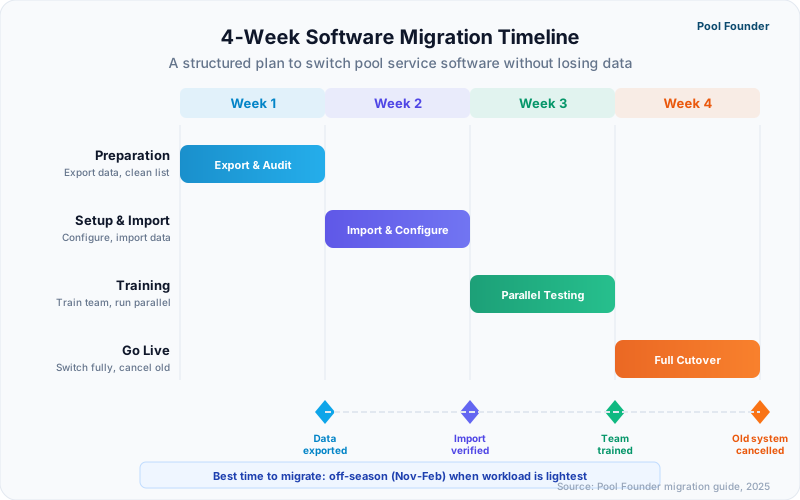
A complete pool software migration follows a 15-step process spanning four phases — preparation, data transfer, team training, and go-live — with the entire sequence taking 2-4 weeks for most pool companies running under 200 accounts and 5 or fewer technicians.
What Should You Do in Week One (Preparation Phase)?
The preparation phase covers account setup, data export, and import verification — three tasks that take 2-4 hours total but prevent every major migration failure that pool companies experience when they rush straight from sign-up to go-live without validating their data.
- 1Sign up for your new platform and complete business profile setup (company name, logo, contact info, service area)
- 2Export all customer data from your current platform as CSV files — customers, service history, chemical logs, invoices
- 3Export or screenshot your current route configurations, including day-of-week assignments and stop sequences
- 4Download all service photos, equipment profiles, and custom field data that may not be included in CSV exports
- 5Import your customer CSV into the new platform and verify that all records transferred correctly — check names, addresses, emails, and phone numbers against the original
- 6Identify and manually correct any import errors — duplicate entries, missing fields, formatting issues with addresses
What Should You Do in Week Two (Configuration and Training Phase)?
Week two focuses on rebuilding your operational workflows in the new platform — routes, service templates, and pricing — while simultaneously training your team on the mobile app interface they will use 95% of the time in the field.
- 1Build your weekly routes in the new platform, using the optimizer to sequence stops. Compare against your previous routes and adjust for any known time-window constraints
- 2Set up your service types, pricing schedules, and recurring billing configurations
- 3Configure invoice templates, payment methods, and any QuickBooks or accounting software integrations
- 4Train each technician individually on the mobile app — have them complete a mock service stop including chemical logging, photo upload, and service notes
- 5Run a full test day on the new platform with your actual route while keeping the old platform active as backup
- 6Review test day results: check for missed data fields, confusing workflows, or mobile app issues that need resolution before full cutover
What Should You Do in Weeks Three and Four (Go-Live and Verification Phase)?
The go-live phase runs both platforms in parallel for the first week, then cuts over completely once the team confirms zero data loss and comfortable workflow adoption — this dual-system period catches issues that testing alone cannot surface.
- 1Go live on the new platform for all daily operations — routing, chemical logging, service documentation, and invoicing
- 2Keep the old platform accessible (do not cancel yet) for reference on historical data, open invoices, and customer details that may not have migrated
- 3Monitor technician adoption daily for the first week — check for skipped fields, workaround behaviors, or consistent confusion points
- 4Send invoices from the new platform and verify that payment processing, tax calculations, and QuickBooks sync function correctly
- 5After 2 weeks of clean operation, cancel your old software subscription. Save final data exports as archival records.
- 6Schedule a 30-day retrospective to identify any lingering issues, re-train on underused features, and optimize configurations based on real usage data
2-4 weeks
Average total migration timeline from sign-up to full cutover for pool companies with under 200 accounts
What Are the Most Common Mistakes When Switching Pool Software?
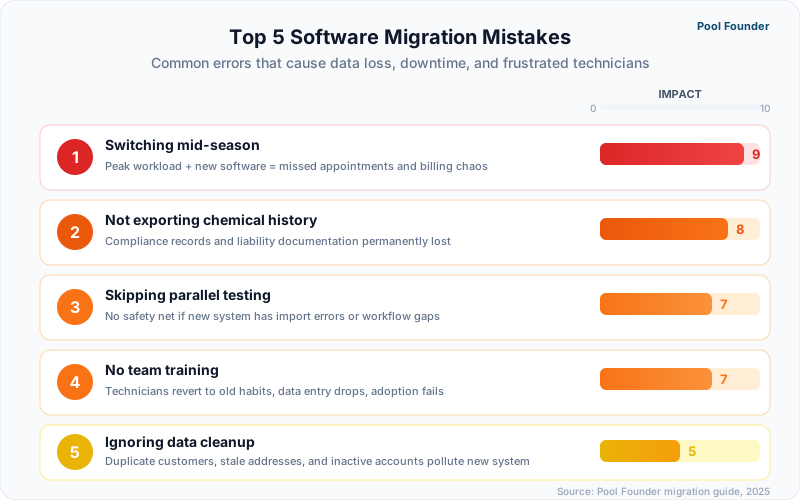
The five most damaging migration mistakes are canceling the old platform before verifying data import, switching mid-season without a parallel operation period, skipping technician training, importing dirty data without cleanup, and underestimating the time needed for billing configuration — each one independently capable of turning a routine migration into a month-long operational disruption.
Why Do Pool Companies Lose Data During Migration?
Data loss during migration is almost always caused by canceling the old platform before completing import verification, assuming that CSV export captured all data fields when it often excludes photos and custom fields, and failing to manually transfer data that exists only in free-text notes or proprietary formats.
| Mistake | Consequence | Prevention |
|---|---|---|
| Canceling old platform too early | Permanent loss of historical data, photos, and records | Keep old account active for 30+ days after go-live |
| No parallel operation period | Missing stops, duplicate invoices, confused technicians | Run both systems for 5-7 days before full cutover |
| Skipping technician training | Low adoption, workaround behaviors, data quality issues | Individual hands-on training with mock service stops |
| Importing dirty data | Duplicate customers, wrong addresses, missing contacts | Clean and verify CSV data before import |
| Switching during peak season | Amplified impact of any migration error during highest-revenue period | Migrate October-February when service volume is low |
| Ignoring billing setup | Invoice errors, payment processing failures, accounting gaps | Test invoice generation and payment processing before go-live |
How Do You Get Technicians to Actually Use New Software?
Technician adoption fails when training consists of a group demo instead of individual hands-on practice, when the mobile interface is harder to use than what they had before, and when management does not enforce usage consistently during the first two weeks — the period when old habits are strongest and the temptation to fall back to paper or the previous app is highest.
- Train each technician one-on-one with a real service stop on the new app — not a conference room demo with sample data
- Address their specific concerns: "Where do I log chemicals?" "How do I mark a gate code?" "What if I lose signal?"
- Set clear expectations: all service data goes into the new platform starting on the go-live date, no exceptions
- Check data completeness daily for the first two weeks — missing chemical logs or empty service notes mean the tech is not using the software
- Ask for feedback after the first week and make configuration changes based on field reality, not office assumptions
- Acknowledge the learning curve publicly — switching tools is frustrating even when the new tool is better
The number one predictor of successful software migration is owner commitment. If the business owner uses the new platform for every operational task from day one — routing, invoicing, customer lookup — the team follows. If the owner keeps a spreadsheet "just in case," the team interprets that as permission to not adopt the new system.
How Does Pool Founder Make Migration Easier?
Pool Founder supports CSV customer import, QuickBooks financial sync, and a guided onboarding workflow that reduces the typical 2-4 week migration timeline to as little as one week — with most operators completing initial setup, data import, and route building in a single afternoon session.
What Import Options Does Pool Founder Support?
Pool Founder accepts CSV imports for customer records with automatic field mapping, QuickBooks sync for financial data and customer lists, and manual bulk-entry tools for operators moving from paper or non-exportable systems — covering the three most common migration starting points for pool service companies.
- CSV import: Upload your customer export file and Pool Founder maps columns to fields automatically. Review and correct any mapping issues before finalizing.
- QuickBooks sync: Connect your QuickBooks account to import customer records, invoice history, and financial data. Ongoing sync keeps both systems aligned after migration.
- Manual entry with bulk tools: For operators moving from paper or apps that do not export, Pool Founder provides fast-entry forms designed for batch customer creation.
- Geocoding: Customer addresses are automatically geocoded during import, enabling immediate route optimization without manual coordinate entry.
- Service location support: Multiple service locations per customer are supported during import for property management companies and multi-property accounts.
What Does the Migration Timeline Look Like with Pool Founder?
Most pool companies complete their Pool Founder migration in 5-7 business days from sign-up to full operation, with the data import and route building phase taking under 4 hours for companies with fewer than 100 accounts — significantly faster than the industry average because the platform was designed with migration as a first-class workflow.
| Migration Step | Time Required | Day |
|---|---|---|
| Account creation and business profile setup | 15 minutes | Day 1 |
| CSV or QuickBooks customer import | 30-60 minutes | Day 1 |
| Import verification and data cleanup | 1-2 hours | Day 1 |
| Route building and optimization | 1-2 hours | Day 1-2 |
| Invoice template and billing configuration | 30 minutes | Day 2 |
| Technician mobile app training | 30 min per tech | Day 2-3 |
| Test service day (parallel with old system) | 1 full day | Day 3-4 |
| Go-live on Pool Founder | — | Day 5 |
| Verification and adjustment period | — | Days 5-10 |
| Cancel old platform | — | Day 30+ |
Pool Founder offers free migration support for companies switching from Skimmer, Jobber, Housecall Pro, or any other platform. The onboarding team can walk you through the import process and verify data accuracy before you go live.
The migration process does not have to be a reason to delay upgrading your software. The operational improvements — faster routing, automated chemical tracking, professional invoicing — start delivering value from day one of the new platform. Every week spent on an inadequate system because switching feels too complicated is a week of lost efficiency that compounds over the entire season.
Ready to streamline your pool service business?
Pool Founder gives you route optimization, automated invoicing, chemical tracking, and everything else you need to run a more profitable pool business.
Frequently Asked Questions
How long does it take to switch pool service software?
Most pool companies complete a full software migration in 2-4 weeks, with the actual data import and setup taking 4-8 hours. Pool Founder migrations typically finish in 5-7 business days because the platform supports CSV import, QuickBooks sync, and guided onboarding that accelerates each step.
Will I lose my customer data when switching software?
Not if you follow proper migration steps. Export all data as CSV files before canceling your old platform, verify the import in your new platform, and keep your old account active for at least 30 days after go-live. The most common cause of data loss is canceling the old platform before verifying that everything transferred correctly.
Can I migrate chemical log history to a new platform?
Chemical log history can be exported as CSV or PDF from most pool-specific platforms, but importing that historical data into a new platform is limited — most tools allow you to reference historical records but cannot import them into their native chemical tracking system. Download and archive your chemical logs as PDFs for compliance records and start fresh chemical logging in the new platform.
Should I switch pool software during peak season?
Off-season migration (October-February) is strongly recommended because lower service volume reduces the impact of any transition issues, gives your team time to learn the new system, and allows for a parallel operation period without doubling peak-season workload. However, if your current software is actively causing service failures, switching immediately is better than waiting 6 months.
How do I get my technicians to adopt new pool service software?
Individual hands-on training with real service scenarios is essential — group demos with sample data do not build muscle memory. Train each technician to complete a full service stop (navigate to address, log chemicals, take photos, add notes, complete the stop) on the new app. Then enforce consistent usage from day one and check data completeness daily for the first two weeks.
Does Pool Founder help with migration from other platforms?
Yes. Pool Founder supports CSV customer import with automatic field mapping, QuickBooks sync for financial data, and geocoding for service addresses. The onboarding team provides free migration support for companies switching from Skimmer, Jobber, Housecall Pro, or any other platform, including data verification before go-live.