Why Pool Companies Outgrow Jobber
Jobber is one of the most popular field service management platforms, serving 200,000+ businesses across dozens of trades. It is affordable, easy to use, and gets companies organized fast. Many pool service operators start with Jobber because it is the first name they find when searching for scheduling and invoicing software. But Jobber was built for all trades, not for pool service specifically, and the gap becomes obvious the first time a technician needs to log chemical readings at a stop.
Pool Founder is built specifically for pool service companies. It includes every core business feature Jobber offers (scheduling, invoicing, route optimization, customer portal) plus the pool-specific capabilities Jobber lacks: chemical tracking, water chemistry documentation, dosing recommendations, and AI-powered route optimization. This guide covers why pool operators switch, what the migration looks like, and what changes in your daily operation.
0
Pool-specific features in Jobber: no chemical tracking, no water chemistry, no dosage calculations, no service reports with chemistry data
Why Do Pool Companies Switch From Jobber?
Pool companies switch from Jobber for one primary reason: it does not support the core workflow of pool maintenance. Every other reason, from pricing to route optimization, is secondary. When 70%+ of your revenue comes from recurring weekly maintenance and your technicians need to document water chemistry at every stop, a platform without chemical tracking creates daily friction that compounds over time.
1. Zero chemical tracking
Jobber has no native chemical tracking. No input fields for pH, chlorine, alkalinity, calcium hardness, or cyanuric acid. No dosage calculators. No water chemistry history. No customer-facing service reports with chemical data. Pool technicians using Jobber must log chemical readings in generic note fields, paper logs, or a separate app. This workaround adds two to three minutes per stop, creates inconsistent records, and prevents automated customer reporting.
2. Generic terminology and workflows
Jobber uses generic field service language: "jobs," "clients," "visits." Pool service has its own vocabulary: "stops," "routes," "pools," "chemical readings," "service reports." This mismatch seems minor but it creates confusion during setup, makes training new technicians harder, and means the software never feels like it was designed for your trade. Pool Founder uses pool industry terminology throughout the platform.
3. Route optimization is adequate but not pool-optimized
Jobber includes route optimization, and it works reasonably well for basic proximity-based routing. But it does not account for pool-specific constraints like gate code access hours, HOA entry requirements, or service time-of-day preferences that affect how pool routes are structured. Pool Founder's AI route optimizer handles these constraints and automatically rebalances routes as you add or remove customers.
4. Per-user pricing adds up with technician growth
Jobber charges $29 per additional user beyond plan limits. If you are on the Connect plan ($139/month billed monthly for 5 users) and hire a sixth technician, your bill jumps to $168/month. By the time you have 10 technicians, you are on the Grow plan at $299/month. Pool Founder's Pro plan covers up to 10 technicians at $249/month flat with no per-user charges, and it includes the chemical tracking you would otherwise pay a second tool for.
| Factor | Jobber | Pool Founder |
|---|---|---|
| Chemical tracking | No | Yes (with dosing recommendations) |
| Water chemistry service reports | No | Yes (branded, customer-facing) |
| Route optimization | Yes (basic proximity) | Yes (AI-powered) |
| Industry terminology | Generic (jobs, clients) | Pool-specific (stops, routes, pools) |
| Pricing (5 techs) | $99 - $139/mo (Connect) | $179/mo flat |
| AI assistant | AI Receptionist (add-on) | George AI (included) |
| Customer portal | Client Hub | Full portal with chemistry trends |
| Setup time | 1 - 4 hours | Under 30 minutes |
What Pool-Specific Features Do You Gain?
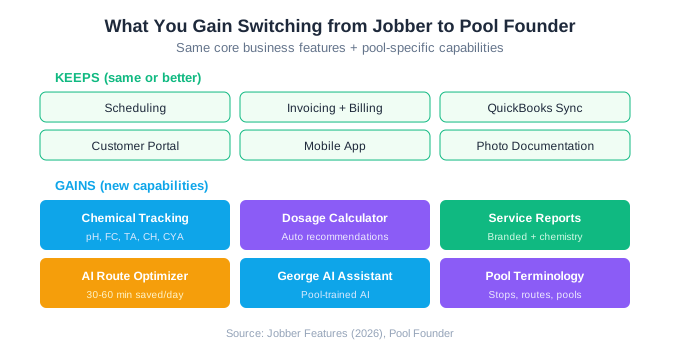
Switching from Jobber to Pool Founder adds a layer of pool-specific functionality that Jobber simply cannot provide. These are not nice-to-have features. They are the core tools that pool technicians use at every single stop, every single day.
Chemical tracking with dosing recommendations
Pool Founder provides dedicated input fields for every water chemistry parameter: free chlorine, total chlorine, pH, alkalinity, calcium hardness, cyanuric acid, and more. The system stores readings over time, showing trends that help technicians identify emerging water quality issues before they become problems. Dosing recommendations suggest how much chemical to add based on current readings and pool volume.
Customer-facing service reports
After every service visit, Pool Founder automatically generates a branded service report that includes water chemistry readings, photos, technician notes, and chemicals applied. These reports are sent to customers and available through the customer portal. This is the single most effective churn-reduction tool in pool service because it makes invisible service visible. Jobber sends generic job completion notifications that include none of this data.
AI-powered route optimization
Pool Founder's route optimizer uses AI to create the most efficient stop sequence across your entire operation, not just individual routes. It accounts for service windows, route capacity, and geographic clustering. When you add a new customer, the system automatically suggests the best route placement to minimize drive time for all affected technicians. Operators report saving 30 to 60 minutes per tech per day vs. manual routing.
George AI assistant
Pool Founder includes George, an AI assistant built into the platform. George helps with customer communication, scheduling decisions, and operational questions. It is not a generic chatbot but a pool-service-trained assistant that understands the terminology, workflows, and common challenges of running a pool business. Jobber offers an AI Receptionist as a paid add-on, but it handles phone calls rather than providing in-platform operational support.
How Does Migration From Jobber to Pool Founder Work?
Migration from Jobber to Pool Founder is straightforward because Jobber supports comprehensive data export. The process takes most operators one to three days of active effort, with a three to five day parallel-run period to verify everything works before fully cutting over.
- 1Export from Jobber. Export your customer list, job history, and invoice records as CSV files from Jobber's settings. Jobber provides clean exports with all relevant fields.
- 2Import into Pool Founder. Upload your customer CSV into Pool Founder. The import tool auto-maps name, address, phone, email, service type, and pricing fields. Review the mapping and confirm.
- 3AI builds your routes. Pool Founder's route optimizer automatically creates optimized routes from your imported customer addresses. Review the suggested routes and adjust any preferences.
- 4Configure billing. Set up recurring billing schedules to match your current Jobber billing. Connect Stripe for payment processing and configure autopay for customers who were on Jobber's autopay.
- 5Run parallel for 3-5 days. Have technicians use Pool Founder for one route day while keeping Jobber active. Compare the experience and verify customer data, route accuracy, and billing.
- 6Complete the switch. Move all technicians to Pool Founder. Cancel Jobber when you are confident in the transition.
Pool Founder provides free migration assistance. The onboarding team handles data import, route configuration, and billing setup at no cost. If you are switching from Jobber, the team can help you map Jobber's data structure to Pool Founder's format.
What Data Carries Over From Jobber?
Jobber provides clean CSV exports of most business data. The transfer is straightforward for customer information and billing records but limited for historical job data. Here is what carries over and what does not.
| Data Type | Transfers From Jobber | Notes |
|---|---|---|
| Customer names and contact info | Yes | Full contact details export as CSV |
| Property addresses | Yes | Used for automatic route building in Pool Founder |
| Service pricing and frequency | Yes | Mapped to Pool Founder billing schedules |
| Job history | Partial | Job records export but may need reformatting |
| Invoice history | Partial | Invoice records export; financial history remains in QuickBooks |
| Photos | No | Photos attached to Jobber jobs do not export |
| Chemical readings | N/A | Jobber has no chemical tracking to export |
| Route configurations | No | Pool Founder rebuilds optimized routes from addresses |
| QuickBooks sync | Re-establish | Connect Pool Founder to the same QuickBooks account |
Since Jobber has no chemical tracking, there is no chemistry data to transfer. This actually makes the Jobber-to-Pool Founder migration cleaner than the Skimmer-to-Pool Founder migration because there is no expectation of historical chemistry records. You start fresh with Pool Founder's chemical tracking from day one.
The QuickBooks integration reconnects easily. Pool Founder integrates with QuickBooks Online, so you simply authorize the connection to the same QuickBooks account you used with Jobber. Customer records, invoice sync, and payment reconciliation continue without disruption.
What Changes in Your Daily Workflow?
The biggest change is addition, not disruption. Your scheduling, invoicing, and route management workflows transfer cleanly. The new elements are the pool-specific features you gain: chemical tracking at every stop, automated service reports, and AI route optimization. Here is the before-and-after comparison for a typical service day.
| Workflow Step | With Jobber | With Pool Founder |
|---|---|---|
| View daily route | Open Jobber app, view schedule | Open Pool Founder app, view optimized route |
| Navigate to stop | Tap address, open maps | Tap stop, open maps (same flow) |
| Log chemical readings | Manual notes or paper log | Dedicated chemistry input fields |
| Calculate dosage | Mental math or separate app | Automatic dosage recommendations |
| Take photos | Attach to job | Attach to service visit |
| Mark stop complete | Complete job | Complete stop |
| Customer notification | Generic completion notice | Branded service report with chemistry data |
| End of day billing | Send invoices from Jobber | Automated billing from Pool Founder |
The daily time savings come from two sources: faster chemical documentation (dedicated input fields vs. manual notes) and optimized route sequencing (less drive time between stops). Technicians report that chemical logging in Pool Founder takes 15 to 20 seconds per stop vs. 1 to 3 minutes of manual note entry in Jobber. Over 20 stops per day, that saves 15 to 50 minutes.
Technicians who switch from Jobber to Pool Founder typically adapt within one to two days. The core mobile workflow (view route, navigate, service, log, complete) is the same. The new elements (chemistry inputs, dosing recommendations) are intuitive because they follow the natural pool service workflow that technicians already know.
Ready to streamline your pool service business?
Pool Founder gives you route optimization, automated invoicing, chemical tracking, and everything else you need to run a more profitable pool business.
Frequently Asked Questions
Why would I switch from Jobber to Pool Founder?
The primary reason is pool-specific features. Jobber has zero chemical tracking, no water chemistry documentation, no dosage calculations, and no customer-facing service reports with chemistry data. Pool Founder includes all of these plus AI-powered route optimization and flat-rate pricing. If pool maintenance is your primary service and you need to document water chemistry at every stop, Pool Founder is purpose-built for your workflow.
How long does it take to migrate from Jobber to Pool Founder?
Most operators complete the migration in one to three days of active effort. Data import takes under an hour. Route building with AI optimization takes 15-30 minutes. Billing configuration takes about an hour. A 3-5 day parallel-run period verifies everything works before fully switching. Pool Founder provides free migration assistance.
Will I lose any data switching from Jobber?
Customer information, addresses, pricing, and service frequency transfer via CSV export. Photos attached to Jobber jobs do not export. Jobber has no chemical tracking data to transfer. Invoice history can be exported but your financial records remain in QuickBooks regardless of which service platform you use. The QuickBooks integration reconnects to the same account.
Is Pool Founder cheaper than Jobber?
It depends on team size. Jobber's Connect plan is $139/month billed monthly ($99/month prepaid annual) for 5 users, while Pool Founder's Team plan is $99/month for up to 3 technicians and Growth is $179/month for up to 6. At 10 technicians, Jobber's Grow plan runs $299/month vs. Pool Founder's Pro plan at $249/month flat. The bigger savings come from not needing a second chemical-tracking tool, since Pool Founder includes the chemistry features Jobber lacks entirely.
Does Pool Founder have all the billing features Jobber has?
Pool Founder includes recurring billing, invoicing, quoting, autopay, payment processing, and QuickBooks sync. Jobber has slightly more mature quoting workflows with multi-line estimates and approval tracking. Both platforms handle the recurring monthly billing that makes up the majority of pool service revenue. Pool Founder adds automated service reports that Jobber does not provide.
Can I try Pool Founder before canceling Jobber?
Yes. Pool Founder offers a 30-day free trial with full access to every feature. Import your Jobber data, build routes, and run both platforms side-by-side for a week before making a decision. There is no contract with Pool Founder, so you can cancel at any time if it does not work for your operation.