Why Do Most Pool Service Websites Fail to Generate Leads?
Over 70% of pool service searches happen on mobile phones. A homeowner types "pool service near me," clicks your Google listing, and lands on your website. You have about 3 seconds to convince them to stay. If your site loads slowly, looks outdated, or does not immediately answer "do you serve my area and what does it cost," they hit the back button and click your competitor. That click costs you $150+ per month in recurring revenue for years to come.
The home services industry averages a 7.8% website conversion rate according to WebFX 2026 benchmarks. That means for every 100 visitors, roughly 8 take action (call, fill out a form, or request a quote). The best pool service websites convert at 12-15% by combining mobile-first design, clear service area information, prominent review widgets, simple quote forms, and transparent pricing. Every element on your site should serve one purpose: make it easy for the visitor to contact you.
Websites that load in 1 second convert at 39%. At 6 seconds, conversion drops to 18%. Speed is the first conversion element, before design, copy, or anything else.
Why Is Mobile-First Design Non-Negotiable?
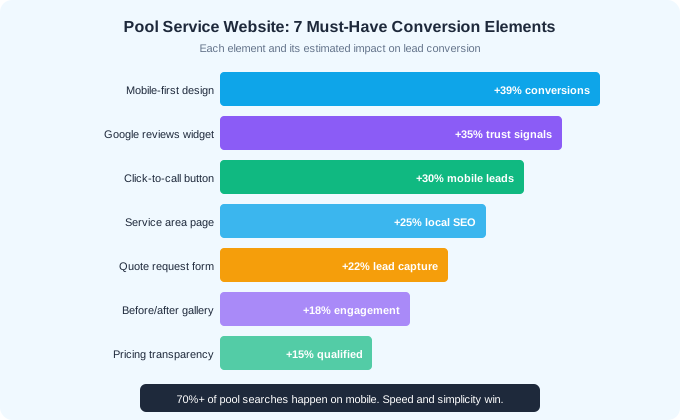
Mobile-first means designing for phone screens first and scaling up to desktop, not the other way around. With over 70% of pool searches happening on mobile, your phone experience is your primary experience. A website that looks great on desktop but has tiny text, broken navigation, or no click-to-call button on mobile is losing the majority of its potential leads.
Mobile-First Essentials
- Tap-friendly buttons: minimum 44x44 pixels, thumb-reachable placement
- Click-to-call button visible on every page without scrolling
- Text readable without zooming: 16px minimum body font size
- No horizontal scrolling on any screen size
- Forms with large input fields and mobile-optimized keyboards (phone keyboard for phone fields)
- Images optimized for mobile bandwidth (WebP format, lazy loading)
- Page load under 3 seconds on a 4G connection (53% of mobile users abandon sites slower than this)
Test your website on your own phone right now. Try to request a quote with one hand while standing up. If it is awkward, slow, or confusing, your potential customers feel the same way. Google's Core Web Vitals also factor mobile performance into search rankings, so a poor mobile experience hurts both conversion and visibility.
How Should You Structure Service Area Pages?
Service area pages tell Google and your visitors exactly where you work. A single "We serve the greater Phoenix area" line is not enough. Create individual pages for each city or major neighborhood you serve, with unique content about your service in that area. These pages rank for "[city] pool service" searches and drive local traffic.
What to Include on Each Service Area Page
- City/neighborhood name in the page title and H1 heading
- Specific mention of neighborhoods or zip codes served within that area
- Service details relevant to that area (hard water issues in Phoenix, salt systems popular in Scottsdale)
- Customer testimonials from that area (ideally with neighborhood mentioned)
- Pricing starting points for common services in that market
- A unique call-to-action referencing the area: "Get a free pool service quote in [City]"
- Embedded Google Map showing your service coverage
Do not create thin, duplicate pages that just swap city names. Google penalizes this. Each service area page should have genuinely unique content about pool service challenges, water chemistry, and customer needs specific to that area. A Scottsdale page should mention high CYA from intense sun. A Tampa page should reference summer algae pressure and storm debris.
Start with pages for your 3-5 highest-density service areas. These pages often rank faster than your homepage for "[city] pool service" keywords because they are more specific and relevant to the searcher.
What Makes a Quote Form Actually Convert?
Most pool service quote forms fail because they ask too many questions or are buried on a separate page. The highest-converting forms have 3-5 fields, are visible above the fold on every service page, and include a clear value proposition ("Get a free quote in 24 hours").
Optimal Quote Form Fields
- 1Name (first and last)
- 2Phone number (make this the primary contact method)
- 3Address or zip code (determines if they are in your service area)
- 4Service type: dropdown (weekly cleaning, one-time, green pool recovery, equipment repair)
- 5Optional: "Anything else we should know?" free-text field
Every field you add beyond the essentials reduces conversion rate. Do not ask for email, pool size, equipment type, or current chemical levels on the initial form. You can collect that information during the follow-up call. The form's only job is to capture the lead.
Form Placement and Design
- Above the fold on every service page (visible without scrolling)
- Sticky mobile CTA bar that stays visible while scrolling
- High-contrast submit button (use your brand color, make it large)
- Social proof adjacent to form: "Join 200+ happy pool owners" or star rating
- Response time expectation: "We respond within 2 hours during business hours"
22%
estimated increase in lead capture when using optimized quote forms vs. phone-only contact
How Do Reviews and Social Proof Drive Conversions?
Reviews are the most trusted form of marketing for local service businesses. BrightLocal reports that 97% of consumers read online reviews before hiring a local service company. Your website needs to display your reviews prominently, not just link to your Google profile. Embedded review widgets convert visitors who would otherwise leave your site to check Google.
Social Proof Elements to Include
- Google review widget on the homepage showing aggregate star rating and recent reviews
- Review count prominently displayed: "4.9 stars from 127 Google reviews"
- Individual testimonials on service pages with customer name and location
- Before/after photo gallery with customer quotes
- "As seen on" badges if you have been featured in local media or industry publications
- Number of customers served: "Trusted by 300+ pool owners in [City]"
- Years in business and any relevant certifications (CPO, licensed, insured)
Place your strongest social proof near your call-to-action. A "Get a Free Quote" button immediately below a row of 5-star reviews converts significantly better than the same button in isolation. The review removes the last objection: "Is this company any good?"
Display reviews from multiple platforms (Google, Yelp, Facebook) to show breadth of positive feedback. But prioritize Google reviews because that is where most people check first and they carry the most SEO weight.
Should You Show Pricing on Your Website?
This is the most debated question in pool service marketing. The argument against showing prices is that competitors will undercut you and customers will judge on price alone. The argument for it is that visitors who see pricing self-qualify before contacting you, resulting in higher-quality leads and less time spent on prospects who cannot afford your service.
The Case for Pricing Transparency
- Visitors who see pricing and still contact you are pre-qualified leads
- Reduces time spent on calls with price-shoppers who want $50/month service
- Builds trust: hiding pricing feels deceptive to consumers
- Improves SEO: "pool service pricing [city]" is a high-intent search query
- Differentiates you from competitors who force visitors to call for pricing
How to Show Pricing Without Locking In
Use "starting at" pricing for each service category: "Weekly pool cleaning starting at $135/month," "Green pool recovery starting at $250," "Equipment diagnostics starting at $85." This gives visitors a realistic range without committing you to a fixed price before seeing the pool. Include a note: "Final pricing based on pool size, equipment, and accessibility."
If you are not comfortable showing specific numbers, at least show relative pricing: "Our residential plans range from $135-$225/month depending on pool size and services included." This gives the visitor enough information to self-qualify without revealing your exact pricing structure.
What Pages Does Every Pool Service Website Need?
Most pool service websites have too many pages with too little content, or too few pages trying to do everything. Here is the essential page structure that covers SEO, conversion, and customer information needs.
| Page | Purpose | Key Elements |
|---|---|---|
| Homepage | First impression, credibility, primary CTA | Hero with value prop, review widget, services overview, quote form |
| Services (individual pages) | SEO for service-specific searches | Service details, pricing, photos, FAQ, quote form |
| Service Area (per city) | Local SEO, geographic targeting | Area-specific content, testimonials, map, quote form |
| About Us | Trust building, brand story | Owner bio, team photos, years in business, certifications |
| Reviews/Testimonials | Social proof aggregation | Embedded Google reviews, written testimonials, before/after photos |
| Contact | Multiple contact methods | Phone, email, form, address, hours, response time promise |
| Blog (optional but valuable) | SEO content, topical authority | Pool care tips, seasonal guides, local content |
Every page except the blog should include a quote form or prominent click-to-call button. The visitor should never have to navigate to a separate contact page to reach you. They should be able to take action from wherever they are on the site.
How Do You Optimize for Local SEO on Your Website?
Your website and Google Business Profile work together for local search visibility. The website provides the content depth and credibility signals that support your GBP ranking. Here are the on-site SEO elements that directly affect local search performance.
Local SEO Website Checklist
- NAP consistency: name, address, phone number identical on your website, GBP, and all directory listings
- City and state in title tags: "Pool Service in Scottsdale, AZ | [Company Name]"
- Schema markup: LocalBusiness structured data with service area, hours, and aggregate review rating
- Google Maps embed on contact page and service area pages
- Internal linking between service pages and service area pages
- Mobile page speed: target under 2.5 seconds for Largest Contentful Paint (LCP)
- HTTPS required: Google explicitly penalizes non-HTTPS sites in search rankings
- Alt text on images including city names where natural: "pool service technician in Phoenix Arizona"
The March 2026 Google core update tightened the relationship between website quality signals and local pack rankings. Businesses with complete, fast, mobile-optimized websites are seeing stronger local search performance than those relying on GBP alone. Your website is no longer optional for local SEO. It is a ranking factor.
Use Google Search Console to monitor your site performance and identify pages that rank on page 2. These are your biggest opportunities. A few internal links, a content refresh, and some review mentions can push a page 2 result into the local pack.
Ready to streamline your pool service business?
Pool Founder gives you route optimization, automated invoicing, chemical tracking, and everything else you need to run a more profitable pool business.
Frequently Asked Questions
How much should a pool service website cost?
A professional pool service website costs $1,500-$5,000 for a custom design or $0-$500 for a DIY builder like Squarespace or Wix. The ROI math is clear: one new customer per month from your website ($150/month recurring) pays for even a premium website within 3-6 months. Invest in quality design and mobile optimization.
Should I use a website builder or hire a developer?
For most pool companies with under 200 accounts, a website builder (Squarespace, Wix, or WordPress with a theme) is sufficient and much more cost-effective. Hire a developer only if you need custom functionality like online booking integration, real-time availability, or a customer portal.
How important is page speed for a pool service website?
Critical. Sites loading in 1 second convert at 39% vs. 18% at 6 seconds. Google also uses page speed as a ranking factor. Compress images to WebP format, use a CDN, minimize plugins, and test with Google PageSpeed Insights. Target under 2.5 seconds for Largest Contentful Paint.
Should I show my pricing on my pool service website?
Yes, at minimum show "starting at" ranges. Pricing transparency builds trust, pre-qualifies leads (reducing time spent on calls with price-shoppers), and improves SEO for pricing-related searches. Use ranges to maintain flexibility for different pool sizes and conditions.
How many service area pages should I create?
Start with 3-5 pages covering your highest-density service areas. Each page should have unique content about pool service in that specific area, not just a city name swap. Expand to additional areas as you build content. Quality beats quantity for service area pages.