Stop Asking for Reviews Manually. Build a System That Does It for You.
Most pool service companies know reviews matter but treat them as an afterthought. A technician finishes a job, drives to the next stop, and the opportunity disappears. BrightLocal's 2026 Local Consumer Review Survey found that 83% of consumers who are asked to leave a review actually do it, and 68% convert on the very first ask. The problem is not willingness. The problem is that nobody asks consistently.
"I used to tell my techs to ask for reviews at the end of every service," says Corey Adams, Pool Founder co-founder and 15-year pool service veteran. "It worked maybe once a week. The moment I switched to an automated text that fires two hours after each stop, we went from 2 reviews a month to 8. Same customers, same service, completely different result."
This guide walks through the exact components of a review generation system: the Google direct link, SMS timing, message templates, follow-up sequences, and velocity targets. Every stat is sourced from BrightLocal, Whitespark, SimpleTexting, or Spiegel Research Center.
Why Does Review Velocity Matter More Than Review Count?
Whitespark's 2026 Local Search Ranking Factors study found that review signals account for approximately 17% of local pack rankings, making them the second most important factor behind Google Business Profile signals. Within that 17%, review velocity, the rate at which new reviews arrive, is weighted more heavily than total count. A pool company with 200 reviews that stopped accumulating six months ago will rank lower than a competitor with 50 reviews gaining 3-4 new reviews monthly.
17%
of local pack ranking signals come from reviews
Source: Whitespark Local Search Ranking Factors 2026
BrightLocal's 2026 data reinforces the consumer side of velocity: 74% of consumers only care about reviews from the last 3 months, and 32% specifically want reviews from the last 2 weeks. For seasonal pool service businesses, this means your spring reviews will not carry you through summer if competitors are generating fresh ones weekly. You need a system that produces steady, ongoing review flow without relying on memory or motivation.
| Review Metric | Benchmark | Source |
|---|---|---|
| Reviews needed for baseline credibility | 10 reviews minimum | Spiegel Research Center |
| Reviews to clear skepticism threshold | 25 reviews | BrightLocal 2026 |
| Reviews to dominate local market | 50+ reviews | BrightLocal Google Reviews Study |
| Minimum monthly velocity target | 2-4 new reviews/month | Whitespark 2026 |
| Consumers who only read recent reviews (3 months) | 74% | BrightLocal 2026 |
How Do You Create a Google Review Direct Link?
The foundation of any review system is a direct link that takes the customer straight to the Google review popup with zero extra clicks. If someone has to search for your business, find the reviews section, and then click "Write a Review," you lose most of them at step one. The direct link format is: https://search.google.com/local/writereview?placeid=YOUR_PLACE_ID. When someone taps that link on their phone, the review popup appears immediately.
How to Find Your Google Place ID
- 1Go to the Google Place ID Finder at developers.google.com/maps/documentation/places/web-service/place-id.
- 2Type your business name and city in the search bar.
- 3Your Place ID appears in the map info window. It starts with "ChI" followed by a string of characters.
- 4Copy the Place ID and insert it into the URL: https://search.google.com/local/writereview?placeid=YOUR_PLACE_ID.
- 5Test the link on your phone to confirm it opens the review popup directly.
- 6Shorten the URL using a tool like Bitly or TinyURL so it looks clean in text messages.
Test your direct link on both iPhone and Android before you put it in your automated system. The link should open the Google Maps app if installed, or fallback to the browser. If the review popup does not appear, double-check the Place ID. One wrong character breaks the link.
When Is the Best Time to Send a Review Request After Pool Service?
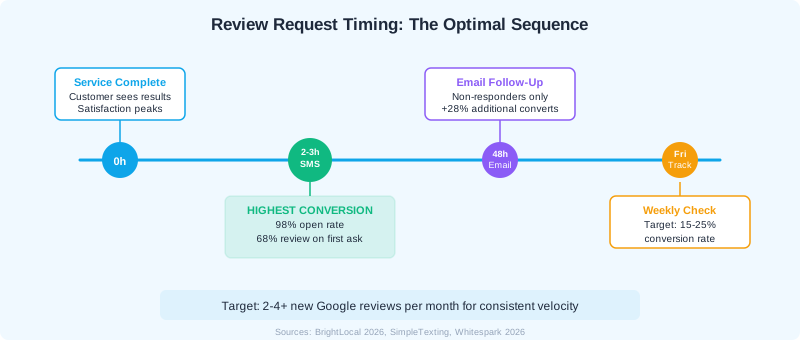
Timing is the single biggest variable in review conversion rates. BrightLocal's 2026 data shows that 68% of consumers leave a review the first time they are asked, and an additional 28% convert on the second ask. The optimal window for home service businesses is 2-3 hours after the job is completed. The customer has seen the clean pool, the initial satisfaction is still fresh, and they have not yet moved on to other tasks.
Why Does SMS Outperform Email for Review Requests?
SMS review requests outperform email on every measurable metric. Text messages have a 98% open rate versus 20% for email, a 45% response rate versus 6% for email, and 90% of texts are read within 3 minutes compared to an average 90-minute delay for email. For pool service companies, texts also match the communication style customers already associate with their technician. It feels personal, not promotional.
| Channel | Open Rate | Response Rate | Time to Read | Source |
|---|---|---|---|---|
| SMS | 98% | 45% | 90 seconds | SimpleTexting / Sender.net |
| 20% | 6% | 90 minutes | Kenect / Sender.net |
What Should the Review Request Text Say?
Keep it short. One sentence, the customer's first name, and the direct link. Longer messages reduce conversion because they feel like marketing. A proven template: "Hi [Name], your pool is all set! If you have a minute, a Google review helps us a lot: [short link]. Thanks! - [Your Company]." That is 30 words. Anything over 40 starts to feel like a sales pitch.
What Does a Complete Review Generation Sequence Look Like?
The most effective review systems use a two-step sequence: an SMS message 2-3 hours after service, followed by an email 48 hours later for anyone who did not respond to the text. This sequence captures both the quick responders and the smaller group of customers who prefer email or need a second nudge. BrightLocal found that the second ask converts an additional 28% of customers beyond the first ask.
- 1Step 1: Automated SMS (2-3 hours post-service) - Send a short, personalized text with the customer's first name and your Google review direct link. Keep it under 160 characters if possible.
- 2Step 2: Email follow-up (48 hours later) - Send only to customers who did not leave a review after the text. Use a slightly different message that references the specific service performed.
- 3Step 3: Weekly tracking (every Friday) - Review your conversion rate. Target 15-25% of service visits resulting in a review request that converts.
- 4Step 4: Monthly velocity check - Confirm you are hitting 2-4+ new reviews per month. Adjust timing or templates if velocity drops.
- 5Step 5: Respond to every review within 48 hours - Businesses that respond to reviews receive 12% more reviews on average. This closes the feedback loop and encourages future reviews.
Never filter who gets a review request based on how you think the service went. Sending review links only to happy customers is called review gating, and it violates Google's content policy and FTC rules. Penalties can reach $51,744 per violation under the FTC's August 2024 rule.
Which Service Moments Produce the Best Reviews?
Not every service visit carries the same review potential. Routine weekly maintenance rarely motivates a customer to write anything because the experience is not differentiated. The highest-conversion moments are tied to visible results or emotional relief. Targeting these moments does not mean skipping review requests on routine visits. It means doubling down with a personal follow-up when a high-impact service is completed.
Top Review-Generating Service Moments
- Green-to-clear recovery - The visual transformation is powerful. Customers often take before-and-after photos themselves. Your review request arrives while they are still marveling at the result.
- Equipment emergency resolved - A pump that stopped working, a heater that died before a party, a leak that was found and fixed. Gratitude peaks immediately after an emergency is handled.
- First service visit for a new customer - First impressions are the strongest. New customers are most likely to leave a review because the experience is novel and they want to confirm they made the right choice.
- Seasonal opening or closing - These are higher-ticket services with a clear before-and-after moment. Customers see the pool go from winterized to swim-ready in one visit.
- After completing a repair the customer was worried about - When a customer expects a large bill or a complicated fix and you deliver a clean solution, they want to tell someone about it.
How Do You Track and Improve Your Review Conversion Rate?
A review generation system without tracking is just a text blast. The key metric is review conversion rate: the number of reviews received divided by the number of review requests sent, expressed as a percentage. For pool service companies, a healthy conversion rate is 15-25%. Below 10% means your timing, message, or link is broken. Above 25% means your system is working well and you should focus on maintaining velocity.
| Metric | Target | Action if Below Target |
|---|---|---|
| Review conversion rate | 15-25% | Test different send times, shorten message, verify link works on mobile |
| Monthly review velocity | 2-4+ new reviews | Increase request volume, add email follow-up step |
| Average star rating | 4.5+ | Focus on service quality, not review manipulation |
| Response rate to reviews | 100% | Set daily reminder to check Google Business Profile |
| Time to respond | Under 48 hours | Use GBP mobile app notifications |
Track these numbers weekly at minimum. The simplest method is a spreadsheet with columns for date, service visits completed, review requests sent, reviews received, and star rating. Over time, you will see patterns. Certain days of the week convert better. Certain service types generate more reviews. Certain technicians consistently produce higher review rates. Use those patterns to optimize.
Pool Founder sends automated review requests after each completed service and tracks conversion rates in your dashboard. No spreadsheets, no manual follow-up. Reviews flow in while you focus on servicing pools.
Ready to streamline your pool service business?
Pool Founder gives you route optimization, automated invoicing, chemical tracking, and everything else you need to run a more profitable pool business.
Frequently Asked Questions
How many reviews should a pool service company aim for per month?
Target 2-4 new Google reviews per month as a minimum. Whitespark's 2026 Local Search Ranking Factors study shows that review velocity, the rate of new reviews, affects local rankings more than total review count. Consistent monthly flow signals to Google that your business is active and trusted.
Is it legal to send automated review request texts to customers?
Yes, as long as the customer has an existing business relationship with you and has not opted out of text communication. The TCPA allows transactional and relationship messages to existing customers. Review requests fall under this category. Always include an opt-out option in your messages.
What time of day should I send review request texts?
Send 2-3 hours after the service is completed, which typically means late morning to mid-afternoon for pool service. Avoid sending before 9am or after 8pm. SimpleTexting data shows that changing send time from 9am to mid-afternoon increased response rates by 37% for local service businesses.
Should I respond to every Google review, even the short ones?
Yes. BrightLocal's 2026 survey found that 88% of consumers are more likely to use a business that responds to all reviews. Even a brief personalized reply shows engagement. Businesses that respond to reviews receive 12% more reviews on average because customers see that their feedback is valued.
What if I get a negative review from a review request?
Respond professionally within 24 hours. Acknowledge the issue, take responsibility, and offer to resolve it offline with a phone number. Never argue publicly. BrightLocal found that 45% of consumers are more likely to visit a business that responds to negative reviews. A thoughtful response to criticism often builds more trust than having no negative reviews at all.
Can I offer a discount in exchange for a Google review?
No. Incentivizing reviews violates Google's content policy and FTC regulations. The FTC's August 2024 rule imposes civil penalties up to $51,744 per violation for deceptive review practices, including offering compensation for reviews without disclosure. Send the same review link to every customer with no strings attached.
Sources & References
- BrightLocal — Local Consumer Review Survey 2026
- Whitespark — Local Search Ranking Factors 2026
- Spiegel Research Center — How Online Reviews Influence Sales
- SimpleTexting — SMS Marketing Statistics 2025
- Sender.net — SMS Marketing Open Rate Statistics
- Kenect — Text vs Email Response Rates
- Google — Maps User Generated Content Policy
- FTC — Rule on Fake Reviews and Testimonials (August 2024)