Why Do the First 30 Days Decide Everything?
Research from the Customer Success Association shows that 23% of customer churn is directly linked to poor onboarding. In pool service, that means nearly one in four customers who cancel do so because the first few weeks felt disorganized, uncommunicative, or disappointing. They expected a professional experience and got silence between service days. The first 30 days are when customers are forming their opinion of you, watching how you communicate, how organized you are, and whether working with you feels easy or frustrating.
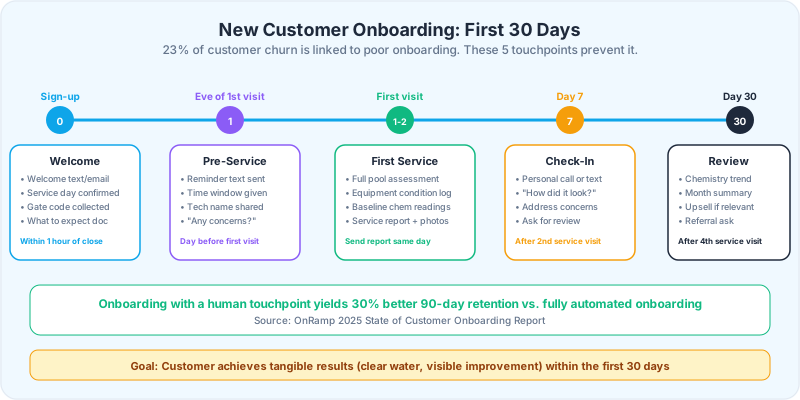
Onboarding with a human touchpoint, a personal phone call, a text check-in, or a face-to-face greeting on the first visit, yields up to 30% better 90-day retention compared to fully automated onboarding according to the OnRamp 2025 State of Customer Onboarding Report. For pool service companies, that means the difference between keeping a $155/month customer for 3 years ($5,580) or losing them after 3 months ($465).
Corey Adams, Pool Founder co-founder and 15-year pool service veteran: "I used to sign up a customer, put them on the route, and show up on Tuesday. No welcome message, no first-visit report, no check-in call. I lost 30% of new customers in the first 90 days. When I built a 30-day onboarding process, that dropped to under 10%. The service did not change. The communication did."
What Are the Five Onboarding Touchpoints?
Effective pool service onboarding requires five intentional touchpoints in the first 30 days: the welcome communication at sign-up, the pre-service reminder before the first visit, the first visit with a full assessment, a check-in after the second service, and a 30-day retention review. Each touchpoint serves a specific purpose and uses a specific channel. Skip any one of them and you create a gap where doubt, confusion, or buyer remorse can grow.
23%
of customer churn is directly linked to poor onboarding. A structured 30-day onboarding process can cut early cancellations in half.
Source: Customer Success Association
What Should the Welcome Communication Include?
The welcome communication should go out within one hour of the customer agreeing to service. Not tomorrow. Not after you finish your route. Within the hour. Speed signals professionalism. Delay signals that they are already being forgotten. The welcome can be a text, an email, or both, but it must confirm four things: you received their sign-up, their service day is scheduled, you know how to access their pool, and what they should expect next.
Welcome Text Template
"Hi [Name], this is [Your Name] with [Company]. Welcome aboard! Your weekly pool service is scheduled for [Day]s. Your first visit will be [Date]. I will do a full pool and equipment assessment and send you a detailed report afterward. If you have a gate code or any special instructions, reply here. Looking forward to keeping your pool in great shape."
Welcome Email Template
- Subject line: "Welcome to [Company]. Your pool service starts [Date]."
- Service day and approximate time window
- What is included in your service (chemicals, testing, cleaning tasks)
- How to reach you (phone, text, email, customer portal link)
- What to expect on the first visit (assessment, photos, detailed report)
- Your cancellation and rain delay policy
- A photo of you or your team so they recognize who is in their backyard
The welcome email is also the right time to ask: "What frustrated you about your previous pool service?" This question gives you intelligence about what the customer values and what they want done differently. Use their answer to customize your service approach.
How Should You Handle the Pre-Service Reminder?
The day before or morning of the first service visit, send a brief text reminder. This accomplishes two things: it confirms you are coming (eliminating the "are they actually going to show up?" anxiety), and it gives the customer a chance to flag any issues before you arrive. Pre-service reminders reduce missed-access situations by 60-70% because customers remember to leave gates unlocked and move obstacles.
Pre-Service Text Template
"Hi [Name], just a heads-up that your first pool service with [Company] is scheduled for tomorrow ([Date]). [Tech Name] will be there between [time window]. Please make sure the gate/access is open. Any questions or concerns before the visit? Reply here anytime."
What to Include in the Pre-Service Reminder
- Confirm the date and approximate time window
- Name of the technician who will be servicing the pool
- Remind them about gate access or pet considerations
- Open the door for questions or special requests
- Keep it to 2-3 sentences. This is a reminder, not a novel.
After the first visit, this becomes automated. Your pool service software should send pre-service notifications automatically. But for the very first visit, make it personal. The customer will notice the difference between an automated message and a text from a real person.
What Makes a Great First Service Visit?
The first service visit is your audition. The customer is watching to see if you match the professionalism you showed on the phone and in your welcome message. This visit should take longer than a normal service stop because you are doing a full assessment in addition to the standard service. Plan an extra 15-20 minutes for the first visit.
First Visit Checklist
- 1Complete the standard service (skim, brush, vacuum, empty baskets, test and adjust chemicals)
- 2Take baseline chemical readings: free chlorine, pH, alkalinity, cyanuric acid, calcium hardness, TDS
- 3Photograph the pool surface, equipment pad, filter, and any visible issues
- 4Inspect all equipment: pump, filter, heater, salt cell, automation system. Note model numbers, condition, and age estimates.
- 5Check for safety issues: broken drain covers, trip hazards, damaged fencing, missing signage
- 6Document everything in a first-visit assessment report
- 7If the customer is home, introduce yourself and walk through the report in person
- 8If the customer is not home, send the assessment report via text/email within 2 hours
The First Visit Report
The first visit report sets you apart from every other pool company the customer has ever used. It should include before/after photos, all chemical readings with explanations of what they mean, equipment condition notes with estimated ages, any immediate recommendations (with cost estimates), and a note about what you will focus on in the next 2-3 visits to optimize their water chemistry.
The first visit report is your most powerful retention tool. Customers who receive a detailed assessment with photos and recommendations in the first week are 3-4x more likely to remain customers at 90 days. They can see exactly what they are paying for.
When and How Should You Do the Day 7 Check-In?
After the second service visit, typically around day 7, make a personal check-in contact. A phone call is best. A personal text is second best. An automated email is distant third. Research shows that implementing a second-week onboarding touchpoint boosts 6-month retention by 9%. The check-in has three goals: confirm satisfaction, address any concerns before they become complaints, and ask for a review.
Check-In Call Script
"Hi [Name], this is [Your Name] with [Company]. I wanted to check in after your first couple of services. How is the pool looking? Is there anything you would like us to adjust or focus on? [Listen and address concerns.] Great. If you are happy with how things are going, I would really appreciate a Google review. It helps other pool owners find us. I can text you the link right after this call."
Common Day 7 Concerns and Responses
| Concern | What It Means | Response |
|---|---|---|
| "Pool does not look different" | Expectations were not set on first visit | Explain chemical balancing takes 2-3 visits. Share the readings showing improvement. |
| "I did not know you came" | Service report was not received or noticed | Resend the report. Confirm notification preferences (text vs. email). |
| "When exactly do you come?" | Time window needs to be communicated | Give a more specific window. Offer to text when en route. |
| "The gate was locked" | Access coordination failed | Get backup access method. Offer to call 10 min before arrival. |
| "Can you also do X?" | Upsell opportunity | Quote the add-on. Add it to the next visit. |
9%
increase in 6-month retention from implementing a second-week onboarding touchpoint. One phone call, one text, or one personal check-in.
Source: OnRamp 2025 State of Customer Onboarding Report
What Does the Day 30 Retention Review Look Like?
At 30 days, the customer has received 4-5 service visits. They have seen your work. They have received your reports. Now is the time to solidify the relationship by showing them the value they have received and planting seeds for the next phase of the relationship. The 30-day review can be an email, a text with a summary, or a brief call.
30-Day Review Email Template
- Subject line: "Your first month with [Company]: here is how your pool is doing"
- Summary of water chemistry trends over 4 visits (show improvement)
- Highlight any issues found and resolved during the month
- Equipment condition update if any changes were noted
- Upcoming recommendations: seasonal adjustments, equipment that should be monitored
- Referral ask: "Know someone who needs pool service? We give $[X] credit for every referral."
- Thank them for choosing your company
Upsell Opportunities at Day 30
The 30-day mark is the right time to introduce add-on services if they are genuinely needed. This is not a hard sell. It is a professional recommendation based on data you collected during the first month. If the filter showed signs of wear during the assessment, recommend a cleaning or replacement. If the pool chemistry required heavy correction every visit, recommend an equipment upgrade like a salt cell or chemical feeder. Always frame recommendations around the benefit to the customer, not the revenue to you.
Re-engagement sequences sent at 30, 60, and 90 days recover 6-22% of at-risk customers. The 30-day review is not just a nice touch. It is a critical retention checkpoint. Customers who receive it are measurably more likely to stay through the first year.
How Do You Automate the Onboarding Process?
You cannot personally call every new customer at every touchpoint once you are managing 80+ pools. The solution is automation with personal touches at the moments that matter most. Automate the welcome text, the pre-service reminder, and the service reports. Keep the day 7 check-in and the day 30 review as personal touchpoints that you or your office manager handle directly.
What to Automate vs. Keep Personal
| Touchpoint | Automate? | Channel | Why |
|---|---|---|---|
| Welcome message | Yes (with personal tone) | Text + email | Speed matters. Auto-send within 1 hour. |
| Pre-service reminder | Yes | Text | Consistent and scalable. Same message every time. |
| Service completion report | Yes | Text/email + app | Generated from service data automatically. |
| Day 7 check-in | No, keep personal | Phone call or personal text | Human touch yields 30% better retention. |
| Day 30 review | Partially (template + personal note) | Template for consistency, personal note for warmth. |
Pool service software that supports automated customer notifications, service reports, and scheduled follow-up reminders handles 80% of the onboarding workflow. The remaining 20%, the personal phone call at day 7 and the customized 30-day review, is where you build the relationship that prevents cancellation. Automated post-service communication reduces 90-day churn by 14%. Combine that with personal touchpoints and you can cut early cancellations by more than half.
Pool Founder automates service reports, customer notifications, and chemical tracking. After every visit, customers receive a report with readings, tasks completed, and photos. That automated transparency replaces the "did they even come?" doubt that kills retention in the first 30 days.
Ready to streamline your pool service business?
Pool Founder gives you route optimization, automated invoicing, chemical tracking, and everything else you need to run a more profitable pool business.
Frequently Asked Questions
What is the most important onboarding touchpoint for pool service?
The day 7 check-in call after the second service visit. Research shows that a human touchpoint during onboarding yields 30% better 90-day retention compared to fully automated onboarding. A simple phone call asking "How is the pool looking? Any concerns?" prevents the majority of early cancellations.
How quickly should you send a welcome message to new pool customers?
Within one hour of the customer agreeing to service. Speed signals professionalism and confirms their decision was the right one. Include the service day, first visit date, what to expect, and how to reach you. Delay creates doubt and opens the door for buyer remorse.
What should a first pool service visit include?
A first visit should include standard service (skim, brush, vacuum, chemicals) plus a full assessment: baseline chemical readings, equipment inspection with model numbers and condition notes, photos of the pool and equipment, and any immediate recommendations. Send a detailed report within 2 hours of completing the visit.
When should you ask a new pool customer for a review?
Ask for a Google review during the day 7 check-in call, after the customer has had two service visits and confirmed they are satisfied. Do not ask on the first visit. Wait until they have experienced enough service to form a positive opinion. Offer to text them the direct review link immediately.
How do you prevent new customers from canceling in the first 90 days?
Follow the five-touchpoint onboarding process: welcome message at sign-up, pre-service reminder before first visit, detailed assessment report after first visit, personal check-in at day 7, and a 30-day retention review. Customers who complete all five touchpoints cancel at less than half the rate of customers who receive no structured onboarding.